


 Video Converter Ultimate
 Screen Recorder
 Reparație video
Aflați cum să editați metadatele OGG cu ușurință, cu pași detaliați
Cu etichete pe fișierele dvs. OGG, dispozitivul pe care îl utilizați în prezent poate înțelege ce este în fișier. Odată ce metadatele sunt atașate, vă poate ajuta să le aranjați corect, determinând etichetele pentru a le găsi rapid. Deci, dacă fișierele dvs. OGG nu au metadate, este necesar să adăugați una. Deși căutarea unui editor de etichete pentru OGG este ușoară, nu suntem siguri dacă acestea sunt perfect sigure de utilizat. În loc să le încercăm și să eșuăm, vom face depanarea pentru fiecare instrument pentru tine. Deci, continuați să citiți această postare pentru a ști cum să editați manual metadatele OGG cu o asigurare a succesului 100%.

Partea 1. Editați metadatele OGG fără a descărca un program extern pe Windows
Pe Windows, poți edita ușor metadatele OGG fără să descarci un program, folosind Properties. Totuși, nu este la fel de eficient ca instrumentul dedicat prezentat mai jos, dar îți permite totuși să faci treaba. Așadar, dacă vrei să știi cum să folosești acest editor de metadate, poți urma pașii de mai jos.
Avantajele utilizării proprietăților pe Windows:
◆ Descărcarea acestuia nu este esențială să-l utilizați oricând și chiar și dumneavoastră nu aveți acces la internet.
◆ Ușor de utilizat și poate fi folosit de orice utilizator care doresc să editeze metadatele.
◆ Suportă o gamă largă de formate OGG, MP3, WAV, WMA și multe alte formate.
Cum să editați cu ușurință etichetele OGG cu proprietăți pe Windows:
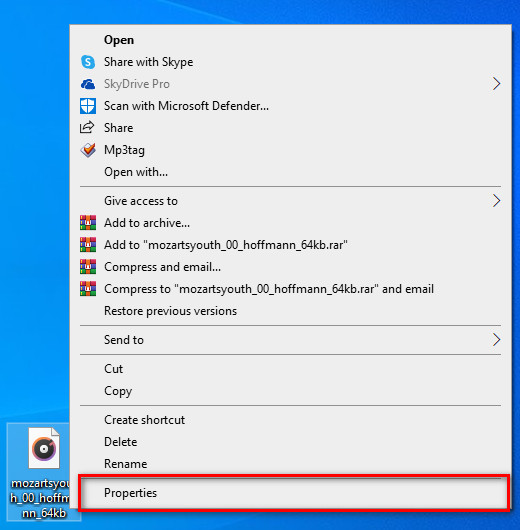
Pasul 1. Găsește fișierul OGG pe desktop, apoi dă clic dreapta pe fișier și, în meniu, apasă pe Properties.
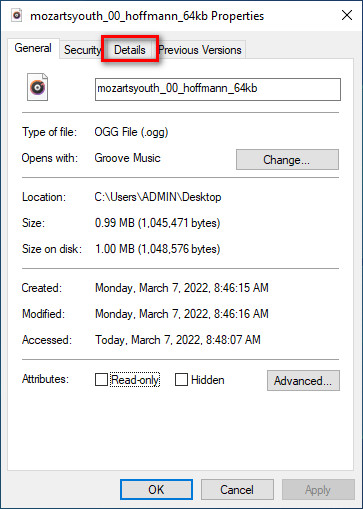
Pasul 2. După ce ai făcut clic pe Properties, pe ecran va apărea un panou. Mergi la fila Details, apasă pe fiecare etichetă și completeaz-o.
Pasul 3. Apasă OK pentru a salva modificările pe care le-ai făcut în Properties.
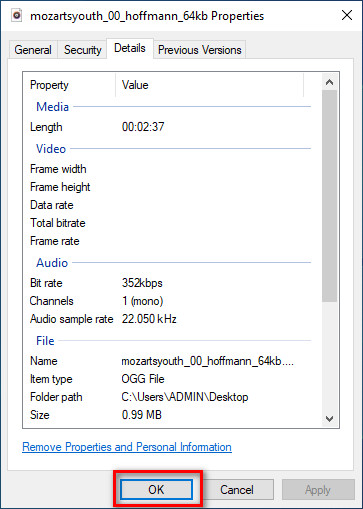
Sfat: această funcție uneori nu salvează metadatele pe care le-ați adăugat în fișierul OGG. Deci, dacă se întâmplă acest lucru, va trebui să o refaceți din nou și să începeți de la început.
Partea 2. Cel mai recomandat editor de etichete OGG pentru a edita metadatele OGG pe Windows și Mac [profesional]
Cea mai bună modalitate de a edita fișiere OGG este să folosești un editor de taguri puternic, dar simplu, pe Windows și Mac, FVC Video Converter Ultimate. Cu acest instrument, poți suprascrie manual metadatele fișierelor OGG în doar câteva clicuri. Spre deosebire de Properties, nu vei întâmpina probleme la editarea sau repararea tagurilor fișierului media. Totuși, va trebui să descarci și să achiziționezi programul pentru a avea acces complet la funcțiile sale excelente, pe care niciun alt instrument nu ți le poate oferi.
Pe lângă capacitatea de editare a metadatelor, acest instrument vă permite să convertiți fișierul dvs. OGG într-un nou format audio, păstrând în același timp sunetul de înaltă calitate stocat în fișierul dvs. OGG. De asemenea, puteți efectua editare de bază pe videoclip și audio, dacă doriți, cum ar fi tăierea, tăierea, îmbinarea, decuparea și multe altele, dar poate efectua și editare avansată; puteți verifica editarea avansată în Caseta de instrumente. Poate vă gândiți care este lucrul suprem despre acest instrument; Ei bine, se ridică la înălțimea așteptărilor tuturor, iar numele final nu este doar un nume, ci este și abilitățile instrumentului. Deci, dacă doriți să utilizați instrumentul pentru a edita metadatele OGG, puteți copia pașii de mai jos pentru a reuși cu vârful degetului.
Avantajul utilizării FVC Video Converter Ultimate [recomandat]:
◆ Este un editor de etichete profesional care poate manipula cu ușurință metadatele fișierului dvs. audio, chiar dacă nu sunteți un profesionist.
◆ Acceptă o gamă largă de formate de încărcat, cum ar fi OGG, MP3, WAV, WMA, AIFF și peste 1000 de formate, inclusiv formate video.
◆ Este cea mai bună alegere pentru începători în editarea metadatelor, rezoluție, calitate, tăiere etc.
◆ Posibilitatea de a descărca software-ul atât pe sistemele Windows, cât și pe Mac, dacă este posibil.
◆ Funcții și caracteristici suplimentare sunt disponibile pe Toolbox pentru a vă ajuta cu diferite sarcini legate de video și audio.
Cum să editați etichete OGG ca un profesionist cu FVC Video Converter Ultimate:
Pasul 1. Apasă butonul de descărcare de mai jos și alege sistemul de operare corect pe care îl folosești. După ce descărcarea s-a încheiat, dă clic pe fișierul software descărcat pentru a-l instala pe unitatea ta. Configurează-l după preferințele tale, apoi, în final, apasă Start Now pentru a lansa programul.
Descărcare gratuită pentru Windows 7 sau o versiune ulterioară Descărcare securizată
Descărcare gratuită pentru MacOS 10.7 sau o versiune ulterioară Descărcare securizată
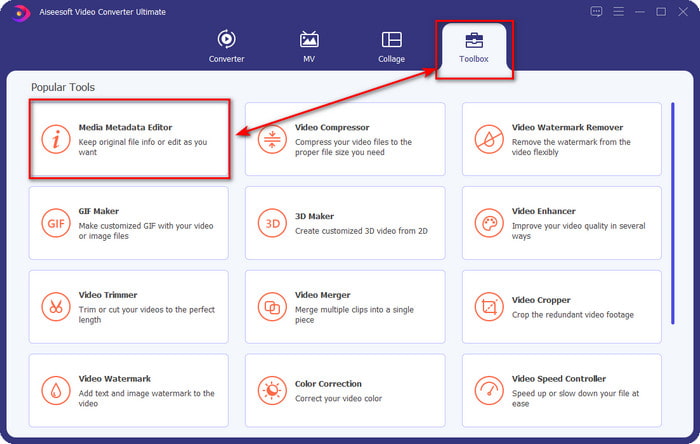
Pasul 2. După ce ai deschis programul pe desktop, mergi la secțiunea Toolbox și găsește Media Metadata Editor; apasă pe această funcție pentru a continua.
Pasul 3. Fă clic pe pictograma + pentru a localiza fișierul OGG salvat pe unitatea desktop. Selectează fișierul cu extensia .ogg și apasă Open pentru a încărca fișierul în program.
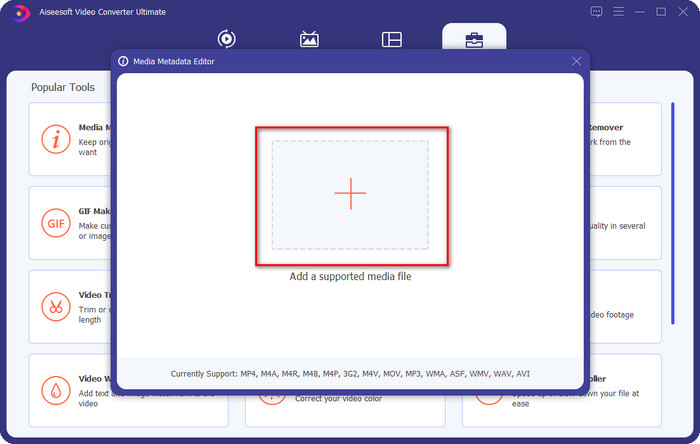
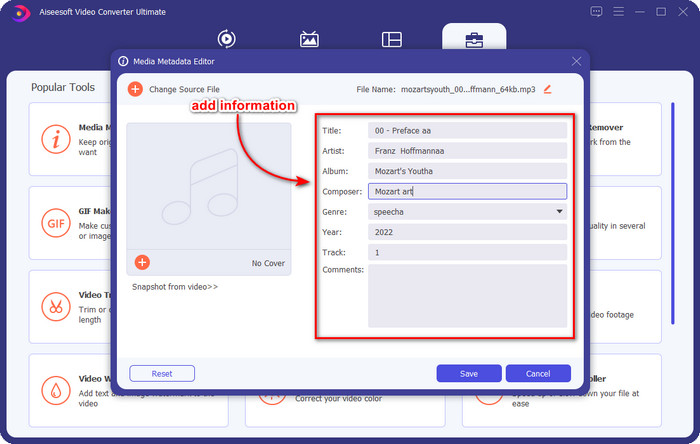
Pasul 4. Editează sau elimină metadatele în fereastra mică ce va apărea pe ecran; apasă pe fiecare textbox și adaugă informațiile pe care vrei să le aplici pe fișierul OGG. Poți, de asemenea, să adaugi o imagine la fișierul audio OGG, dacă dorești, dar asigură-te că imaginea este salvată pe desktop.
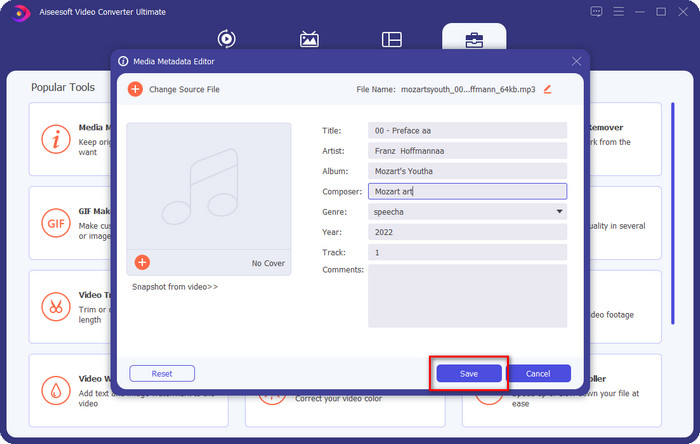
Pasul 5. Dacă ai terminat de adăugat informațiile necesare pentru fișierul OGG, poți face clic pe Save pentru a salva fișierul împreună cu metadatele. Astfel, ai adăugat acum metadatele editate ale fișierului OGG pe desktop, cu ajutorul celui mai bun editor de metadate OGG pe care îl poți folosi în siguranță și rapid pe ambele sisteme de operare.
Partea 3. Întrebări frecvente despre editarea metadatelor OGG
Pot folosi fișierul OGG pe Mac?
Fișierele OGG nu sunt acceptate pe dispozitivele Apple, dar poți folosi o aplicație terță pentru a reda fișierele OGG care nu pot fi redate în mod normal pe Mac. Vrei să știi cum? Dacă da, apasă pe acest link, deoarece am adunat informațiile despre OGG și despre cum să redai ușor fișierele OGG pe Mac.
Este OGG mai popular decât MP3?
Din punct de vedere al popularității, MP3 este mult mai acceptat decât OGG, deoarece este mult mai flexibil dacă le comparăm. Ambele sunt containere audio bune și au puteri audio diferite. Dar din punct de vedere al calității, OGG este mult mai bun decât MP3, dar este mai puțin acceptat.
Pot înregistra OGG de înaltă calitate?
Desigur, da, poți înregistra în format OGG. Dar ce instrument suportă formatul OGG? Dacă există vreunul, este el cel mai bun recorder OGG pe care îl pot folosi? Ei bine, toate aceste întrebări își găsesc răspunsul dacă dai clic pe acest link și continui să citești.
Concluzie
Uimitor, nu-i așa? Chiar este, având în vedere ce poți face pentru a edita metadatele OGG cu soluțiile enumerate mai sus. Dacă ai nevoie de unul, acestea sunt soluțiile cunoscute pentru a rezolva tagurile fișierelor OGG. Dacă nu ai încredere în informațiile pe care le-am prezentat aici, ar trebui să le încerci pe amândouă, iar noi îți putem garanta succesul în editarea tagurilor fișierelor tale OGG. Însă, dacă vrei un instrument profesionist pentru a edita tagurile fișierelor OGG, trebuie să folosești instrumentul suprem pentru a duce sarcina la bun sfârșit. FVC Video Converter Ultimate este, fără îndoială, cea mai bună alegere pentru editarea oricăror taguri ale oricărui tip de fișier media pe care îl deții. Dacă crezi că acesta este instrumentul potrivit pentru tine, îți recomandăm să citești pașii pe care i-am oferit mai sus pentru a edita ușor tagurile.
-
 7 editori populari de etichete muzicale pe Windows, Mac și dispozitive mobile
 Etichetele muzicale sunt populare de utilizat pentru aranjarea muzicii din biblioteca dvs. în funcție de datele din interior. Dacă vrei să-l schimbi? Citiți detaliile de mai jos pentru a afla mai multe.
-
 4 editori de metadate pentru cărți audio sugerate în 2022
 Dacă nu aveți nicio idee despre editorul de etichete Audiobook, acest articol vă va ajuta. Cunoaște-l mai bine citind fiecare detaliu de mai jos și instrumentele de utilizat.
-
 Top 5 editoare gratuite de etichete MP3 disponibile online și offline
 Vrei să știi cum să editezi etichetele MP3? În acest caz, continuați să citiți. Pentru astăzi, vă oferim 5 dintre cele mai bune editoare de etichete MP3 pe care le puteți folosi.
