


 Video Converter Ultimate
 Screen Recorder
 Reparație video
 Descărcare sigură
Ghid despre cum să editați metadatele WebM pentru Windows și Mac
Necesitatea de a include o etichetă pentru a adăuga informații suplimentare despre conținutul fișierului WebM este unul dintre motivele pentru care trebuie să edităm metadatele acestui format. Uneori, acestea trebuie corectate imediat pentru a fi vizibile pentru utilizatori, sistem și aplicație. Unul dintre scopuri este să se afle ce conținut specific are fișierul. Așadar, înainte de a transfera datele online, este esențial să știi cum să editezi metadatele unui fișier WebM. Informează-te și află cum să faci acest lucru citind articolul de mai jos.

Partea 1. Cel mai rapid mod de a edita metadatele WebM pe Windows și Mac [Versiune ușoară]
FVC Video Converter Ultimate oferă o editare a metadatelor fără complicații, pentru un proces ușor pentru utilizatorii și clienții care îl folosesc. Cu acest editor de metadate, poți ajusta rapid sau elimina etichetele din fișierele tale WebM, MOV, TS, RMVB și din cele peste 1000 de formate pe care acest instrument le suportă, ca un profesionist. Acest instrument își respectă numele și așteptările utilizatorilor, așa că, dacă vrei un software perfect atât pentru începători, cât și pentru avansați, trebuie să alegi acest instrument. Spre deosebire de alte programe, poți actualiza metadatele fișierului WebM cu informații exacte, adăugându-le manual.
Vreau mai mult? Acest instrument excelează în editarea metadatelor și în alte domenii de rezolvare a problemelor video și audio. De exemplu, tăiați, tăiați, editați, creați GIF-uri, accelerați videoclipurile și faceți mai multe cu instrumentul în mai puțin de un minut. Și pentru a vă dovedi că software-ul este suprem în nume și performanță. Demonstrația scrisă de mai jos vă va învăța cum să editați metadatele WebM fără a depune prea mult efort asupra acestei probleme.
Pași despre cum să editați etichete WebM cu FVC Video Converter Ultimate:
Pasul 1. Pentru a avea acest software complet, poți face clic pe butonul de descărcare de mai jos și alege sistemul de operare pe care îl folosești în prezent. Urmează procesul de instalare după ce ai dat clic pe fișierul descărcat, apoi deschide instrumentul făcând clic pe Start Now.
Descărcare gratuită pentru Windows 7 sau o versiune ulterioară Descărcare securizată
Descărcare gratuită pentru MacOS 10.7 sau o versiune ulterioară Descărcare securizată
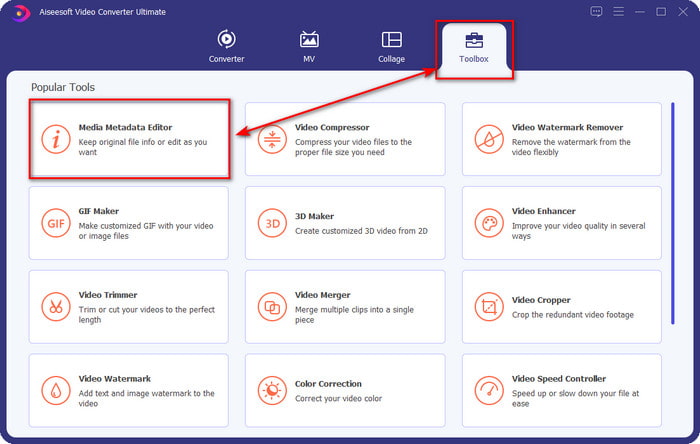
Pasul 2. Deschide secțiunea Toolbox și găsește Media Metadata Editor în lista de instrumente care va apărea mai jos.
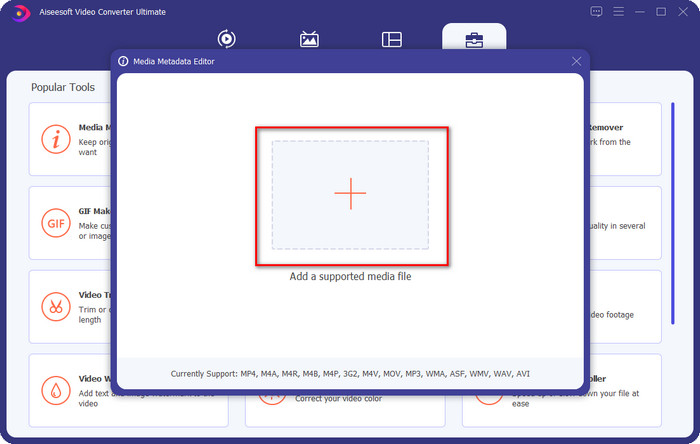
Pasul 3. Adaugă fișierul WebM făcând clic pe butonul +, găsește-l în managerul de fișiere și dă clic pe Open pentru a continua.
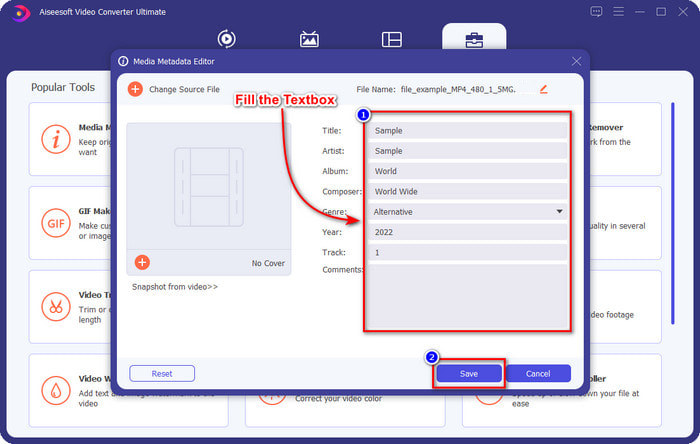
Pasul 4. Tastează toate informațiile pe care vrei să le adaugi ca etichetă la fișierul tău WebM în fiecare casetă de text. Apoi, dacă ai terminat de adăugat toate informațiile ca etichete, fă clic pe Save. Simplu, nu-i așa? Așa se adaugă metadate la fișierul tău WebM cu ajutorul acestei soluții complete pe care o poți avea pe Windows și Mac.
Partea 2. Cum să editați metadatele WEBM utilizând software-ul din linia de comandă pe desktop
FFmpeg
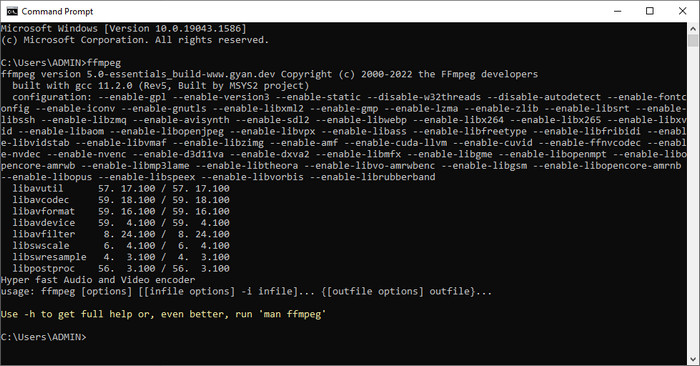
FFmpeg este o soluție cunoscută pentru orice problemă legată de media, cum ar fi repararea metadatelor. Spre deosebire de primul instrument, va trebui să folosești un cod specific drept comandă pentru a realiza o anumită sarcină, cum ar fi comanda de a edita manual metadatele fișierului respectiv. Chiar dacă acest software open‑source folosește elemente tehnice pe care unii utilizatori nu le pot înțelege, este totuși remarcabil ce poate realiza acest editor. Continuă să citești pentru a afla cum să editezi metadatele WebM folosind unul dintre programele de tip linie de comandă din listă.
Pași pentru editarea etichetelor WebM cu Ffmpeg:
Pasul 1. Descarcă și instalează software-ul pe desktop. Găsește locația fișierului WebM și copiază numele fișierului.
Pasul 2. Dă clic pe Windows, tastează command prompt în căutare și fă clic pe rezultat pentru a-l deschide. Apoi copiază acest cod ffmpeg -i fileexample.webm -metadata title='samplemetadata' -c copy fileexample.webm și lipește-l în fereastra de comandă.
Notă: filexample.webm sunt numele fișierului webm pe care îl folosim pentru această sarcină. Adăugați numele fișierului în funcție de numele exact al fișierului dvs.
Pasul 3. Apasă Enter pentru a porni procesul și lasă software-ul să suprascrie fișierul original.
Instrumentul EXIF
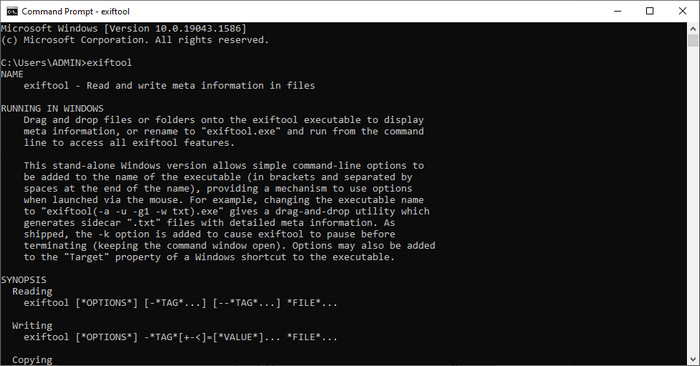
La fel ca FFmpeg, EXIF Tool este un software gratuit de tip linie de comandă pe care îl poți descărca pe aproape toate sistemele de operare desktop. Cu acest software poți citi, edita și crea metadate pe fișierul existent, lucru pe care alte fișiere media nu ți-l pot oferi în întregime. Programul poate edita etichetele fișierelor video, audio, imagine și PDF pentru a le face corect și precis. Mai devreme am spus că este la fel ca FFmpeg, și este adevărat, dar codurile lor sunt diferite, astfel încât, dacă vrei să folosești acest instrument, va trebui să înveți un alt set de coduri, fără legătură cu cele din FFmpeg. Este greu? Din fericire, am adăugat un set de pași ușor de înțeles pentru a edita metadatele WebM cu ajutorul acestui instrument.
Pași pentru editarea etichetelor WebM cu EXIF Tool:
Pasul 1. Descarcă software-ul de pe site-ul oficial, apoi instalează-l pentru a trece la pasul următor.
Pasul 2. Deschide managerul de fișiere, selectează fișierul și copiază-i numele. Apoi deschide CMD și tastează acest cod exiftool –common fileexample.webm pentru a vedea informațiile de bază despre fișierul tău WebM.
Notă: CMD este același cu promptul de comandă; le poți localiza pe ferestre și tastați CDM.
Pasul 3. Adaugă acest cod în fereastra de comandă pentru a schimba fișierul exiftool -filename='metadtasample' fileexample.mkv și apasă Enter pentru a începe procesul de adăugare a metadatelor.
Partea 3. Întrebări frecvente despre WebM Metadata Editor
De ce este formatul WebM popular pentru site-urile web HTML 5?
Formatul WebM este unul dintre formatele alternative de drepturi de autor cu cea mai rapidă creștere, care conține elemente video și audio HTML 5. Acest format folosește două codecuri diferite, VP8 și VP9, pe care Proiectul WebM le-a dezvoltat.
Pot îmbina fișierele WebM?
Poți îmbina o secvență de fișiere WebM înainte de a le adăuga metadate. Așadar, dacă vrei să știi cum să îmbini ușor mai multe fișiere WebM, fă clic pe acest link pentru a afla mai multe.
Care e mai bun? WebM sau MP4?
Ambele formate sunt excelente pentru stocarea fișierelor video în felul lor, însă scopul lor este diferit. Deși WebM este unul dintre cele mai bune formate pentru partajarea online, există în continuare probleme legate de compatibilitatea lui cu unele dispozitive. Dacă ai aceeași problemă cu fișierele WebM, îți sugerăm să convertești formatul în MP4. Pentru a avea instrumentul la îndemână, poți citi conținutul acestui articol făcând clic pe acest link.
Concluzie
Acum că avem toate informațiile de care avem nevoie și am învățat cum să edităm metadatele WebM, este momentul să alegi metoda potrivită. Dacă vrei să încerci un instrument de tip linie de comandă, atunci FFmpeg și EXIF Tool sunt cele mai bune soluții pentru a repara metadatele fișierului tău WebM. Urmând tutorialele pe care le-am oferit pentru ele, poți îndeplini rapid sarcina. Dar dacă vrei o versiune mai simplă de editare a metadatelor fișierului tău WebM, atunci FVC Video Converter Ultimate este un instrument indispensabil. Dacă încă mai ai îndoieli, îți sugerăm să descarci software-ul pe desktop și să îl încerci chiar acum!
-
 Top 4 schimbatoare de date ale fișierelor pentru Windows PC și Mac [Actualizat 2022]
 Aveți o problemă cu modificarea etichetelor de oră și dată din fișierul dvs.? Dacă vrei să știi cum să o faci, poți continua să citești acest articol pentru a ști.
-
 Sfaturi și trucuri simple despre cum să adăugați cu ușurință etichete la un fișier
 Doriți să adăugați cu ușurință etichete pe fișiere? Atunci acest articol vă oferă cel mai bun și cel mai simplu mod în care vă puteți baza rapid pe această sarcină.
-
 Top 3 editori de metadate FLAC pe Mac și Windows [Actualizat 2022]
 Doriți să modificați metadatele FLAC? În acest caz, trebuie să citiți acest articol, deoarece oferim suficiente cunoștințe despre cel mai recent editor de metadate FLAC pe care îl puteți utiliza.
