


 Video Converter Ultimate
 Screen Recorder
 Reparație video
 Descărcare sigură
3 dintre cei mai buni editori de metadate FLAC pe care ar trebui să-i cunoașteți în 2025
It is known to us that FLAC is the best lossless musical file format, and it is an ideal format for ripping the audio on CDs because it doesn't lose the raw audio if this is the format you choose. Amongst the lossless audio file, this is the best choice for it is compatible with any device. It produces a compression ratio of 30 to 50 percent without losing the original quality. With this audio format, you can have the metadata, album cover, and fast seeking all at once. Instances may occur, such as wrong tags on the FLAC file, because the format is not perfect like the other format. In less than five minutes, you will know the different FLAC metadata editors on Mac and Windows that you can use to fix the problem.

Partea 1. Cel mai bun editor de metadate FLAC pentru Mac și Windows – FVC Video Converter Ultimate
FVC Video Converter Ultimate is the most effective software you must have regarding this metadata editing problem. This tool provides a professional and easy-to-understand GUI to help any users have a smooth sailing process of changing or fixing metadata at ease. Also, you can add multiple information or tags to your FLAC, such as title, author's name, date, album cover, and many more. Its competitor on metadata editing focuses on changing the metadata of a few audio and video formats. But with this software, you can easily upload any FLAC, MP3, WMA, WMV, and other 1000+ formats and edit their metadata as quickly as 1-2-3.
Mai mult, acest instrument nu este capabil doar să modifice, să repare sau să ștergă metadatele; se poate folosi și ca soluție la orice problemă legată de video-audio. Și cu asta, vă putem asigura că, odată ce utilizați instrumentul, nu este nevoie să vă faceți griji cu privire la reîntâmpinarea aceleiași probleme, deoarece aveți cea mai bună soluție. Doriți să utilizați editorul de metadate FLAC de top pe Mac și Windows? Dacă da, continuați să citiți pașii de mai jos, deoarece vă oferim tutorialul ușor de urmat și finalizați sarcina eficient.
Step 1. You can have the ultimate software on your desktop; click the appropriate OS to download the correct tool. Continue the installation process by opening the file you've downloaded, and press Start Now to continue.
Descărcare gratuită pentru Windows 7 sau o versiune ulterioară Descărcare securizată
Descărcare gratuită pentru MacOS 10.7 sau o versiune ulterioară Descărcare securizată
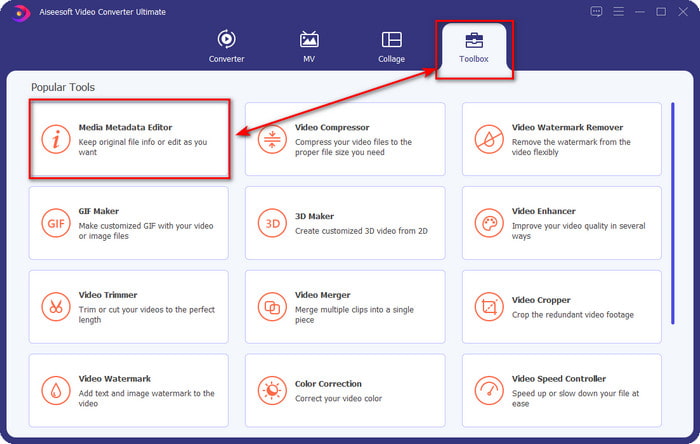
Step 2. Click Media Metadata Editor to open the tag editor feature on the Toolbox section.
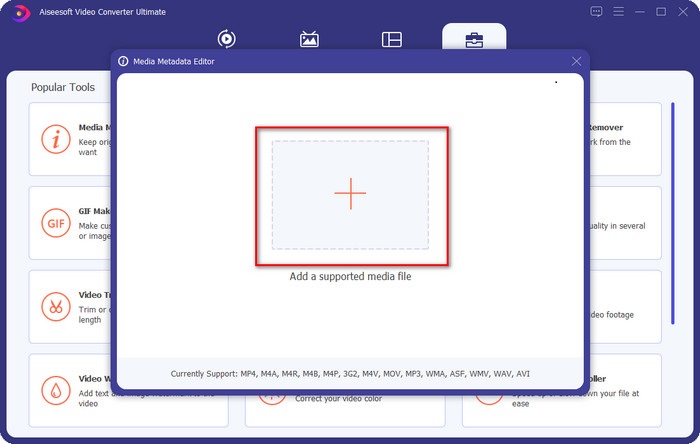
Step 3. You must click the + button to add the file, look it on the folder that will show, and click Open to add the FLAC file successfully.
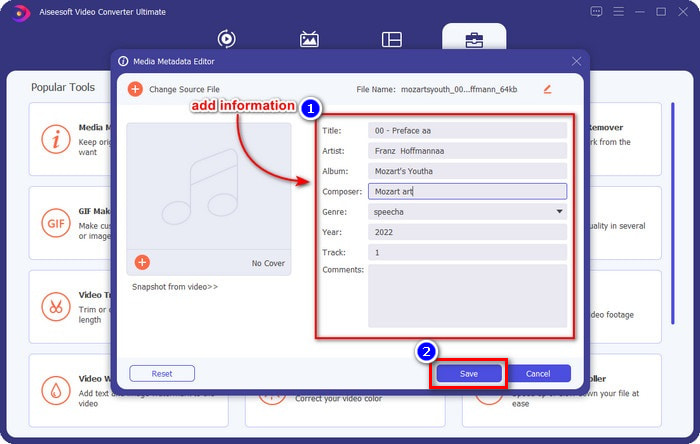
Step 4. In this panel, you can now change the metadata of your FLAC on each textbox. Then click Save to save the update you've made with the software. As easy as that, you've added tags on your FLAC and corrected them efficiently with the help of an ultimate tool.
Pro
- Este cea mai bună alegere pentru editarea metadatelor pe FLAC, MP4, WMA, WAV, TTA, OGG și peste 1000 de formate.
- Acceptă mai multe funcții de editare pe care le puteți utiliza în secțiunea Caseta de instrumente.
- Interfață grafică intuitivă și ușor de utilizat.
- Descărcabil pe sistemele de operare Windows și Mac.
Contra
- Achiziționarea instrumentului este o necesitate pentru a beneficia de caracteristicile incredibile la un cost scăzut.
Partea 2. Alte 2 cele mai bune editoare gratuite de metadate FLAC pentru Windows
Fregata 3
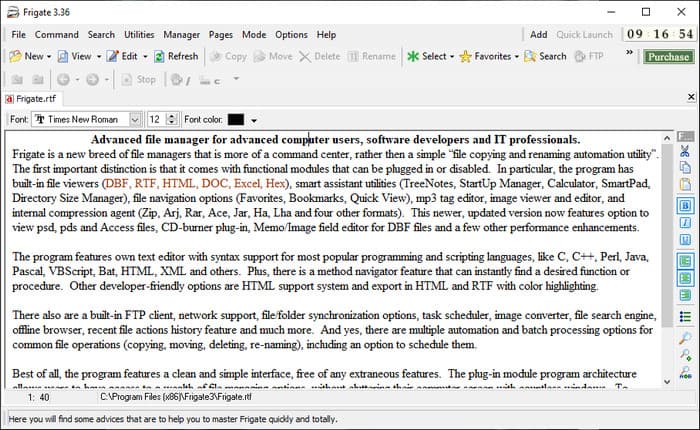
Frigate3 is a FLAC metadata editor that you would love to use on your Windows. With this tool, you can easily adjust the tags you have on your desktop. But before you download the tool, you must check out the two options it provides, the standard and pro versions. The standard version of this tool only includes the basic features you will have while using it. If you've downloaded the standard version, the file size is smaller than the pro one.
În timp ce, dacă ați descărcat versiunea pro a acesteia, veți avea toate caracteristicile oferite de acest software, care nu sunt standard, dar dimensiunea fișierului este mult mai mare decât standardul. În ciuda faptului că este un software Windows gratuit, putem vedea totuși că instrumentul este puțin greu de înțeles, iar GUI-ul său nu arată atât de bine ca celelalte software de pe piață. Chiar dacă aceasta este o problemă, este totuși considerată un instrument eficient pentru a gestiona această sarcină.
Pro
- Descărcare gratuită pe Windows.
- Acceptă versiunile standard și pro ale instrumentului.
- Poate adăuga plug-in-uri.
Contra
- GUI nu este bun ca și celălalt editor de metadate.
- Uneori, instrumentul este greu de lansat.
- Rețeaua este nesecurizată atunci când accesați site-ul web oficial al instrumentului.
MusicBrainz PiCard
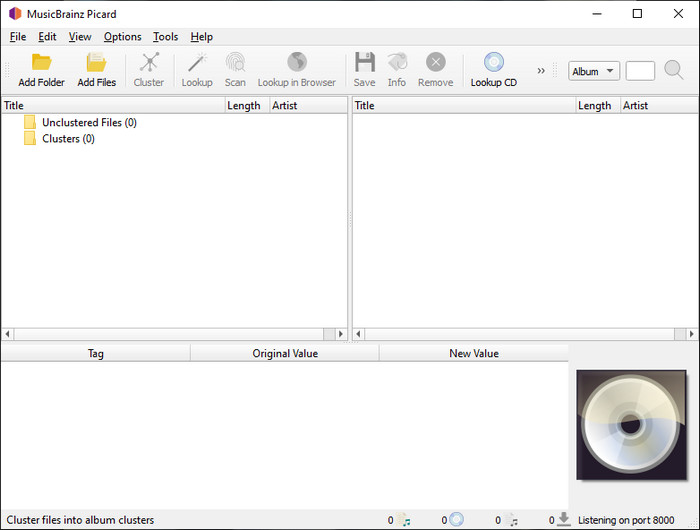
MusicBrainz PiCard is a Windows-based FLAC metadata editor you can freely download on your desktop to finish adding the metadata. If the audio file has a record on the database, you can retrieve the tags or update them with the help of this tool. Unlike other tools, this software can add multiple in-depth information such as the performers and instruments used on the music. But remember that the volunteers accumulate the tags on the MusicBrainz.
În plus, acest software este un editor de etichete audio dedicat, ceea ce înseamnă că doar acceptă majoritatea formatelor audio, fie că sunt cu pierderi, fără pierderi sau ambele. Chiar dacă este o enciclopedie cuprinzătoare de etichete muzicale și o face utilizabilă pentru public, unele etichete pe care le oferă nu sunt de încredere, așa că va trebui să le adăugați manual. Cu toate acestea, instrumentul este ușor de utilizat și mai bun decât Frigate3, dar nu este la fel de bun ca instrumentul suprem.
Pro
- Are o bază de date încorporată pentru etichete audio.
- Interfață de utilizator simplă.
- Este ușor să înveți cum să-l folosești.
Contra
- Uneori, metadatele adunate în baza de date nu sunt de încredere.
- Este limitat doar la fișierele audio.
Partea 3. Întrebări frecvente despre Editorul de metadate FLAC
Pot înregistra FLAC de înaltă calitate?
Absolutely, yes, you can record audio in this format, but remember now all of the audio recorders support this format, and not all can record high-quality audio output. So, if you don't know how to record a high-quality FLAC lossless recorder, you must click this link to learn more about this topic.
Care este cel mai bun software pentru a converti FLAC?
Fără îndoială, FVC Video Converter este cel mai bun convertor FLAC pe care îl puteți folosi pentru a face FLAC compatibil cu celelalte dispozitive fără a pierde calitatea originală. Cu acest instrument, puteți converti mai multe FLAC simultan, dar amintiți-vă, dacă doriți mai mult decât o descărcare cu convertor, instrumentul suprem este o necesitate.
Nota vocală acceptă FLAC ca ieșire audio?
Voice Memo uses M4A instead of FLAC for storing audio recorded format. If you want to know more about voice memos, you can read the full-detailed scope we did on the built-in app; read it carefully to know if it is the best audio recorder on iOS devices by clicking this link.
Concluzie
FLAC is not just an audio format, but it is one of the best audio formats you must use to store high-quality audio on your devices. So, if you want to arrange the .flac on your library, then the help of the tool we review can help you handle the task efficiently. If you are a Windows user, we suggest reading the software we found to add metadata on Windows in part 2. But if you want a more reliable and pro tool to add metadata on FLAC, we suggest you use the FVC Video Converter Ultimate instead. With a tool like this, you can do pro editing on tags that the other Windows tool we present can’t provide. So, if you want to know more about the best FLAC metadata editor on Mac and Windows, you must download it to discover the other functions.
-
 Top 5 editori de metadate video pentru 2025 [Recenzie imparțială]
 Doriți să vedeți metadatele video? Dacă da, citiți detaliile de mai jos pentru a înțelege pe deplin subiectul și pentru a afla care instrument vi se potrivește cel mai bine.
-
 7 editori populari de etichete muzicale pe Windows, Mac și dispozitive mobile
 Etichetele muzicale sunt populare de utilizat pentru aranjarea muzicii din biblioteca dvs. în funcție de datele din interior. Dacă vrei să-l schimbi? Citiți detaliile de mai jos pentru a afla mai multe.
-
 5 editoare de metadate MP4 de top [Actualizat 2025]
 Cum îmi pot schimba metadatele MP4? Cel mai bun mod de a schimba metadatele MP4-ului este să utilizați un editor de etichete care acceptă formatul MP4, cum ar fi exemplul pe care îl enumeram mai jos.
