


 Video Converter Ultimate
 Screen Recorder
 Reparație video
Recenzie despre editorii de metadate FLV pentru a edita metadatele FLV [fără efort]
FLV is a popular format used to deliver digital content using Adobe Flash Player embedded with SWF. Although it is best to transfer files in the extension of .flv, some contents are lost, especially if interrupted. Then if this happens, what should you do? Fortunately, we have metadata available on the market. Want to know what Windows, Mac, and Online tools you can use? Keep on reading to learn the best ways to change the FLV metadata format easily.

Partea 1. 3 a celui mai bun editor de metadate video disponibil pe Windows/Mac/Online
Video Converter Ultimate
Video Converter Ultimate is one of the powerful FLV metadata editors to easily update and change the FLV tags. This tool is available on any Windows or Mac OS to use. While using the ultimate tool, you can quickly add, remove, or update the metadata on 1000+ formats with the help of this tool, not only on FLV. Unlike another metadata editor, this tool offer s variety of options that are perfect for any video type problem. Such as converting, speeding it up or down, reversing, and other sets of amazing filters to make your video very unique that the other tag editor doesn't offer it to you.
În plus, plănuiți să editați videoclipul FLV, cum ar fi adăugarea de efecte, filtre, tăiere, îmbinare, adăugare de text sau filigran. Acest instrument poate ajuta la îndeplinirea sarcinii cu ușurință la orice utilizator. Toate aceste lucruri sunt posibile cu ajutorul instrumentului suprem. Va trebui să nu căutați nimic cu cele mai bune GUI și funcții. Dacă vă întrebați și doriți să încercați să utilizați acest instrument, puteți urma pașii de mai jos pentru a ști cum să utilizați instrumentul.
Step 1. Press the download button to have the FLV metadata injector on your desktop; choose Windows or Mac. Install the tool by clicking the file, following it accordingly, and running it.
Descărcare gratuită pentru Windows 7 sau o versiune ulterioară Descărcare securizată
Descărcare gratuită pentru MacOS 10.7 sau o versiune ulterioară Descărcare securizată
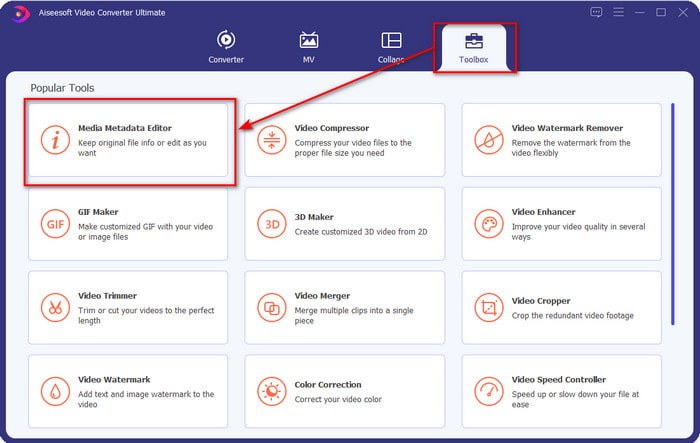
Step 2. After you've opened the software, go to the Toolbox and select Media Metadata Editor to edit the tags on your FLV.
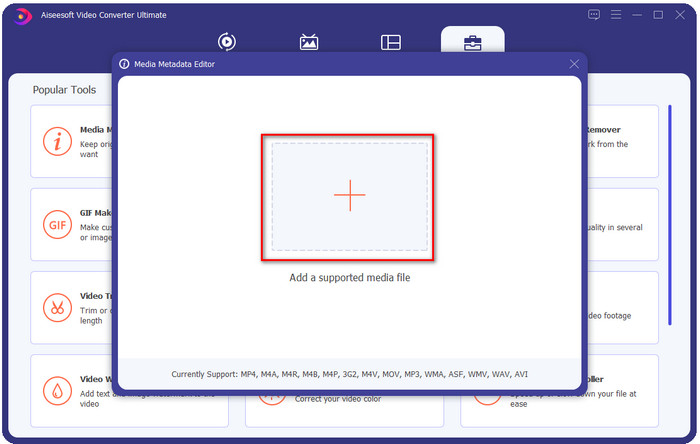
Step 3. Add the FLV files by hitting the + icon, locate the file on the file folder that will show on your screen, and click Open.
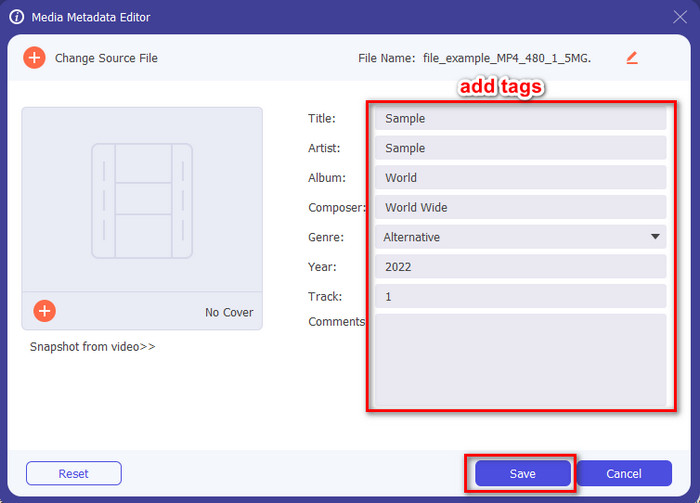
Step 4. Add, change, or remove the information on the textbox and press Save. With that, you've now added tags to your FLV file as simple as it is.
FLVMeta - Editor de metadate FLV
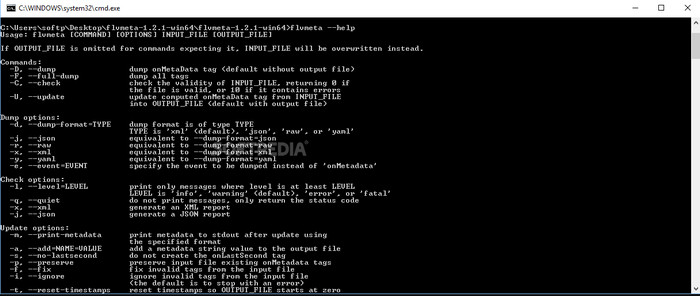
If you are a pro and want to try a dedicated FLV metadata editor you can download, we would like to introduce the FLVMeta – FLV Metadata Editor. This tool isn't the typical editor you've already encountered because it is a command-line tool. It means to command the tool; you will need to insert a specific code. Similarly to FFmpeg, you will need to input the location, file name, data, and many complicated things. Although this isn't the best choice for beginners who need to edit their FLV metadata, it is worth mentioning because it does the job perfectly.
Mai mult, software-ul nu funcționează cu celelalte formate; îl puteți folosi doar pe FLV dacă doriți să utilizați instrumentul. Dacă aveți multe fișiere FLV și doriți să le schimbați etichetele și aveți cunoștințe de bază despre manipularea unui instrument de linie de comandă, vă sugerăm să utilizați acest lucru. Dacă nu, veți avea nevoie de timp pentru a studia instrumentul pentru a face o sarcină simplă, cum ar fi adăugarea de metadate.
Editor online de metadate FLV
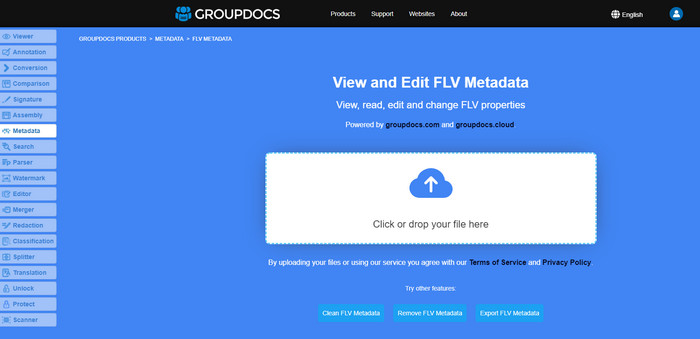
Don't want to download a tool to edit the FLV metadata format? In that case, you can use the Online FLV Metadata Editor. With this tool, you can edit the metadata on your FLV without installing the software for free, for it is a web-based tool. Even though the tool is free on the web, this tool won't function if you don't have internet, and the process might be interrupted if you have slow internet.
Spre deosebire de FLVMeta, acest instrument acceptă mai multe formate și nu numai FLV; nu acceptă la fel de larg ca instrumentul suprem. Deci, dacă doriți să finalizați editarea sarcinii fără a descărca software-ul, vă sugerăm să utilizați acest lucru, deoarece este, de asemenea, sigur de accesat. Dar nu uitați, pentru a evita problemele neașteptate, asigurați-vă că aveți o conexiune la internet stabilă.
Partea 2. Diagramă de comparație despre Top 3 Editor de metadate FLV
| Caracteristici | Video Converter Ultimate | FLVMeta – Editor de metadate FLV | Editor online de metadate FLV |
| Sigur de utilizat |  | | |
| Ușor de utilizat | |  | |
| Dependent de Internet | | | |
| Caracteristici de editare, cum ar fi tăierea, tunderea, tăierea, îmbinarea etc. | | | |
| Cea mai bună interfață grafică pentru utilizatori | | | |
Partea 3. Întrebări frecvente despre FLV Metadata Editor
FLV și F4V sunt la fel?
Although they are both Adobe Flash-related, their purpose is different. For example, FLV has the same encoder used on SWF files, ideally used to transfer data over the internet. In contrast, F4V is an ISO-based format that resembles the MP4. Although they are both good at transferring files over the internet, their aspect and structures are different. If you want to convert your F4V to FLV, click this, and learn to convert the format into an FLV.
Unde pot juca FLV?
Not all media players can play FLV format because of its limited support. Yet you are in luck, as we gathered the finest FLV player you can use on your device to play your FLV files without worrying if it is supported. These tools are tested to ensure that they can play FLV files on Windows, Mac, Android, and iPhone; to know more, click this link.
Este FLV formatul standard de partajare video?
Înainte de a-l considera cel mai bun format de partajare video pe care îl puteți folosi pe web pentru a reda videoclipuri de înaltă calitate; cu toate acestea, există formate și mai bune în această nouă eră, cum ar fi MP4. Deoarece este mai compatibil cu diferite dispozitive pe care utilizatorii le au, acesta este cunoscut ca format video standard. Deși puteți partaja în continuare fișierele FLV pe web, va trebui totuși să reconsiderați dispozitivul receptorului acelui fișier. Și dacă sunteți receptorul, va trebui să descărcați un instrument terță parte pentru a-l reda sau pentru a-l converti într-un format care poate fi redat.
Concluzie
Deși există instrumente limitate care sprijină FLV, suntem totuși norocosi; deoarece putem edita în continuare metadatele FLV datorită instrumentelor de mai sus. Dar ne întristează inima că trebuie să alegem unul pe care să îl folosim, chiar dacă ne pot ajuta. Dacă nu v-ați hotărât ce să utilizați, trebuie să utilizați instrumentul suprem. Este cea mai sigură alegere, deoarece este simplă, dar vă poate ajuta cu ușurință să vă ocupați de sarcină. Încă nu crezi care sunt abilitățile acestui instrument? În acest caz, trebuie să-l descărcați pe desktop pentru a-l utiliza și a-l testa singur pentru a vedea dacă îndeplinește sarcina. Am aprecia dacă ne-ați putea trimite un mesaj despre sugestia, recomandarea și multe altele despre aplicație.
-
 Ce sunt metadate: aflați informațiile de bază despre metadate
 Ce sunt metadatele? Este acest lucru important? Care sunt părțile metadatelor? Aveți aceeași întrebare? În acest articol, veți afla informațiile de bază despre metadate.
-
 4 dintre cele mai bune vizualizatoare de metadate online și offline [Actualizat 2025]
 Pot verifica metadatele fișierului meu? Da, poți, cu ajutorul acestei postări îți vom prezenta diferitele vizualizatoare de metadate pe care le poți folosi.
-
 6 Filtre Snapchat animate Snapchat alese preferate pe Snapchat
 Vrei să știi cele mai bune modalități de a adăuga filtre la videoclipurile Snapchat? Ei bine, poți să dai clic pe aceasta și să înveți diferitele filtre pe care le poți folosi pentru a aplica videoclipuri Snapchat.
