


 Video Converter Ultimate
 Screen Recorder
 Reparație video
Revizuire despre importanța editorului de etichete ID3 în 2022
Melodiile pe care le-ai descărcat de pe site-uri de muzică au, într-adevăr, metadate, cunoscute și sub numele de etichete ID3. De obicei, toate informațiile de care ai nevoie despre acea piesă se află în informațiile din etichetă. Uneori însă, fișierul muzical nu vine cu etichete sau conține informații greșite. Într-o astfel de situație, ai nevoie de un software care să te ajute să gestionezi ușor această sarcină. În acest context, îți prezentăm cu plăcere cel mai bun editor de etichete ID3 pe care îl poți descărca pe Windows, Mac, iOS și Android pentru a edita etichetele melodiilor tale.

Partea 1. Ce este eticheta ID3
Etichetele ID3 sunt esențiale pentru orice utilizator care vrea să știe mai multe detalii despre o melodie. Un exemplu bun de etichete pe care le poți vedea fără să deschizi câmpurile de tag este numele artistului și titlul piesei. Deși nu le-am adăugat noi în fișierul audio, ele sunt totuși integrate pentru a ne ajuta să știm dacă redăm muzica potrivită.
Cu toate acestea, dacă nu aveți o etichetă pe melodiile sau podcastul dvs., atunci există șansa ca fișierele să fie amestecate în întreaga bibliotecă sau folder în care sunt stocate. Adăugarea etichetelor pe fișier vă poate ajuta să determinați fișierul și să-l aranjați astfel încât să arate organizat. Dacă fișierul dvs. nu are unul, atunci trebuie să adăugați date. Păstrați mingea în mișcare pentru a vă ajuta să căutați editorul de etichete ID3 pe care ar trebui să-l utilizați și care se va potrivi nevoilor dvs.
Dar înainte de a începe, vă rugăm să pregătiți metadatele pe care doriți să le adăugați la fișierul dvs. audio; acestea includ titlul, autorul, capitolul, paginile, comentariile, versurile și altele. După ce ați citit acest lucru, veți fi surprins de recenzia noastră despre editoarele de etichete de top pe care le puteți utiliza pe toate dispozitivele.
Partea 2. Cel mai bun editor de etichete ID3 pe Windows/Mac pentru a schimba metadatele cu ușurință
FVC Video Converter Ultimate – Cel mai bun editor de etichete ID3
Unul dintre lucrurile de bază pe care ar trebui să le știi când alegi un editor de etichete ID3 pe Mac sau Windows este că acesta ar trebui să fie precis, ușor de utilizat și accesibil; toate acestea se regăsesc în FVC Video Converter Ultimate. Este cunoscut drept un editor de metadate de primă clasă, ușor de folosit chiar și pentru utilizatorii care nu știu cum să le ajusteze corect. Spre deosebire de alte editoare de etichete, nu va trebui să faci multe acțiuni complicate pentru a adăuga sau corecta etichetele audio sau video. Așadar, dacă ești nou în acest domeniu al editării sau reparării etichetelor ID3, fără îndoială că acesta este software‑ul complet de care ai nevoie.
În plus, nu l-am numit un editor unic fără motiv; poate te gandesti de ce. Dacă vom explora mai multe despre instrument, veți vedea că puteți face editare video avansată și de bază aici pentru a face videoclipul să arate remarcabil prin adăugarea de efecte și filtre. Există încă prea multe funcții nemenționate pe care le puteți dezvălui dacă descărcați instrumentul. Dar astăzi, ne vom concentra pe utilizarea acestui software de editare a etichetelor ID3 pentru a vă ajuta să editați și să remediați rapid etichetele melodiilor.
Pasul 1. Mai întâi, descarcă software‑ul pe sistemul de operare ales; sunt disponibile două opțiuni, Windows și Mac. Apoi instalează-l corect, urmează procesul de configurare, apoi deschide instrumentul după ce ai terminat toate acestea.
Descărcare gratuită pentru Windows 7 sau o versiune ulterioară Descărcare securizată
Descărcare gratuită pentru MacOS 10.7 sau o versiune ulterioară Descărcare securizată
Pasul 2. După ce ai deschis instrumentul, trebuie să mergi la secțiunea Toolbox și să deschizi Media Metadata Editor făcând clic pe el.
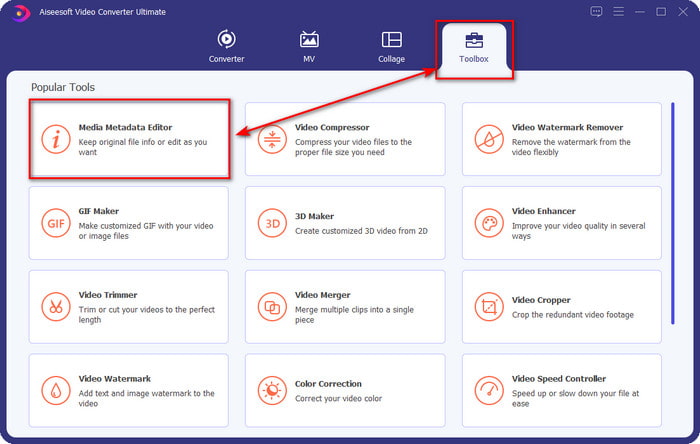
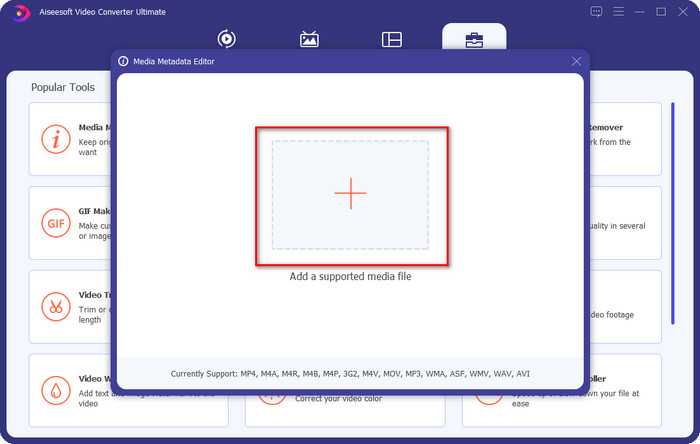
Pasul 3. Apasă pictograma + în noua fereastră care va apărea pe ecran, selectează fișierul audio căruia vrei să-i modifici etichetele ID3, apoi apasă Open pentru a-l încărca.
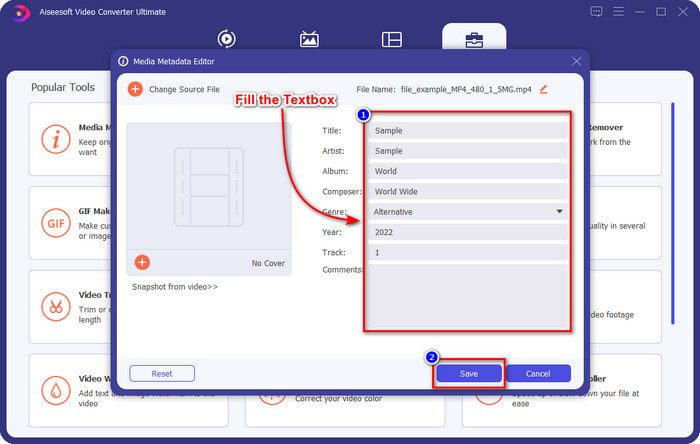
Pasul 4. Acum poți introduce informațiile pe care vrei să le adaugi fișierului audio și să dai clic pe Save când ai terminat cu fiecare textbox. Atât de simplu: acum ai adăugat etichete fișierului audio cu ajutorul acestui software.
Pro
- Acceptă schimbarea fără efort MP3, WMA, WAV și peste 1000 de metadate.
- Conversia ultra-rapidă și accelerarea hardware sunt acceptate pentru un proces cu viteză fulgerătoare.
- Funcțiile principale până la cele avansate de editare video sunt disponibile în Toolbox.
- Este prima alegere a milioane de utilizatori din întreaga lume care își asumă această sarcină.
Contra
- Achiziționarea instrumentului este necesară pentru a avea toate funcțiile de editare fanteziste.
- Nu este disponibil pe Android și iOS.
VLC Media Player
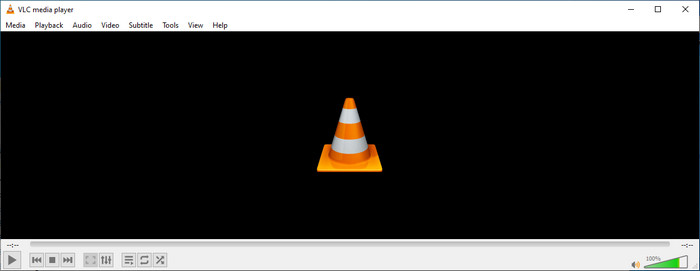
VLC Media Player este un player multimedia de top pe care îl poți descărca pe Windows și Mac. Acest instrument te poate ajuta să redai videoclipuri fără a descărca codecuri suplimentare pe sistem, dar îl poți folosi și pentru a edita etichetele ID3 ale fișierelor audio. Deși nu este un editor de metadate dedicat, poate totuși să corecteze etichetele greșite. Așadar, dacă ai deja acest instrument, poți ajusta ușor metadatele pieselor tale, dar nu te aștepta la prea mult de la el, pentru că nu este la fel de performant ca un editor de etichete ID3 de primă clasă pe desktop.
Pro
- Un player media și un editor de metadate pe care le puteți folosi pe orice dispozitiv.
- Acceptă un format media mediu pentru a schimba etichetele.
- GUI este simplu și simplu.
Contra
- Nu este un editor de metadate pro.
- Acceptă funcții limitate privind editarea etichetelor.
Partea 3. Top 3 ID3 Tag Editor pe dispozitivele mobile iOS/Android
Editor de etichete de muzică Star
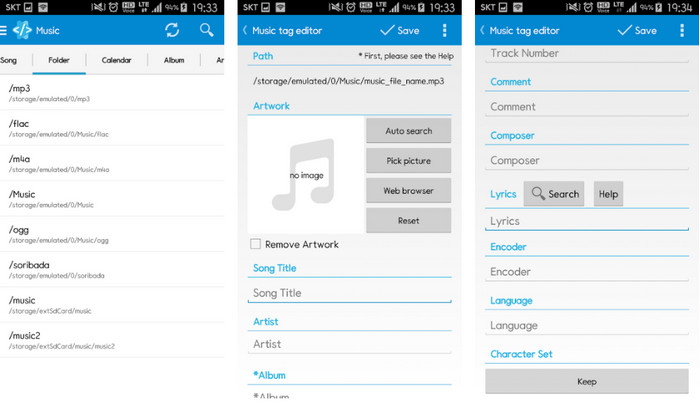
Star Music Tag Editor este unul dintre cele mai folosite editoare de etichete ID3 pe Android. Această aplicație îți poate afișa diverse informații despre melodiile tale, iar tu le poți modifica, dacă este nevoie. Interfața sa grafică este foarte simplă, astfel încât poți învăța ușor cum să o folosești chiar dacă nu ești familiarizat cu un instrument pentru editarea etichetelor. Chiar dacă aplicația este excelentă, are totuși unele neajunsuri în adăugarea metadatelor, în special a copertei albumului. Deși pot apărea probleme, rămâne un editor de etichete de încredere pe care îl poți descărca pe telefonul tău Android.
Pro
- Descărcați gratuit editorul de metadate pe Android.
- GUI este simplu și ușor de înțeles.
- Adăugați cu ușurință etichetele pe fișierul audio.
Contra
- Are o problemă la adăugarea unei coperți de imagine pe fișierul audio.
- Uneori bug-uri încă se întâmplă.
Clouds Music Player pentru Clouds
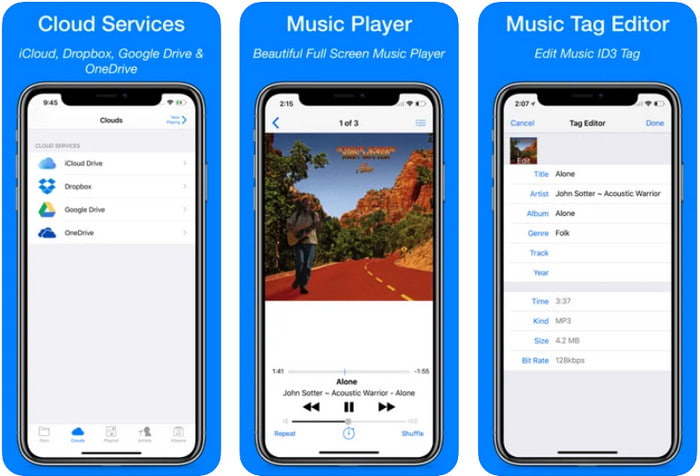
Clouds Music Player for Clouds este o aplicație multifuncțională pe care o poți descărca pe dispozitivele iOS. Poate edita etichetele ID3 pe iPhone, reda muzică și crea tonuri de apel din melodii. În ciuda funcțiilor sale, interfața este clară și simplă, iar tu poți accesa serviciul de stocare în cloud direct prin aplicație. Chiar dacă are o interfață prietenoasă, unele informații pe care le poți adăuga ca metadate în fișierul audio sunt insuficiente, ceea ce înseamnă că poți edita doar etichetele de bază. Cu toate acestea, este o alegere foarte bună de descărcat dacă ești utilizator de iOS.
Pro
- Disponibil pe orice dispozitiv iOS pentru descărcare.
- Editor muzical multifuncțional și editor de etichete.
- Editor de metadate intuitiv pe iOS.
Contra
- Nu acceptă adăugarea mai multor metadate.
- Problemele și erorile de modificare a metadatelor apar, dar nu des.
Aplicația Dash- Infotainment
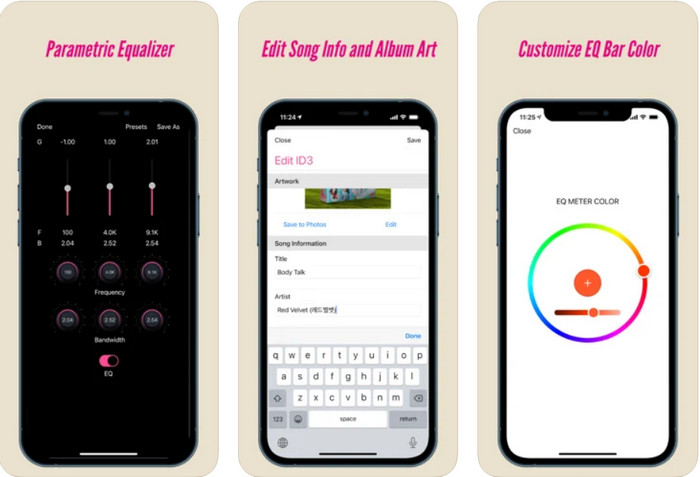
Dash- Infotainment App este un alt instrument pe care îl poți descărca pentru a edita etichetele ID3 pe iPhone, ori de câte ori ai nevoie. Nu ai prea multe de învățat înainte de a folosi aplicația, datorită interfeței sale simple și bine organizate. Poți folosi acest instrument pentru a modifica ușor parametrii fișierelor FLAC și ALAC cu ajutorul egalizatorului ușor de utilizat. De asemenea, poți vedea viteza și busola (tempo și tonalitate) melodiei pe care o încarci aici. La fel ca primul editor de etichete pentru iPhone, poți adăuga doar titlul, artistul și coperta albumului, dar trebuie să ții minte că formatul trebuie să fie doar FLAC sau ALAC; dacă nu este în unul dintre aceste formate, nu îl poți încărca.
Pro
- Curba de învățare nu este prea rigidă.
- Este disponibil un egalizator audio multitudine.
- GUI nu este mult și nici mai puțin.
Contra
- Acceptă doar formatul FLAC și ALAC.
- Nu există prea multe de oferit în ceea ce privește editarea metadatelor.
Partea 4. Întrebări frecvente despre ID3 Tag Editor
Care este cel mai bun editor de etichete ID3 de linie de comandă pe care îl pot folosi?
Dacă ești în căutarea unui editor de etichete ID3 în linie de comandă, trebuie să știi că FFmpeg este un editor care funcționează din comandă. Cu acest instrument poți converti, roti, tăia, decupa și edita etichetele de metadate. Dacă vrei să afli mai multe despre FFmpeg, poate dorești să citești cum să îl folosești făcând clic pe linkul pentru a edita ușor metadatele cu FFmpeg.
Care sunt celelalte tipuri de metadate?
Există șase tipuri de metadate: descriptive, administrative, de referință sau explicative, statistice, juridice și structurale. Dacă vrei să afli mai multe despre aceste tipuri și despre informațiile lor, poți da clic pe acest link și să citești mai departe despre ele.
Este posibil să vizualizați etichete fără o aplicație?
Da, în loc să descarci un software, poți folosi un instrument online pentru a vedea etichetele fișierului tău. Dă clic pe acest link pentru a vizualiza online metadatele pe desktop, dar noi îți vom prezenta, de asemenea, și câteva instrumente pe care vei dori să le descarci.
Concluzie
Cu informațiile enumerate mai sus, a devenit posibilă editarea etichetelor ID3 folosind editorii pe care i-am prezentat mai sus, indiferent de dispozitivul pe care îl utilizați în prezent. În plus, aplicația și software-ul sunt perfecte pentru utilizatorii care trebuie să își editeze metadatele. Chiar dacă instrumentele oferă utilizatorilor o oportunitate excelentă de a edita metadatele, este încă fără îndoială că instrumentul suprem prezintă o modalitate eficientă de editare a etichetelor ID3 pe orice fișier muzical. Dacă doriți să aveți cel mai bun editor de etichete ID3 pe Windows și Mac, îl puteți descărca direct făcând clic pe butonul de descărcare prezentat mai sus, apoi bucurați-vă de măreția sa.
-
 2 Cele mai bune moduri de a edita metadatele OGG pe care ar trebui să le încercați gratuit
 Trebuie să editați metadatele OGG? Ei bine, vă puteți ocupa cu ușurință de editarea etichetelor folosind software-ul corect. Dacă nu aveți unul, citiți acest articol este o necesitate.
-
 O privire de ansamblu absolută despre Editorul de metadate Pentaho [Actualizat 2022]
 Nu găsește un articol de încredere despre Pentaho Metadata Editor? Din fericire, noi înșine am revizuit instrumentul pentru a oferi informațiile pe care le veți ști despre instrument.
-
 Sfaturi și trucuri despre Editorul de metadate VLC pe care trebuie să-l cunoașteți în 2022
 Doriți să utilizați VLC ca editor de metadate? În acest caz, puteți citi acest articol, deoarece oferim o revizuire imparțială a editorului de metadate VLC.
