


 Video Converter Ultimate
 Screen Recorder
 Reparație video
 Descărcare sigură
Cum se îmbină fișierele MPG pe computer
Când încerci să extragi (rip) un film de pe DVD pe computer, de obicei acesta va fi salvat în format MPG. Deoarece filmul extras este întotdeauna împărțit în mai multe clipuri MPG scurte, este posibil să vrei să unești mai multe clipuri video în format MPG într-unul singur, pentru a obține fișierul complet al filmului. În acest articol îți vom arăta cum să unești fișiere MPG în 2 moduri.

Partea 1. Cum să vă alăturați fișierelor MPG cu Video Converter Ultimate
Pentru a îmbina filmele MPG și a le edita, este posibil să aveți nevoie de un software profesional de alăturare video. Video Converter Ultimate este cel mai bun mod de a vă rezolva problema. Cu funcțiile puternice de îmbinare, conversie și editare a videoclipurilor, vă puteți simți liber să vă alăturați multor fișiere MPG și să le reglați pe computer.
- 1. Alăturați-vă și convertiți diferite tipuri de formate video, inclusiv fișiere MPG cu un singur clic.
- 2. Funcții multiple de editare video MPG, inclusiv tăiere, împărțire rotativă și adăugare de filigran și subtitrări.
- 3. Casetă de instrumente specială, care vă oferă îmbunătățitor video MPG pentru a îmbunătăți calitatea video.
- 4. Adăugați temă și filtre pentru a vă decora clipurile de film mpg
Descărcare gratuită pentru Windows 7 sau o versiune ulterioară Descărcare securizată
Descărcare gratuită pentru MacOS 10.7 sau o versiune ulterioară Descărcare securizată
Pasul 1. Descarcă și instalează Video Converter Ultimate. Alege interfața Converter. Apoi poți adăuga fișierele MPG pe care vrei să le unești făcând clic pe pătratul Add Files din centrul interfeței. Poți de asemenea să tragi mai multe fișiere MPG în acel pătrat pentru a le adăuga. Aplicația îți permite să adaugi mai multe fișiere MPG și să le îmbini într-unul singur.
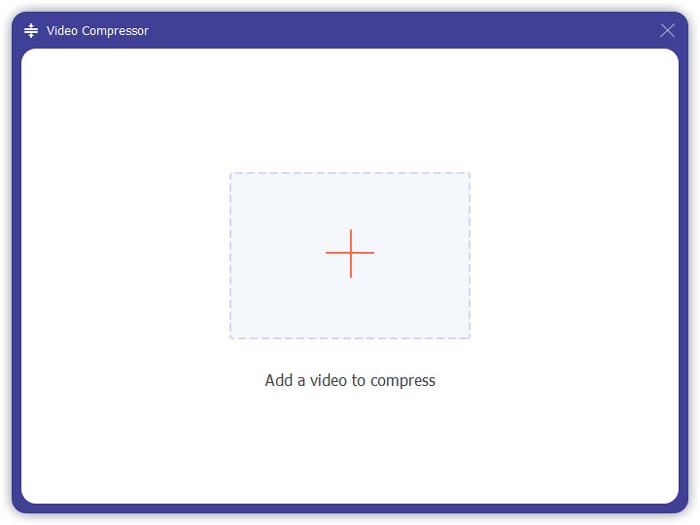
Pasul 2. Apoi alege formatul video pe care vrei să-l obții făcând clic pe câmpul Convert All to din partea dreaptă. Poți alege diverse tipuri de formate din meniu, inclusiv MP4, MOV, MKV etc. Poți ajusta manual parametrii formatului făcând clic pe pictograma în formă de rotiță (gear).
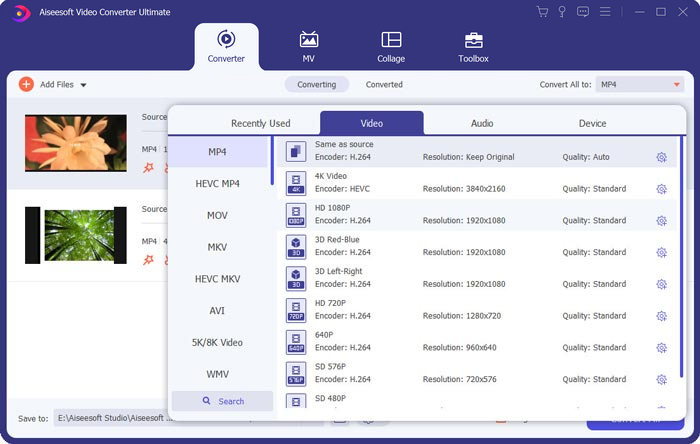
Pasul 3. Pentru a-ți edita videoclipurile, poți face clic pe pictograma în formă de foarfecă (scissor) pentru a deschide interfața de editare. Poți seta momentele de început și de sfârșit ale videoclipurilor pentru a le decupa. Clipurile MPG din bara din stânga sunt afișate în ordine cronologică. Dacă vrei să schimbi ordinea videoclipurilor, le poți trage și le poți pune într-o altă succesiune. În videoclipul final, clipul aflat deasupra va fi redat înaintea celui aflat dedesubt.
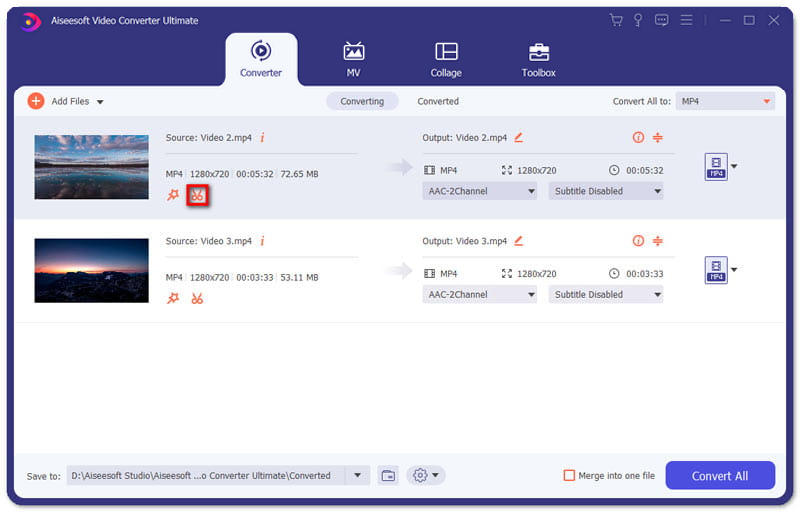
Pasul 4. Când termini editarea, le poți îmbina și poți exporta proiectul final. Trebuie să știi că videoclipurile vor fi îmbinate în ordine cronologică, conform succesiunii din interfața de editare. Pentru a începe îmbinarea, trebuie să bifezi caseta Merge into One File și să faci clic pe butonul Convert All. După finalizare, poți găsi videoclipul îmbinat în folder.
Apoi poți reda fișierele MPG direct cu MPG MPEG player.
Partea 2. Cum să vă alăturați fișierelor MPG gratuit online
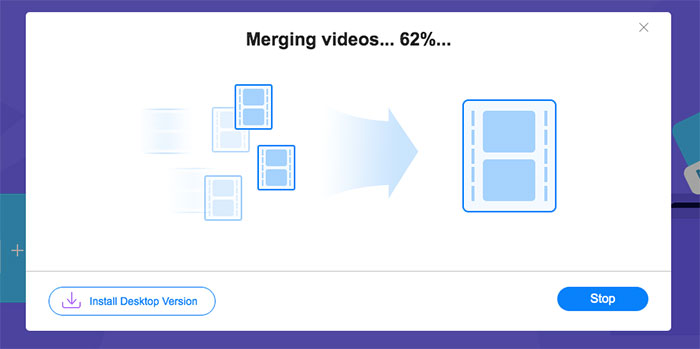
Dacă vrei să unești fișiere MPG online, gratuit, poți folosi Free Online Video Merger. Interfața simplă și bine concepută este prietenoasă pentru toți utilizatorii.
Pasul 1. Descarcă launcher-ul și instalează programul de îmbinare. Apoi poți adăuga fișiere MPG făcând clic pe + din interfață. În partea de jos a ecranului poți ajusta rezoluția și formatul videoclipului îmbinat în meniu. Ordinea videoclipurilor este cronologică, de la stânga la dreapta pe ecran.
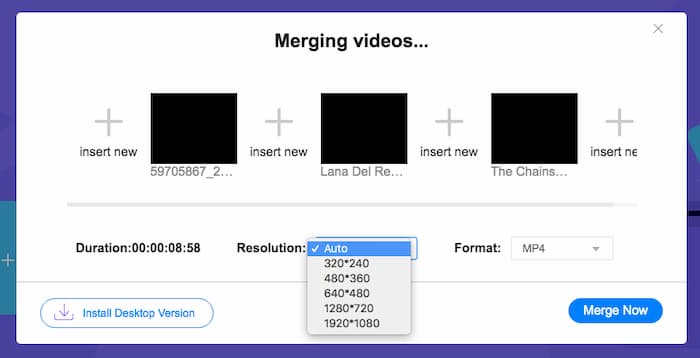
Pasul 2. Pentru a începe îmbinarea, trebuie să faci clic pe butonul Merge Now. Când îmbinarea este terminată, poți găsi videoclipul în folderul implicit Download de pe computerul tău.
Partea 3. Întrebări frecvente despre Join MPG Files
1. Cum pot deschide un fișier video MPG?
De obicei, fișierul video MPG este versiunea MPEG-1 și MPEG-2. MPEG-1 este compatibil cu majoritatea playerelor media, cum ar fi Windows Media Player și VLC Media Player. MPEG-2 este conceput pentru videoclipuri DVD. Puteți descărca un decodor DVD terță parte pentru a-l deschide.
2. Ce este un fișier MPG?
Fișierul MPG este un fișier video folosit pentru a salva date video și audio. Poate salva și comprima date audio și video mari în dimensiuni mici, fără a pierde calitatea. Este standardizat de Moving Picture Experts Group (MPEG). MPG este utilizat pentru salvarea și distribuirea filmelor pe Internet. Fișierele MPG sunt salvate ca PS sau MPEG-PS într-un format de container de flux de programe.
3. Cum pot îmbina gratuit fișiere video MPG?
Există multe instrumente gratuite de alăturare video pe Internet. Fuziunea video gratuită online menționată mai sus este un instrument gratuit cu o interfață ușoară și clară care poate satisface cererea dvs.
Concluzie
Când vrei să unești mai multe fișiere MPG într-unul singur, ai nevoie de un program profesional de îmbinare video. În acest articol poți afla cum să folosești astfel de programe pentru a-ți îndeplini cerința. Dacă ai întrebări despre instrumentele de îmbinare video sau vrei să afli mai multe despre unirea fișierelor MPG, lasă un comentariu mai jos.
-
 2 metode de ultimă oră pentru a vă alătura videoclipurilor MXF de la Sony X70
 Dacă ați luat câteva videoclipuri MXF de la Sony X70, care sunt cele mai bune metode pentru a alătura fișierelor MXF? Iată cele 2 metode eficiente de a combina videoclipurile cu o calitate înaltă.
-
 2 moduri de a comprima videoclipuri pentru YouTube
 Videoclipurile YouTube sunt mari și lent de încărcat? Pur și simplu comprimați dimensiunea fișierului video în mai mic pentru YouTube în două moduri, online și pe computer.
-
 GIF Player - 5 cele mai bune jucătoare GIF pentru Windows PC, Mac, Android și iPhone
 Ce program deschide fișiere GIF? Cum pot vedea GIF-uri pe Android? Are iPhone un player GIF pentru a deschide GIF-uri? Această postare împărtășește pentru tine cei mai buni 5 jucători GIF.
