


 Video Converter Ultimate
 Screen Recorder
 Reparație video
 Descărcare sigură
Metode necontestabile despre cum să eliminați sigla iSkysoft din videoclip
iSkysoft este o aplicație excelentă, cu multe funcții grozave, care o fac să se remarce față de alte programe similare. Este o aplicație simplă, care îți permite să convertești un fișier video dintr-un format în altul și să faci ceva editare video de bază. Totuși, partea tristă la acest software este că vei avea un filigran iSkysoft mare pe videoclipurile tale după ce utilizezi această aplicație. A avea un filigran/logo mare pe videoclip nu este deloc plăcut de privit. Din fericire, există aplicații de încredere pe care le poți folosi pentru a elimina elemente deranjante, cum ar fi logo-ul/filigranul iSkysoft. Trebuie să citești acest articol dacă vrei să afli cele mai bune metode de a elimina logo-ul iSkysoft din videoclipul tău.

Partea 1: Eliminați logo-ul iSkysoft din Video pe desktop
Logo-ul iSkysoft de pe ecran este cu adevărat enervant, mai ales când îți urmărești videoclipurile preferate. Dar nu mai trebuie să îți faci griji. Poți scăpa de acel logo folosind Video Converter Ultimate. Acest software de încredere te poate ajuta să elimini logo-ul iSkysoft din videoclipurile tale în două moduri simple: cu ajutorul instrumentului Video Watermark Remover și al instrumentului Video Cropper. Cu aceste unelte, poți elimina cu ușurință logo-ul iSkysoft din videoclipul tău. Dacă logo-ul iSkysoft se află într-un colț al videoclipului, este recomandat să folosești instrumentul Video Cropper. Dar, dacă logo-ul este plasat în partea din mijloc, poți folosi instrumentul Video Watermark Remover. În acest fel, îți poți urmări filmele sau videoclipurile preferate fără să fii iritat de logo.
În plus, pe lângă eliminarea filigranelor din videoclipuri, Video Converter Ultimate are mai multe funcții. Are un amplificator video, fuziune video, cropper, trimmer, rotator, convertor și multe altele. În plus, una dintre funcțiile principale ale acestei aplicații este de a converti diferite formate de fișiere video. De asemenea, utilizatorii neprofesioniști pot utiliza această aplicație deoarece are o interfață simplă. Dacă doriți să aflați cum să eliminați sigla iSkysoft din videoclipul dvs., vă vom arăta cele două moduri simple pe care le oferă această aplicație.
Folosind Video Watermark Remover
Pasul 1: Mai întâi trebuie să descarci Video Converter Ultimate pe desktop pentru a folosi acest software excelent. După ce îl descarci, urmează procesul de instalare și pornește aplicația.
Descărcare gratuită pentru Windows 7 sau o versiune ulterioară Descărcare securizată
Descărcare gratuită pentru MacOS 10.7 sau o versiune ulterioară Descărcare securizată
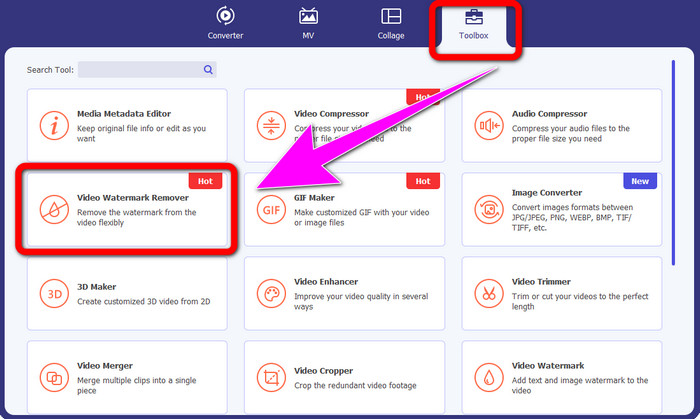
Pasul 2: După ce ai lansat software-ul, mergi la panoul Toolbox și selectează instrumentul Video Watermark Remover. Așteaptă-te ca o altă interfață să apară pe ecran.
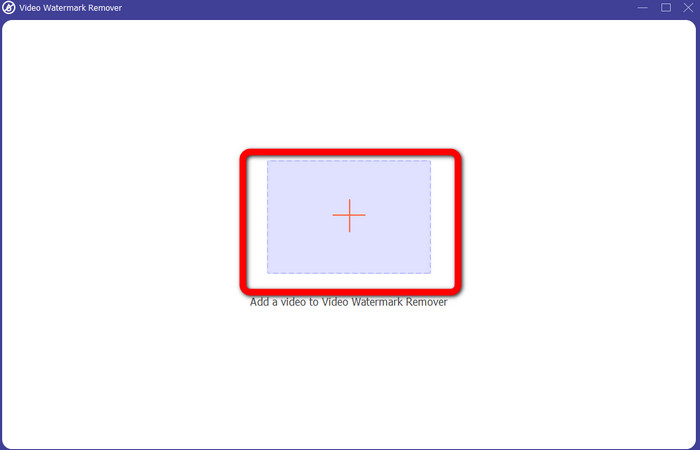
Pasul 3: Când vezi noua interfață, dă clic pe pictograma plus și atașează videoclipul cu logo-ul iSkysoft pe care vrei să îl elimini.
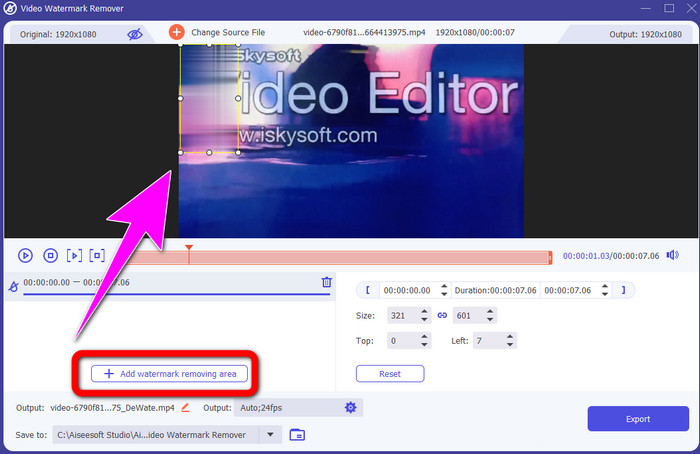
Pasul 4: Apoi, fă clic pe butonul Add Watermark Removing Area. Mută caseta pe videoclip și acoperă logo-ul iSkysoft.
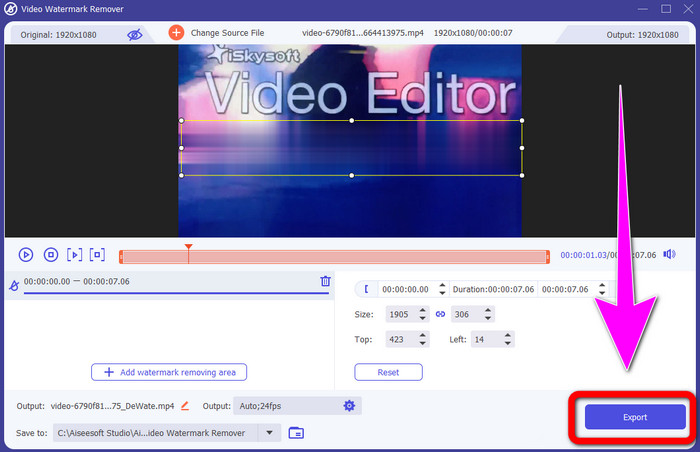
Pasul 5: La final, dă clic pe butonul Export pentru a salva videoclipul final.
Folosind Video Cropper
În această parte, vă vom arăta cum să eliminați sigla iSkysoft din videoclip folosind instrumentul Video Cropper.
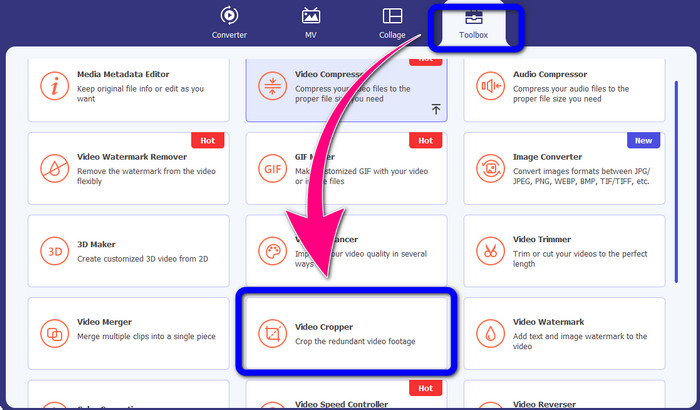
Pasul 1: Rulează aplicația pe desktop. În panoul Toolbox, trebuie să dai clic pe instrumentul Video Cropper. La fel ca în cazul celuilalt instrument de mai sus, așteaptă-te să apară o nouă interfață pe ecran.
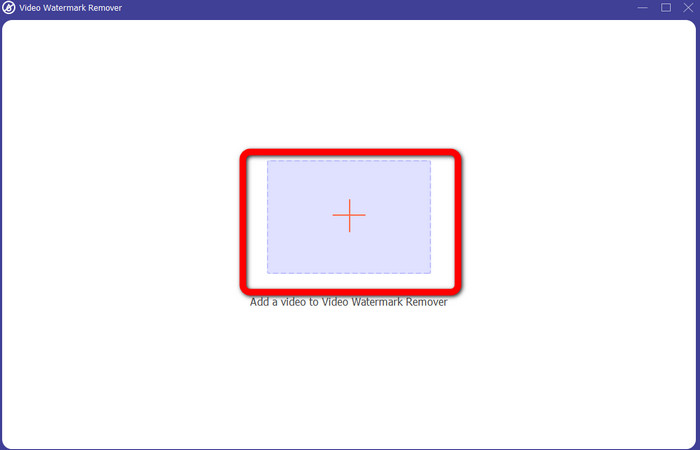
Pasul 2: Fă clic pe butonul cu Plus pentru a importa videoclipul cu logo-ul iSkysoft.
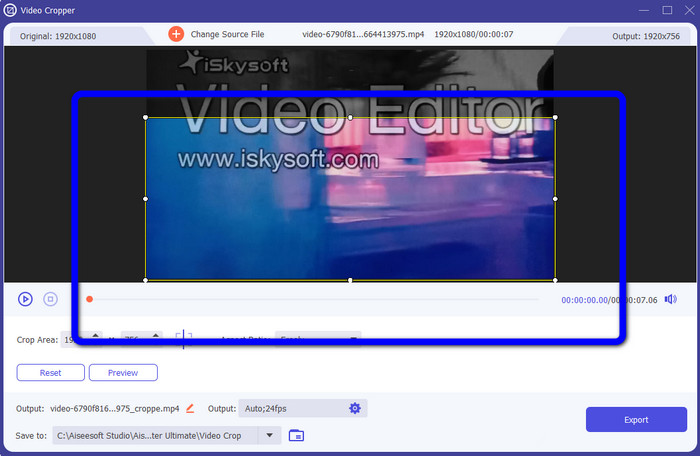
Pasul 3: În această etapă, poți decupa acum videoclipul pentru a elimina logo-ul iSkysoft din videoclip. Folosește mouse-ul pentru a muta marginile videoclipului.
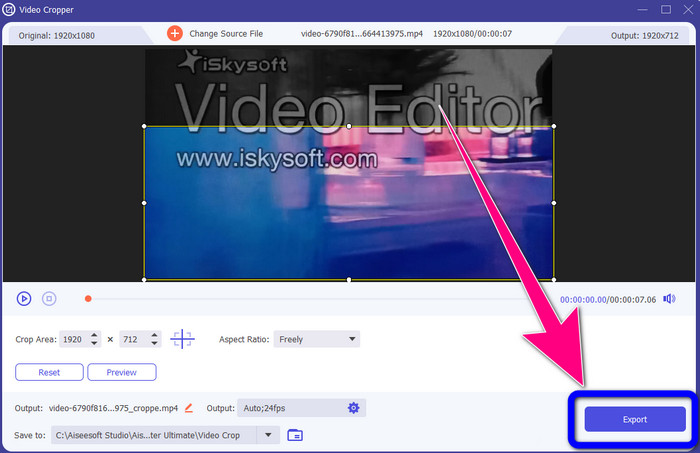
Pasul 4: Pentru ultimul pas, dă clic pe butonul Export și salvează rezultatul pe desktop.
Partea 2: Cum să eliminați sigla iSkysoft din video online
Folosind HitPaw
Poți, de asemenea, să elimini logo-ul iSkysoft online. Unul dintre cele mai bune instrumente pe care le poți folosi este HitPaw. Această aplicație online poate elimina cu ușurință logo-ul din videoclip. O poți folosi atât pe desktop, cât și online, ceea ce este convenabil pentru oricine. De asemenea, HitPaw este sigur de utilizat. Se asigură că videoclipurile pot fi editate și vizualizate doar de tine. În plus, nu trebuie să îți faci griji cu privire la limitările acestui software. Nu are limite în ceea ce privește eliminarea logo-urilor din videoclipurile tale. Nu este nevoie să cumperi această aplicație, deoarece este gratuită. Totuși, dacă elimini logo-ul sau orice
elemente inutile din videoclipul dvs., trebuie să așteptați puțin mai mult. Această aplicație are o procedură de eliminare lentă, care necesită mult timp pentru utilizatori. De asemenea, depinde de conexiunea ta la internet. Va funcționa bine dacă aveți o conexiune rapidă. Dar, dacă aveți o conexiune lentă, așteptați-vă la o întârziere. Urmați pașii simpli de mai jos pentru a elimina sigla iSkysoft din videoclipurile dvs.
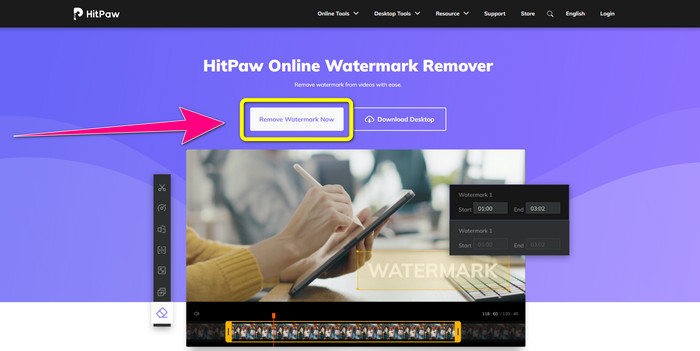
Pasul 1: Accesează site-ul HitPaw. Dă clic pe butonul Remove Watermark Now - Choose File pentru a introduce videoclipul cu logo-ul iSkysoft pe care vrei să îl elimini.
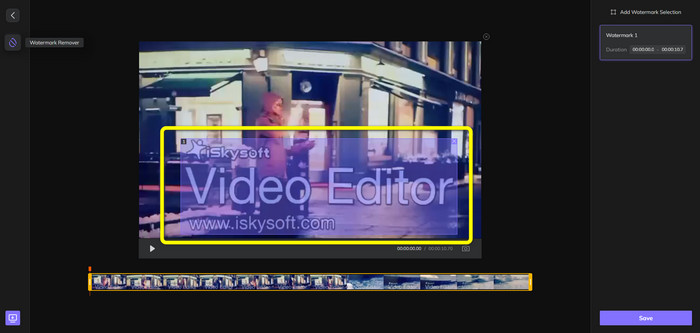
Pasul 2: După ce ai atașat fișierul video, pe ecran va apărea o casetă albastră. Folosește această casetă pentru a acoperi logo-ul iSkysoft. Poți redimensiona caseta.
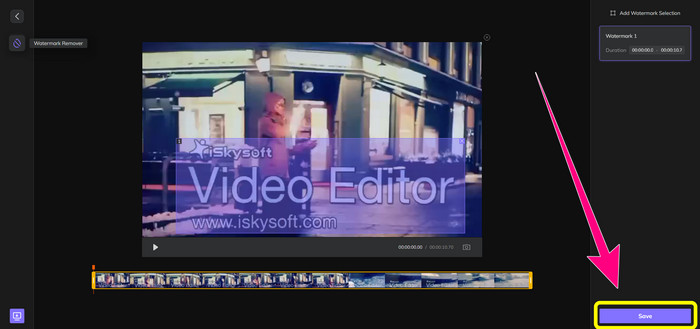
Pasul 3: Dacă ai terminat de acoperit logo-ul iSkysoft din videoclip, dă clic pe butonul Save. Așteaptă procesul de eliminare și salvează videoclipul.
Utilizarea Video Watermark Remover Online
Un alt instrument online pe care îl poți folosi este Video Watermark Remover Online. Folosind această aplicație, poți elimina logo-ul iSkysoft din videoclipurile tale. Este, de asemenea, un software ușor de utilizat, potrivit pentru utilizatorii neprofesioniști. Poți elimina și orice alt element enervant din videoclipuri fără a pierde din calitatea acestora. Totuși, dacă folosești versiunea gratuită, există o limitare în ceea ce privește eliminarea logo-urilor din videoclipuri. Poți elimina logo-uri sau filigrane doar din 5 videoclipuri. Trebuie să achiziționezi un abonament dacă vrei să adaugi mai multe videoclipuri în Video Watermark Remover Online. De asemenea, nu îți poți salva rezultatul într-un alt format. Îl poți salva doar în același format, ceea ce nu este ideal. În cele din urmă, are un proces de prelucrare lent al fișierelor. Urmează ghidul simplu de mai jos pentru a elimina logo-ul iSkysoft din videoclipurile tale.
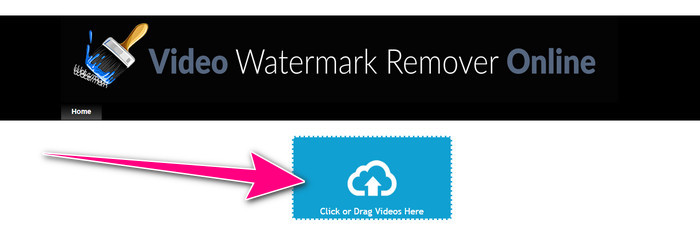
Pasul 1: Accesează site-ul Video Watermark Remover Online. Selectează butonul Click or Drag Videos Here pentru a importa fișierul video cu logo-ul iSkysoft pe care vrei să îl ștergi.
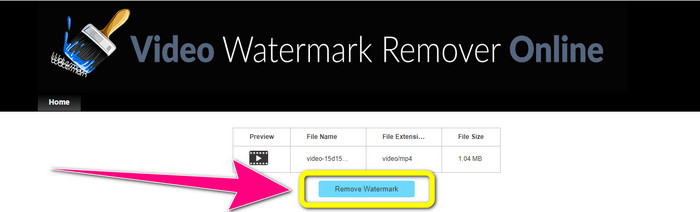
Pasul 2: Apoi, fă clic pe butonul Remove Watermark și așteaptă procesul de eliminare.
Legat de:
Cea mai rapidă metodă de a elimina logo-ul dintr-un video în Adobe Premiere Pro
Cum să elimini logo-ul dintr-un video folosind Windows Movie Maker
Partea 3: Întrebări frecvente despre eliminarea siglei iSkysoft
Puteți elimina un logo dintr-o imagine?
Da, poți folosi FVC Free Watermark Remover pentru a șterge logo-ul din imaginea ta ușor și rapid.
Este ilegală eliminarea filigranului?
În conformitate cu Legea privind drepturile de autor din SUA, secțiunea 1202, eliminarea filigranelor fără permisiunea proprietarului este ilegală.
Cum elimin logo-ul gratuit?
Puteți utiliza versiunea de încercare gratuită a Video Converter Ultimate pentru a elimina gratuit un logo din videoclip.
Concluzie
Acest articol a prezentat metode excelente de a elimina logo-ul iSkysoft din videoclipul tău folosind instrumente pentru desktop și online. Dar dacă vrei să cauți un program excelent pentru eliminarea logo-urilor pe care să îl utilizezi, atunci poți descărca Video Converter Ultimate. Această aplicație oferă un proces rapid de eliminare. Este, de asemenea, accesibilă tuturor utilizatorilor.
-
 8 remarcabile dispozitive de îndepărtare a filigranelor video online și offline
 Dacă sunteți în căutarea celui mai bun software gratuit de îndepărtare a filigranelor video pe care îl puteți utiliza pe telefoanele dvs. Windows, Mac, iPhone și Android, acest articol este pentru dvs.
-
 Cele mai bune metode despre cum să eliminați filigranul care poate fi mușcat din videoclip
 Acest articol vă va arăta cel mai fiabil și fantastic dispozitiv de îndepărtare a filigranelor. Aceste aplicații minunate vă vor ajuta să rezolvați acest tip de problemă
-
 Proceduri ușor de învățat pentru a elimina sigla din videoclip
 Căutați cel mai bun și ușor de îndepărtat logo video? Atunci, acest articol este bun pentru tine. Profitați de ocazie pentru a afla despre eliminarea unei sigle dintr-un videoclip.
