


 Video Converter Ultimate
 Screen Recorder
 Reparație video
 Descărcare sigură
Moduri complete de a elimina eficient filigranul filtrului Picsart de pe videoclipurile dvs
În zilele noastre, este esențial să ai pe desktop un software de editare media vizuală de încredere, precum Picsart. Cu ajutorul lui poți ajusta câteva opțiuni pentru a transforma o imagine obișnuită într‑o fotografie așa cum nimeni nu a mai văzut! Poți atrage mai mulți clienți sau urmăritori cu o imagine atrăgătoare pe care o creezi. Totuși, există o problemă atunci când folosești Picsart: filigranul pe care îl adaugă după export. Filigranul este destul de deranjant și poate distrage atenția de la imagine dacă nu este eliminat. Așadar, dacă îți dorești software‑ul și un tutorial despre cum să elimini filigranul Picsart, continuă să citești acest articol și află mai multe!

Partea 1. Cum să eliminați filigranul Picsart utilizând software-ul gratuit de pe desktop
FVC Video Converter Ultimate - Eliminatorul de filigran numărul unu pe Windows și Mac
Să începem prin a prezenta software‑ul nostru de top care te poate ajuta și învăța cum să elimini filigranul Picsart. FVC Video Converter Ultimate este arma indispensabilă din arsenalul tău, de care vei avea nevoie pentru a elimina cu ușurință filigranul de pe videoclipuri și a obține un rezultat profesional. Datorită performanței și funcțiilor sale incomparabile, mulți utilizatori l‑au încercat deja, iar instrumentul nu i‑a dezamăgit. Dacă ai nevoie de ajutor pentru a elimina filigranul din videoclipul tău, poți urma pașii de mai jos și să îi reproduci.
Pasul 1. Poți instala acest software profesionist pe dispozitivul tău făcând clic pe butonul de descărcare corespunzător de mai jos. După aceea, trebuie să instalezi programul pe computer și să dai clic pe Start Now pentru a‑l deschide.
Descărcare gratuită pentru Windows 7 sau o versiune ulterioară Descărcare securizată
Descărcare gratuită pentru MacOS 10.7 sau o versiune ulterioară Descărcare securizată
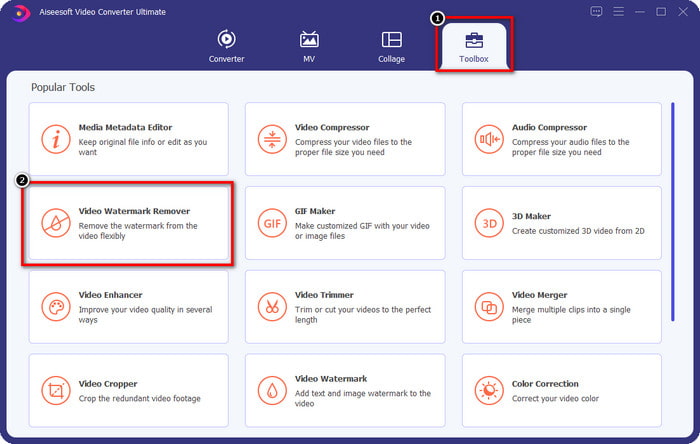
Pasul 2. În secțiunea Toolbox vei vedea alte funcții pe care le poți folosi și care te pot ajuta să adaugi o notă rafinată videoclipului tău. Dar astăzi, dă clic pe Video Watermark Remover.
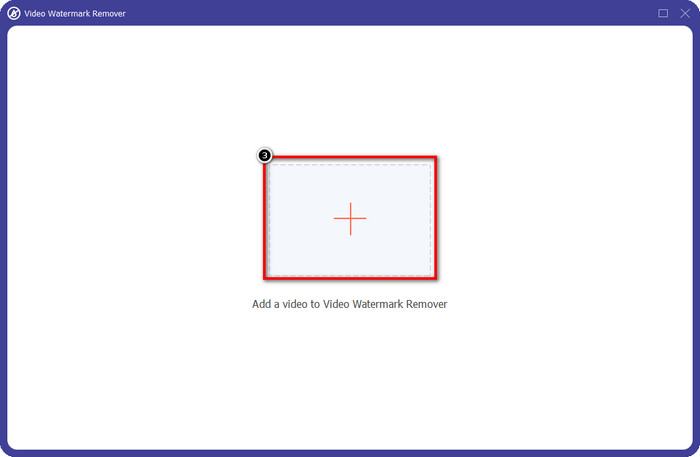
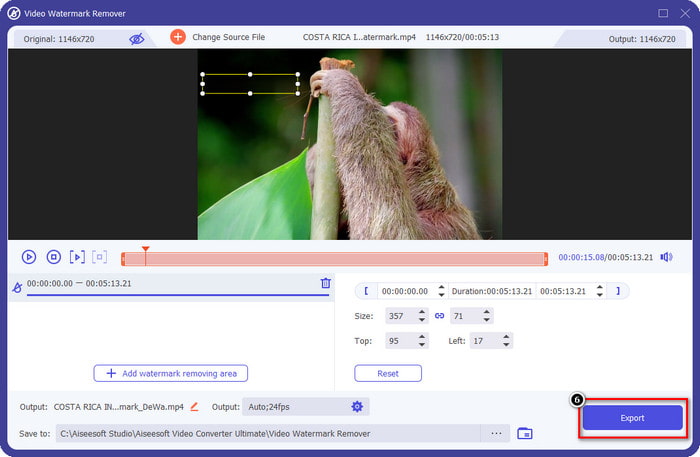
Pasul 3. Încarcă videoclipul pe care l‑ai editat în Picsart făcând clic pe pictograma +. Caută fișierul în folderul care va apărea pe ecran, apoi dă clic pe Open.
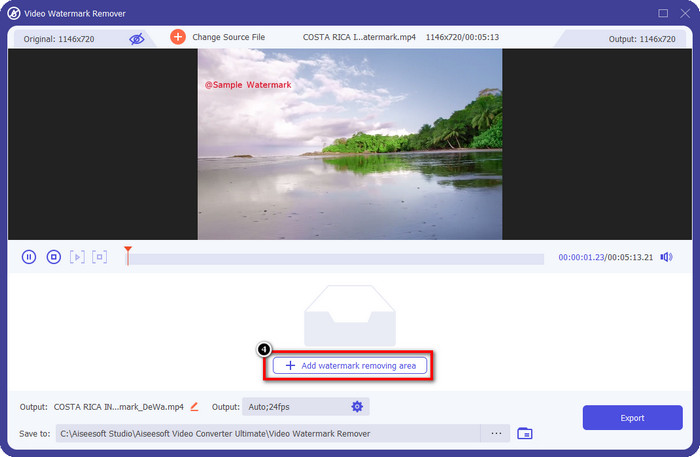
Pasul 4. Apasă pe Add Watermark Removing Area pentru a elimina filigranul încorporat în videoclipul pe care l‑ai încărcat.
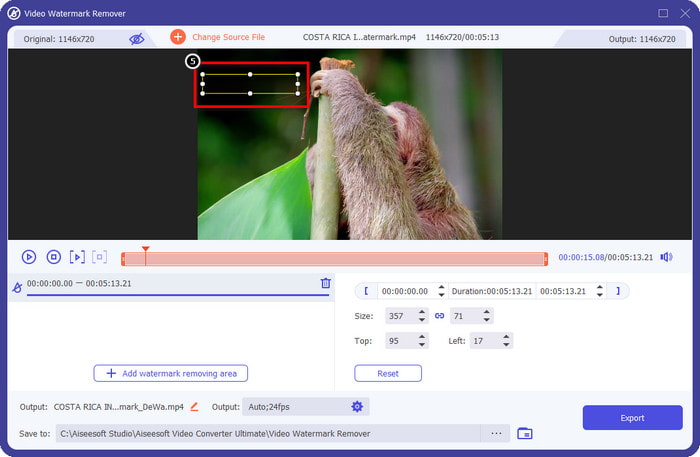
Pasul 5. Ține apăsat și poziționează caseta de selecție peste filigran, acoperindu‑l complet. Poți mări sau micșora caseta în funcție de preferințe.
Pasul 6. După ce ai terminat de acoperit filigranul cu caseta de selecție, dă clic pe Export pentru a salva rezultatul final pe unitatea ta locală.
Fotografii pe Windows - Filigran de acoperire cu design 3D
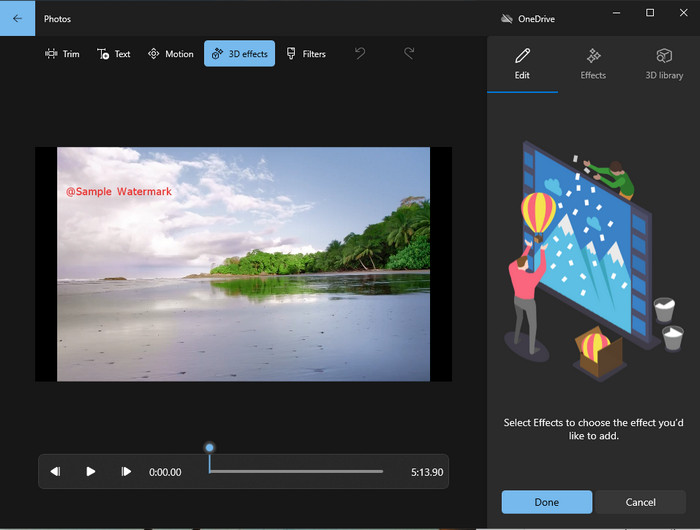
Dacă nu îți place să instalezi programe și ești utilizator de Windows, ar trebui să încerci să folosești aplicația Photos pentru a edita filigranul din videoclip. Să înveți cum să elimini filigranul Picsart cu acest instrument va fi și mai rapid, deoarece nu trebuie să treci prin faza de descărcare a unei aplicații. Acest instrument nu elimină efectiv filigranul din videoclip, dar îl poți acoperi cu ajutorul unor elemente 3D. Cu toate acestea, performanța acestui vizualizator și editor media implicit este bună. Nu ești convins? Atunci poți citi pașii de mai jos și să îi urmezi dacă dorești.
Pasul 1. Fă clic pe butonul Windows din bara de activități și caută aplicația Photos pentru a o deschide.
Pasul 2. După ce ai deschis editorul integrat, trebuie să faci clic pe semnul + pentru a încărca aici videoclipul pe care vrei să îl editezi.
Pasul 3. Mergi la 3D Effects, fă clic pe 3D Library și caută designul pe care vrei să îl folosești pentru a acoperi filigranul. Plasează designul selectat peste zona în care se află filigranul.
Pasul 4. Apasă pe Finish Video pentru a salva rezultatul final pe unitatea locală din Windows.
PickFrom Blur Video Online
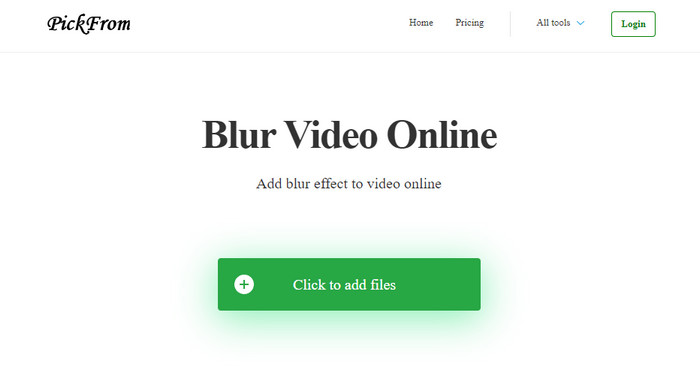
PickFrom Blur Video Online te poate ajuta să elimini filigranul PicsArt din videoclipurile pe care le ai pe web. Acest instrument nu este foarte cunoscut, dar îl prezentăm astăzi. L‑am inclus deoarece este eficient în eliminarea filigranelor din videoclipurile pe care le încarci. Interfața (GUI) este simplă și clară; nu te vei rătăci când vei folosi acest software. Așadar, dacă vrei să elimini filigranul, hai să parcurgem pașii de mai jos.
Pasul 1. Deschide browserul web, caută numele instrumentului și fă clic pe primul rezultat pentru a deschide eliminatorul de filigrane online.
Pasul 2. Fă clic pe Click to Add File pentru a putea încărca videoclipul aici.
Pasul 3. Bifează opțiunea Blur Part of the Video, apoi poziționează caseta de selecție peste filigran.
Pasul 4. Apasă pe Start pentru a descărca videoclipul fără filigran.
Partea 2. Cum să eliminați Picsart Watermark prin achiziționarea versiunii Premium
Trebuie să achiziționați software-ul dacă nu doriți să aveți probleme cu eliminarea filigranului auriu Picsart. Vă va costa o anumită sumă, deoarece va trebui să plătiți pentru aceasta înainte de a-l putea folosi și apoi exportați videoclipul fără niciun filigran încorporat. Deci, dacă doriți un tutorial pas cu pas despre achiziționarea Picsart, trebuie să urmați următorul tutorial pe care îl adăugam.
Pasul 1. Deschide site‑ul oficial Picsart și autentifică‑te în contul tău. Dacă nu ai un cont, trebuie să îți creezi unul dând clic pe Sign up aici.
Pasul 2. Pe pagina principală a site‑ului, fă clic pe Pricing și consultă prețurile pentru fiecare produs disponibil.
Pasul 3. Alege abonamentul dorit, lunar sau anual, apoi dă clic pe Go to Payment.
Pasul 4. Adaugă datele de facturare completând informațiile necesare, apoi dă clic pe Purchase Now.
Articole similare:
Elimină filigranul din pozele de absolvire
Partea 3. Întrebări frecvente despre cum să eliminați Picsart Watermark
Pot achiziționa permanent Picsart Gold?
Nu acceptă o bază de plată unică sau un plan, așa că dacă doriți să utilizați Picsart Gold, va trebui să beneficiați de planul lunar sau anual. Verificați prețul fiecărui plan accesând site-ul său oficial.
Pot crea un abonament personalizat pe Picsart?
Da, puteți crea un abonament pentru o echipă pe Picsart. Puteți seta numărul de persoane care vor folosi aplicația.
Unde pot accesa Picsart?
Puteți descărca Picsart pe Windows, Android și iOS. Din păcate, aplicația nu are o versiune pentru Mac în acest moment, dar nu fi trist pentru că poți folosi alt software de editare media disponibil pe sistemul tău.
Concluzie
Tutorialul pe care l-am predat mai devreme vă oferă o idee despre eliminarea filigranelor folosind PicsArt și a celor mai bune dispozitive de îndepărtare a filigranelor pe care le puteți utiliza. Acum vă puteți bucura de videoclipul pe care îl editați pe Picsart fără să vă deranjați cu filigranul produsului pe care îl adaugă la rezultatul final. Deci, dacă încă nu sunteți convins de instrumentele pe care le prezentăm, este obligatoriu să le încercați mai întâi, în special FVC Video Converter Ultimate. Faceți clic pe butonul de descărcare și aveți-l gratuit pe Windows și Mac, apoi bucurați-vă de caracteristicile și funcțiile pe care le oferă de care puteți profita.
-
 Cum să eliminați filigranul Pond5 folosind instrumentele ultime
 Aflați cum să eliminați filigranul Pond5 urmând pașii simpli de mai jos. Puteți elimina cu ușurință filigranul Pond5 de pe imaginea dvs. folosind aceste instrumente impresionante.
-
 2 moduri puternice de a elimina filigranul Dxtory
 Aflați cum să eliminați filigranul Dxtory urmând cele mai bune două metode. Dacă sunteți în căutarea celui mai potrivit instrument pentru a elimina filigranul Dxtory, citiți aici.
-
 Dispozitive de îndepărtare a filigranelor Arnold Maya remarcabile pe care nu trebuie să le ratați
 Mulți agenți de îndepărtare a filigranului pot elimina filigranul Arnold Maya. Dar dacă vrei să știi care sunt cele mai bune dispozitive de îndepărtare a filigranelor Arnold Maya, citește această pagină.
