


 Video Converter Ultimate
 Screen Recorder
 Reparație video
 Descărcare sigură
Cum să eliminați filigranul din videoclipurile exportate Renderforest în cele din urmă
Renderforest este un pact complet de șabloane animate excelente pentru intrări, altele, titluri, reclame sau așa ceva. Puteți începe de la zero sau puteți utiliza șabloanele disponibile aici. Chiar dacă nu ești un expert în editare video, poți totuși să reușești să o depășești folosind această platformă web. Datorită utilizării sale și avantajului optim, mulți utilizatori au ales această platformă pentru a crea un design de înaltă calitate, eficient, compatibil și de încredere dacă beneficiați de un abonament.
Astfel, poți descărca gratuit aici videoclipul pe care îl editezi dacă te înregistrezi, însă cu filigran. Filigranul creează o problemă pentru mulți dintre noi, atât pentru cei care exportă deja videoclipul aici, cât și pentru cei care nu își permit taxa de abonament a acestui instrument. Mai jos vom lista tutoriale despre eliminarea filigranului din Renderforest folosind cele mai valoroase instrumente pe care le-am adunat în timpul investigației noastre. Le putem împărtăși cu tine dacă continui să citești partea următoare a acestui articol.

Partea 1. 3 modalități eficiente de a elimina filigranul din videoclipul Renderforest
FVC Video Converter Ultimate
FVC Video Converter Ultimate este un eliminator de filigran video remarcabil, care îți poate oferi un ghid pas cu pas despre cum să elimini filigranul Renderforest. Poți conta pe acest instrument pentru a îndepărta filigranul din videoclipul tău fără complicații. Dacă ar fi să comparăm acest instrument „ultimate” cu altele, acesta are puterea de a elimina filigranul din videoclipul tău cu ajutorul tehnologiei AI. Cu toate acestea, este cel mai bun instrument pentru a elimina filigranul din videoclipul tău, indiferent de formatul pe care îl încarci. Ce face acest instrument atât de bun? Nu trebuie să fii priceput la tehnologie pentru a-l folosi; cu ghidul și pașii simpli de mai jos, poți elimina filigranul pe care Renderforest îl atașează videoclipului.
Pasul 1. Descarcă programul pe desktop făcând clic pe butonul de descărcare potrivit. Fă clic pe fișierul descărcat, instalează-l și apasă Start Now pentru a lansa imediat software‑ul.
Descărcare gratuită pentru Windows 7 sau o versiune ulterioară Descărcare securizată
Descărcare gratuită pentru MacOS 10.7 sau o versiune ulterioară Descărcare securizată
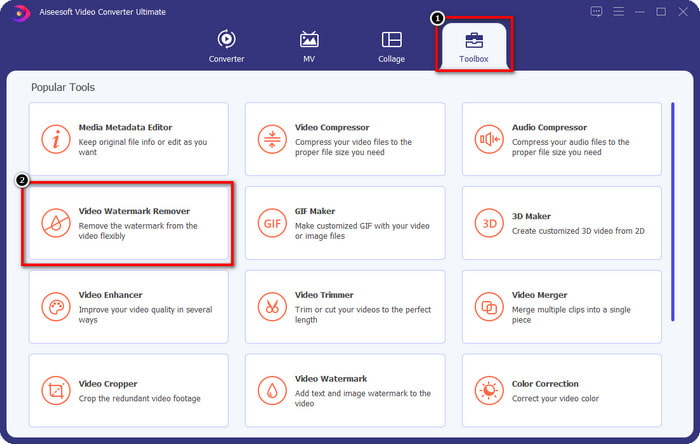
Pasul 2. După ce lansezi software‑ul, deschide Toolbox, apoi fă clic pe Video Watermark Remover din această secțiune.
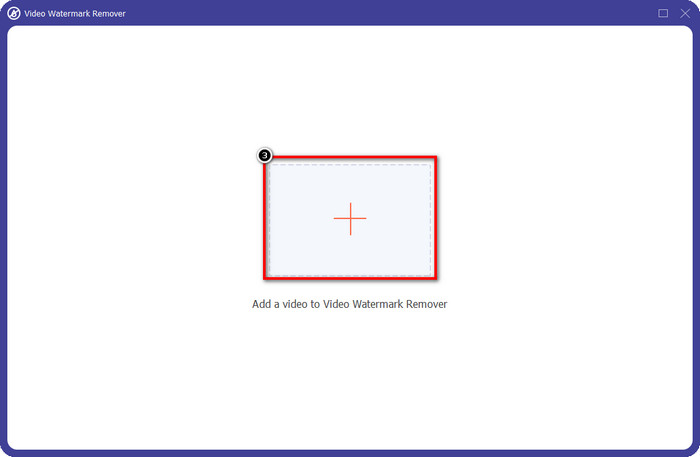
Pasul 3. Fă clic pe pictograma + de pe ecran pentru a încărca videoclipul Renderforest pe care l-ai exportat cu filigran.
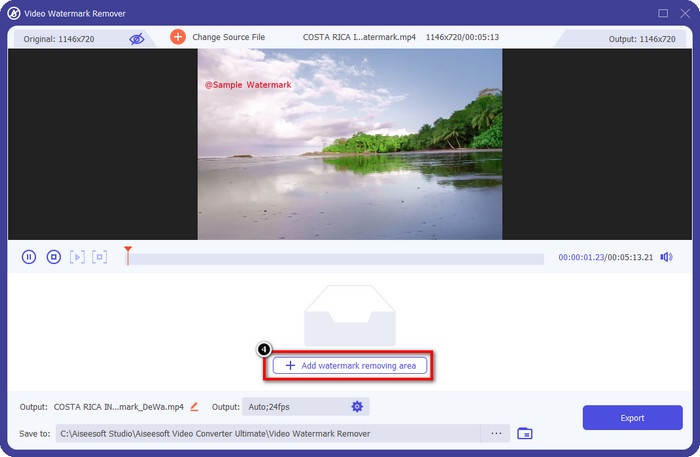
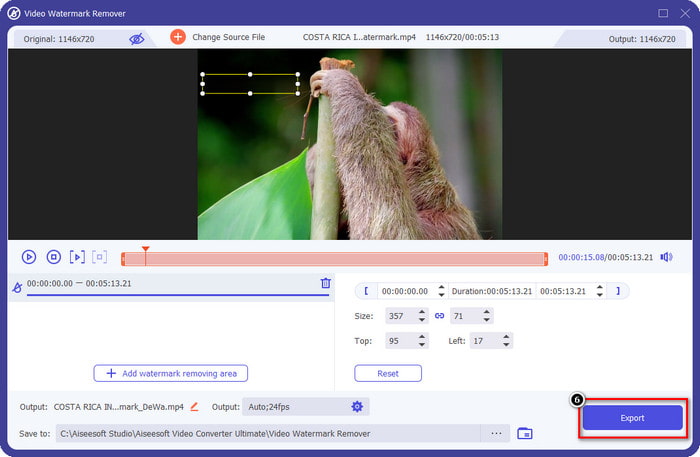
Pasul 4. Apasă Add Removing Watermark Area pentru a începe eliminarea filigranului Renderforest.
Pasul 5. Pe noua fereastră de pe ecran, trage caseta de selecție și potrivește-o cu filigranul. Poți ajusta liber caseta de selecție, dacă este nevoie.
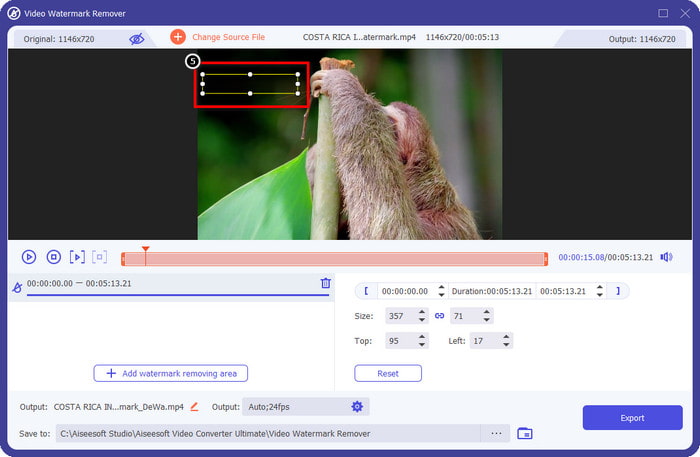
Pasul 6. Acum, după ce caseta de selecție detectează filigranul din videoclipul tău, fă clic pe Export pentru a începe eliminarea și salvarea videoclipului fără filigran. Va procesa videoclipul foarte rapid și vei putea folosi videoclipul fără filigranul deranjant.
Articole similare:
Elimină filigranul Video Helper
Eliminați logo-ul acum
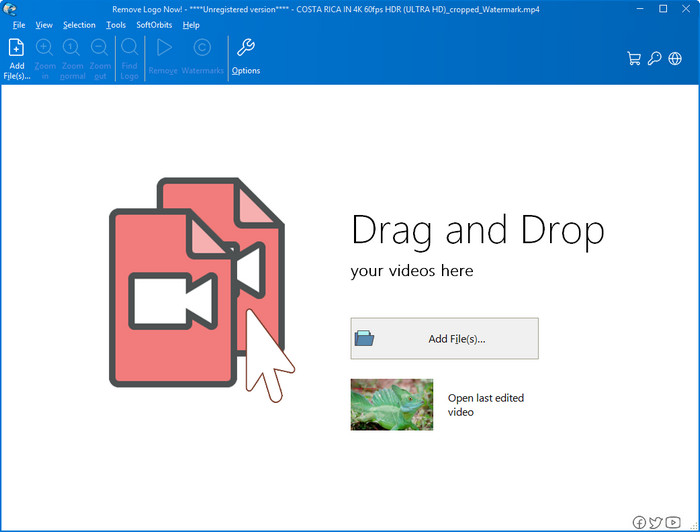
În continuare pe listă, Remove Logo Now și-a construit o reputație excelentă pentru eliminarea filigranelor suprapuse pe Windows. Cu acest instrument, nu ai nevoie de expertiză ca să știi cum să elimini filigranul Renderforest pe un PC. După eliminarea filigranului, dacă te uiți cu atenție, pot rămâne ușoare urme în zona în care a fost filigranul. Dar dacă nu te uiți în detaliu, nu vei observa filigranul sau reziduurile în videoclipul exportat. Tutorialul de mai jos te va învăța cum să elimini filigranul din videoclipul tău pe dispozitivele cu Windows.
Pasul 1. Descarcă și instalează Remove Logo Now pe desktop, apoi urmează pașii de instalare.
Pasul 2. Lansează software‑ul, apoi fă clic pe Add Files pentru a încărca videoclipul aici. Poți de asemenea să tragi și să plasezi videoclipul aici pentru o încărcare mai eficientă a fișierelor.
Pasul 3. Alege instrumentul pe care vrei să îl folosești pentru a marca filigranul. După ce ai selectat unul, evidențiază filigranul și fă clic pe Remove.
Pasul 4. Fă clic pe Start pentru a începe procesul de eliminare a filigranului oferit de acest instrument.
Video Watermark Remover Online

Nu îți place să descarci software pe desktop, dar vrei totuși să știi cum să elimini filigranul Renderforest? Atunci încearcă să folosești Video Watermark Remover Online. Poți folosi acest eliminator de filigrane complet automatizat pentru a elimina gratuit filigranul din videoclipul tău, fără a-l descărca pe desktop. La fel ca instrumentele menționate aici, chiar dacă ești începător în editarea video sau în eliminarea filigranelor, poți stăpâni utilizarea acestui instrument în câteva minute. Urmează tutorialul de mai jos pentru a afla cum să îl folosești.
Pasul 1. Deschide eliminatorul de filigran online căutându-l în browserul tău web preferat.
Pasul 2. Fă clic pe pictograma upload cloud de pe site-ul principal pentru a insera videoclipul pe care l-ai exportat din Renderforest.
Pasul 3. Așteaptă finalizarea încărcării, deoarece filigranul este eliminat automat din videoclipul tău, apoi fă clic pe Download pentru a obține videoclipul fără filigran.
Partea 2. Întrebări frecvente despre cum să eliminați filigranul Renderforst
Cât este taxa de abonament pentru Renderforest?
Renderforest acceptă trei tipuri diferite de prețuri de care puteți beneficia; $ 14,99 pentru Lite, $24,99 pentru Pro și $29,99 pentru Business în fiecare lună. Acest preț are un scop diferit unul de celălalt; puteți accesa site-ul său principal pentru a vedea care sunt înrolați disponibile pe abonamentul de care doriți să beneficiați.
Este posibil să eliminați filigranul din Renderforest Video fără un instrument?
Da, puteți elimina filigranul din Renderforest fără a utiliza un instrument, și în acest fel este achiziționând o taxă lunară sau anuală pentru software. Astfel încât, atunci când exportați fișierul video, nu va fi adăugat niciun filigran.
Care este cel mai bun plan pentru Renderforest; Lunar sau Anual?
Abonamentul lunar este o alegere bună dacă doriți să utilizați instrumentul de câteva ori, dar dacă decideți să utilizați software-ul pentru o perioadă lungă de timp, este mai bine să beneficiați de un plan anual, deoarece vă va costa mai puțin decât reînnoirea in fiecare luna. Dar înainte de a profita, puteți utiliza Renderforest gratuit, conectându-vă contul aici, apoi încercați să utilizați gratuit celelalte șabloane pe care le oferă.
Concluzie
Într-adevăr, acest articol oferă dovezi solide pentru eliminarea gratuită a filigranului Renderforest, folosind cele mai utile trei dispozitive de îndepărtare a filigranului pe care le puteți folosi. Dacă sunteți un utilizator Windows și doriți să eliminați filigranul de pe desktop, trebuie să încercați să utilizați Eliminați logo-ul acum. Dar dacă nu vă place să descărcați software, trebuie să încercați să utilizați Video Watermark Remover Online, deoarece puteți utiliza acest instrument pentru a elimina eficient filigranele.
Dar dacă sunteți un utilizator Windows sau Mac și doriți un dispozitiv eficient de îndepărtare a filigranelor, atunci, fără îndoială, cel mai bun dispozitiv de îndepărtare a filigranelor pe care îl puteți utiliza este FVC Video Converter Ultimate. Este cel mai bun dispozitiv de îndepărtare a filigranului pe care îl puteți folosi pentru a elimina filigranul care vă deranjează videoclipul Renderforest în mod eficient și profesional.
-
 2 moduri de a elimina rapid filigranul VSDC pe Windows și Mac
 Căutați o modalitate de a elimina filigranul VSDC de pe videoclipurile dvs.? Cu acest articol, oferim instrumente pe care le puteți folosi pentru a scăpa de filigran.
-
 Eliminați filigranul Animoto de pe videoclipuri ușor și eficient
 Cum să eliminați filigranul Animoto de pe videoclip? Continuați să citiți acest articol, deoarece am oferit un tutorial complet despre cum să faceți acest lucru.
-
 Cum să eliminați filigranul din videoclip utilizând Final Cut Pro [Ghid complet]
 Ai o problemă cu filigranul de pe videoclipuri? Nu am spus mai mult, pentru că am oferit un tutorial despre cum să eliminați filigranul din videoclip folosind Final Cut Pro.
