


 Video Converter Ultimate
 Screen Recorder
 Reparație video
 Descărcare sigură
Cele mai bune metode despre cum să eliminați sigla VideoScribe dintr-un videoclip
Îți dorești să înveți cum să elimini sigla VideoScribe din videoclipurile tale? Există situații în care dai peste o siglă în videoclipurile tale. Nu o poți evita, mai ales când deținătorul videoclipului vrea să își protejeze materialul și să își promoveze brandul. De asemenea, poți întâlni o siglă atunci când folosești versiunea gratuită a unei anumite aplicații. Cel mai bun exemplu este aplicația VideoScribe. Dacă folosești versiunea gratuită a acestei aplicații, videoclipul tău va avea sigla VideoScribe, cu excepția cazului în care cumperi varianta completă. Totuși, înainte de asta, poți folosi și alte aplicații gratuite pentru a elimina sigla din videoclipuri. Trebuie să citești acest articol pentru a afla cum poți elimina o siglă fără să cumperi nimic.

Partea 1: Cum să eliminați sigla VideScribe din Video Offline
Dacă vrei să elimini sigla VideoScribe din videoclipurile tale offline, poți folosi Video Converter Ultimate. Această aplicație te poate ajuta să elimini sigla VideoScribe din videoclipurile tale ușor și rapid. Poți, de asemenea, să folosești acest software pentru a edita videoclipuri fără pierderi de calitate. În plus, are o interfață grafică simplă, care oferă un rezultat de înaltă calitate. Video Converter Ultimate este disponibil atât pe Mac, cât și pe Windows. Deși are multe funcții, este totuși potrivit pentru începători. Această aplicație poate suporta numeroase formate de fișiere, precum FLV, MOV, MP4, MTS, DivX, XviD și multe altele. În plus, aplicația are multe instrumente de editare pe care le poți folosi pentru a-ți îmbunătăți videoclipurile, cum ar fi îmbunătățirea, tăierea, decuparea, corectarea culorilor, rotirea videoclipurilor și multe altele. Video Converter Ultimate îți poate oferi, de asemenea, două moduri de a elimina sigla VideoScribe din videoclipurile tale.
Folosind Video Watermark Remover
Pasul 1: Apasă butonul de descărcare de mai jos pentru a descărca Video Converter Ultimate pe Windows sau Mac. După aceea, instalează software-ul pe dispozitiv și pornește aplicația.
Descărcare gratuită pentru Windows 7 sau o versiune ulterioară Descărcare securizată
Descărcare gratuită pentru MacOS 10.7 sau o versiune ulterioară Descărcare securizată
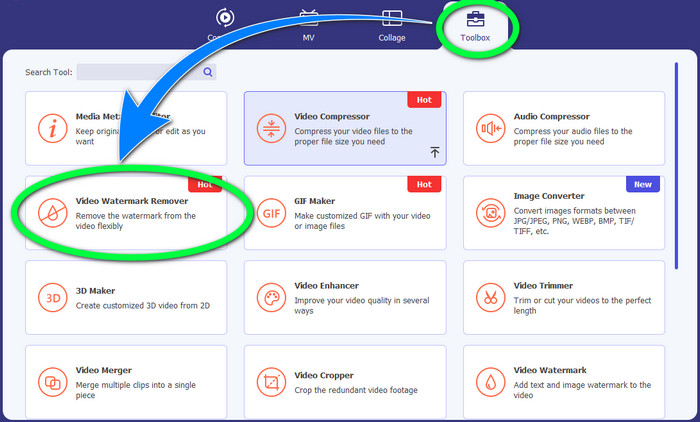
Pasul 2: După aceea, mergi la panoul Toolbox și apasă butonul Video Watermark Remover. O nouă interfață va apărea pe ecran.
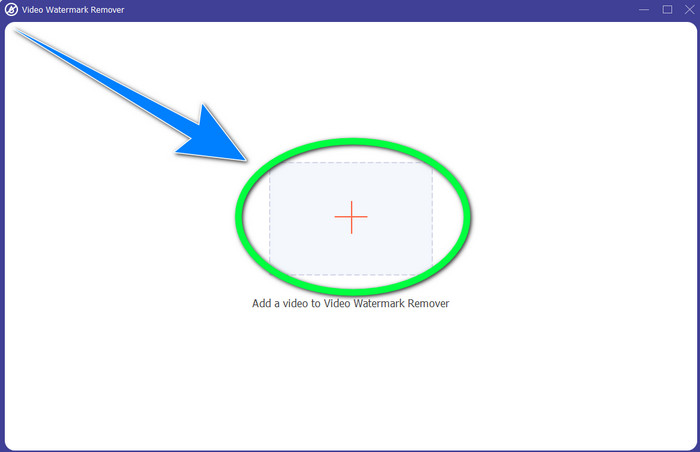
Pasul 3: Fă clic pe butonul + pentru a importa fișierul video cu sigla VideoScribe pe care vrei să o elimini.
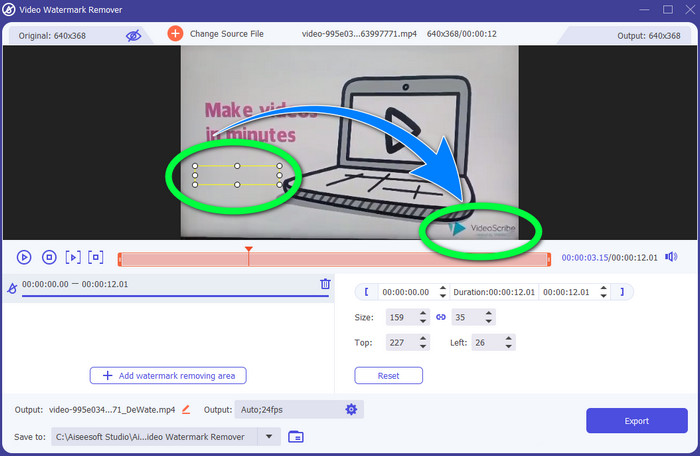
Pasul 4: După ce ai terminat de importat videoclipul, apasă pe Add Watermark Removing Area și poziționează cutia mică de selecție peste siglă. Poți ajusta dimensiunea casetei.
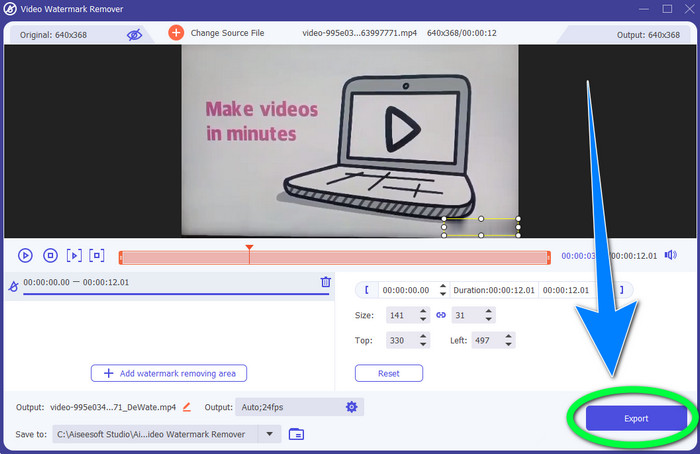
Pasul 5: La ultimul pas, poți apăsa butonul Export pentru a salva videoclipul fără siglă.
Utilizarea funcției Video Cropper
Pasul 1: Instrumentul de decupare este o altă modalitate de a elimina sigla VideoScribe. Din Toolbox, apasă butonul Video Cropper.
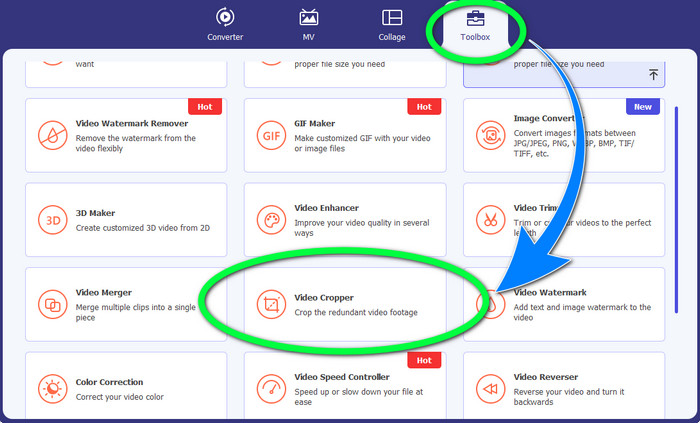
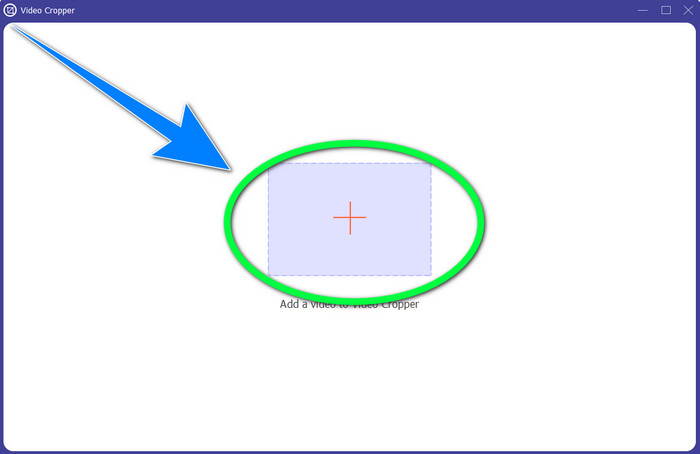
Pasul 2: O nouă interfață va apărea pe ecran. Selectează butonul cu semnul + și inserează videoclipul cu sigla VideoScribe.
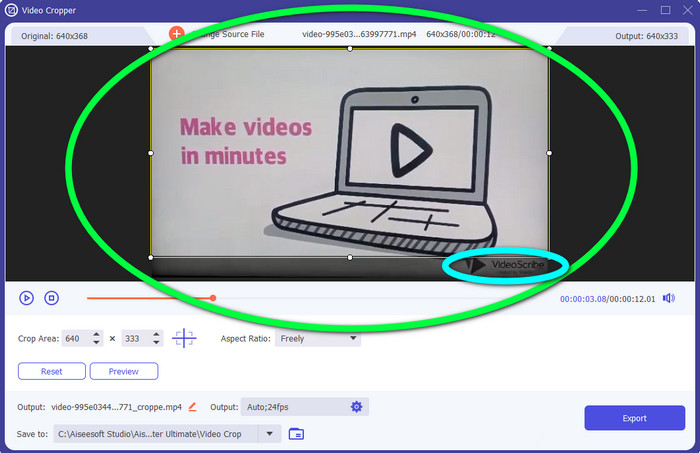
Pasul 3: Instrumentul de decupare îți permite să decupezi marginile videoclipului. Dacă sigla se află pe marginea videoclipului, poți tăia acea zonă pentru a o elimina.
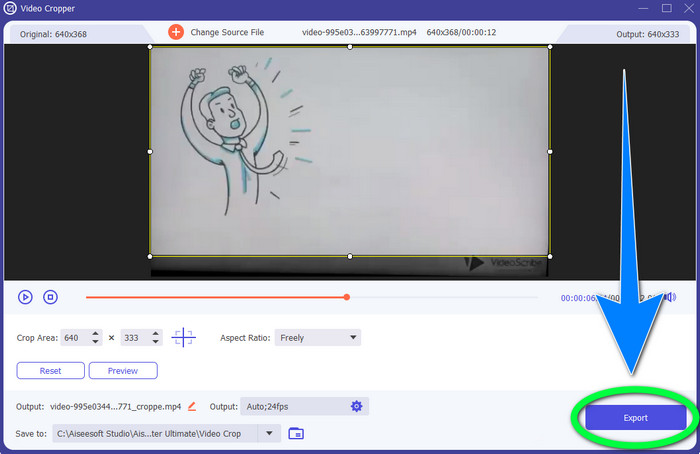
Pasul 4: Apoi, dacă consideri că ai eliminat deja sigla VideoScribe, poți selecta butonul Export și să îți salvezi videoclipul final pe dispozitiv.
Partea 2: Cum să eliminați sigla VideoScribe din Video Online
Folosind BeeCut-Online Watermark Remover
Vrei să elimini sigla VideoScribe din videoclipurile tale online? BeeCut-Online Watermark Remover este unul dintre instrumentele online excelente și utile pe care le poți folosi. Acest instrument online te poate ajuta să elimini obiectele deranjante din videoclipuri, precum sigle, watermark-uri, texte, ștampile de dată și altele. Astfel, poți elimina sigla VideoScribe din videoclipurile tale fără efort, datorită interfeței sale simple. De asemenea, BeeCut-Online Watermark Remover suportă numeroase formate de fișiere, cum ar fi FLV, MOV, MP4, WebM, ASF, AVI, 3GP, MPG și altele. Mai mult, poți elimina și elementele supărătoare din imagini cu ajutorul acestui instrument. Din păcate, această aplicație depinde de conexiunea la internet, ceea ce înseamnă că nu o poți folosi dacă nu ai acces la internet sau conexiune activă. În ceea ce privește procesul de eliminare, uneori acesta este de durată, în funcție de viteza conexiunii tale la internet, fie ea rapidă sau lentă. Ți-am pus la dispoziție pașii de mai jos, în ordine.
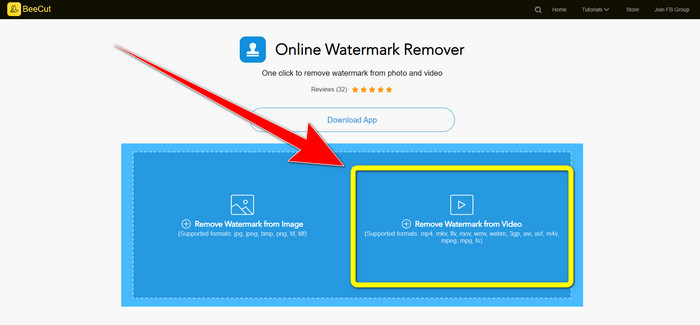
Pasul 1: Accesează site-ul BeeCut-Online Watermark Remover. Fă clic pe butonul Remove Watermark from Video și atașează videoclipul tău cu sigla VideoScribe.
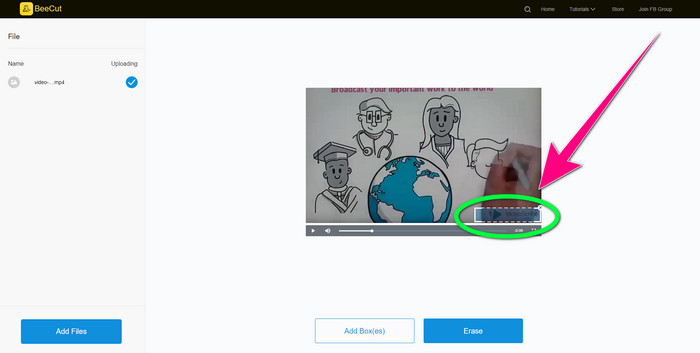
Pasul 2: După ce ai adăugat videoclipul, folosește căsuța mică pe care o vezi pe videoclip și trage-o pentru a acoperi sigla.
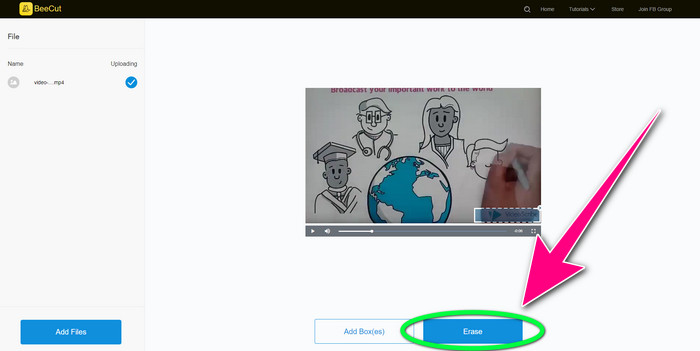
Pasul 3: Când ai terminat de acoperit sigla folosind căsuța mică, selectează butonul Erase pentru a salva și descărca videoclipul fără sigla VideoScribe.
Utilizarea Video Watermark Remover Online
Video Watermark Remover Online este un alt instrument online pe care îl poți folosi pentru a elimina sigla VideoScribe din videoclipurile tale. Are o interfață simplă și este potrivit pentru începători. În plus, poți elimina sigle din videoclipurile tale fără pierdere de calitate, ceea ce este excelent. Totuși, acest instrument online are funcții limitate în versiunea gratuită. Poți elimina sigle doar din 5 videoclipuri și nu le poți exporta în alte formate de fișiere. Și, deoarece este o aplicație online, nu o poți folosi fără conexiune la internet. De asemenea, uneori, instrumentul nu funcționează corespunzător. Dacă vrei să înveți cum să elimini sigle din videoclipurile tale, urmează pașii simpli de mai jos.
Pasul 1: Accesează site-ul Video Watermark Remover Online. Fă clic pe butonul Click or Drag Videos Here pentru a insera videoclipul cu siglă VideoScribe.

Pasul 2: Apasă butonul Remove Watermark și așteaptă procesul de eliminare. Apoi poți salva videoclipul.
Partea 3: Întrebări frecvente despre eliminarea siglei VideoScribe din videoclip
Pot avea încredere în instrumentele online pentru a elimina siglele din videoclipurile mele?
Da, poti. Instrumentele online sunt sigure și vă pot securiza fișierul video. Unele instrumente vă pot șterge automat fișierele după proces, așa că nu trebuie să vă faceți griji. Cu toate acestea, nu toate instrumentele online sunt la fel, așa că trebuie totuși să căutați recenzii pentru a ști dacă puteți avea încredere într-un anumit instrument.
Cum scapi de siglele dintr-un videoclip?
Dacă doriți să scăpați de logo, descărcați Video Converter Ultimate pe computer sau Mac. Puteți utiliza dispozitivul de îndepărtare a filigranului video sau instrumentul de tăiere video. Aceste două moduri vă pot ajuta să scăpați de sigla din videoclipul dvs.
Pot elimina sigla VideoScribe fără abonament?
Da, desigur! Puteți elimina sigla VideoScribe folosind Video Converter Ultimate. Nu trebuie să achiziționați această aplicație pentru a elimina sigla deoarece este gratuită.
Concluzie
Acest articol ți-a oferit informații despre eliminarea siglei VideoScribe dintr-un videoclip folosind un program descărcabil și instrumente online. Totuși, dacă vrei să elimini o siglă din videoclipurile tale rapid și fără efort, poți folosi Video Converter Ultimate.
-
 3 dintre cele mai recente dispozitive de îndepărtare a filigranelor Shutterstock de care veți avea vreodată nevoie
 Nu-i place filigranul Shutterstock atașat videoclipului exportat? Puteți folosi un dispozitiv de îndepărtare a filigranului Shutterstock pentru a-l șterge eficient.
-
 Cum să eliminați filigranul Powtoon folosind 4 metode eficiente
 Citiți acest articol pentru a afla cum să eliminați filigranul Powtoon folosind cele mai bune instrumente pe care le-am inclus aici și un tutorial.
-
 Apowersoft Watermark Remover Review - Caracteristici, argumente pro și contra și prețuri
 Apowersoft Watermark Remover este una dintre cele mai bune eliminări de filigrane care acceptă online și offline, faceți clic pe aceasta pentru a afla mai multe!
