


 Video Converter Ultimate
 Screen Recorder
 Reparație video
Top 6 software de inversare pe care le puteți folosi pentru a inversa videoclipurile pe Windows și Mac
Inversarea unui videoclip poate crea un mesaj nou care poate face publicul să se gândească sau să uimească. Acest efect video a fost folosit pentru a face un videoclip interesant și pentru a transmite un mesaj într-un mod diferit. O mulțime de videoclipuri muzicale precum Breezeblock de la Aljt au fost încărcate în video invers pe YouTube. Deci, pentru a afla mai multe despre cum să inversați videoclipurile, urmați acest ghid. Pentru că vă ajută să faceți inversarea video mai ușor ca niciodată.

Partea 1. Software-ul offline de top 1 și 2 și aflați cum să inversați un videoclip pe Windows și Mac
Top 1. Video Converter Ultimate
Au apărut multe programe de editare video care vor să domine piața, dar convertorul fenomenal rămâne în continuare cea mai bună alegere. Video Converter Ultimate a fost deja folosit și a ajutat milioane de utilizatori în legătură cu probleme precum cum să inversezi un videoclip. Acest instrument îți permite să editezi singur, dar cu un rezultat de nivel profesional. Chiar dacă nu ai experiență în editare, acest instrument este cea mai bună opțiune pentru tine – și este excelent chiar și dacă ai deja experiență. De asemenea, multe programe de editare nu oferă aceleași funcții avansate pe care acest software ți le pune la dispoziție. Așadar, dacă vrei să afli mai multe despre acest software, hai să trecem la pașii de mai jos și să îi urmăm corect.
Pasul 1. Descarcă mai întâi software‑ul pe hard disk, apoi instalează‑l și urmează procesul de configurare.
Descărcare gratuită pentru Windows 7 sau o versiune ulterioară Descărcare securizată
Descărcare gratuită pentru MacOS 10.7 sau o versiune ulterioară Descărcare securizată
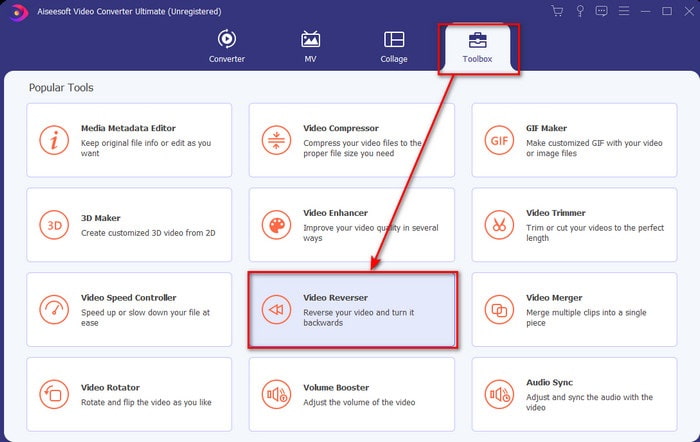
Pasul 2. Apoi pornește instrumentul și, în Toolbox, găsește Video Reverser.
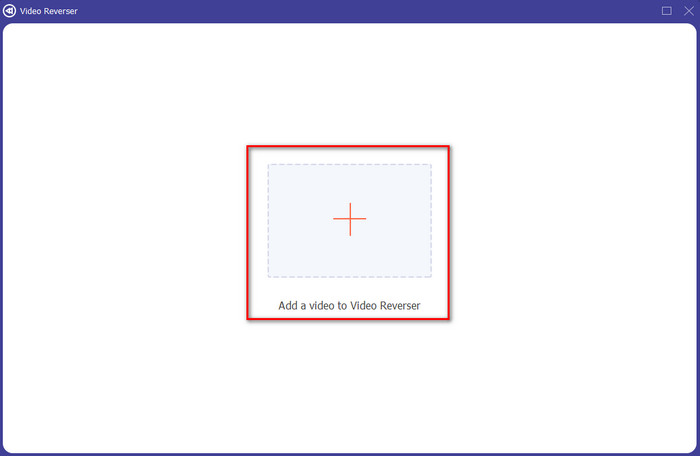
Pasul 3. Fă clic pe + și alege videoclipul pe care vrei să îl inversezi din folder. Apoi fă clic pe Open pentru a trece la pasul următor.
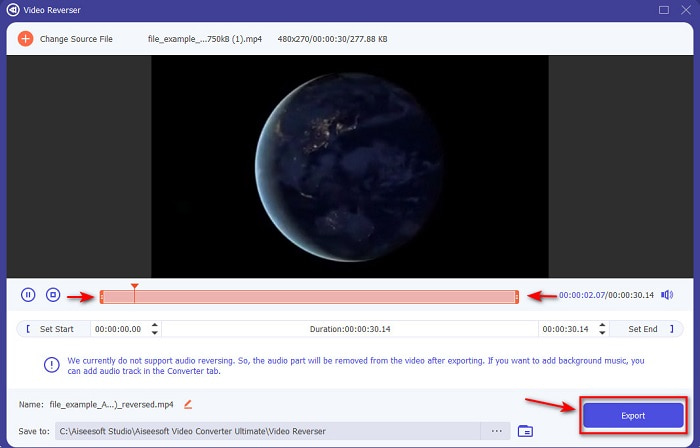
Pasul 4. Ajustează lungimea videoclipului mutând playback in and out. Pentru a descărca videoclipul inversat, fă clic pe Export.
Pasul 5. Așteaptă câteva secunde până se încheie exportul; după ce s‑a terminat, poți revedea videoclipul făcând clic pe fișierul inversat din folder. Bucură‑te de redarea inversă fără întârzieri oferită de Ultimate Converter Ultimate.
Pro
- Ieșirea finală profesională poate fi executată cu ușurință dacă utilizați acest instrument.
- Are o mulțime de caracteristici uimitoare pentru a vă face videoclipul fenomenal.
- În acest instrument se poate face inversare nelimitată.
Contra
- Trebuie să fie descărcat mai întâi înainte de a-l putea folosi.
- Nu este gratuit, dar merită dacă cumpărați acest instrument profesionist fenomenal.
Articole similare:
Cum să unești mai multe videoclipuri
Cum să adaugi audio la un videoclip
Top 2. Easy Video Maker
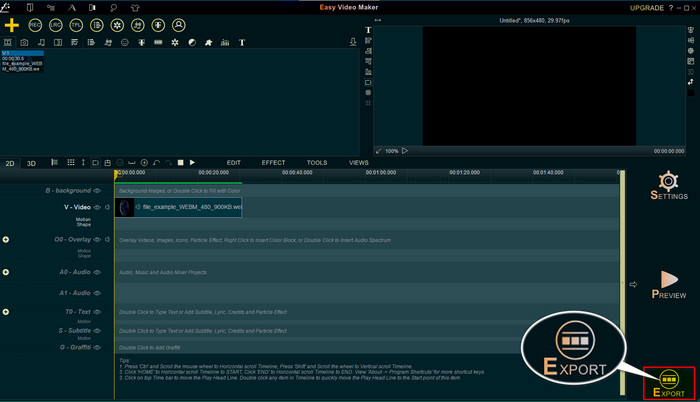
Easy Video Maker este un instrument util pe care îl poți folosi și care oferă funcții de editare video la nivel mediu, de care ai nevoie. De asemenea, îl poți folosi pentru a îmbunătăți aspectul vizual al videoclipului, deoarece suportă tranziții, efecte, îmbinare și multe altele. Totuși, interfața instrumentului pare desprinsă din anii ’90, deoarece arată foarte învechită. În plus, instrumentul este greu de folosit pentru creare și editare video, dar performanța sa este bună. Formatul pe care îl suportă pentru fișierul final este MP4. Așadar, dacă vrei să folosești acest instrument, urmează pașii de mai jos.
Pasul 1. Descarcă de pe web versiunea oficială Easy Video Maker.
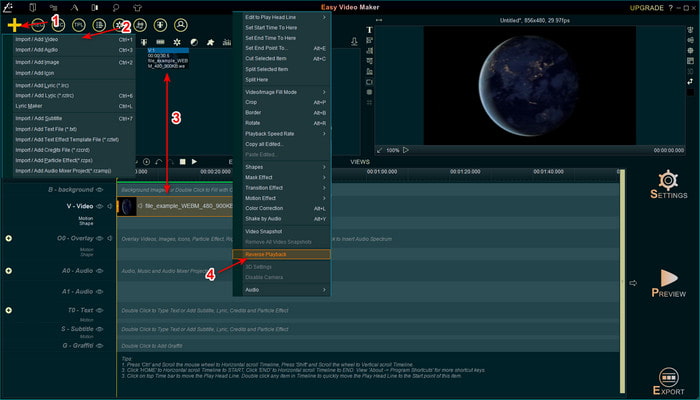
Pasul 2. Apoi pornește programul, fă clic pe butonul Add și pe Import/ Add Video. Trage fișierul în Timeline și fă clic dreapta pe videoclip. Fă clic pe Reverse Playback pentru a inversa videoclipul.
Pasul 3. Apasă Export pentru a salva fișierul pe unitatea ta de stocare.
Pro
- Instrumentul poate fi descărcat gratuit.
- Acceptă editarea la nivel mediu de care veți avea nevoie.
- Învățarea cum să folosești acest lucru va dura ceva timp, dar te vei obișnui cu el.
Contra
- Lansarea instrumentului se încarcă mult mai mult decât era de așteptat, iar interfața acestuia pare prea veche. Nu retro, ci literalmente vechi.
- Nu puteți exporta mai mult de 5 minute de videoclip în versiunea sa gratuită.
Partea 2. Top 3 & 4 Instrument online pentru a inversa un videoclip
Top 3. Ezgif
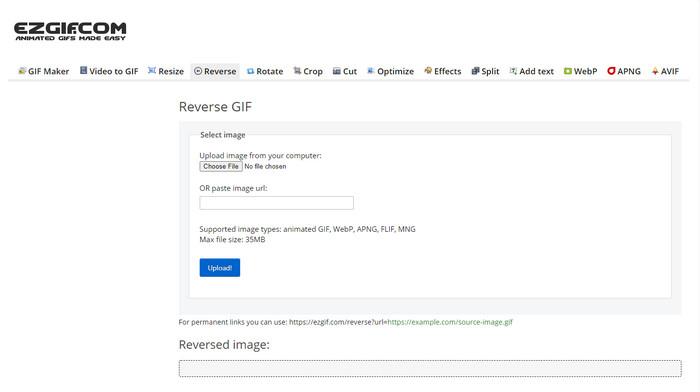
Ezgif are o funcție pe care o poți folosi pentru a inversa clipuri online, gratuit. De asemenea, are și alte funcții de editare, cum ar fi realizarea de GIF‑uri, redimensionare, decupare, optimizare și altele. Totuși, dacă încerci să încarci în acest instrument online un fișier mai mare de 35 MB, te poți aștepta ca acesta să nu îți permită să îl inversezi, deoarece este prea mare. Așadar, dacă intenționezi să inversezi un videoclip lung, acest instrument nu este cea mai bună alegere, pentru că are limitări. Însă performanța funcției de inversare este foarte bună pentru a inversa clipuri gratuit.
Pro
- Nu este nevoie să-l descărcați pe desktop.
- Flexibil și eficient.
- Ușor de utilizat.
Contra
- Îți limitează inversarea la doar 35 MB, ceea ce este foarte mic pentru a fi folosit.
- Descărcarea fișierului invers în unitate durează mult mai mult decât se aștepta.
Top 4. Clideo
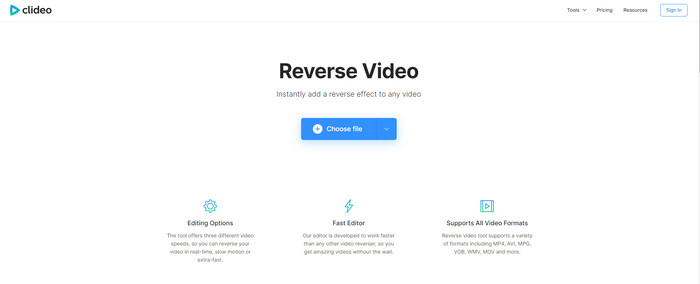
Un alt instrument online pe care îl poți folosi pentru a derula un videoclip înapoi este Clideo. Aspectul vizual al instrumentului este foarte minimalist, dar reușit. Per ansamblu, arată mai îngrijit decât Ezgif și pare mai profesionist. Dar, cum se spune, să nu te lași păcălit de aparențe: încărcarea fișierului aici este extrem de lentă, mai ales dacă fișierul are peste 40 MB. Din acest motiv, asigură‑te că ai mult timp liber și răbdare doar pentru a aștepta încărcarea fișierului. Totuși, oferă o mulțime de funcții de editare pe care le poți folosi pentru a‑ți îmbunătăți videoclipul gratuit.
Pro
- Gratuit pentru a fi folosit de oricine are o conexiune la internet.
- Interfața cu utilizatorul web este în general excelentă.
- Sunt disponibile funcții de editare uimitoare.
Contra
- Încărcarea și descărcarea videoclipului pentru a inversa va dura mult timp decât era de așteptat.
- Un filigran uriaș este inclus după ce exportați videoclipul invers.
Partea 3. Top 5 și 6 aplicații pentru a inversa un videoclip pe iPhone/Android
Top 5. Reverse Video: Redați înapoi 4+
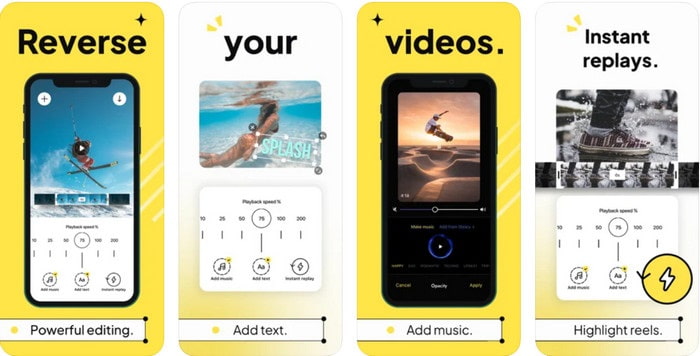
Reverse Video: Play Backwards 4+ este disponibilă doar pentru utilizatorii de iOS și este folosită pentru editarea videoclipurilor redate invers. Interfața acestei aplicații este ușor de înțeles și poți adăuga și text și muzică de fundal. Deși poți descărca aplicația gratuit, multe recenzii spun că acest instrument este o înșelătorie pe bani. De asemenea, utilizatorii au menționat că sunt forțați să lase un review de 5 stele pentru a putea accesa funcțiile aplicației. Totuși, dacă vrei să o încerci singur, nu te aștepta la ceva grozav, pentru că această aplicație nu este cea mai bună alegere pentru inversare.
Pro
- Obține deja 4,5 stele la rating.
- Înapoi video aici este bine să fie folosit.
Contra
- Majoritatea recenziilor de aici nu vorbesc despre aplicație. Și majoritatea sunt repetitive care vorbesc despre prostii.
- Este nevoie de o veșnicie pentru a încărca un singur fișier.
- Calitatea video exportată gratuit este proastă.
Top 6. Reverse Movie FX - video magic
Inversarea filmelor se poate face cu ajutorul acestei aplicații Android pe care o poți descărca din Play Store, Reverse Movie FX - magic video. Este deja folosită de mulți utilizatori care adoră să creeze filme inversate și oferă și suport pentru buclă și muzică de fundal. Deși instrumentul pare fără cusur, calitatea video a fișierului de ieșire scade. Practic, dacă inversezi un videoclip 1080, te poți aștepta la 720 sau mai puțin. De asemenea, conține reclame, așa că ai grijă, pentru că unele apar pe neașteptate. În plus, procesul de inversare aici este ușor și mai bun decât în Reverse Video: Play Backwards 4+.
Pro
- Este grozav să creezi un clip invers, un film sau un videoclip pe telefonul tău.
- Interfață cu utilizatorul ușor de înțeles.
- 4,5 stele în recenziile aplicației.
Contra
- Aplicația are o mulțime de reclame care apar de nicăieri.
- Erori minore și majore sunt încă în aplicație. De exemplu, dacă încercați să inversați un videoclip, uneori, apare eroare.
Partea 4. Întrebări frecvente despre Reverse Video
Care este diferența dintre invers și invers?
Inversați concentrarea asupra transformării ceva într-o altă parte sau altă poziție; poate fi cu susul în jos sau pe dos. De exemplu, dacă inversați numărul 12, rezultatul va fi 21. În timp ce inversarea este dintr-o direcție care merge înapoi la direcția inițială. De exemplu, dacă ceasul este pe invers, va număra până la 12, 11, 10, 9, 8, 7, 6 și așa mai departe.
Efectul video de derulare înapoi poate fi folosit ca tranziții?
Da, în loc să folosiți o tranziție animată bună, veche, de ce nu încercați să explorați arta de a derula videoclipurile înapoi. Doar adăugarea inversă poate fi foarte eficientă, mai ales dacă nu aveți atât de experimentat în editarea videoclipurilor. Și doar folosind asta ca tranziție, poți face un videoclip grozav care poate face uimiți alți oameni, chiar și pe tine. Apoi adăugați muzică în fundal ca o notă finală pentru a o face mai fabuloasă.
Pot să vizionez un videoclip invers pe VLC?
Da, puteți viziona deja clipuri inverse, film sau orice tip de videoclip pe VLC. Dar dacă nu este prefabricat sau ar trebui să spunem că nu este deja invers când îl jucați acolo. Atunci este trist să spunem că nu acceptă redarea videoclipurilor în sens invers. Deci, înainte de a-l juca pe VLC, apoi inversați-l cu ajutorul instrumentului din listă.
Concluzie
Ca rezultat al răbdării tale de a citi și a urma cu atenție pașii din acest articol despre cum să inversezi un videoclip, acum ai cunoștințele și abilitățile necesare pentru a realiza singur efectul de inversare. Acum trebuie să alegi cel mai bun software de inversare pentru a obține cel mai bun efect și a face videoclipul tău să iasă în evidență. Și, înainte de toate, cel mai bun program de inversare din această listă este nimeni altul decât fenomenalul Video Converter Ultimate. Așadar, acesta este momentul potrivit să îl descarci, să îl încerci și să creeți efectul de redare inversă chiar aici.
Descărcare gratuită pentru Windows 7 sau o versiune ulterioară Descărcare securizată
Descărcare gratuită pentru MacOS 10.7 sau o versiune ulterioară Descărcare securizată
-
 Cum să vă alăturați videoclipurilor VOB de pe DVD-uri pe Windows și Mac
 Cum să vă alăturați videoclipurilor VOB de pe DVD pe Windows și Mac? Iată 2 metode eficiente pentru a combina fișierele VOB extrase și a le îmbina direct de pe un DVD.
-
 6 cele mai bune fuziuni AVI: Cum să vă alăturați fișierelor video AVI pe Windows și Mac
 Când doriți să vă alăturați videoclipurilor AVI pentru un DVD, puteți afla despre caracteristicile celor mai buni 6 cei mai buni unitori AVI, inclusiv instrumente online gratuite, precum și programele desktop din articol.
-
 [Ghid] 2 metode de ultimă oră pentru a vă alătura videoclipurilor MXF de la Sony X70
 Dacă ați luat câteva videoclipuri MXF de la Sony X70, care sunt cele mai bune metode pentru a alătura fișierelor MXF? Iată cele 2 metode eficiente de a combina videoclipurile cu o calitate înaltă.
