


 Video Converter Ultimate
 Screen Recorder
 Reparație video
Înțelegere profundă despre cele 5 editoare video cu mișcare lentă disponibile
Îți place să urmărești sporturi cu lovituri de mare viteză precum cursele, boxul, baseballul, voleiul și altele? Toate sporturile menționate au nevoie de o cameră cu viteză mare doar pentru a face o analiză a mișcării. Dacă vrei să analizezi fiecare mișcare a fiecărui sportiv, atunci încearcă să citești despre cel mai bun creator de videoclipuri în reluare pe care îl poți folosi. De asemenea, cu ajutorul instrumentului de mai jos, nu vei avea nevoie de niciun echipament suplimentar în afară de desktop, internet sau telefon. Pe măsură ce continuăm, citește cu atenție instrumentele și alege-l pe cel care ți se potrivește cel mai bine.

Partea 1. 3 Cel mai bun Slow-Motion Video Maker pentru Windows PC, Mac și online
1. Video Converter Ultimate
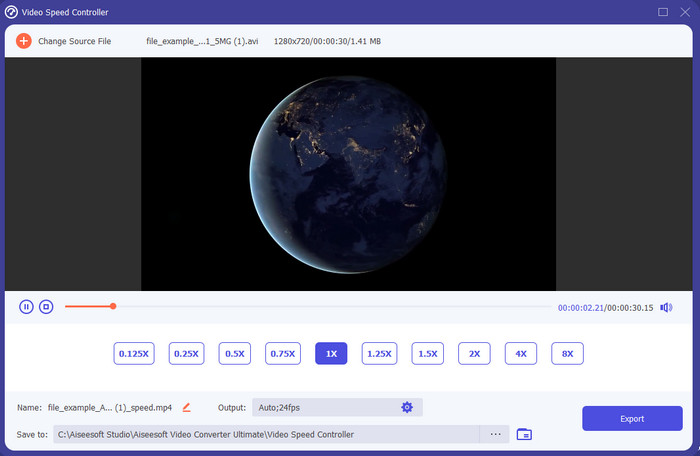
Vrei să știi care dintre editorii video pentru reluare este cel mai bun de folosit pentru a transforma redarea în slow motion? Atunci încearcă să folosești Video Converter Ultimate, pentru că acest instrument nu este doar cel mai bun, este fenomenal. Acest instrument are deja o mulțime de funcții avansate pe care vei dori să le folosești chiar dacă nu ești profesionist în editare. Chiar dacă ești profesionist, acest software este cea mai bună alegere, indiferent de nivelul abilităților tale de editare. Mai mult, poți adăuga rapid efecte de reluare lentă pe videoclipul tău fără să citești un manual sau să te uiți la videoclipuri despre cum se face. Pentru că instrumentul oferă instrucțiuni mult mai simple decât cel de mai jos. Deși trebuie plătit înainte de a-l putea accesa, totuși prețul nu este foarte mare. Dacă vrei să afli mai multe despre acest instrument, citește caracteristicile-cheie de mai jos.
Caracteristici cheie ale Video Converter Ultimate:
◆ Aplicație avansată de creare a videoclipurilor în reluare cu instrucțiuni de bază.
◆ Interfață de instrumente ușor de utilizat.
◆ Reglați cu ușurință viteza videoclipului pe Controlerul de viteză video.
◆ Suportă peste 200 de formate video și audio.
◆ Poate fi descărcat și accesat pe sistemele de operare PC și Mac.
Descărcare gratuită pentru Windows 7 sau o versiune ulterioară Descărcare securizată
Descărcare gratuită pentru MacOS 10.7 sau o versiune ulterioară Descărcare securizată
2. Unitatea de timp Boris Continuum
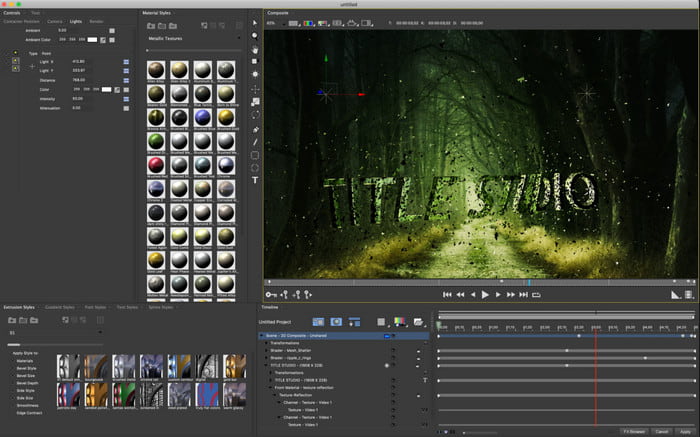
Boris Continuum Time Unit este cea mai bună alegere dacă vrei să ai o aplicație puternică pentru realizarea de videoclipuri în reluare. Nu există alt instrument care să poată face ceea ce oferă acesta pentru a obține un rezultat profesional. Mai mult, acest instrument are cele mai detaliate funcții de editare pe care ai vrea să le încerci. Deși instrumentul este mai bun decât celelalte, este totuși literalmente super scump. De asemenea, dacă vrei să încerci să folosești acest instrument, trebuie să ai un desktop de înaltă performanță, pentru că nu îl vei putea folosi pe calculatoare mai vechi.
Pro
- Cel mai bun instrument de utilizat pentru a face editări grele.
- Este compatibil cu toate platformele.
- Interfața instrumentului arată mai mult ca un instrument pro.
Contra
- Acest software este cel mai scump din acest articol.
- Avea nevoie de o unitate de sistem de înaltă calitate.
- Nu este cea mai bună alegere pentru un începător care nu are experiență în editare.
3. VEED.IO
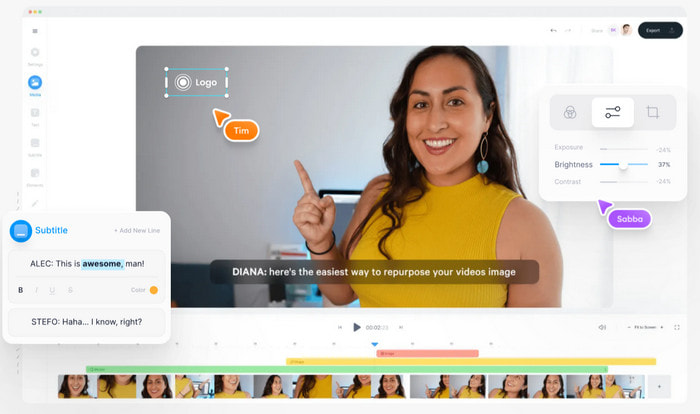
Așadar, dacă nu vrei să cheltui niciun ban și ai o conexiune la internet, încearcă să accesezi VEED.IO. Acesta este cel mai bun software online pentru a face videoclipuri în reluare, deoarece este simplu și ușor de accesat. Interfața generală a instrumentului este foarte curată, cu instrucțiuni clare, astfel încât este foarte comod pentru toată lumea. Totuși, poți încărca doar fișiere mai mici de 50 MB, iar dacă vrei să adaugi fișiere mai mari, acest instrument îți va cere să faci upgrade. De asemenea, dacă nu ai cumpărat instrumentul, așteaptă-te ca rezultatul final să aibă un filigran.
Pro
- Poate fi accesat cu ușurință de oricine are conexiune la internet.
- Fără reclame deranjante pe site.
- Ușor de tratat de către începători la editare.
Contra
- Caracteristicile instrumentului sunt foarte limitate în versiunea gratuită a instrumentului.
- dependent de internet. Deci, dacă internetul este lent, așteptați-vă la un ritm lent de încărcare, descărcare și editare. De asemenea, nu puteți accesa acest instrument dacă nu aveți o conexiune la internet.
Partea 2. 2 a celei mai bune aplicații video cu mișcare lentă pe Android și iOS
1 SloPro
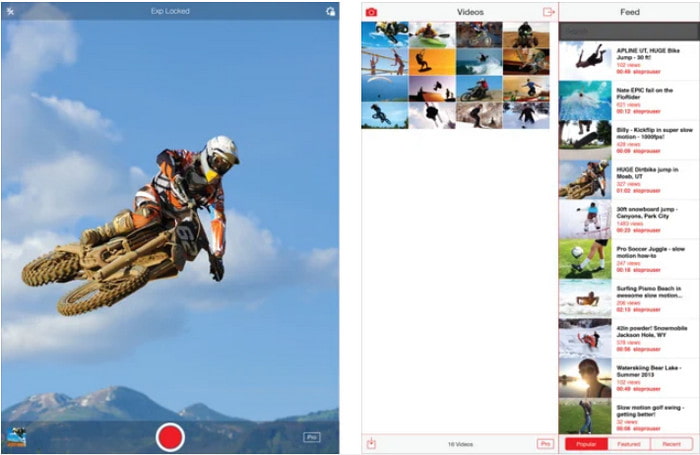
SloPro este cea mai bună aplicație pentru videoclipuri în reluare pe care o poți descărca gratuit pe iOS. Aplicația poate reda în reluare până la 500–1000 fps. În plus, poți modifica videoclipul de la redare rapidă la redare lentă sau invers. Deși aplicația poate fi o opțiune foarte bună, are încă multe neajunsuri. De exemplu, fișierul video va fi salvat în galeria aplicației și nu în galeria camerei. De asemenea, dacă încerci să folosești 1000 fps, videoclipul devine bug-uit, conform utilizatorilor care au încercat deja. În plus, acest instrument este în continuare grozav pentru că este gratuit și încetinirea redării se poate face foarte ușor aici.
Pro
- Cea mai bună redare cu încetinitorul pe care o puteți folosi gratuit pe iOS.
- Primește deja un rating corect și 3,3 stele.
- Simplu și ușor de utilizat.
Contra
- Rezultatul final nu este salvat direct în galerie.
- Toate videoclipurile salvate în galeria SloPro sunt aleatorii și nu sunt clasificate corespunzător.
- Dacă utilizați 1000 fps, așteptați-vă la o ieșire video cu probleme.
2. Slow Motion Video Maker
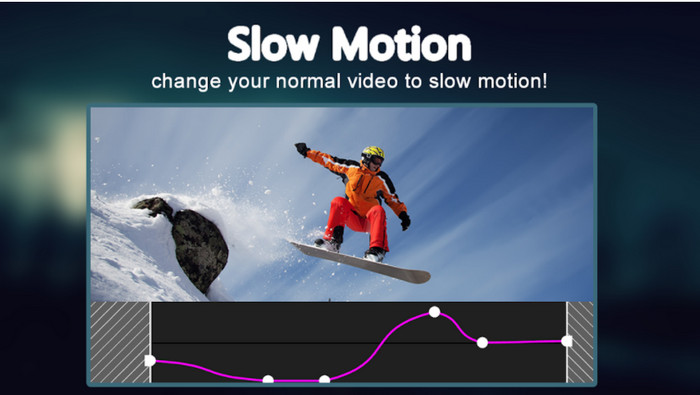
Una dintre cele mai bune aplicații de creare a videoclipurilor în reluare pe care o poți descărca gratuit pe telefonul tău Android este Slow Motion Video Maker. Cu ajutorul acestei aplicații, poți realiza cu ușurință redare rapidă și în reluare a videoclipurilor tale. Totuși, aplicația are o mulțime de reclame enervante care apar din senin. De asemenea, redarea în reluare se poate face doar la 0,5x. Dar, per ansamblu, este foarte bună pentru încetinirea unui videoclip pe Android, însă reclamele strică mult experiența.
Pro
- Aplicația se poate descărca gratuit din magazinul Play.
- Este grozav să fie folosit pentru a încetini ușor videoclipul.
- Aplicația este ușor de gestionat.
Contra
- Are o mulțime de reclame plictisitoare care apar de nicăieri.
- Descărcarea videoclipului poate dura mult timp, deoarece nu are procesare accelerată.
Partea 3. Întrebări frecvente despre Slow Motion Video Maker
Care este rolul FPS-ului?
Este folosit pentru a calcula seria consecutivă de cadre care apar pe panoul de afișare. Acest lucru se vede cel mai frecvent în fiecare captură de mișcare, cum ar fi în jocurile video, camerele foto, filme și chiar și ochiul nostru poate vedea 30 până la 60 fps.
Care este cea mai bună rată FPS la încetinitorul?
FPS-ul ideal pe care îl puteți utiliza pentru a viziona videoclipuri în redare cu încetinitorul este între 120 sau 240 fps. Deci, dacă doriți să aveți o redare mai detaliată cu încetinitorul, atunci creșteți FPS-ul.
Cum să redați un videoclip în redare rapidă?
Pentru a-ți face o idee despre cum să redai un videoclip în viteză mare, încearcă să dai clic pe acest link. Află care sunt cele 5 cele mai bune instrumente pe care le poți folosi pentru a accelera un videoclip.
Concluzie
În concluzie, toate instrumentele prezentate aici sunt cei mai buni creatori de videoclipuri în reluare pe care îi poți găsi pe web. De asemenea, acest articol deja te-a ajutat și ți-a făcut căutarea mai ușoară ca niciodată. Totuși, există un instrument anume pe care ai putea dori să îl folosești pentru a-ți îmbunătăți videoclipul, cu ajutorul Video Converter Ultimate. Toate funcțiile avansate pe care le poți folosi aici sunt uluitoare și totuși ușor de utilizat. În plus, dacă încă nu ești convins, încearcă mai întâi să descarci instrumentul și testează-l singur.
-
 Cea mai bună aplicație Android pentru a reda fișiere MOV pe telefoanele dvs. mobile
 Îți este greu pentru că înregistrarea ta MOV nu a putut fi redată pe Android? Deci, în acest caz, sunteți în căutarea celui mai bun player MOV pentru Android.
-
 5 playere AVI puternice pentru a viziona și reda fișiere AVI [Web și desktop]
 Aflați ce playere AVI puteți folosi pentru a reda și viziona fișierele .avi. Continuați să citiți mai jos și alegeți care este cel mai bun media player decât celălalt.
-
 Modalități eficiente despre cum să faceți fișiere MKV pe Xbox One S 2021
 Descoperiți modalități care vă pot ajuta să redați fișiere MKV pe Xbox One S folosind unele dintre cele mai bune convertoare.
