


 Видео конвертер Ultimate
 Устройство записи экрана
 Видео ремонт
Глубокое понимание 5 доступных видеоредакторов Slow Motion
Вы любите смотреть динамичные зрелищные виды спорта, такие как гонки, бокс, бейсбол, волейбол и другие? Для всех этих видов спорта требуется высокоскоростная камера хотя бы для анализа движений. Если вы действительно хотите разобрать каждое движение каждого спортсмена, ознакомьтесь с лучшими программами для создания видео в режиме замедленной съёмки, которые вы можете использовать. Кроме того, с помощью приведённых ниже инструментов вам не понадобится никакое дополнительное оборудование, кроме настольного компьютера, интернета или телефона. По мере чтения внимательно изучите описания и выберите тот инструмент, который лучше всего вам подходит.

Часть 1. 3 лучших средства создания замедленного видео для ПК с Windows, Mac и онлайн
1. Конвертер видео Ultimate
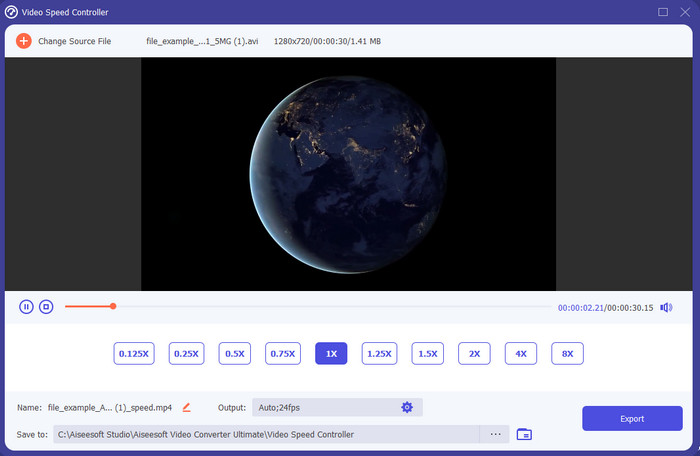
Хотите узнать, какой из редакторов видео с замедленным воспроизведением лучше всего подходит для создания слоу‑мо? Попробуйте Video Converter Ultimate, потому что этот инструмент не просто хороший — он по‑настоящему выдающийся. В нём уже есть множество продвинутых функций, которые вам понравится использовать, даже если вы не профи в видеомонтаже. А если вы и так профессионал, это ПО всё равно будет отличным выбором при любом уровне навыков. Более того, вы сможете быстро добавить эффект замедления на видео, не читая инструкцию и не просматривая обучающие ролики. Потому что инструмент предлагает гораздо более простые и понятные шаги по сравнению с описанными ниже решениями. Хотя программа и платная, её стоимость остаётся вполне доступной. Если хотите узнать об этом инструменте больше, прочитайте его ключевые особенности ниже.
Ключевые особенности Video Converter Ultimate:
◆ Продвинутое приложение для создания видео в замедленной съёмке с простыми инструкциями.
◆ Удобный интерфейс инструмента.
◆ Легко регулируйте скорость видео на контроллере скорости видео.
◆ Поддерживает более 200+ видео и аудио форматов.
◆ Его можно загрузить и использовать в операционных системах ПК и Mac.
Бесплатная загрузкаДля Windows 7 или более поздних версийБезопасная загрузка
Бесплатная загрузкаДля MacOS 10.7 или более поздних версийБезопасная загрузка
2. Единица времени Борис Континуум
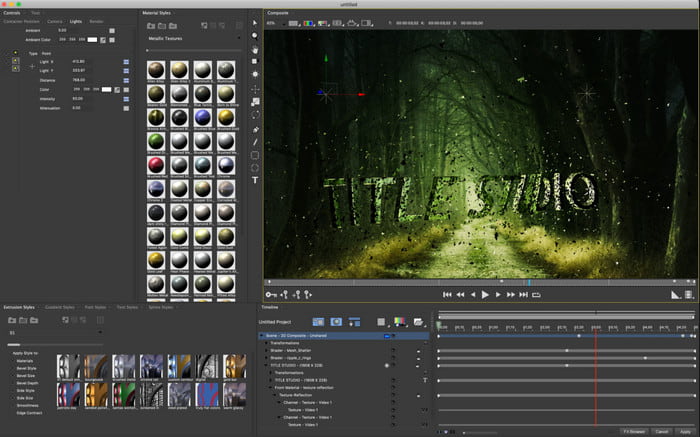
Boris Continuum Time Unit — лучший выбор, если вам нужно мощное приложение для создания видео в замедленной съёмке. Нет другого инструмента, который предлагал бы столь же профессиональный результат. Кроме того, у него одни из самых детализированных функций редактирования, которые вам наверняка захочется опробовать. Хотя этот инструмент и превосходит многие другие по возможностям, он при этом действительно очень дорогой. Также, если вы хотите его использовать, вам понадобится современный, высокопроизводительный настольный компьютер, потому что на старых системах эта программа попросту не запустится.
Плюсы
- Лучший инструмент для тяжелого редактирования.
- Он совместим со всеми платформами.
- Интерфейс инструмента больше похож на профессиональный инструмент.
Минусы
- Это программное обеспечение является самым дорогим в этой статье.
- Нужен был полноценный системный блок.
- Не лучший выбор для новичка, у которого нет опыта редактирования.
3. ВЕЕД.ИО
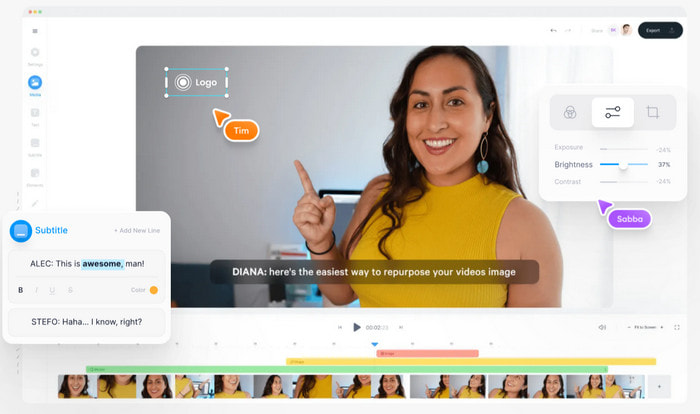
Если вы не хотите тратить деньги и у вас есть доступ в интернет, попробуйте сервис VEED.IO. Это лучшее онлайн‑ПО для создания видео в замедленной съёмке, поскольку оно простое и удобное. Интерфейс сервиса очень аккуратный, с понятными прямыми подсказками, так что им легко пользоваться кому угодно. Однако вы можете загружать файлы только меньше 50 МБ, а при попытке загрузить больший размер система потребует перейти на платный тариф. Кроме того, если вы не оплатите сервис, на итоговом видео будет присутствовать водяной знак.
Плюсы
- Может быть легко доступен любому, у кого есть подключение к Интернету.
- Отсутствие надоедливой рекламы на сайте.
- Новичкам в редактировании легко разобраться.
Минусы
- Функции инструмента очень ограничены в бесплатной версии инструмента.
- Интернет-зависимость. Так что, если у вас медленный интернет, ожидайте медленную загрузку, загрузку и редактирование. Кроме того, вы не можете получить доступ к этому инструменту, если у вас нет подключения к Интернету.
Часть 2. 2 лучшего приложения для замедленного видео на Android и iOS
1 СлоПро
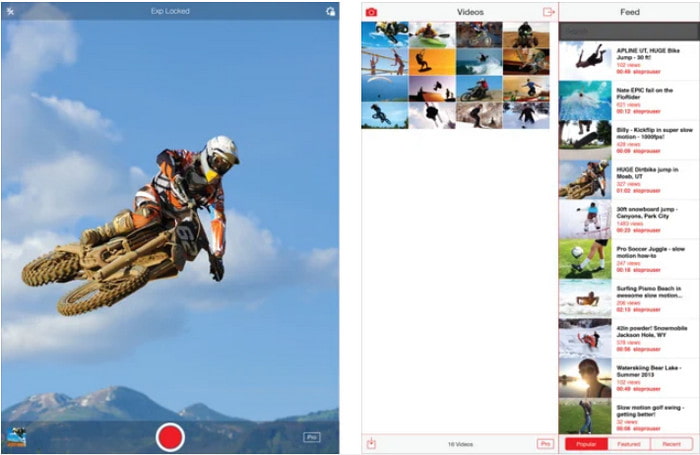
SloPro — лучшее приложение для создания видео в замедленной съёмке, которое можно бесплатно скачать на iOS. Приложение умеет воспроизводить видео в замедленном режиме до 500–1000 кадров в секунду. Кроме того, вы можете менять скорость — от ускоренного до замедленного воспроизведения и наоборот. Хотя это и отличный вариант, у приложения есть и существенные недостатки. Например, готовые ролики сохраняются в собственной галерее приложения, а не в плёнке камеры. Также пользователи отмечают, что при попытке съёмки в 1000 fps видео начинает сильно «глючить». Тем не менее инструмент остаётся очень полезным: он бесплатен, а замедление видео в нём делается очень легко.
Плюсы
- Лучшее замедленное воспроизведение, которое вы можете использовать на iOS бесплатно.
- Он уже получил справедливую оценку и 3,3 звезды.
- Легко и просто использовать.
Минусы
- Конечный результат не сохраняется напрямую в галерее.
- Все видео, сохраненные в галерее SloPro, случайны и не классифицированы должным образом.
- Если вы используете 1000 кадров в секунду, ожидайте глючного видео.
2. Создатель замедленного видео
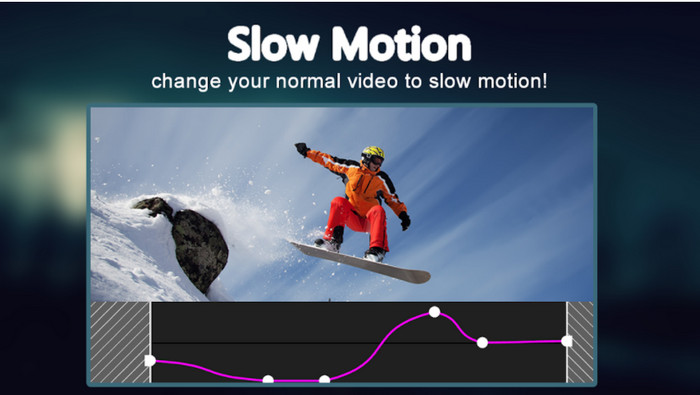
Одно из лучших приложений‑замедлителей видео, которое вы можете бесплатно установить на свой Android‑смартфон, — это Slow Motion Video Maker. С его помощью вы легко выполните ускоренное и замедленное воспроизведение своих роликов. Однако в приложении очень много навязчивой рекламы, возникающей из ниоткуда. К тому же замедление можно задать только до 0,5 от исходной скорости. В целом оно хорошо подходит для замедления видео на Android, но избыток рекламы сильно портит впечатление.
Плюсы
- Приложение можно бесплатно загрузить в магазине Play.
- Это здорово использовать для плавного замедления видео.
- Приложение легкое в управлении.
Минусы
- У него много надоедливой рекламы, появляющейся из ниоткуда.
- Загрузка видео может занять много времени, потому что оно не имеет ускоренной обработки.
Часть 3. Часто задаваемые вопросы о Slow Motion Video Maker
Какова роль FPS?
Он используется для расчета последовательных серий кадров, отображаемых на панели дисплея. Это чаще всего наблюдается при каждом захвате движения, например, в видеоиграх, камерах, фильмах, и даже наш глаз может видеть от 30 до 60 кадров в секунду.
Какая лучшая частота кадров в секунду в замедленной съемке?
Идеальный FPS, который вы можете использовать для просмотра видео в замедленном воспроизведении, составляет от 120 до 240 кадров в секунду. Итак, если вы хотите получить более детальное замедленное воспроизведение, увеличьте FPS.
Как воспроизвести видео в режиме ускоренного воспроизведения?
Чтобы понять, как воспроизводить ролик в ускоренном режиме, перейдите по этой ссылке. Узнайте, какие 5 лучших инструментов вы можете использовать для ускорения видео.
Заключение
Подводя итог, все представленные здесь инструменты — это лучшие программы для создания видео в замедленной съёмке, которые вы можете найти в интернете. Эта статья уже упростила вам поиск и сэкономила время. Однако есть один особенный инструмент, который вам особенно стоит попробовать для улучшения качества видео, — это Video Converter Ultimate. Все его продвинутые функции впечатляют и при этом остаются простыми в использовании. Если вы всё ещё сомневаетесь, просто скачайте программу и протестируйте её сами.
-
 Лучшее приложение для Android для воспроизведения файлов MOV на мобильных телефонах
 Испытываете трудности, потому что ваша запись MOV не может быть воспроизведена на вашем Android? Итак, в этом случае вы ищете лучший проигрыватель MOV для Android.
-
 5 мощных проигрывателей AVI для просмотра и воспроизведения файлов AVI [Интернет и настольный компьютер]
 Узнайте, какие проигрыватели AVI можно использовать для воспроизведения и просмотра файлов .avi. Продолжайте читать ниже и выберите, какой медиаплеер лучше, чем другой.
-
 Эффективные способы создания файлов MKV на Xbox One S 2021
 Узнайте, как воспроизводить файлы MKV на Xbox One S с помощью лучших конвертеров.
