


 Видео конвертер Ultimate
 Устройство записи экрана
 Видео ремонт
Рекомендации, которым необходимо следовать при преобразовании MXF в MOV с высоким качеством
MXF расшифровывается как Material Exchange Format (формат обмена материалами). OMF — это открытый файловый формат, который позволяет обмениваться аудиовизуальными материалами, а также сопутствующими данными и метаданными. Изначальный вариант MXF был разработан группой ведущих компаний в области телерадиовещания и цифрового продакшена. Цель MXF — стандартизировать форматы файлов, обеспечить совместимость между различными аппаратными и программными решениями и в перспективе полностью отказаться от использования лент. Если вы ищете подходящий конвертер для преобразования MXF в MOV, ниже представлены варианты, из которых вы можете выбрать наиболее подходящий.
Часть 1. Обзор: MXF и MOV
MXF — отличный выбор как для записи, так и для доставки контента. Однако использование межкадрового сжатия не всегда оптимально при создании фильмов. Для распаковки межкадрового сжатия требуется больше времени, поскольку многие методы предполагают использование субпиксельной информации для покадровой точности в After Effects (AE). При межкадровом сжатии при декодировании некоторые кадры приходится воссоздавать, и именно здесь у After Effects могут возникать сложности.
Тем не менее, расширение файла MOV обозначает видеоформат Apple QuickTime. Этот мультимедийный контейнер может также хранить несколько дорожек с различными типами данных (аудио, видео, субтитры). Такие функции, как отделение медиаданных от смещений, абстрактные ссылки на данные и списки правок дорожек, делают его идеальным для видеомонтажа. Контейнер MOV также широко используется для онлайн‑распространения видео.
Часть 2. Отличные методы преобразования MXF в MOV
Используя новейшее и эффективное программное обеспечение Video Converter Ultimate, вы можете конвертировать MXF в MOV офлайн, а также в широкий спектр других форматов с возможностью восстановления качества. С помощью этой программы вы сможете преобразовывать MXF в MOV быстрее, чем при использовании многих других конвертеров. Кроме того, вы можете изменить качество видео перед конвертацией. Дополнительно вы можете улучшить свой видеоролик, воспользовавшись различными функциями конвертера. Используя это приложение, вам не придется переживать о том, что выбранный вами формат окажется несовместимым. Познакомившись с этим лучшим конвертером, выполните следующие шаги:
Шаг 1. Нажмите кнопку Free Download ниже, чтобы начать загрузку! После завершения загрузки вы можете установить программу как на Windows, так и на Mac. Сначала установите программное обеспечение на рабочий стол вашего компьютера, затем нажмите Start Now, чтобы начать работу.
Бесплатная загрузкаДля Windows 7 или более поздних версийБезопасная загрузка
Бесплатная загрузкаДля MacOS 10.7 или более поздних версийБезопасная загрузка
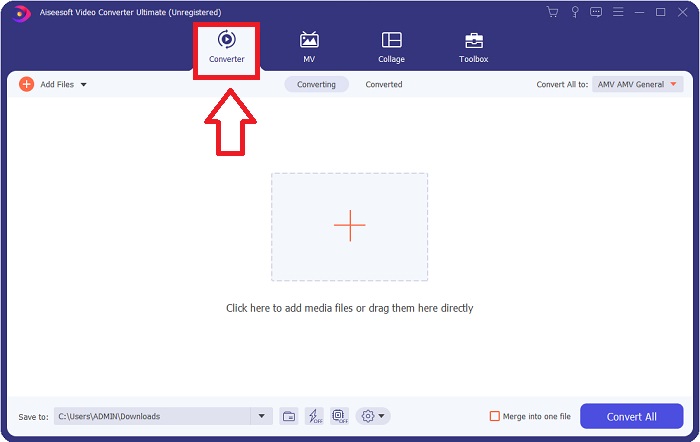
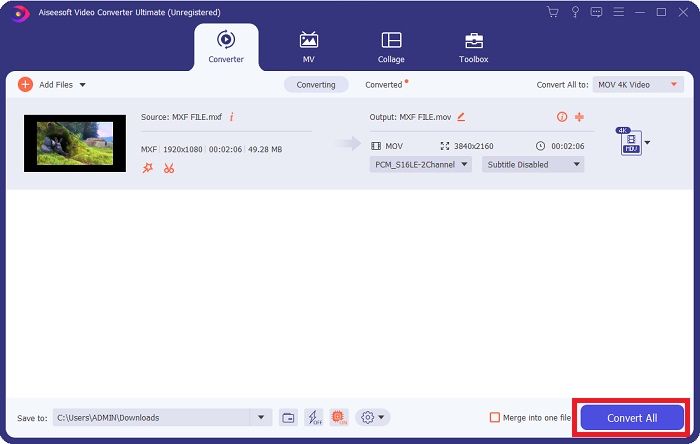
Шаг 2. Запустите загруженную программу, нажав соответствующую кнопку. Как только вы откроете программу впервые, отобразится интерфейс Converter. Именно здесь вы начнёте процесс перекодирования вашего видео.
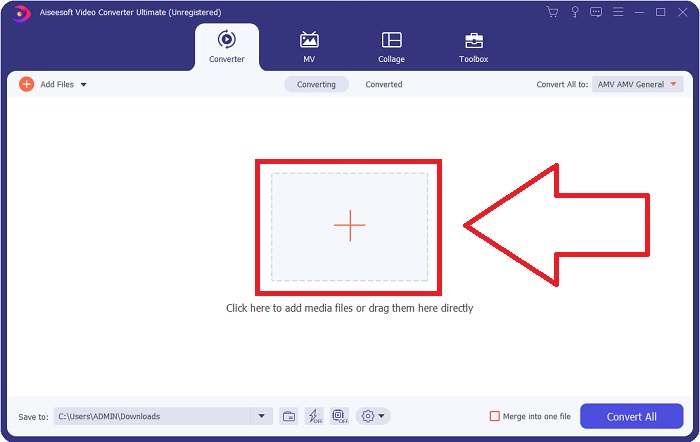
Шаг 3. Начните процесс конвертации, импортировав ваши файлы в конвертер. Видеофайл, который вы хотите преобразовать, можно просто перетащить на значок с символом «+».
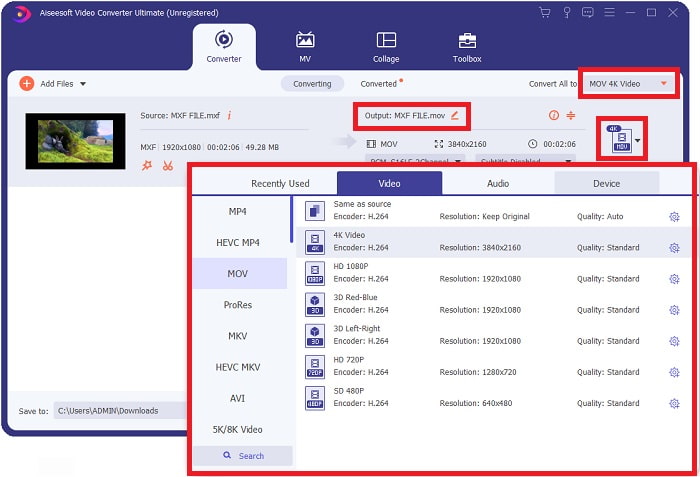
Шаг 4. Затем выберите формат MOV в выпадающем списке Convert All to. Как только вы выберете формат MOV, вам станет доступен широкий набор параметров качества видео. Если нужного варианта вывода нет в списке, вы можете настроить качество по своему усмотрению. Нажав на значок шестерёнки, вы сможете отрегулировать разрешение, частоту кадров и даже качество звука. Щёлкните Create New, чтобы сохранить изменения.
Шаг 5. Когда вы закончите редактирование качества, разрешения, частоты кадров и других параметров, для начала конвертации видео просто нажмите кнопку Convert All.
Часть 3. Еще один совет по преобразованию MXF в MOV [Онлайн]
Использование Free Video Converter Online — один из лучших способов быстро конвертировать широкий спектр видеоформатов. В отличие от многих других онлайн‑конвертеров, этот инструмент практически не ограничен по поддерживаемым форматам. Поэтому он особенно удобен для новичков. Ниже приведены шаги, которые необходимо выполнить, чтобы подробнее познакомиться с этим онлайн‑сервисом.
Шаг 1. Перейдите на главную страницу онлайн‑конвертера, нажав на эту ссылку.
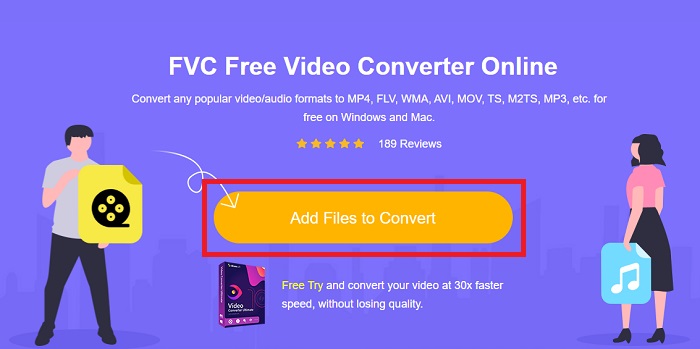
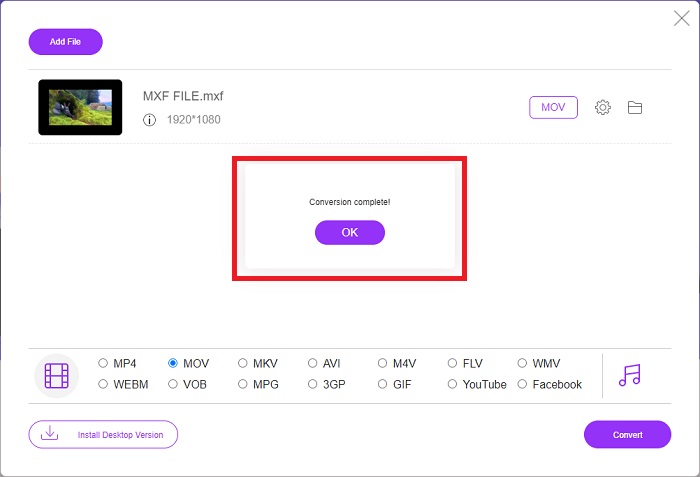
Шаг 2. Если вы пользуетесь инструментом впервые, нажмите кнопку Add Files to Convert, чтобы загрузить лаунчер для вашего компьютера. После повторной загрузки он запустится автоматически. Откройте файл из папки загрузок, выбрав его и нажав Open.
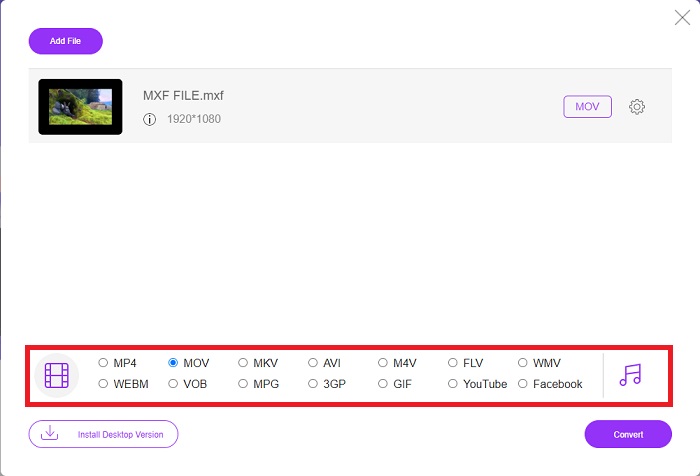
Шаг 3. После того как вы выбрали формат MOV, который хотите использовать, щёлкните по нему, чтобы запустить процесс конвертации.
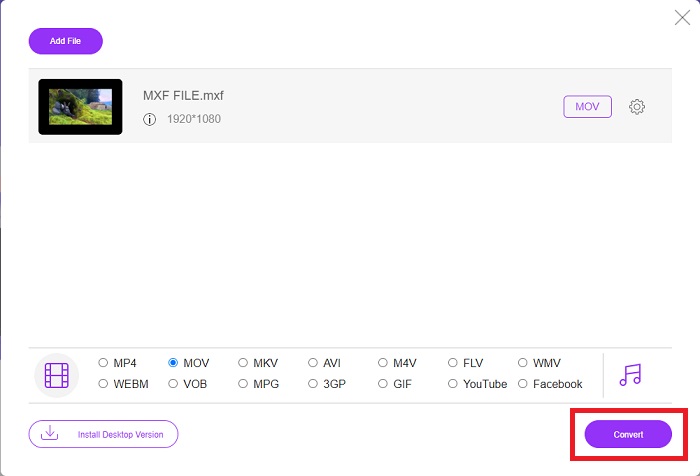
Шаг 4. Когда формат MOV уже выбран, нажмите кнопку Convert, чтобы начать процесс конвертации.
Шаг 5. Через несколько минут, когда преобразованный файл появится в папке на рабочем столе компьютера, вы сможете начать его просмотр, просто щёлкнув по нему.
Часть 4. Часто задаваемые вопросы о преобразовании MXF в MOV
MXF - это то же самое, что MOV?
В цифровом мире это тоже проблема. Формат обмена материалами и видеоформат QuickTime подпадают под общий термин «контейнерные форматы». Когда видеопрограмма поддерживает заданный формат контейнера, она может использовать стандартные инструменты для управления контейнерами, такие как открытие файла, поиск определенного момента времени и воспроизведение, быстрая перемотка вперед или назад с использованием общедоступных стандартов и библиотек. В новом формате файла или новых библиотеках для управления носителями нет необходимости.
MOV сырой?
При работе с видео в формате RAW наиболее часто встречаются типы файлов: AVI (. Avi) и MOV (. Mov); поскольку это несжатое видео, размеры их файлов могут быть очень большими - до гигабайта или более в зависимости от длины и качества видео.
Что такое MXF File Pro Tools?
Используя возможности Quicktime Pro Tools, SoundCode Exchange MXF может обмениваться файлами MXF. Pro Tools может визуализировать файлы MXF как фильмы Quicktime благодаря компоненту Quicktime и утилите перетаскивания. Видеодорожка может быть создана за секунды с помощью функции импорта Quicktime в Pro Tools, которая может воспроизводить файлы MXF высокой или стандартной четкости. Используя видеокарту Blackmagic, теперь вы можете просматривать отснятый материал в виде окна в Pro Tools или выводить на внешний дисплей. В то же время аудиодорожки MXF можно импортировать как файлы WAV для редактирования и микширования в Pro Tools.
Заключение
В заключение, у вас есть широкий выбор вариантов — будь то программное обеспечение или онлайн‑сервис для конвертации видео из одного формата в другой. По возможностям и удобству использования эти решения во многом дополняют друг друга. Одни просто выполняют поставленную задачу, другие предлагают широкий набор дополнительных функций. В этой статье внимание сосредоточено именно на этом, чтобы помочь вам определить, какое решение лучше подойдёт в вашей ситуации. Поскольку никогда не знаешь, когда могут понадобиться дополнительные инструменты — реверсирование видео, улучшение качества, объединение файлов и т. д., мы в первую очередь рекомендуем Video Converter Ultimate. Вместо того чтобы каждый раз искать онлайн‑конвертер, вы можете постоянно держать эту программу на своём компьютере.
-
 4 бесплатных способа конвертировать видеокамеру MXF в MP4 для универсального воспроизведения
 Этот пост представляет собой подробное руководство по конвертации MXF в MP4 на компьютере. Вы можете получить 4 бесплатных конвертера MXF в MP4 для перекодирования видеокамеры из MXF в MP4 за несколько простых шагов.
-
 4 лучших конвертера MXF для преобразования MXF в AVI [бесплатно и платно]
 Что это за файл - MXF? Как конвертировать MXF в AVI? Это несколько вопросов, на которые мы отвечаем. Итак, если у вас есть тот же вопрос, прочтите эту статью.
-
 Как конвертировать AVI в MOV с помощью простых шагов и инструментов
 Вы хотите знать, как преобразовать AVI в воспроизводимый MOV? Вы должны следовать этой статье, чтобы узнать, как это сделать, и узнать, как добиться успешного преобразования.
