


 Видео конвертер Ultimate
 Устройство записи экрана
 Видео ремонт
2 лучших конвертера M4V в FLV для Windows/Mac/онлайн
Видеои аудиоконтейнер, созданный в первую очередь для использования в Apple iTunes, — формат M4V. Этот формат защищён системой DRM, чтобы избежать нарушений авторских прав. Поэтому файл трудно воспроизвести, если у вас нет учётной записи iTunes с действительными данными для входа. Если вы хотите смотреть такие видео на ПК или телефоне Android, необходимо конвертировать их в воспроизводимый FLV. Чтобы узнать, как конвертировать M4V в FLV, прочтите эту статью и получите краткое представление о M4V и FLV.

Часть 1. 1-й выбор при преобразовании M4V в FLV на Mac и ПК
Это самый эффективный конвертер, которым вам наверняка понравится пользоваться, особенно если вы конвертируете M4V в FLV на Mac или на ПК. FVC Video Converter Ultimate — самый востребованный конвертер, на который уже полагается множество пользователей. Более того, если вам нужен многофункциональный инструмент с выдающимся качеством результата, он подойдёт идеально. Здесь вы можете конвертировать любые медиафайлы и задавать качество SD, HD, 1080p и даже 4K. От этого инструмента стоит ожидать только лучшего — его название «Ultimate» говорит само за себя. Чтобы раскрыть его максимальные возможности по конвертации, следуйте инструкции ниже.
Как конвертировать M4V в FLV с помощью FVC Video Converter Ultimate:
Шаг 1. Нажмите кнопку загрузки ниже и выберите операционную систему, которую вы используете. После загрузки нажмите Install, появится приветственный интерфейс, затем нажмите Start Now.
Бесплатная загрузкаДля Windows 7 или более поздних версийБезопасная загрузка
Бесплатная загрузкаДля MacOS 10.7 или более поздних версийБезопасная загрузка
Шаг 2. Запустите программу, нажмите знак + в центре интерфейса и выберите .m4 файл в появившейся папке, щёлкните по нему и нажмите Open.
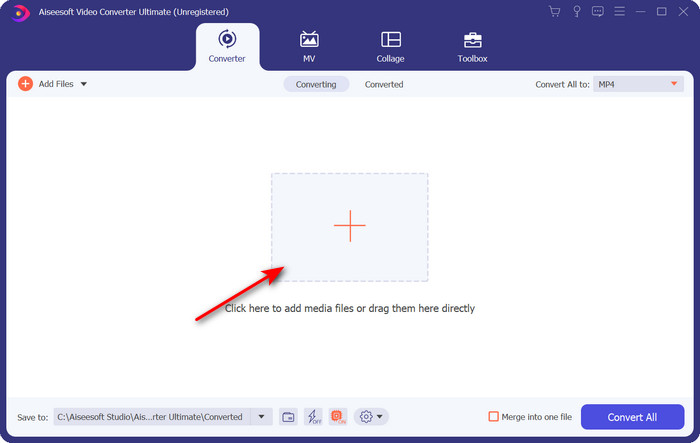
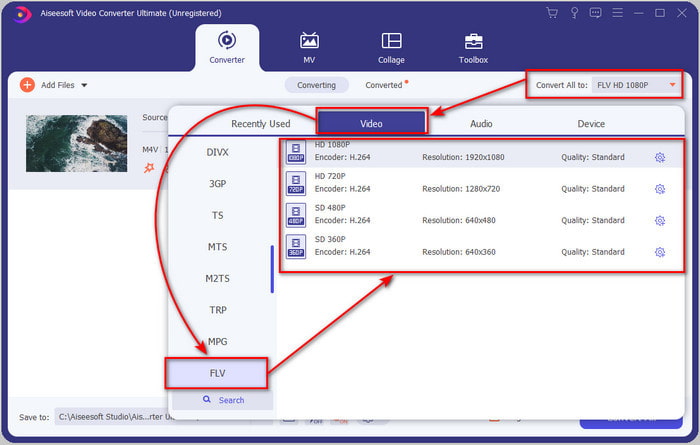
Шаг 3. Когда файл .m4v появится в интерфейсе, нажмите Convert All в и найдите формат FLV.
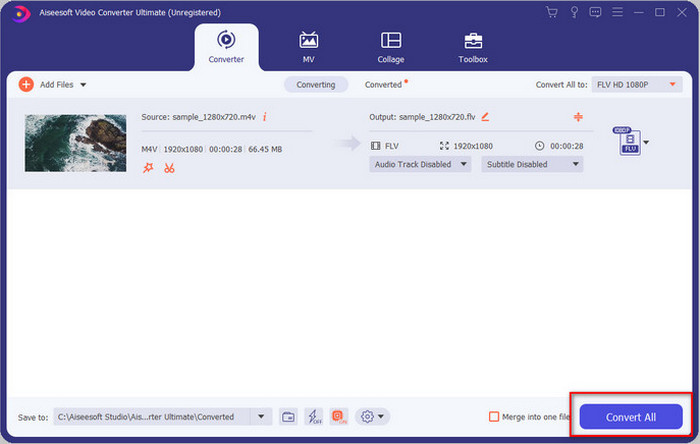
Шаг 4. Затем нажмите Convert All, чтобы начать преобразование M4V в FLV.
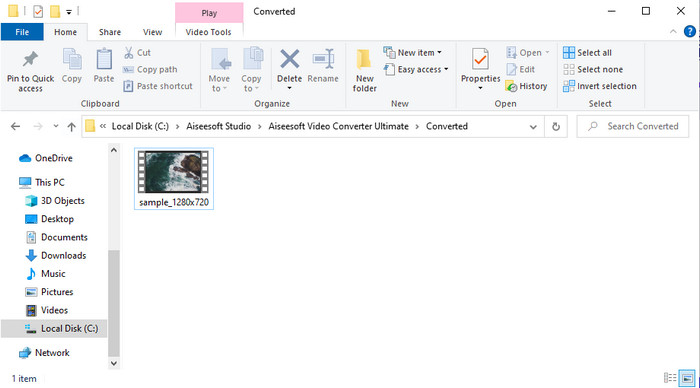
Шаг 5. Конвертация файла займёт меньше минуты благодаря высокой скорости, которую обеспечивает этот инструмент. Появится папка с вашим конвертированным файлом; нажмите на файл, чтобы просмотреть его или поделиться им онлайн.
Плюсы
- Быстрое преобразование и аппаратное ускорение доступны для лучшего опыта.
- Доступно на всех платформах, таких как ПК или Mac.
- Выполнение редактирования видео, чтобы сделать его выдающимся, может быть превзойдено здесь.
Минусы
- Оплата перед использованием, но цена на него доступная.
- Загрузите программное обеспечение перед использованием.
Часть 2. Второй вариант бесплатного преобразования M4V в FLV через Интернет
Онлайн‑конвертацию ваших файлов можно эффективно выполнить, если вы используете подходящий сервис для конвертации M4V в FLV онлайн — с помощью FVC Free Video Converter Online. Этот онлайн‑инструмент — лучший конвертер, к которому можно получить доступ из любого веб‑браузера при наличии подключения к интернету. Кроме того, вы можете конвертировать файлы без ограничения по размеру, но пакетная конвертация здесь недоступна. Несмотря на то, что онлайн‑сервис очень хорош, ему всё равно требуется стабильный интернет, поэтому при его отсутствии он, как и другие веб‑конвертеры, не подойдёт. Если же интернет у вас есть и вы хотите получить качественную бесплатную онлайн‑конвертацию, следуйте шагам ниже.
Как конвертировать M4V в FLV с помощью FVC Free Video Converter Online:
Шаг 1. Перейдите по этой ссылке, чтобы открыть бесплатный онлайн‑конвертер, который предоставляет FVC.
Шаг 2. В веб‑интерфейсе нажмите Add Files to Convert, чтобы скачать установщик. После завершения загрузки установщика снова нажмите Add Files to Convert, появится папка — выберите файл M4V.
Скачайте версию для ПК, чтобы конвертировать файлы пакетно.
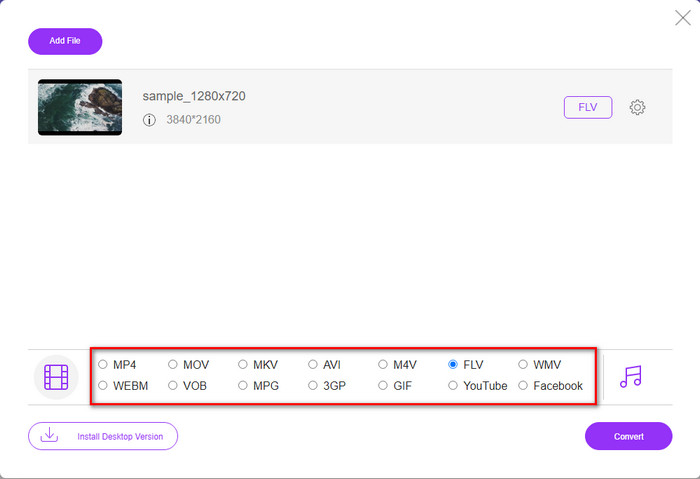
Шаг 3. Откроется новый веб‑интерфейс, внизу выберите формат FLV, нажав на него.
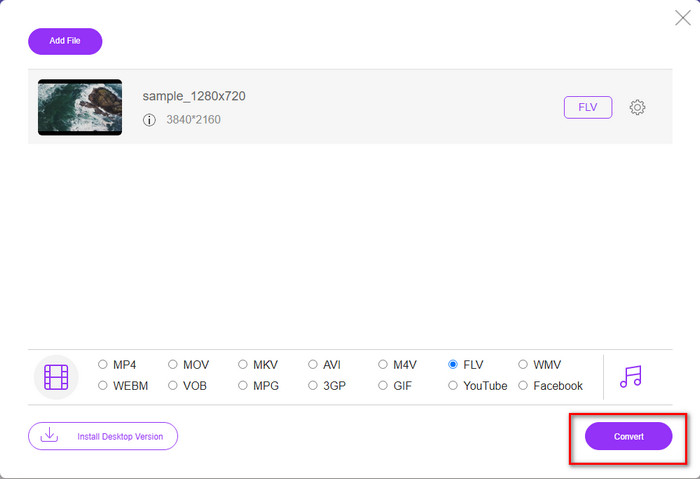
Шаг 4. Чтобы начать бесплатную конвертацию M4V в FLV, нажмите Convert.
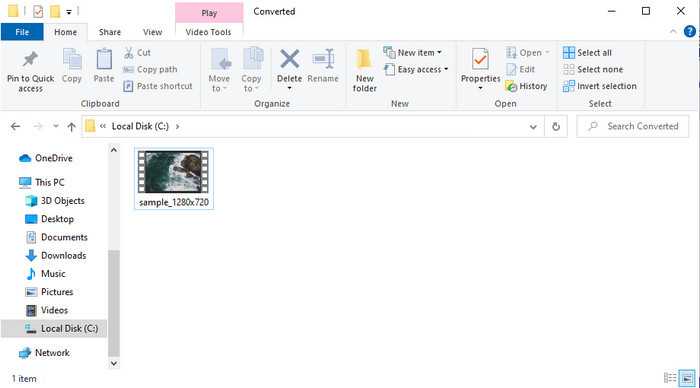
Шаг 5. После завершения конвертации в интерфейсе появится папка; нажмите на файл, чтобы воспроизвести его в локальном медиаплеере.
Плюсы
- Бесплатный и совместимый во всех веб-браузерах.
- Неограниченный размер файла и преобразование.
- Безопасно и без рекламы в основном веб-инструменте.
Минусы
- Для использования инструмента требуется подключение к Интернету.
- Менее поддерживаемый формат для загрузки и преобразования.
Часть 3. Различия между форматами M4V и FLV
M4V хранит видео самого высокого качества, загруженное из вашего магазина Apple iTunes. Этот формат похож на MP4, потому что они используют кодек MPEG-4 в качестве компрессора. Но видео M4V защищены авторскими правами Apple FairPlay DRM. Таким образом, воспроизведение видео в этом формате сложно, потому что оно не будет воспроизводиться сразу, если вы вставите их в медиаплеер, отличный от iTunes или Quicktime Player. Доступ к незащищенным файлам M4V можно получить в медиаплеере, изменив расширение файла на .mp4.
Напротив, FLV используется для максимально быстрой передачи видео- и аудиоданных через Интернет. Flash Video — это наиболее удобный формат, который есть на каждом веб-сайте HTML 5. Однако этот формат был прекращен, потому что Adobe Flash уже ушел в отставку. Тем не менее, вы по-прежнему можете воспроизводить его на подключаемых модулях вашего медиаплеера, необходимых после его загрузки или преобразования.
M4V против FLV
M4V разработан Apple, которая также использует MPEG 4. Файлы M4V часто используются для хранения видео, загруженных из магазина Apple iTunes, таких как музыкальные клипы, телевизионные эпизоды и т. д. Некоторые файлы M4V могут быть защищены от копирования, поскольку они используют Защита авторских прав Apple FairPlay DRM.
Adobe Flash Player использовал FLV для доставки видеоконтента, такого как фильмы и телепередачи. В настоящее время Adobe больше не разрабатывает плеер и рекомендует пользователям удалить его из соображений безопасности. Однако вы по-прежнему можете использовать формат FLV во многих программах, отличных от Adobe/Macromedia.
Часть 4. Часто задаваемые вопросы о преобразовании M4V в FLV
Как лучше; MP4 или M4V?
Если вы хотите защитить свой файл, то M4V — это формат, который вы должны использовать, потому что он доступен только на Apple, и он защищен. Но предположим, вам нужен формат, совместимый со всеми медиаплеерами, редактором и многим другим. В этом случае MP4 — это универсальный медиаформат, который вы хотели бы использовать.
Могу ли я играть в M4V на VLC?
VLC — бесплатный проигрыватель, совместимый со всеми платформами, и он может воспроизводить почти все медиаформаты. Однако защищённый M4V здесь не воспроизводится, потому что он защищён DRM. Поэтому, если вы хотите смотреть .m4v во VLC, необходимо конвертировать файл M4V в MP4 или AVI.
Потеряю ли я качество после преобразования M4V?
После преобразования M4V его качество должно сохранять стандартную скорость исходного качества M4V. Однако некоторые конвертеры не поддерживают преобразование видео в форматы HD, 1080 или 4k. Таким образом, вам лучше выбрать идеальный инструмент, а не хороший инструмент, который удовлетворит ваши потребности в конвертации без потери качества.
Заключение
В целом, два представленных здесь инструмента — онлайн и офлайн — отлично подходят тем, кто хочет конвертировать M4V в FLV. Кроме того, мы получили представление о двух форматах — M4V и FLV. Хотя изменение M4V необходимо для просмотра защищённого файла, выбрать подходящий инструмент для этой задачи бывает непросто. Поэтому мы представили два решения, с помощью которых вы можете бесплатно конвертировать формат, используя FVC Free Video Converter Online, или же выйти на новый уровень конвертации с FVC Video Converter Ultimate. Итак, чего вы ждёте, если хотите бесплатно смотреть свои M4V? Выберите один из инструментов выше, следуйте простым и быстрым шагам — и готово, наслаждайтесь видео.
-
 [Руководство] Как конвертировать видео M4V в анимированные GIF на Windows / Mac
 Если вы хотите создавать анимированные файлы GIF из ваших любимых видео M4V, вы можете узнать о 2 простых и эффективных способах конвертировать видео M4V в GIF с индивидуальными настройками.
-
 3 Программа конвертации видео, используемая для преобразования iTunes M4V в AVI на Mac
 Не знаете, как конвертировать MKV в формат AVI? Продолжая читать эту статью, мы узнаем 3 инструмента, которые помогут вам преобразовать этот формат файла.
-
 Бесплатный конвертер M4V в MOV - Как конвертировать M4V в MOV
 Если ваш медиаплеер не поддерживает формат M4V, сталкивались ли вы когда-нибудь с трудностями при просмотре фильма на своем iPhone? Основная тема этой статьи — преобразовать его в видеофайл MOV.

