


 Видео конвертер Ultimate
 Устройство записи экрана
 Видео ремонт
Подробное руководство о том, как преобразовать анимированный GIF в FLV с помощью шагов
Добавление GIF‑изображений к сообщениям, чтобы донести мысль более ясно, стало сегодня модным трендом. Сейчас это используется как маркетинговый приём благодаря тому, как такие сообщения воздействуют на аудиторию. При всём при этом некоторые платформы не поддерживают публикацию GIF на своих сайтах. Эта проблема может сильно раздражать, но преобразовать GIF в видеоформат, например FLV, и поделиться им — проще простого. Не знаете, как конвертировать анимированные GIF в FLV на ПК, Mac, онлайн, на Android и iOS? Давайте ознакомимся с инструментами, которые помогут вам это сделать.

Часть 1. Как конвертировать анимированный GIF в FLV с помощью FVC Video Converter Ultimate
Не можете поделиться GIF, потому что формат не поддерживается? Тогда попробуйте преобразовать свой анимированный GIF в FLV с помощью FVC Video Converter Ultimate. Этот инструмент поддерживает конвертацию ваших GIF и других файлов в более чем 200 форматов с различными разрешениями. Кроме того, программа использует аппаратное ускорение и обеспечивает быструю конвертацию, чтобы вы не тратили много времени на обработку файла. Более того, этот мощный конвертер доступен на всех операционных системах — как Windows, так и Mac. Без сомнений, это один из лучших вариантов для конвертации медиафайлов. Итак, давайте приступим и узнаем, как преобразовать ваш GIF и потом поделиться им.
Шаг 1. Нажмите кнопку загрузки, установите программу, затем нажмите «Start Now», чтобы перейти к следующему шагу после завершения установки.
Бесплатная загрузкаДля Windows 7 или более поздних версийБезопасная загрузка
Бесплатная загрузкаДля MacOS 10.7 или более поздних версийБезопасная загрузка
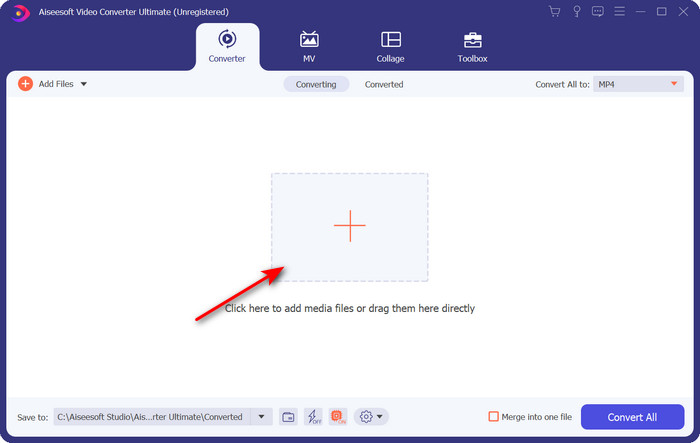
Шаг 2. Нажмите Add Files или кнопку +, чтобы добавить GIF‑файл в программу, затем нажмите Open.
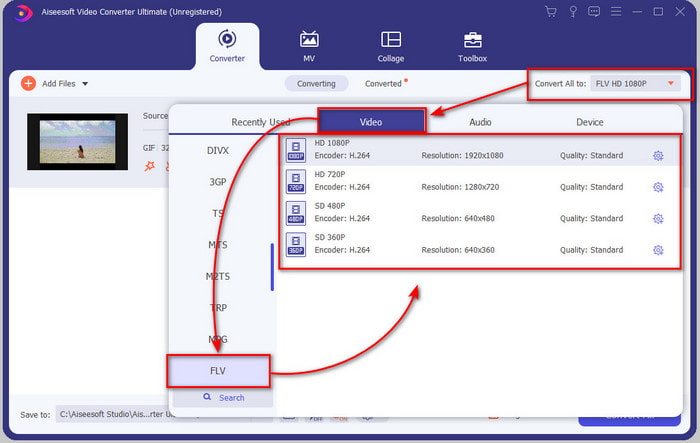
Шаг 3. В левой части интерфейса конвертера нажмите Convert All to, затем выберите FLV как конечный формат.
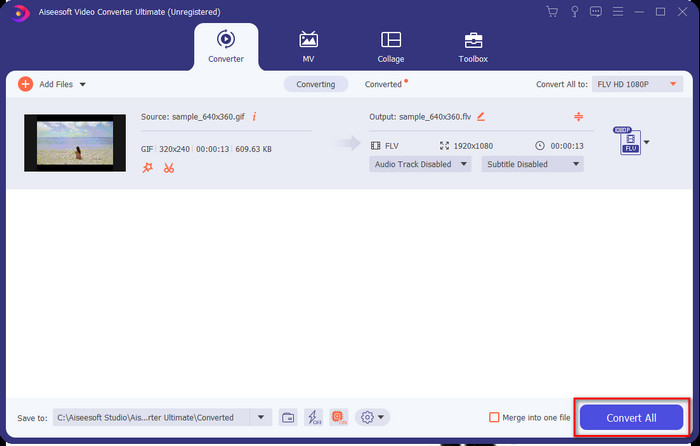
Шаг 4. Когда будете готовы конвертировать GIF в FLV, нажмите Convert All.
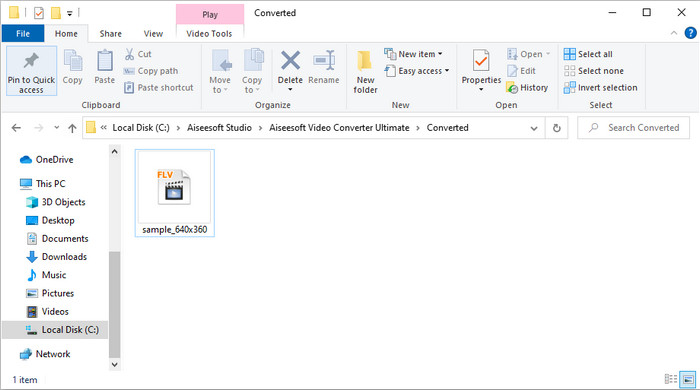
Шаг 5. На экране появится папка с уже конвертированным файлом — теперь он готов к отправке куда угодно.
Часть 2. Преобразование GIF в FLV онлайн
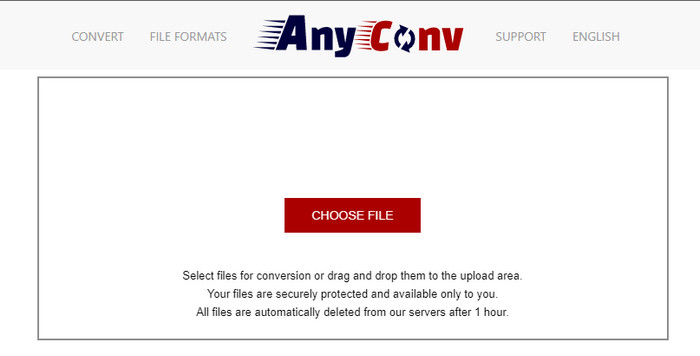
Вы можете использовать AnyConv, чтобы бесплатно конвертировать GIF в FLV онлайн; кроме того, сервис поддерживает широкий набор форматов файлов для изображений, электронных книг, документов и многого другого. Более того, вы можете пользоваться этим конвертером в любое время и в любом месте при наличии подключения к интернету. Однако здесь нельзя выполнять пакетную конвертацию, чтобы сэкономить время на обработке нескольких файлов сразу. Также вы не сможете загружать медиафайлы размером более 50 МБ, так как это не поддерживается. Если хотите узнать, как пользоваться этим онлайн‑инструментом, следуйте инструкции ниже.
Шаг 1. Откройте онлайн‑сервис в браузере, перейдя по адресу сайта.
Шаг 2. Нажмите Choose File, чтобы загрузить GIF, затем смените формат на FLV. После этого нажмите «Convert», чтобы запустить процесс конвертации.
Шаг 3. Нажмите Download .FLV, чтобы сохранить файл на свой диск.
Часть 3. Преобразование GIF в FLV на iPhone
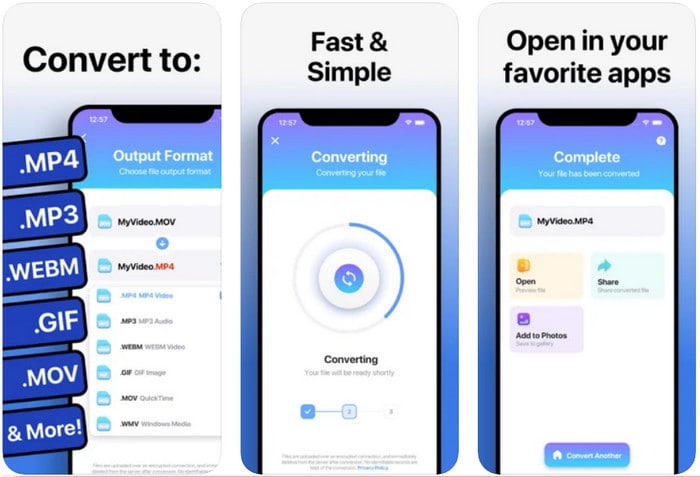
The Video Converter — это один из лучших конвертеров, который вы можете установить на своё устройство под управлением iOS и изменить GIF на FLV. Этот iOS‑конвертер получил оценку 4,2 от пользователей за свою эффективную работу. Тем не менее некоторые пользователи жалеют о покупке бессрочной лицензии, так как после покупки стали сталкиваться с частыми сбоями и ошибками. Но если вы всё же хотите попробовать, можете воспользоваться бесплатной версией, скачав приложение и следуя шагам ниже.
Шаг 1. После загрузки приложения откройте его, нажмите Photos и найдите GIF.
Шаг 2. Выпадающее меню отобразится автоматически, затем найдите формат FLV и нажмите на него.
Шаг 3. Нажмите Convert Files, чтобы запустить конвертацию.
Часть 4. Преобразование GIF в FLV на Android
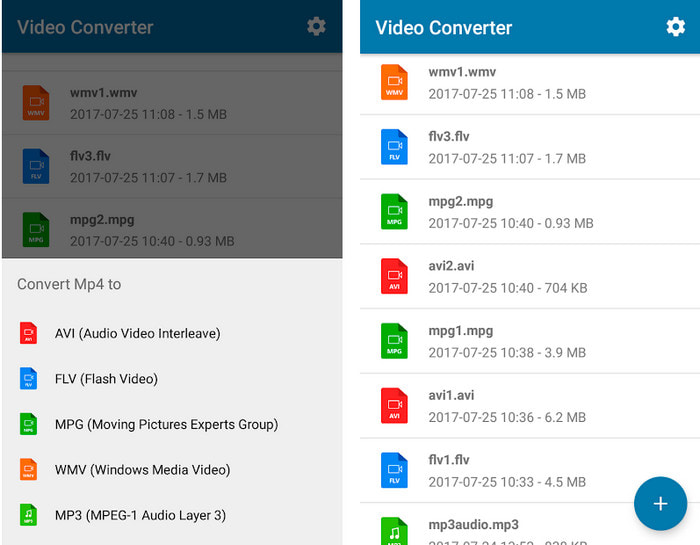
Если вы пользователь Android, вы можете воспользоваться приложением Video Converter: MP3, AVI, MPEG, GIF, FLV, WMV, MP4, чтобы быстро конвертировать GIF в FLV. Это приложение доступно в магазине Play Store на вашем телефоне, если вы хотите изменять формат файлов на новый. В отличие от ранее упомянутого инструмента, этот конвертер имеет невысокий рейтинг — всего 2,3 звезды на основе 1K отзывов. Хотя оценка довольно низкая, приложение всё равно способно преобразовать ваш файл в другой формат. Если хотите узнать, как это сделать, переходите к шагам ниже.
Шаг 1. Загрузите приложение на своё устройство Android, найдя его в Play Store.
Шаг 2. Откройте приложение, нажмите кнопку plus в разделе GIF, чтобы выбрать файл, который хотите конвертировать. Появится новый вариант — нажмите FLV (Flash Video).
Шаг 3. После конвертации найдите получившееся видео в папке вашего телефона.
Часть 5. Краткое обсуждение GIF и FLV
Формат GIF несложный для понимания, потому что мы видим и используем их почти каждый день. Этот формат содержит движущееся изображение; хотя медиафайлы анимированы, это все же не считается видеоформатом. Давайте немного углубимся в GIF; этот формат поддерживает 8 бит на пиксель для изображений с цветовой палитрой до 256 цветов в 24-битной цветовой комбинации RGB. Цветов хоть и много, но этого все равно мало, учитывая, что JPG и PNG содержат больше цветовых комбинаций. Но если вы не хотите иметь скучное неподвижное изображение, вы должны использовать GIF, потому что он маленький и анимированный.
С другой стороны, FLV — лучший формат для передачи видео- и аудиофайлов через Интернет. Рассматривая этот файл как стандартный формат видео в HTML 5, даже если вы не используете флэш-плагины для воспроизведения видео. До сих пор этот формат получил большую поддержку при обмене в Интернете по сравнению с GIF.
Чтобы продолжить, если вы хотите добавить или поделиться GIF на всех сайтах социальных сетей, необходимо сначала преобразовать файл в FLV без потери качества.
Часть 6. Часто задаваемые вопросы о преобразовании GIF в FLV
Как сделать гифку?
Хотя вы можете скачивать или создавать GIF онлайн, лучше всего сделать его самостоятельно. Если хотите узнать секрет создания персонализированных GIF, нажмите на эту ссылку и прочитайте подробности.
Как долго может воспроизводиться GIF?
Максимальная длина GIF не должна превышать 15 секунд, но если ваш GIF зациклен, ограничений по времени нет. Стандартом для каждого GIF является быстрая отправка файла и меньшая загрузка.
Могу ли я воспроизводить GIF-файлы на VLC?
Как уже было сказано, GIF — это формат изображения, а не видео. Поэтому, если вы откроете GIF‑файлы в VLC, они будут показываться как статичное изображение, а не анимация. Вот лучшие плееры для GIF, которыми вы можете воспользоваться.
Заключение
Исходя из всего вышесказанного, теперь нам гораздо проще без лишних хлопот конвертировать GIF в FLV, AVI, MP4, MOV и другие форматы. Однако, если вы хотите выполнять конвертацию максимально эффективно, вам стоит скачать FVC Video Converter Ultimate. Этот инструмент не только один из лучших для смены форматов, но и отличается впечатляющими дополнительными возможностями. Хотите узнать, какие функции доступны в этой программе? Тогда нажмите кнопку загрузки и изучите все особенности этого софта.
-
 Как лучше всего конвертировать GIF в AVI [с открытым исходным кодом и премиум]
 Хотите конвертировать GIF в формат AVI без потери качества видео? Продолжайте читать, чтобы узнать, как преобразовать файл GIF в AVI.
-
 Лучший конвертер GIF для преобразования анимированного GIF в формат MOV [2021]
 Конвертируйте ваш GIF в формат MOV без особых усилий, не влияя на качество видеофайла. С помощью шагов и различных инструментов.
-
 10 лучших конвертеров GIF в MP4 для преобразования анимированных GIF в MP4 [2021]
 Узнайте, какой конвертер лучше всего подходит для преобразования GIF в MP4. В этой статье мы поговорим о различных инструментах, которые вы можете использовать, и следите за обновлениями.
