


 Видео конвертер Ultimate
 Устройство записи экрана
 Видео ремонт
Научитесь конвертировать MTS в WMV разными способами

Часть 1. Лучший инструмент для конвертации MTS в WMV Online
Большинство из нас предпочитает не иметь дела с неудобствами, поэтому мы не хотим устанавливать программные конвертеры. Пользователи ищут онлайн‑конвертер, который мог бы преобразовывать их типы файлов. FVC Free Video Converter Online — это полностью бесплатный онлайн‑видеоконвертер. Хотя эта программа бесплатна, вам не нужно беспокоиться о качестве, потому что FVC Free Video Converter не ухудшает качество во время конверсии.
Шаг 1: Для начала нажмите на эту ссылку, и вы будете перенаправлены на сайт. Там нажмите кнопку Add Files to Convert, чтобы скачать лаунчер; затем вам нужно будет загрузить файлы, которые вы хотите конвертировать.
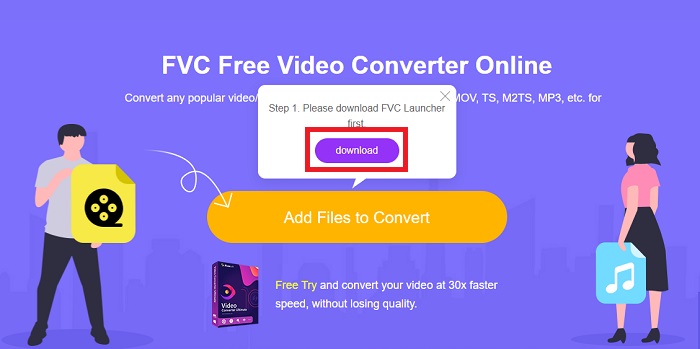
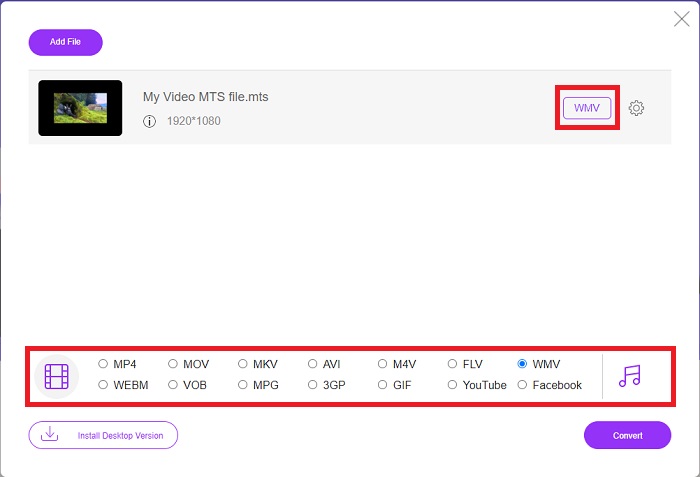
Шаг 2: После этого вы можете снова нажать эту кнопку, чтобы загрузить видеофайл. Внизу вы увидите все доступные форматы и выберите среди них WMV.
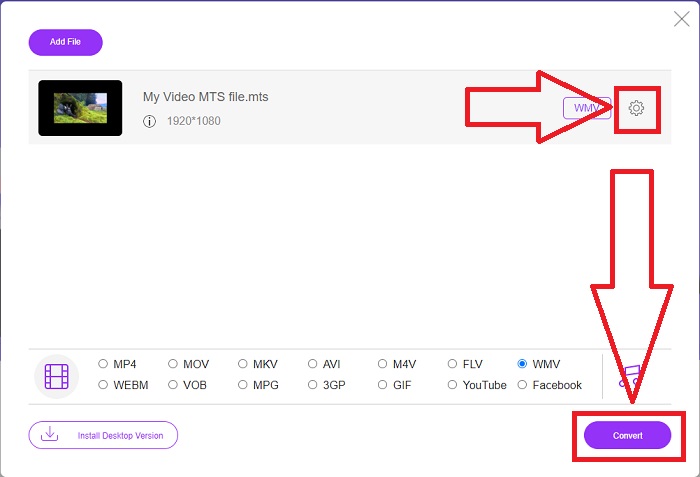
Шаг 3: Дополнительные параметры по‑прежнему доступны. Нажмите на значок шестерёнки, и откроется список всех настроек, которые вы можете изменить для своего видео. Как только вы выберете формат, нажмите OK, чтобы сохранить изменения, и затем нажмите Convert, чтобы наконец запустить конвертацию.
Часть 2. Как конвертировать MTS в WMV с помощью Best Converter Offline
При выборе конвертера мы должны учитывать простоту, так как нам не нужен дорогой и сложный в использовании инструмент. Мы рады представить Video Converter Ultimate и его интерфейс. Этот конвертер обладает максимально простым интерфейсом, и благодаря этой простоте им легче всего пользоваться. Кроме того, вы можете быстро добавлять свои файлы и просматривать поддерживаемые типы. Здесь есть и другие функции, на которые вы можете положиться, чтобы сделать процесс редактирования более удобным. Если вы хотите опробовать всё это самостоятельно, выполните следующие простые шаги:
Шаг 1: Сначала вам нужно установить саму программу. Для этого скачайте .exe‑файл, нажав кнопку Free Download ниже для Windows или Mac. Дождитесь окончания загрузки и откройте файл, чтобы начать установку. Нажмите Start Now и запустите программу.
Бесплатная загрузкаДля Windows 7 или более поздних версийБезопасная загрузка
Бесплатная загрузкаДля MacOS 10.7 или более поздних версийБезопасная загрузка
Шаг 2: После запуска появится интерфейс с кнопкой «+» по центру. Нажмите на неё, чтобы загрузить MTS‑видеофайл, который вы хотите конвертировать, или просто перетащите файл в окно для быстрого добавления.
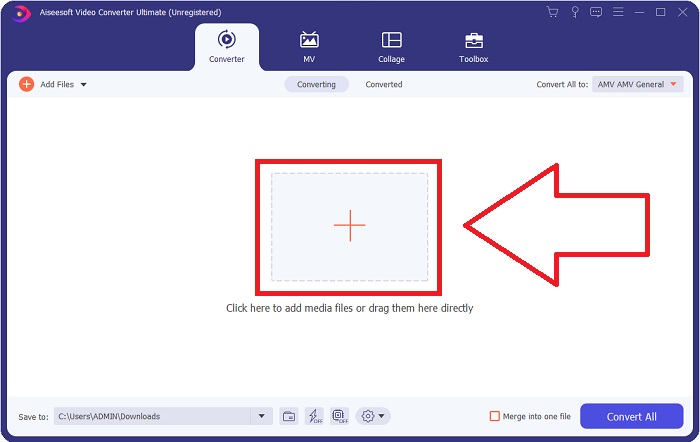
Шаг 3: Если процесс прошёл успешно и файл появился в интерфейсе, справа от него вы увидите текущий формат вашего видео. Нажмите на стрелку‑выпадающий список, и отобразятся все доступные форматы. Пролистайте вниз и выберите WMV или просто введите его в строке поиска. Кроме того, на правой панели вкладки вы можете выбрать нужное качество.
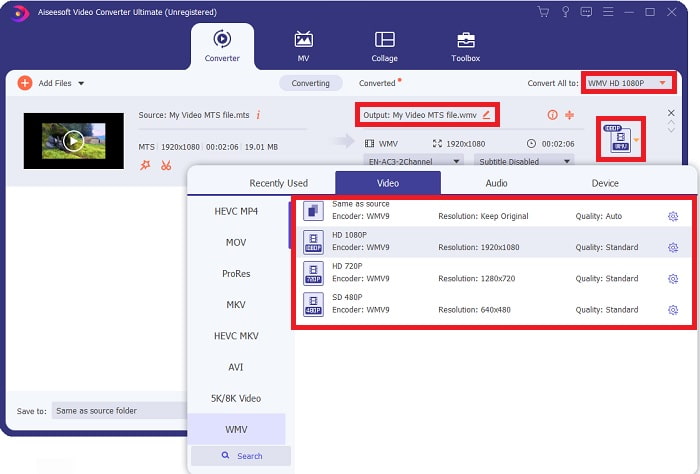
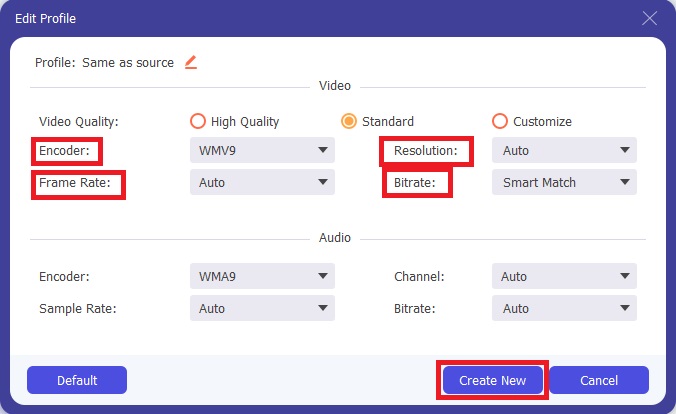
Шаг 4: Для дополнительных параметров нажмите на значок шестерёнки справа от выбранного качества видео. Там вы сможете дополнительно отредактировать видео — изменить разрешение, частоту кадров, битрейт и многое другое. По окончании настроек нажмите кнопку Create New.
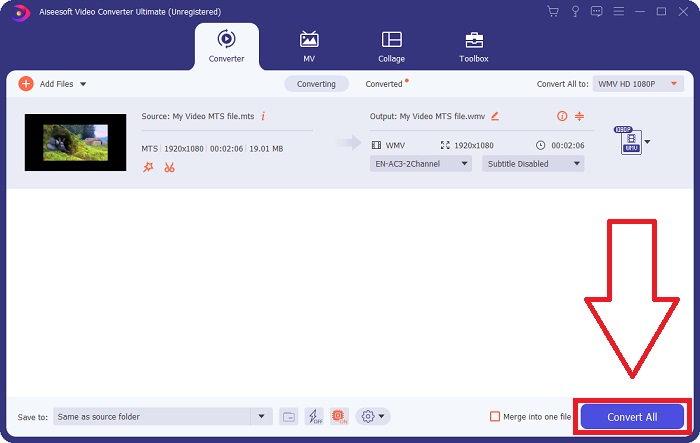
Шаг 5: Когда все необходимые настройки будут выполнены, нажмите кнопку Convert All в правом нижнем углу, чтобы запустить конвертацию, и дождитесь её завершения.
Часть 3. Расширенные знания о МТС VS. WMV
| Расширение файла | .мтс | .wmv |
| Описание | Advanced Video Coding High Definition (AVCHD) — это формат видео, который использует расширение имени файла MTS в качестве имени файла. Некоторые бренды видеокамер, такие как JVC, Sony, Canon и Sanyo, используют видеоформат HD MPEG и сохраняют свои файлы с расширением имени файла .mts. | Как часть платформы Microsoft Windows Media, WMV (Windows Media Video) включает в себя различные видеокодеки и форматы кодирования. Вначале его целью было конкурировать с форматом RM в потоковых онлайн-приложениях. Используя технологию WMV, видео можно сохранять, сжимать и доставлять на Blu-ray/DVD. |
| Ассоциированные программы | ◆ Roxio Creator NXT Pro 7 ◆ Блендер ◆ VLC Media Player ◆ Apple Final Cut Pro X | ◆ VLC Media Player ◆ MPlayer ◆ Media Player Classic ◆ Проигрыватель Windows Media |
| Разработано | Сони/Панасоник | Microsoft |
| Тип файла | Видео/mp2t | Видео/x-ms-asf |
Часть 4. Часто задаваемые вопросы о преобразовании MTS в WMV
Какой плеер может воспроизвести файл МТС?
Если у вас есть видео в формате MTS, вы можете редактировать его с помощью программного обеспечения, входящего в комплект HD‑камер Sony и Panasonic, или воспользоваться одной из перечисленных ниже программ: Blender — для работы с несколькими элементами (кроссплатформенный); MAGIX Vegas — программный пакет для создания различных видов визуальных эффектов (Windows); CyberLink PowerDirector — программа для видеомонтажа (Windows, Mac, Android).
Есть ли в файлах MTS звук?
Несколько факторов могут вызвать потерю звука в файлах MTS. Наиболее распространенным является то, что процесс согласования не может быть завершен, что приводит к отсутствию звука или вырезанию звука, а также к невозможности скопировать всю структуру папок (а не только медиафайлы) с карты памяти.
Какая польза от WMV?
Компания Microsoft представила формат файлов WMV как семейство видеокодеков для Windows Media Player. WMV — это сокращение от 'Windows Media Video', сжатого формата видеоконтейнера, разработанного для работы в среде Windows Media. Для продажи видеоконтента онлайн или на дисках HD DVD и Blu‑ray файлы WMV являются одним из наиболее подходящих форматов. Чтобы воспроизводить файлы WMV, нажмите здесь и узнайте о некоторых полезных WMV‑проигрывателях.
Заключение
Все конвертеры, указанные выше, являются надежными и рекомендуемыми инструментами для конвертации MTS в WMV. Video Converter Ultimate и Free Video Converter Ultimate — два лучших конвертера, несравнимых с другими онлайн-инструментами и программным обеспечением. Он предлагает различные виды рекомендуемых инструментов и поддерживает множество форматов видео.
-
 [Бесплатно и онлайн] 5 способов конвертировать M2TS в MP4
 Хотите преобразовать видео с видеокамеры HD в обычный MP4? Вот 5 простых и бесплатных способов изменить файл M2TS на MP4 в Windows и Mac.
-
 Как конвертировать M2TS в MKV бесплатно и онлайн
 Хотите конвертировать M2TS в MKV, сохранив исходное качество? В этом посте показаны бесплатные онлайн-методы для преобразования M2TS в MKV без потерь.
-
 [2021] 6 лучших бесплатных онлайн-способов конвертировать M2TS в MP3
 Можно ли преобразовать файл M2TS в MP3? В этом посте мы перечислили 6 лучших бесплатных онлайн-способов конвертировать M2TS в MP3, AAC, AIFF и другие аудиоформаты.
