


 Видео конвертер Ultimate
 Устройство записи экрана
 Видео ремонт
Как профессионально конвертировать 3GP в WMV [онлайн и оффлайн]
3GP — это популярный мобильный формат, который передаёт данные через мобильные телефоны, не расходуя много трафика и при этом экономя место. Кроме того, этот формат стандартизирован для записи видео на телефонах третьего поколения, но, будьте уверены, такое видео можно воспроизводить и на устройствах второго и четвёртого поколения. Хотя на телефонах он работает отлично, фактически он предназначен только для смартфонов. Поэтому неудивительно, что файл .3gp может не очень хорошо показывать себя на настольном компьютере. Тем не менее вы можете научиться конвертировать 3GP в формат, который гораздо лучше поддерживается на ПК, например WMV. Хотите узнать, как конвертировать 3GP в WMV на профессиональном уровне? В таком случае давайте сразу перейдём к делу и не будем тратить время зря.

Часть 1. Что такое 3GP
Это формат на основе ISO, в котором хранятся медиапотоки, такие как H.263 или H.264 для видео и AMR или AAC для аудио, идеально подходящие для сжатия с потерями. Более того, этот формат 3-го поколения удобен для хранения данных на переносных дисках наших телефонов, даже на IOS. Несмотря на то, что 3GP все еще доступен, эффективность этого формата начала падать, и по этой причине 3GPP вышел на сцену и стал его улучшенной версией.
Часть 2. Что такое WMV
Это собственный мультимедийный формат, разработанный Windows для потоковой передачи видео в Интернете. В отличие от любого другого формата, такого как 3GP, WMV использует многократный кодировщик, чтобы сделать файл еще более сжатым. Из-за возможности использовать множество кодировщиков, более эффективно обмениваться видео в этом формате. Однако у использования большого количества кодировщиков есть обратная сторона, особенно при редактировании и воспроизведении, поскольку не все медиаплееры и редакторы поддерживают широкий спектр кодеков. Хотя формат использует компрессор, качество мультимедиа не будет изменено или снижено.
Часть 3. Профессиональный способ конвертировать 3GP в WMV с помощью Video Converter Ultimate
Хотите получить профессиональный конвертер для бесплатного скачивания 3GP в WMV на свою платформу? FVC Video Converter Ultimate предлагает экспертный процесс конвертации, не требующий больших усилий. Этот конвертер поднимает преобразование на новый уровень, который не могут предложить другие онлайн‑ или офлайн‑конвертеры. Более того, этот мощный инструмент поддерживает более 200 медиаформатов на выбор, в отличие от большинства аналогов.
Пока у вас есть этот конвертер, всегда ожидайте профессионального результата в конвертированном медиаформате. Хотите использовать профессиональный конвертер для преобразования файлов 3GP? Если это так, вы можете выполнить следующие шаги, чтобы успешно преобразовать с помощью окончательного инструмента.
Шаги по конвертации файла 3GP в WMV с помощью FVC Video Converter Ultimate
Шаг 1. Ниже представлены кнопки загрузки; выберите ту, что соответствует вашей платформе. Например, нажмите кнопку загрузки для Windows, если вы пользователь Windows. Если вы пользуетесь Mac, нажмите вторую. После завершения загрузки установите конвертер, затем запустите его, нажав Start Now. И что ещё важнее, после запуска вам нужно немного познакомиться с интерфейсом, прежде чем переходить к следующим шагам.
Бесплатная загрузкаДля Windows 7 или более поздних версийБезопасная загрузка
Бесплатная загрузкаДля MacOS 10.7 или более поздних версийБезопасная загрузка
Шаг 2. В левой верхней части интерфейса вы увидите кнопку Add Files; нажмите её, и откроется папка. Найдите на диске компьютера файл .3gp и загрузите его, нажав Open.
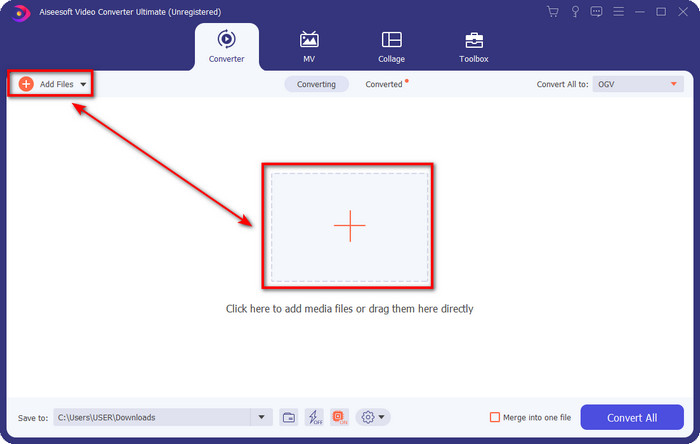
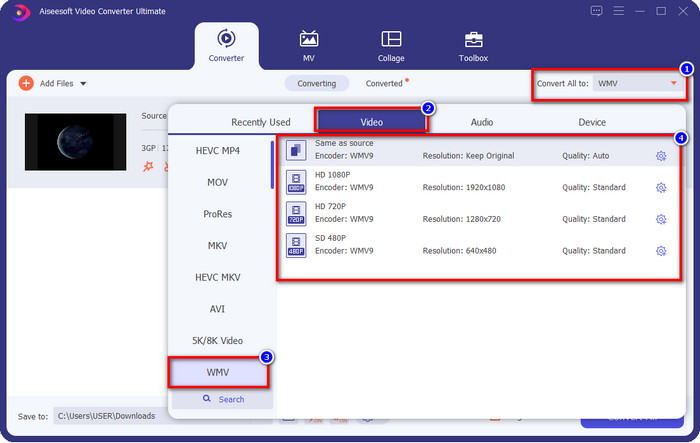
Шаг 3. Нажмите Convert All to, чтобы выбрать нужный вам формат WMV, или просто выберите WMV как конечный выходной формат.
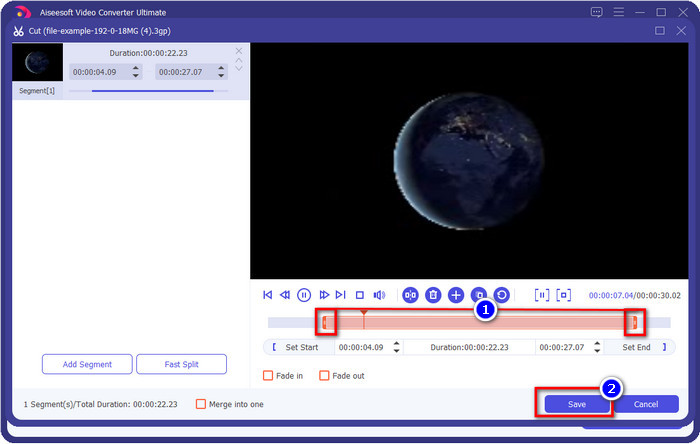
Необязательно. Прежде чем мы конвертируем файл 3GP в WMV, давайте вкратце рассмотрим другие функции этого инструмента. Нужно обрезать видео? Не проблема. Нажмите кнопку с ножницами, перетащите ползунок с обеих сторон так, как вам нужно, и нажмите Save, чтобы применить сделанную обрезку.
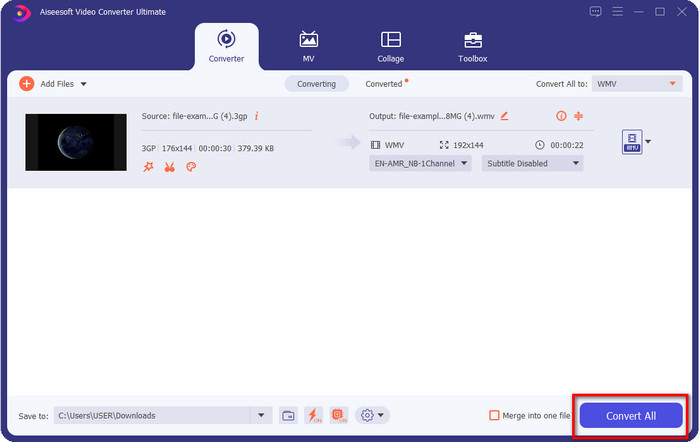
Шаг 4. Начните процесс конвертации, нажав кнопку Convert All. Конвертирование завершится за короткое время, и вуаля — файл WMV будет сохранён на ваш диск.
Часть 4. Онлайн-способ конвертировать MXF в WMV с помощью бесплатного онлайн-конвертера видео
Ещё один продукт FVC, но уже в онлайн‑формате, — это FVC Free Video Converter Online. Этот профессиональный онлайн‑конвертер предлагает более аккуратный и чистый интерфейс по сравнению с другими веб‑конвертерами. Кроме того, вам не нужно загружать конвертер на устройство, чтобы им пользоваться: просто откройте браузер и запустите конвертер. Хотя веб‑версия очень удобна, она не может обеспечить весь тот функционал, который даёт настольный инструмент. Однако, если вы хотите конвертировать 3GP в WMV онлайн, это подходящее решение — просто повторите шаги ниже, чтобы воспользоваться этим сервисом.
Шаги по бесплатной онлайн‑конвертации 3GP в WMV с помощью FVC Free Video Converter Online
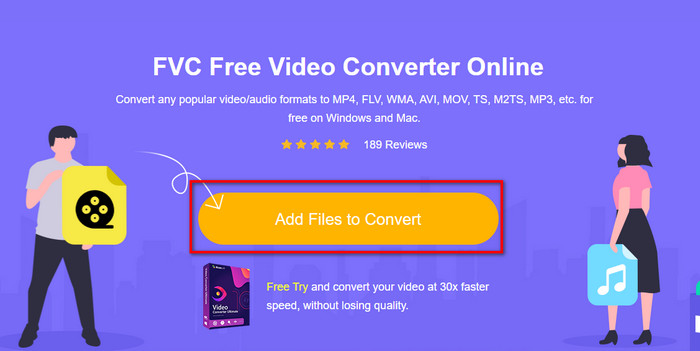
Шаг 1. Нажмите на эту ссылку, чтобы открыть онлайн‑конвертер.
Шаг 2. После перехода по ссылке нажмите Add Files to Convert, чтобы запустить конвертер. Если вы используете его впервые, вам нужно будет установить лаунчер, нажав Add Files to Convert, но он гораздо меньше по размеру, чем полнофункциональный настольный инструмент. Найдите файл 3gp, который хотите конвертировать, и нажмите Open.
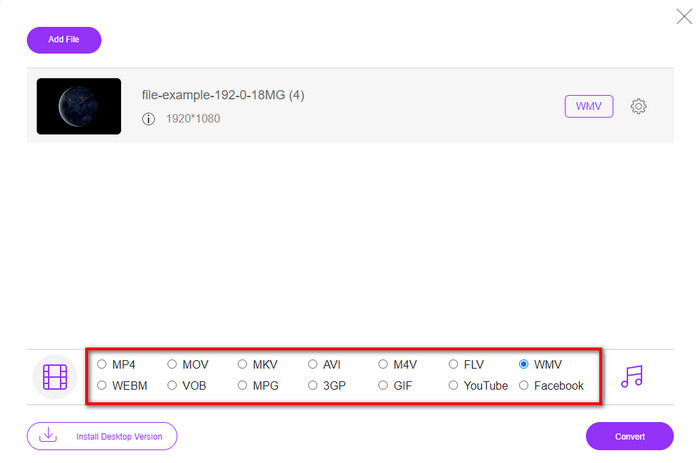
Шаг 3. После загрузки файла 3GP можно выбрать один из представленных ниже форматов или нажать WMV.
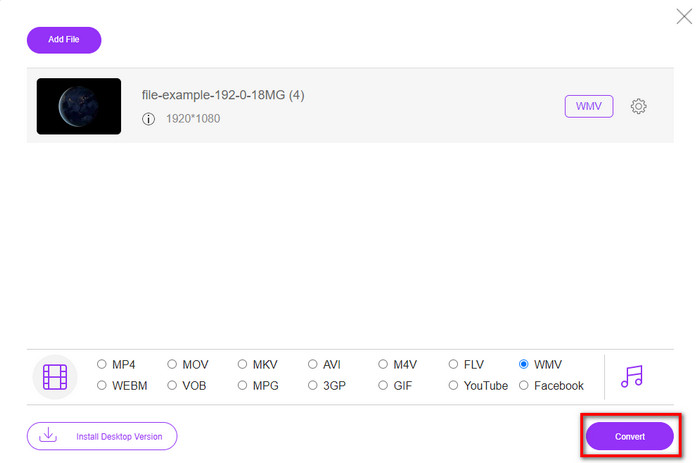
Шаг 4. Уже выбрали формат? Тогда нажмите Convert, чтобы начать процесс конвертации файла.
Часть 5. Часто задаваемые вопросы о преобразовании 3GP в WMV
Стоит ли использовать онлайн-конвертер 3GP в WMV?
Если вы не хотите загружать конвертер на свое устройство, лучше всего использовать онлайн-конвертер. Но помните, что не все онлайн- или офлайн-конвертеры безопасны в использовании. В большинстве случаев на них есть вирусы, если вы их устанавливаете или не выполняете задачу эффективно. Но если вы хотите быть уверены в своем преобразовании, мы рекомендуем использовать продукты конвертера FVC, поскольку они не содержат вредоносного ПО 101% и гарантируют успех вашего процесса преобразования.
Можно ли объединить несколько видео 3GP?
Да, с помощью инструментов слияния FVC вы можете объединять несколько роликов в формате 3GP. Поэтому, если вы хотите узнать, как объединить несколько ваших видео 3GP, обязательно прочитайте эту статью, чтобы узнать, как это сделать.
У видео 3GP хорошее качество?
3GP имеет хорошее качество, но не может сохранять качество высокой четкости, поэтому ожидайте, что качество видео 3GP будет низким.
Заключение
В заключение: конвертеры, перечисленные в этой статье, были отобраны выборочно, но с учётом определённого стандарта профессионального результата. Кроме того, мы сами воспользовались этими инструментами, чтобы представить и описать только проверенные факты об их возможностях. Более того, если вы не хотите скачивать конвертер на свой компьютер, чтобы экономить место, и при этом стремитесь к профессиональному результату, мы настоятельно рекомендуем использовать FVC Free Video Converter Online. Но если вы хотите перекодировать свои 3GP‑файлы максимально профессионально, мы настойчиво советуем выбрать FVC Video Converter Ultimate. Всё ещё сомневаетесь в наших словах? Тогда обязательно попробуйте сами, чтобы оценить экспертное качество конвертации, которое предлагает этот инструмент, и научиться конвертировать 3GP в WMV.
-
 Топ-4 самых эффективных способа конвертации формата 3GP в AVI [2025]
 Могу ли я конвертировать мои файлы 3GP в AVI? Что ж, вы можете легко преобразовать его, если попробуете эти доступные инструменты, поскольку мы собрали все возможные решения вашей проблемы преобразования 3GP в AVI.
-
 Лучший конвертер 3GP в FLV для использования при конвертации 3GP в FLV [2025]
 Вы когда-нибудь пытались конвертировать 3GP в FLV, но не знаете, какой конвертер вы будете использовать? Прочтите эту статью, чтобы узнать все подробности о преобразовании 3GP в FLV.
-
 2 лучших способа конвертации неподдерживаемого 3GP в DivX [2025]
 Многие пользователи спрашивают, как преобразовать 3GP в DivX. Итак, теперь мы предлагаем статью, которая поможет вам без проблем конвертировать файл .3gp.
