


 Видео конвертер Ultimate
 Устройство записи экрана
 Видео ремонт
Узнайте, как конвертировать MPG в WMV с помощью 2 лучших конвертеров
If we compare MPG files with the other formats, they are outdated. Furthermore, many users ask how to convert MPG to WMV for free without losing the quality of the video. So now, let's not wait anymore longer, and let's discuss the tools you can use to convert your .mpg files and more details about the two formats. Keep the ball rolling and the pace as we proceed to the converters you can use.

Часть 1. Преобразование MPG в WMV бесплатно онлайн
If you wish to convert MPG to WMV online, you must consider boundaries, especially the file size. Since MPG files are big depending on the bitrate, so you will need an online converter that doesn't limit the file size. FVC Free Video Converter Online doesn't limit the size you can upload and the times you convert. Although the tool has no limitations, it still lacks supported formats you can choose from. However, suppose you don't want to spend a penny on your conversion. In that case, you must select this converter because this is the only online converter that provides excellence in your conversion needs. Want to know how to use this online MPG converter? If so, continue reading the succeeding details below and learn how to use this online converter.
Step 1. First, you can click this link, and a new tab will automatically open.
Step 2. Tick the Add Files to Convert button to allow the tool to run into your system. After that, you can choose the .mpg file you want to convert on the computer folder that will pop up on your screen. Once you've already selected the file, click Open to upload it.
Скачайте версию для ПК, чтобы конвертировать файлы пакетно.
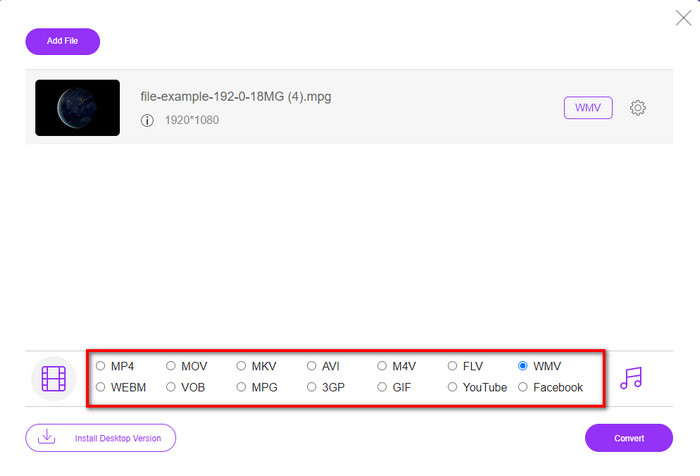
Step 3. Under there is a setlist of the format you can choose on; click MKV to proceed to the last step.
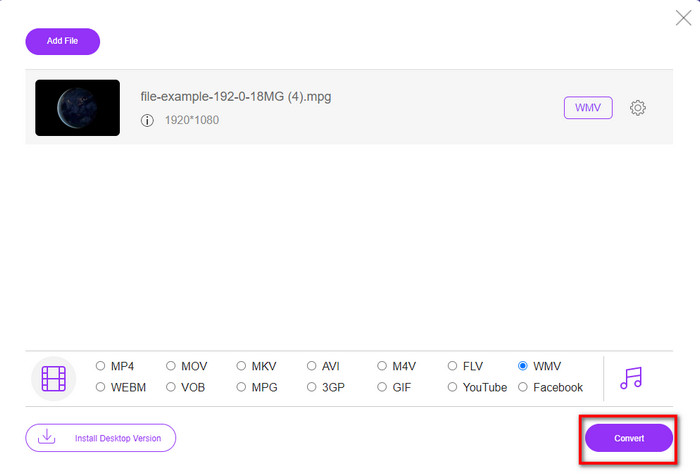
Step 4. Start converting your file by clicking the Convert button below.
Часть 2. Преобразование MPG в WMV в Windows 11/10 без потери качества [рекомендуется]
Still not satisfied with the converter online? What if we tell you that you can use an MPG to WMV converter free download instead of much faster with other functions. FVC Video Converter Ultimate will help you with many problems regarding your videos, especially converting the format. Although the tool can convert, there are many areas we need to explore in this tool. Want to know more about these? Then read the key features available below.

FVC Видеоконвертер Ultimate
4 255 366+ загрузок- Он поддерживает преобразование файлов MPG, WMV, AVI, MP4, MOV, MKV, FLV, M4V и т. д. в более чем 200 форматов.
- Он прост в использовании и имеет очень интуитивно понятный интерфейс, который нравится многим пользователям.
- Отлично подходит для редактирования вашего видео, такого как вырезание, объединение, обрезка, создание GIF-файлов и многое другое.
- Сверхбыстрое преобразование и аппаратное ускорение доступны для молниеносного процесса преобразования.
- Доступно на всех платформах, таких как Windows и macOS.
- Преобразование нескольких файлов MPG или WMV за один раз с поддержкой пакетного преобразования.
Бесплатная загрузкаДля Windows 7 или более поздних версийБезопасная загрузка
Бесплатная загрузкаДля MacOS 10.7 или более поздних версийБезопасная загрузка
Вы можете иметь все эти функции, если у вас есть этот окончательный инструмент. Но перед этим давайте прочитаем полный объем и шаги по использованию этого для преобразования MPG в WMV.
Step 1. You can click the download button below and select which platform you are using. After downloading, install the converter next, and run the tool.
Бесплатная загрузкаДля Windows 7 или более поздних версийБезопасная загрузка
Бесплатная загрузкаДля MacOS 10.7 или более поздних версийБезопасная загрузка
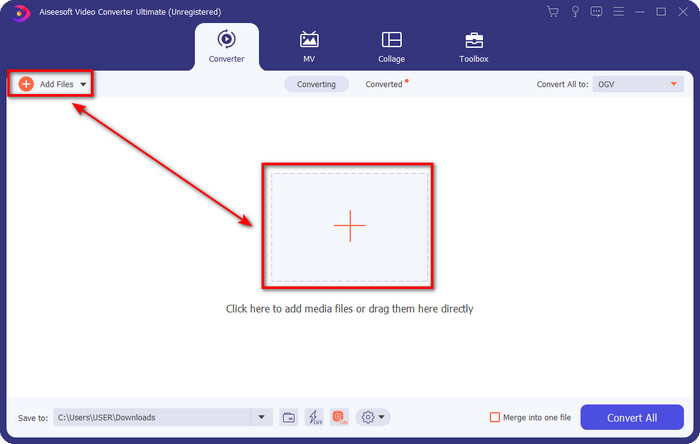
Step 2. To upload the MPG file, you can click the Add Files or the + button in the middle. Instantly a folder will show, select the file, and press Open to proceed.
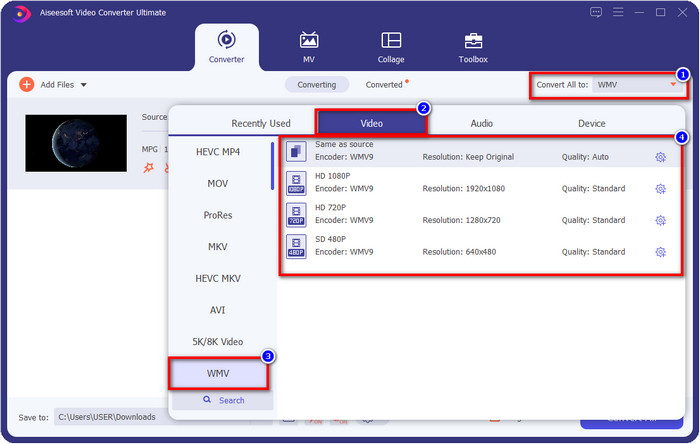
Step 3. Before you convert the file, you will need to select the format in the setlist by clicking the Convert All to button. Select WMV format, then choose the encoder you want to have.
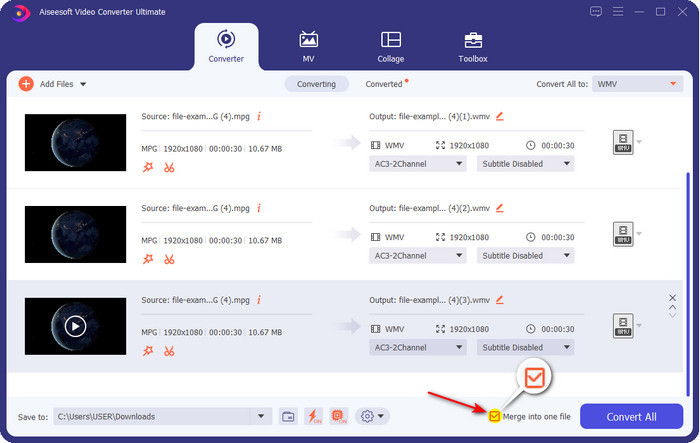
Optional. Need to merge different sets of MPG files? In that case, you can tick the box to join the final output.
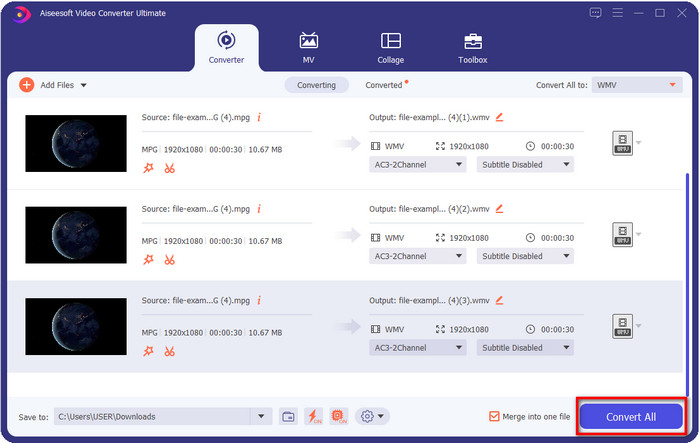
Step 4. Hit Convert All to start the converting process. After converting MPG to WMV, a computer folder will show on your screen.
Часть 3. В чем разница между MPG и WMV
MPG and WMV are both media containers for audio and video. Even though these formats mentioned can store still there are many differences between the two formats. Do you want to know more? The following details will discuss the MPG and WMV more and what you need to reconsider before choosing a free online or offline MPG to WMV converter.
MPG is known for being one of the first formats developed in the early years. This format uses two types of encoder that is under MPEG, and that is the MPEG-1 and the MPEG-2. It uses two compressors to suffice the needs that MPEG-1 can't do, which means the MPEG-2 is a backup for the MPG. Furthermore, it is said to be one of the high-quality videos before, but many formats have become better; a great example is the WMV. To play your MPG files, you can read on the best MPG/MPEG players.
WMV также может использовать два компрессора Windows и многие файлы в один файл. Он известен всем пользователям Windows, потому что это первоклассный формат, доступный в Windows. Хотя он использует два или более компрессора, он все равно никогда не портит качество после использования кодека. Кроме того, этот формат более совместим со всеми рабочими столами Windows и отлично подходит для потоковой передачи видео.
MPG против WMV
Созданный Группой экспертов по движущимся изображениям (MPEG), MPG является распространенным форматом цифрового видео для хранения информации о видео, аудио и метаданных. Это весьма полезно при создании фильмов для публикации в Интернете. Эти файлы в формате MPG обычно содержат сжатие видео/аудио MPEG-1 или MPEG-2.
Созданный Microsoft, WMV был одним из самых распространенных видеоформатов еще в 2000-х годах. Его можно просмотреть в Интернете и воспроизвести с помощью различных медиаплееров в Windows. И это также формат видеофайла по умолчанию для проигрывателя Windows Media. Но в последнее время его захватили другие форматы.
Часть 4. Часто задаваемые вопросы о преобразовании MPG в WMV
Как конвертировать MPG в WMV с помощью проигрывателя Windows Media?
First, you can't convert format on Windows Media Player, but you can rip the CD and change the format if you want to save it into your desktop. To begin with, open the Windows Media Player on your PC, click Organize, then Options. Under it, click Rip Music, choose the format by clicking the dropdown button, and press OK. Now you can insert the CD, and it will automatically rip the file from the CD.
Где я могу посмотреть свой видеофайл MPG?
You can use the native media player on Windows to play the .mpg file, which is the Windows Media Player. But if you want a much better option, click and read this article to know more about the possible MPG/MPEG player available on all platforms.
Как конвертировать MPG в WMV в Windows Movie Maker?
Although the Windows Movie Maker is for editing, you can change the format here. Still, it is not the typical converting process you will expect like the other converters online and offline. Moreover, this editor is only available on Windows 10 and less, so if you have the latest version of Windows, you can't download this editor. To convert your MPG video to WMV format, follow the succeeding steps. Open the editor and drag the file to the blank interface. Click File, then Save Movie, choose the device settings you want, and wait for the process to end. Thus, all of the files you render will save as .wmv.
Заключение
All of the tools presented above are assured to help you change MPG to WMV as we try them ourselves to make sure that all of the details in this article will only state facts. Suppose you don't want to download a converter on your device to save some space, then we recommend using the FVC Free Video Converter Online. However, suppose you want to add a professional touch that the online converter can't provide. In that case, FVC Video Converter Ultimate is the perfect tool for the job. Still, were you not convinced with the ultimate tool? In that case, you need to download the software on your desktop to use and have the ultimate experience in converting.
-
 [2022] Горячий выбор конвертера MPG в AVI, который поможет вам конвертировать MPG в AVI
 Вы когда-нибудь задумывались о преобразовании вашего MPG в видеофайл AVI, чтобы просто воспроизвести его на своем видеоплеере? Вот лучшая статья, в которой рассказывается о проблеме выше, которую вы можете найти.
-
 3 простых способа конвертировать MPG в MOV на вашем Mac / Windows / Online
 Хотите преобразовать файлы MPG, а затем перенести их на iOS, iPod, iPad или Mac? Эта статья поможет разобраться, как конвертировать MPG в MOV с помощью шагов.
-
 Как конвертировать MPG в FLV без потери качества [проверено]
 Вы должны смотреть свой любимый фильм на этом медиаплеере, но он не поддерживает MPG. Попробуйте преобразовать файл MPG в FLV с помощью этих конвертеров, которые описаны в этой статье.

