


 Видео конвертер Ultimate
 Устройство записи экрана
 Видео ремонт
 Безопасная загрузка
Как эффективно удалить водяной знак из исходного графика на графике
Возможно, вам потребуется использовать Origin Graph, чтобы создать шаблон для математических или научных данных, которые слишком сложно описать словами. Это программное обеспечение уже помогло студентам, исследователям, преподавателям, бизнесменам и другим пользователям, которым нужно построить собственный график. Благодаря набору готовых шаблонов вы можете создать визуально привлекательный график, который привлечёт внимание зрителей. Проблема, с которой вы, вероятнее всего, столкнётесь при использовании бесплатной версии, заключается в том, что на итоговое изображение накладывается текстовый водяной знак. Трудно справиться с этим водяным знаком? Больше не волнуйтесь! Мы поможем вам. Здесь мы представим полезные советы по удалению водяного знака из Origin Graph, а затем по его использованию в ваших документах Word или презентациях PowerPoint.

Часть 1. Как удалить водяной знак из Origin Graph с помощью онлайн-средства для удаления водяных знаков с изображений
FVC Free Watermark Remover Online — это первоклассный онлайн‑инструмент для удаления текстовых водяных знаков, которым вы можете воспользоваться, чтобы убрать водяной знак Origin Graph. Этот инструмент максимально эффективно удаляет любые объекты с ваших изображений, чтобы после удаления водяного знака они выглядели ещё более профессионально. Можем заверить, что это специализированное средство для удаления водяных знаков, на которое вы можете рассчитывать, когда сталкиваетесь с подобной задачей. Задаётесь вопросом, просто ли им пользоваться? Больше не спрашивайте! Ниже мы привели шаги, которым вы можете следовать, чтобы избавиться от текстового водяного знака на изображении, добавленного Origin Graph.
Шаг 1. Нажмите эту ссылку, чтобы открыть онлайн‑сервис для удаления водяных знаков с изображений; в новом окне браузера сразу откроется вкладка с доступом к инструменту.
Шаг 2. Нажмите Upload Image, чтобы добавить сюда фотографию с водяным знаком, найдите нужный файл в папке и нажмите Open, чтобы успешно загрузить его.
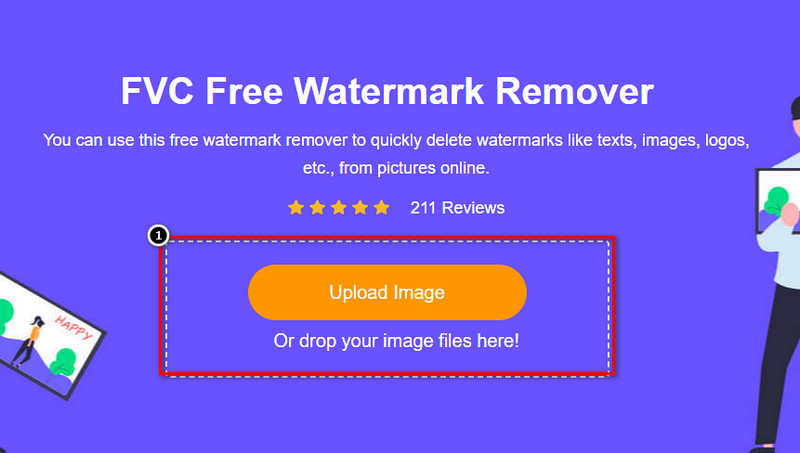
Шаг 3. Вы можете использовать три инструмента для выделения водяного знака; хотя они работают по‑разному, их эффективность одинакова. Выберите один из инструментов и выделите участок изображения, на котором находится водяной знак.
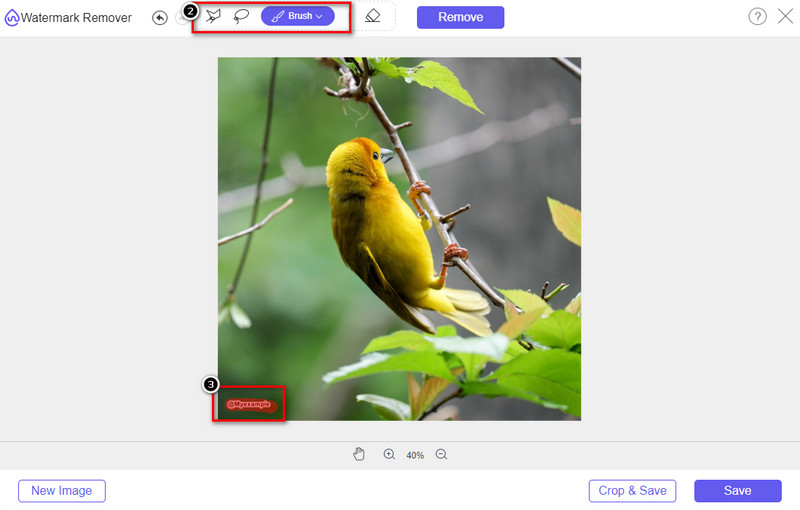
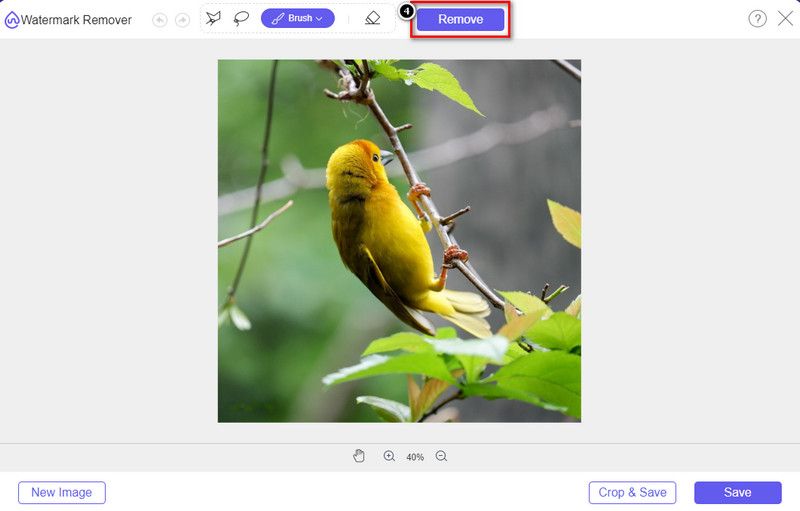
Шаг 4. Обязательно нажмите значок Remove после того, как выделите водяной знак выбранным инструментом. Этот шаг важен, чтобы при экспорте изображения вы получили его уже без водяного знака.
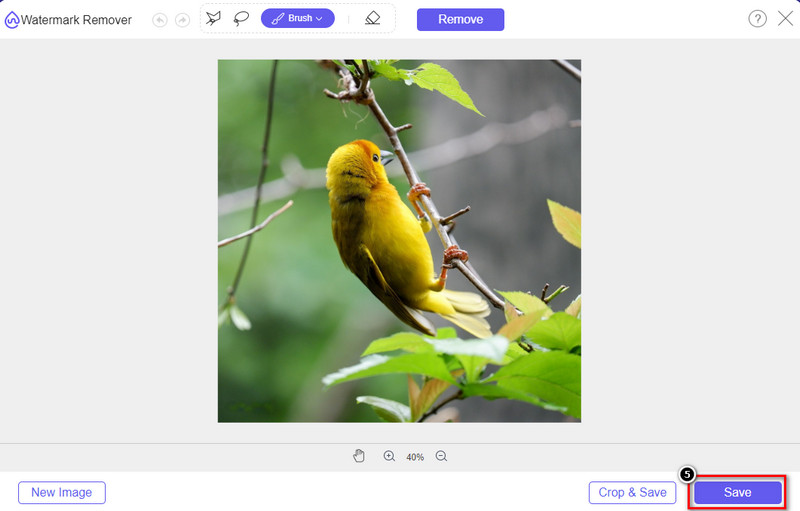
Шаг 5. Чтобы запустить процесс экспорта, нажмите кнопку Save. Дождитесь завершения обработки — после этого вы сможете просмотреть изображение без видимого водяного знака Origin Graph на выбранной области.
Плюсы
- Бесплатное веб-средство для удаления водяных знаков с изображений, к которому вы можете получить доступ.
- Он эффективно работает над удалением водяного знака с поддержкой технологии AI.
- Он поддерживает широкий спектр форматов изображений, которые могут быть на вашем локальном диске.
- На экспортированные изображения водяной знак не добавляется.
Минусы
- Для работы необходимо подключение к Интернету.
- Его внимание сосредоточено на удалении водяного знака и ни на чем другом.
Часть 2. Как скопировать графики из Origin в Word или PowerPoint без водяного знака
В этой части статьи мы дадим вам процедуру, которую вам нужно знать, чтобы добавить график, который вы создали в Origin Graph, без водяного знака. Следуйте ему соответственно, чтобы успешно добавить график, который вы делаете в Microsoft Word и PowerPoint, без водяных знаков.
Вам нужно будет освободить не менее 1,9 ГБ из-за огромного размера файла. В файле размером 1,9 ГБ вы можете получить необходимую помощь, но если вам не нужна помощь, вы можете загрузить ее версию размером 652 МБ через .zip или .exe.
Шаги о том, как создать график на исходном графике без водяного знака:
Шаг 1. Сначала скачайте Origin Graph на вашу операционную систему с его официального сайта. Откройте программу, чтобы начать создавать нужный вам график.
Шаг 2. После запуска программы добавьте необходимые значения в таблицу. Здесь вы можете добавить больше переменных и соответствующее количество графиков.
Дополнительно: Вы можете нажать Plot, чтобы просмотреть другие доступные типы графиков, такие как Basic 2D, Bar, Statistical и другие.
Шаг 3. Нажмите File, затем Save, чтобы экспортировать созданный вами график.
Шаг 4. Вы можете следовать шагам, приведённым в Части 1, и воспользоваться руководством по удалению водяного знака из Origin Graph с помощью FVC Free Watermark Remover Online.
Как использовать график в Word без водяных знаков:
Шаг 1. Откройте приложение Word на вашем компьютере и нажмите «Пустой документ». Если нужный документ Word уже создан, откройте этот файл.
Шаг 2. Перейдите на вкладку Insert, затем нажмите Pictures. Найдите файл с графиком на локальном диске, щёлкните по нему один раз и нажмите Open, чтобы загрузить его в Word.
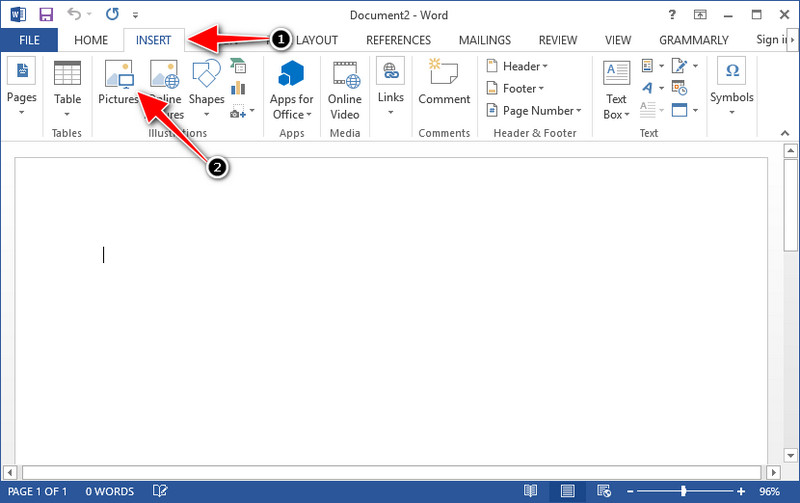
Шаг 3. Изображение автоматически появится в открытом или созданном документе Word; теперь вы можете разместить график, удерживая его и перетаскивая по странице.
Как использовать график в Powerpoint без водяных знаков:
Шаг 1. Запустите PowerPoint на вашем компьютере и выберите «Пустая презентация». Вы также можете просмотреть последние созданные презентации слева. Если среди них есть файл, в который нужно добавить график, щёлкните по нему, чтобы открыть.
Шаг 2. Нажмите Insert и выберите Picture, чтобы вставить изображение графика, созданного в Origin Graph.
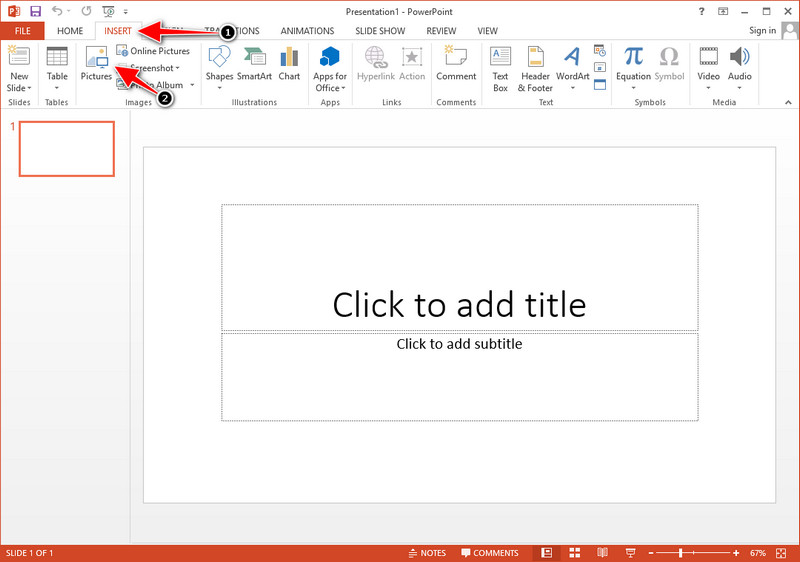
Шаг 3. Отрегулируйте размер изображения с графиком и расположите его на слайде.
Дополнительные материалы:
Как удалить водяной знак B612 с ваших изображений
Как бесплатно удалить водяной знак WOW Slider
Часть 3. Часто задаваемые вопросы о том, как удалить водяной знак из Origin Graph
Сколько стоит Ориджин Про?
Для отдельных пользователей вы можете получить премиум-версию Origin Graph для запуска $435. Вы можете посетить официальный магазин Origin Lab.
Где я могу официально скачать Origin Graph?
Посетите Origin Lab, чтобы загрузить Origin Graph. Прежде чем вы сможете загрузить программное обеспечение на свой рабочий стол, оно будет задавать вопросы. После этого будет два варианта загрузки файла, хотите ли вы скачать его с помощью или нет, в виде .exe или zip.
Excel и Origin — это одно и то же?
Excel и Origin имеют графический интерфейс, похожий на электронную таблицу, для упорядочивания данных, расчета и определения меток. Однако Excel фокусируется на содержании многих столбцов и строк, которые вы можете использовать. Но с Origin он предназначен для упорядочивания атрибутов, которые используют формулу столбца, а не формулу ячейки, как это поддерживает Excel.
Заключение
Теперь, когда вы узнали, как удалить водяной знак из Origin Graph, пришло время использовать созданный вами график и представить его профессионально. Если вы хотите использовать его в Word или Powerpoint, вы можете прочитать часть 2, чтобы узнать, как это сделать. Удаление водяного знака с помощью этого инструмента, безусловно, наиболее востребовано всеми, кто хочет удалить водяной знак с изображений. Проблема решается с помощью этого инструмента. Если эта статья помогла вам, пожалуйста, оставьте 5 звезд ниже.
-
 Подробные инструкции по удалению водяных знаков с помощью Pixlr [эффективно]
 Хотите знать, как удалить водяной знак с Pixlr? Если это так, продолжайте читать ниже, чтобы узнать, как это сделать, и какие альтернативы вы можете использовать.
-
 Удалите водяной знак Animotica на экспортированных видео с помощью 3 проверенных способов
 Вы когда-нибудь задумывались, можно ли удалить водяной знак Animotica на экспортированных видео? В этой статье описано, как это сделать.
-
 Бесплатные способы удаления водяного знака VideoShop на видео [без особых усилий]
 Чтобы удалить водяной знак VideoShop, на вашем устройстве потребуется средство для удаления водяных знаков. Чтобы узнать, что это такое, прочитайте эту статью.
