


 Видео конвертер Ultimate
 Устройство записи экрана
 Видео ремонт
 Безопасная загрузка
Самые простые способы удаления логотипа ManyCam с вашего устройства
Хотите узнать, как убрать логотип ManyCam в Windows и на Mac? В таком случае в этом посте вы найдете несколько способов удалить логотип с ваших видео, которые стоит попробовать. Смотреть любимые ролики с водяными знаками или логотипами довольно раздражающе: вы не можете в полной мере наслаждаться видео, они отвлекают внимание. Из‑за водяных знаков, картинок, текста или логотипов иногда вообще не видны отдельные участки видео. К счастью, вы можете использовать удобные программы с функцией удаления водяных знаков, чтобы убрать эти лишние объекты с ваших роликов.
С помощью этих приложений вы больше никогда не разочаруетесь. Если вам интересно узнать о лучших методах удаления логотипа ManyCam, лучше всего прочитать эту статью.

Часть 1: Как удалить логотип ManyCam, активировав подписку
Если вы хотите узнать, как убрать водяные знаки в ManyCam, вы находитесь в нужном месте. ManyCam — это программа для прямых трансляций, доступная и для Windows, и для Mac. С её помощью можно создавать оригинальные эфиры на ваших платформах, записывать обучающие материалы, бизнес‑презентации, стримить игры и многое другое. Кроме того, в ней есть множество полезных функций: добавление музыки, запись экрана, использование «зелёного экрана», трансляция игр и пр. Для создателей контента ManyCam очень ценен и полезен. В нём есть необходимые инструменты, такие как скрикастинг и запись экрана, что делает работу с ним удобной.
Тем не менее, каждый раз, когда вы создаете или редактируете свое видео, в нижней части видео появляется логотип manycam, что настораживает. К счастью, вы можете удалить этот логотип, активировав подписку на ManyCam. Выполните следующие действия, чтобы узнать, как удалить логотип manycam, активировав подписку.
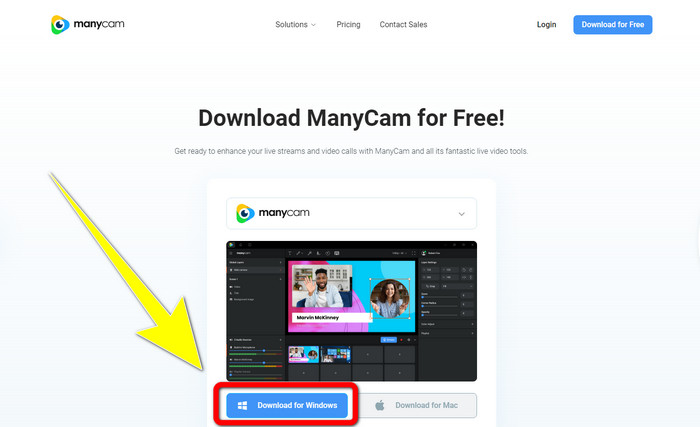
Шаг 1: Чтобы скачать ManyCam, нажмите кнопку Download for Windows. Затем перейдите к установке программы.
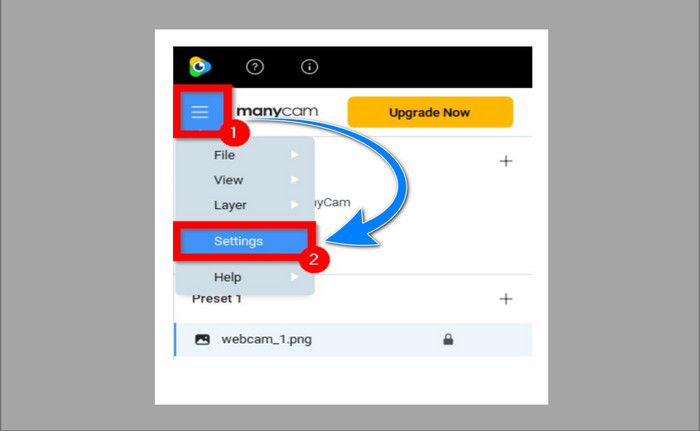
Шаг 2: Запустите приложение на компьютере и нажмите на иконку меню (три полоски) ManyCam, затем перейдите в раздел Settings > Account и войдите в аккаунт, который вы создали после покупки подписки.
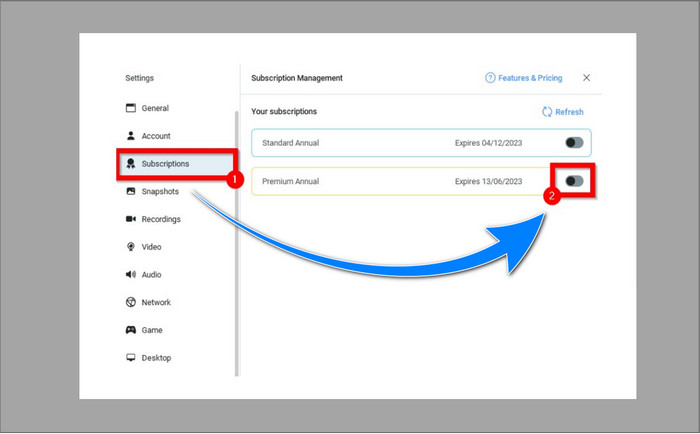
Шаг 3: Перейдите на вкладку Subscription, чтобы убедиться, что подписка активирована.
Шаг 4: Если подписка уже активирована, появится всплывающее сообщение, и на этом всё — логотип будет убран.
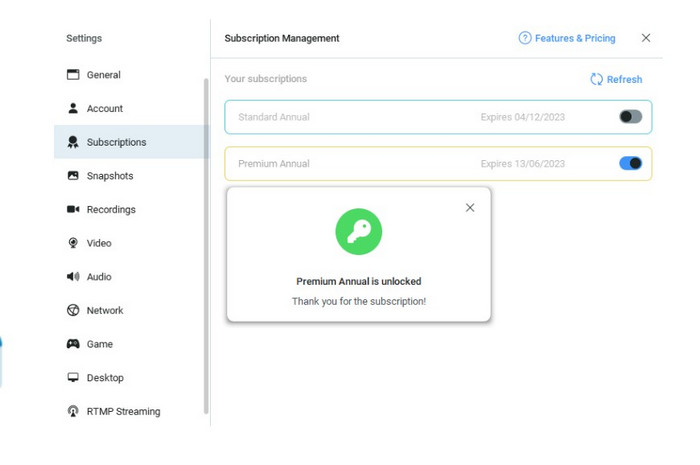
Если ваше приложение ManyCam уже активировано, водяные знаки или логотип на ваших видео будут автоматически удалены. Вы можете наслаждаться просмотром любимых видео, не встречая на них водяных знаков.
Часть 2: Как удалить логотип ManyCam без подписки
Хотите бесплатно убрать водяной знак ManyCam? Помимо приложения ManyCam, вы можете использовать и другую программу, чтобы удалить логотип ManyCam. Лучшая программа, которой вы можете воспользоваться, — это Video Converter Ultimate. Это приложение способно удалять лишние объекты на ваших видео, такие как текст, водяные знаки, логотипы и т. д. Кроме того, в Video Converter Ultimate есть множество инструментов для редактирования: контроллер скорости видео, улучшение качества, добавление и удаление водяных знаков, цветокоррекция, усиление громкости и многое другое. Лучший модуль для удаления водяных знаков в Video Converter Ultimate — это Video Watermark Remover.
Этот инструмент поможет вам легко удалить водяные знаки. Кроме того, это приложение доступно как для Windows, так и для Mac. Кроме того, вам не составит труда использовать это приложение. Он также поддерживает несколько форматов аудио- и видеофайлов, таких как MP4, FLV, MOV, MKV, MP3, AAC и другие. Если вы хотите удалить логотип ManyCam с помощью Video Converter Ultimate, эта статья покажет вам два способа. Эти способы используют обрезку видео и удаление водяных знаков с видео.
1. Использование обрезки видео
Шаг 1. Скачайте FVC Video Converter Ultimate и установите программу.
Бесплатная загрузкаДля Windows 7 или более поздних версийБезопасная загрузка
Бесплатная загрузкаДля MacOS 10.7 или более поздних версийБезопасная загрузка
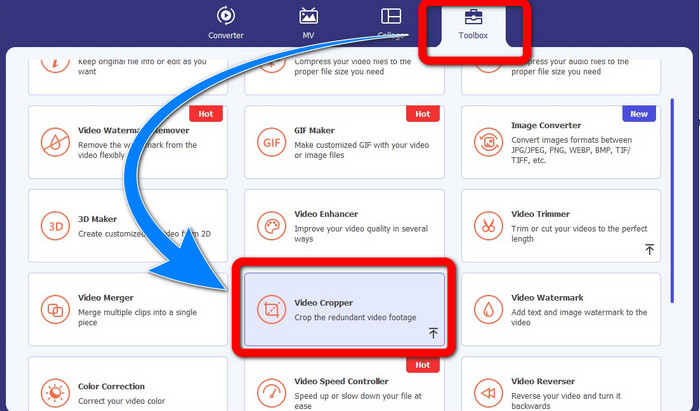
Шаг 2: После установки запустите приложение. Нажмите Toolbox > Video Cropper.
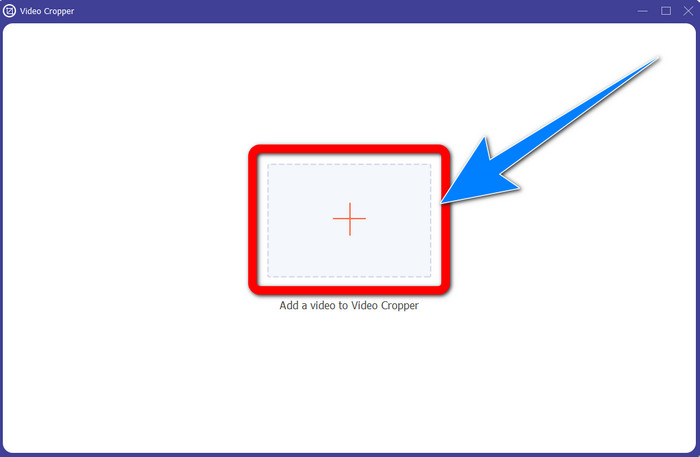
Шаг 3: После нажатия на Video Cropper откроется новое окно. Нажмите кнопку с плюсом и добавьте ваши видео с водяным знаком ManyCam.
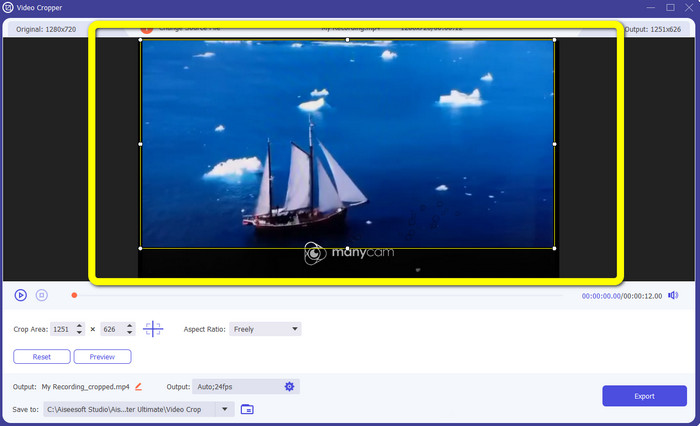
Шаг 4: Когда файл уже добавлен, вы можете обрезать видео так, чтобы убрать водяной знак.
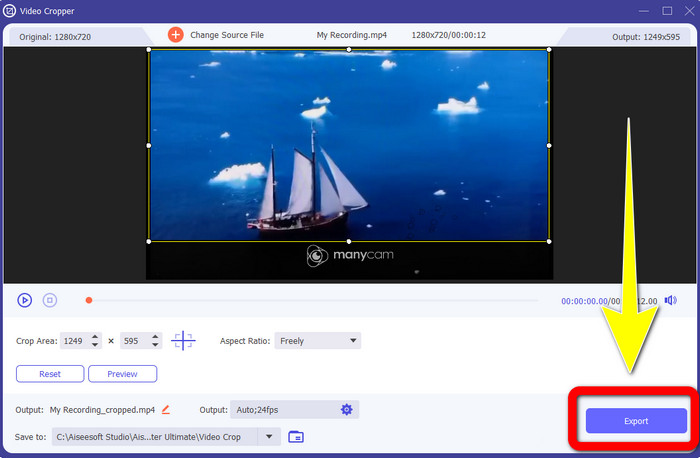
Шаг 5: После удаления водяного знака нажмите кнопку Export, чтобы сохранить итоговый файл. Теперь вы можете смотреть любимое видео без водяного знака.
2. Использование средства для удаления водяных знаков с видео
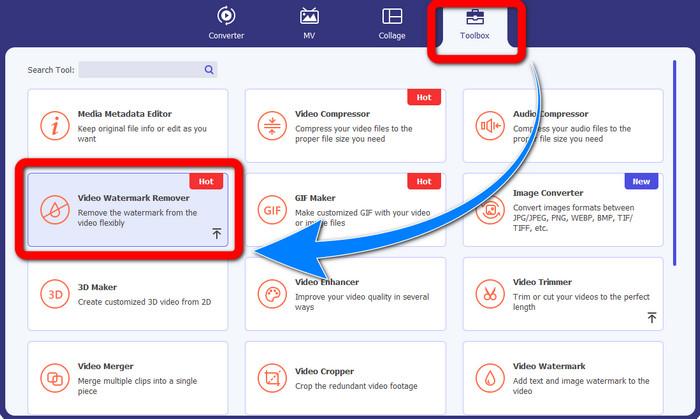
Шаг 1: Откройте приложение. Перейдите в Toolbox > Video Watermark Remover.
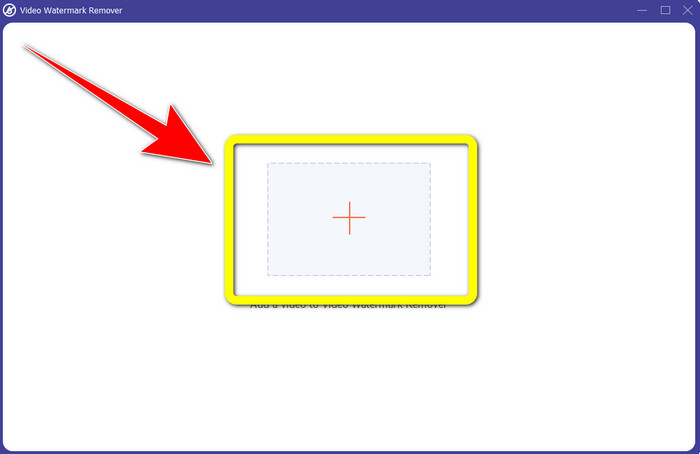
Шаг 2: После нажатия на Video Watermark Remover появится новое окно. Нажмите на кнопку с плюсом, чтобы добавить ваше видео с водяными знаками ManyCam.
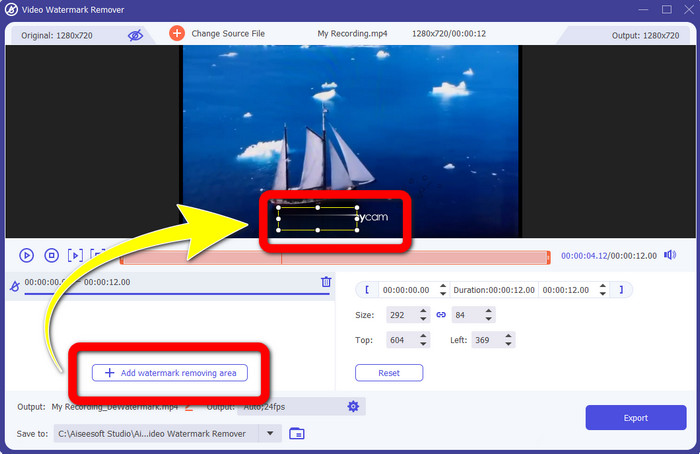
Шаг 3: Когда видео уже добавлено, нажмите Add Watermark Removing Area, после чего на видео появится прямоугольник. Перетащите его на область водяного знака, чтобы закрыть его.
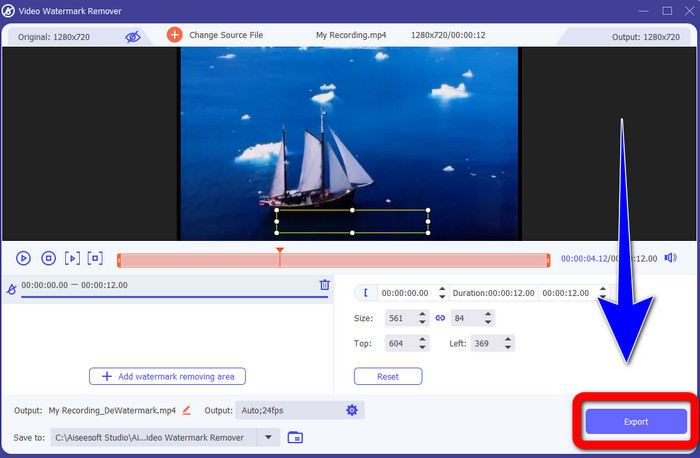
Шаг 4: Когда вы закончите удаление водяных знаков с видео, нажмите Export, чтобы сохранить результат. Это лучший способ бесплатно убрать логотип ManyCam.
Часть 3. Часто задаваемые вопросы об удалении логотипа ManyCam
Сколько времени займет удаление логотипа?
Вам не придется ждать дольше, потому что процесс удаления логотипа или любых ненужных объектов займет всего несколько секунд.
Могу ли я удалить логотип ManyCam со своего телефона?
Да! Вы можете удалить логотип ManyCam на своих устройствах Android или iPhone, используя различные программные приложения для удаления водяных знаков. Найдите приложение в своем магазине игр или магазине приложений и попробуйте использовать те приложения, которые вы видите в верхних результатах.
Есть ли лучший способ удалить водяные знаки на моем Mac?
Конечно, да! Вы можете использовать удобную программу с функцией удаления водяных знаков, чтобы убрать логотипы на Mac. Это приложение — Video Converter Ultimate. Оно отлично работает и в Windows, и в macOS. Эта программа помогает удалять лишние объекты на видео, такие как логотипы, водяные знаки, изображения и текст.
Могу ли я использовать инструмент обрезки из приложения ManyCam, чтобы удалить логотип ManyCam?
К сожалению, нет! Использовать инструмент кадрирования для удаления логотипа ManyCam неэффективно. Даже если вы попробуете обрезать видео, чтобы убрать логотип, он всё равно будет отображаться. Единственный рабочий способ убрать логотип — активировать подписку в ManyCam.
Помимо ManyCam, есть ли другой способ удалить водяные знаки с моих видео?
Да, есть! Помимо ManyCam, есть и другие приложения для удаления водяных знаков, которые вы можете использовать без покупки. Video Converter Ultimate — одно из лучших приложений, которое вы можете использовать для удаления водяных знаков с видео. Он прост и удобен в использовании, что подходит для начинающих.
Заключение
Исходя из приведённой выше информации, вы можете узнать, как убрать логотип ManyCam в Windows и на Mac. Вы можете использовать само приложение ManyCam, чтобы легко удалить логотип после активации подписки. Кроме того, если вам нужна программа с функцией удаления водяных знаков бесплатно, используйте Video Converter Ultimate. Это приложение станет отличным помощником для удаления ненужных объектов с ваших видео.
-
 Самые простые методы о том, как удалить водяной знак с фотографий
 Вас раздражают водяные знаки на ваших фотографиях? Не беспокойтесь! Эта статья предоставит простые и легкие способы удаления водяных знаков с ваших фотографий.
-
 Как удалить водяной знак Powtoon с помощью 4 эффективных методов
 Прочтите эту статью, чтобы узнать, как удалить водяной знак Powtoon, используя лучшие инструменты, которые мы включили сюда, и учебное пособие.
-
 Обзор средства для удаления водяных знаков Apowersoft — особенности, плюсы и минусы, а также цены
 Apowersoft Watermark Remover — одно из лучших средств для удаления водяных знаков, которое поддерживает как онлайн, так и офлайн. Нажмите здесь, чтобы узнать больше!
