


 Видео конвертер Ultimate
 Устройство записи экрана
 Видео ремонт
 Безопасная загрузка
100% Бесплатные способы сжатия размера файла M4V из ГБ в МБ
Формат файла M4V, аналогичный MP4, представляет собой отличный видеоконтейнер, созданный Apple. Вы можете воспроизводить файлы M4V практически на всех популярных проигрывателях, таких как iTunes, QuickTime, VLC Media Player, RealPlayer и других. Но иногда вы можете обнаружить, что ваше видео M4V слишком велико для хранения или публикации. В этой ситуации вам нужно уменьшить размер файла.
Если вы не знаете, как сжать M4V, можете попробовать приведённые ниже варианты.

Часть 1. Как сжать M4V онлайн бесплатно
Как мы уже упоминали, может быть немного сложно редактировать и делиться большим видеофайлом на YouTube, Facebook, Instagram или других сайтах потокового вещания. Потому что на этих сайтах обычно есть строгие ограничения на размер загружаемого вами видео. Кроме того, большие файлы могут занимать много места на вашем компьютере, диске, телефоне, флешке, карте памяти и т. Д.
Поэтому, когда у вас есть большой файл M4V, лучше уменьшить его размер с помощью профессионального видеосжимающего ПО. Если вы ищете бесплатную программу, почему бы не попробовать FVC Free Video Compressor? Её можно использовать совершенно бесплатно. Более того, это онлайн‑инструмент для сжатия, а значит, вы сможете сжать любое видео до нужного размера, не устанавливая на компьютер громоздкое программное обеспечение.
Вы можете использовать его в любом популярном браузере, таком как Google Chrome, Mozilla Firefox и Microsoft Edge. И к сжатому видео не будет добавляться водяной знак. Вы даже можете наслаждаться видео с высоким качеством изображения.
Вот шаги по сжатию больших файлов M4V в Интернете.
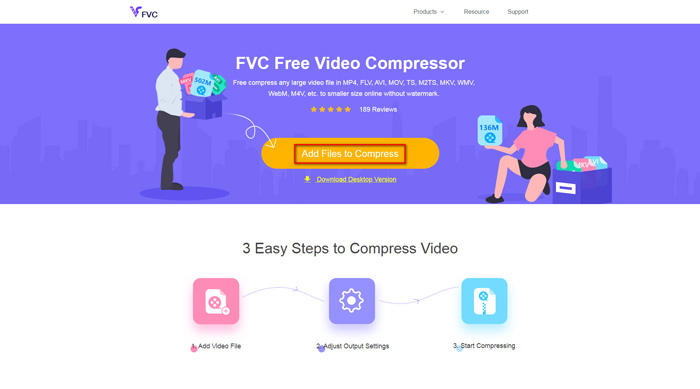
Шаг 1. Перейдите на сайт FVC Free Video Compressor в вашем браузере. В баннере вы увидите кнопку Add Files to Compress (Добавить файлы для сжатия). Нажмите на неё и следуйте инструкциям, чтобы скачать и установить лаунчер FVC на свой компьютер.
Шаг 2. Затем выберите файл M4V, который вы хотите сжать. После этого вы можете перемещать ползунок за полем Size (Размер), чтобы без труда настроить и получить именно тот размер файла, который вам нужен. При необходимости вы также можете отдельно изменить разрешение и битрейт.
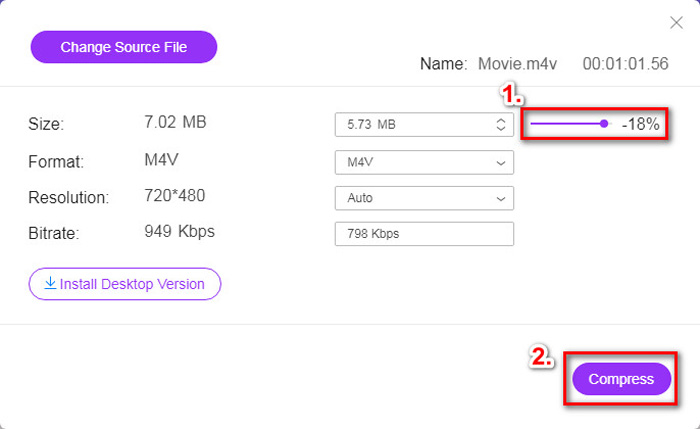
Шаг 3. Если вы хотите сжать M4V и сохранить его в формате MP4, выберите MP4 в качестве выходного формата. Если нет, просто нажмите Compress (Сжать) в правом углу. Выберите папку для сохранения сжатого видео и подождите несколько секунд, чтобы получить нужный файл.
Часть 2. Как уменьшить размер файла M4V на Mac / Windows
Поскольку M4V — это формат, разработанный компанией Apple, вы также можете использовать штатный проигрыватель Apple, QuickTime Player, чтобы сжимать файлы M4V на Mac. Кроме того, QuickTime Player имеет версию для Windows для пользователей ПК. Но стоит учесть, что последняя версия для Windows — QuickTime 7.7.9, выпущенная в 2016 году. Поэтому, если вам нужен более современный инструмент, вы можете попробовать FVC Free Video Compressor, который справляется даже с 4K‑видео.
В любом случае выполните следующие действия, чтобы уменьшить размер файла M4V в QuickTime.
Шаг 1. Откройте в QuickTime файл M4V, который нужно сжать.
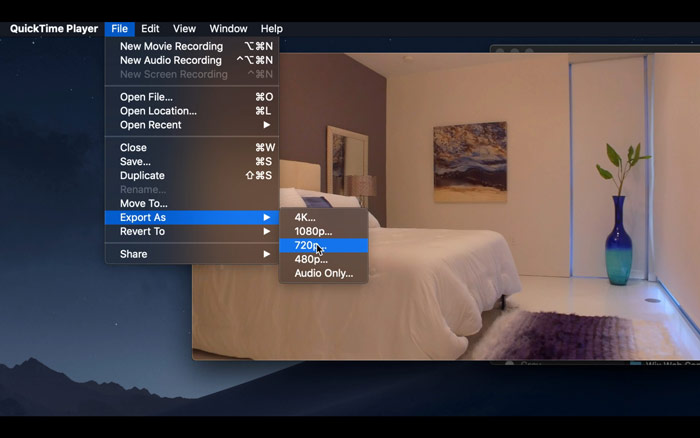
Шаг 2. Найдите меню File (Файл) в левом верхнем углу. Нажмите на него и выберите в списке пункт Export As (Экспортировать как). Затем укажите разрешение ниже исходного, чтобы сжать видео. В конце концов, наша цель — не увеличить его размер.
Шаг 3. Если вы не хотите менять путь сохранения, просто нажмите Save (Сохранить). Дождитесь завершения экспорта видео.
Часть 3. Часто задаваемые вопросы о сжатии M4V
1. Могу я просто переименовать M4V в MP4?
Нет, если вы имеете в виду конвертацию M4V в MP4 путём простого переименования расширения в .mp4. Их кодирование различается. Вам стоит воспользоваться более профессиональным инструментом, чтобы конвертировать M4V в MP4.
2. Принимает ли YouTube формат M4V?
К сожалению, YouTube поддерживает только ограниченное количество форматов файлов, которые не включают M4V. Итак, если вы хотите загрузить видео M4V на YouTube, вам следует преобразовать его в формат, поддерживаемый YouTube, например MP4.
3. Как объединить несколько видео M4V в одно?
Если у вас есть несколько файлов M4V, которые нужно объединить в один, вы можете воспользоваться FVC Free Online Video Merger, чтобы объединить различные видеофайлы.
Заключение
Теперь у вас есть 2 простых и бесплатных способа сжать файл M4V. Если вы пользователь Mac, можете уменьшить размер видео с помощью QuickTime Player. Но если вас не устраивают фиксированные разрешения, которые предлагает QuickTime, или вы работаете на ПК с Windows, попробуйте FVC Free Video Compressor.
-
 Конвертер M4V в MP3 - 4 лучших метода извлечения MP3 из файлов M4V
 Если вы хотите с легкостью извлекать аудиофайлы MP3 из видео M4V, вы можете узнать больше о 4 лучших конвертерах M4V в MP3, чтобы получить желаемые аудиофайлы из статьи.
-
 4 способа бесплатно конвертировать фильмы QuickTime в MP4 на телефоне / компьютере
 Прочтите и получите 4 способа бесплатно конвертировать видео из QuickTime в MP4 на своем телефоне или компьютере. Вы можете легко изменить формат файла с MOV на MP4 на Windows / Mac / iPhone / Android / онлайн.
-
 4 лучших конвертера MP4 в M4V, которые с легкостью превращают видео MP4 в M4V
 Когда вам нужно преобразовать файлы MP4 в M4V, вы должны узнать больше о различиях между двумя форматами, а также о лучших конвертерах MP4 в M4V из статьи.
