


 Видео конвертер Ultimate
 Устройство записи экрана
 Видео ремонт
 Безопасная загрузка
2 простых способа сжатия MXF с меньшим размером файла
MXF — это промышленный стандарт файлового формата, который поддерживает полный тайм-код и метаданные. Он в основном предназначен для профессиональной работы с видеоконтентом, особенно в телевизионном вещании. MXF — это контейнерный видеоформат для профессионального видео- и аудиоконтента по стандарту SMPTE. Вы можете легко получить высококачественное MXF‑видео со своей цифровой видеокамеры. В то же время MXF‑файл обычно имеет большой размер.
Когда вы хотите поделиться большим MXF‑видео, крайне важно сжать MXF до меньшего размера файла. Вопрос в том, знаете ли вы, как сжимать файлы MXF?

На самом деле на рынке представлено множество инструментов для сжатия и редактирования видео, которые могут помочь вам сжать MXF и уменьшить размер файла. В этом материале показано, как сжать MXF с помощью Adobe Premiere Pro и бесплатного онлайн‑сервиса для сжатия видео.
Часть 1. Как сжимать файлы MXF бесплатно в Интернете
Чтобы сжать MXF до меньшего размера файла, вы можете выбрать популярное программное обеспечение для сжатия MXF‑видео — Free Video Compressor. Оно позволяет уменьшить размер файла MXF‑видео, сохранив исходное качество изображения и звука. Этот видеосжатие-плагин отлично поддерживает все наиболее часто используемые видеоформаты, включая MXF, MP4, MOV, AVI, MKV, FLV и другие. Он даёт возможность сжимать MXF как на компьютерах с Windows, так и на Mac.
Шаг 1. Когда вы хотите сжать файл MXF, перейдите на официальный сайт этого средства сжатия MXF‑файлов. Нажмите кнопку Add Files to Compress, чтобы установить небольшой лаунчер для сжатия MXF‑файлов.

Шаг 2. Выберите и добавьте файл MXF, который вы хотите сжать, в этот бесплатный онлайн‑компрессор видео. Здесь вы можете свободно настраивать степень сжатия видео в соответствии с вашими потребностями. Кроме того, вам доступна настройка разрешения видео, частоты кадров, битрейта и имени видео. Также вы можете выбрать другой выходной формат, например MP4, для сжатого видео.

Шаг 3. После этого просто нажмите кнопку Compress, чтобы начать бесплатное онлайн‑сжатие файла MXF.

В отличие от многих других онлайн-видео компрессоров, этот бесплатный видео компрессор не добавит водяных знаков в ваш сжатый файл MXF.
Часть 2. Как сжать MXF в Adobe Premiere Pro
Adobe Premiere Pro — это распространённый профессиональный пакет для видеомонтажа для пользователей Mac и Windows. Если Premiere Pro установлен на вашем компьютере, вы можете использовать его для сжатия файлов MXF.
Шаг 1. Запустите Premiere Pro на своём компьютере. После входа в главное окно нажмите New Project, чтобы создать новый проект. В открывшемся окне вы можете настроить различные параметры.
Шаг 2. Нажмите File, затем Import и далее Media, чтобы выбрать и импортировать ваш MXF‑файл. Если вы хотите сжать MXF‑файл, находящийся на цифровой камере, подключите камеру к компьютеру. Также вы можете перетащить MXF‑видео напрямую из папки.
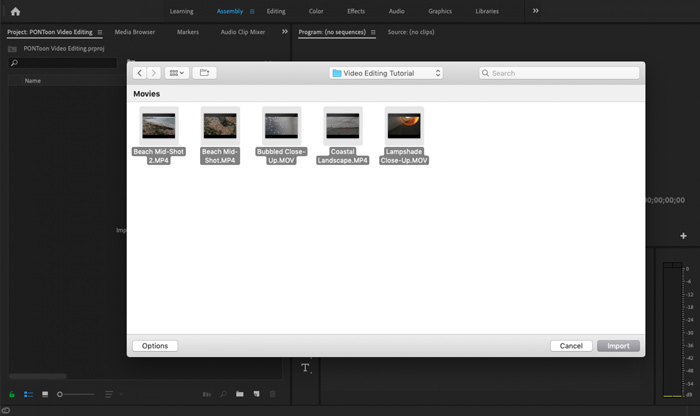
Шаг 3. Переключитесь в рабочую область Editing (Монтаж), чтобы удобнее сжать ваш MXF‑файл.
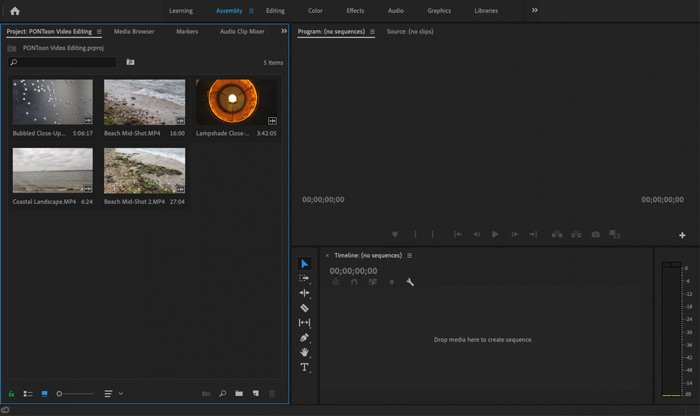
Шаг 4. Теперь вы можете редактировать MXF‑файл на временной шкале. Просто перетащите клип MXF из импортированных медиа на таймлайн, чтобы создать новую последовательность. Затем вы можете обрезать MXF‑файл, чтобы уменьшить его размер.

Вы также можете выбрать собственное разрешение видео и другие параметры для сжатия файла MXF. Кроме того, вы можете выводить MXF в видеоформат с меньшим размером файла.
Часть 3. Часто задаваемые вопросы о сжатии файлов MXF
Вопрос 1. Что такое видеоформат MXF?
MXF, расшифровывается как Material eXchange Format, представляет собой контейнерный формат, в котором хранятся видео, аудио и метаданные. Это формат видео-контейнера для профессионального видео- и аудиоконтента стандарта SMPTE. Многие профессиональные цифровые видеокамеры, такие как Sony, Panasonic, Canon и другие, хранят видео в формате MXF.
Вопрос 2. Как бесплатно конвертировать MXF в MP4 онлайн?
MP4, без сомнения, является самым популярным форматом, который поддерживается практически всеми плеерами, редакторами и устройствами. Поэтому во многих случаях вам нужно конвертировать MXF в MP4 для более удобного воспроизведения или редактирования. Вы можете воспользоваться Free Online Video Converter, чтобы без труда выполнить конвертацию MXF в MP4.
Вопрос 3. Является ли MXF форматом видео без потерь?
MXF может хранить отснятый материал в формате RAW без потерь, который предлагает профессиональные студии пост-продакшн расширенные возможности в рабочих процессах для цветокоррекции и редактирования видео. Формат MXF может полностью поддерживать временной код SMPTE.
Заключение
В этой статье мы в основном рассмотрели, как сжимать файлы MXF. Нужно признать, что сжатие MXF‑файлов в Adobe Premiere Pro слишком сложно. Поэтому рекомендуется использовать предложенную программу Free Video Compressor, чтобы уменьшить размер ваших MXF‑файлов.
-
 Как сжать видео MP4 до меньшего размера
 Видео MP4 слишком велико для загрузки? Хотите уменьшить размер видео? Вот 3 эффективных способа без ограничений сжать файл MP4 до меньшего размера.
-
 Учебник по сжатию GIF и уменьшению его размера с высоким качеством
 Вот 2 простых способа сжать GIF на вашем компьютере или мобильном телефоне. Вы можете использовать FVC Free Online Video Compressor и Photoshop для уменьшения размера файла GIF в различных аспектах.
-
 4 способа сжатия больших файлов QuickTime MOV без потери качества
 В этой статье подробно показано, как сжимать видео в формате QuickTime MOV на вашем телефоне или компьютере. Если ваше MOV-видео слишком велико для отправки, совместного использования или сохранения, вы можете получить здесь 4 работоспособных решения.
