


 Видео конвертер Ultimate
 Устройство записи экрана
 Видео ремонт
 Безопасная загрузка
MOV в MPG: краткое руководство по конвертации этих форматов в 2023 году
Для справки: файлы MOV сегодня получают высокую оценку, так как считаются одним из наиболее подходящих форматов для хранения фильмов. Этот тип файла широко признан как формат по умолчанию для продуктов Apple, таких как iPhone, iPad и MacBook. Однако при попытке загрузить файлы MOV в интернет вы можете столкнуться с трудностями, потому что их размер больше по сравнению с другими видеоформатами. Чтобы обойти это ограничение, вы можете конвертировать MOV в MPG. Поэтому оставайтесь с нами и читайте дальше эту инструкцию — мы поможем вам разобраться, как это сделать.

Часть 1. Преобразование MOV в MPG
1. Конвертер видео Ultimate
Video Converter Ultimate — это универсальное офлайн‑решение, позволяющее удовлетворить все ваши потребности по конвертации MOV в MPG. Всего в несколько кликов программа позволяет преобразовать файл, будь он большого или малого размера. Более того, этот инструмент оснащён настройками вывода, что даёт пользователям возможность получать видео высокого качества и подстраивать результат под свои предпочтения. Ниже приведена пошаговая простая инструкция, как быстро конвертировать MOV в MPG.
Шаг 1. Установите программу
Для начала нажмите соответствующую вашей системе кнопку Скачать ниже. После этого откройте установочный файл и запустите его, чтобы программа появилась на вашем экране.
Бесплатная загрузкаДля Windows 7 или более поздних версийБезопасная загрузка
Бесплатная загрузкаДля MacOS 10.7 или новееБезопасная загрузка
Шаг 2. Загрузите файлы MOV для конвертации
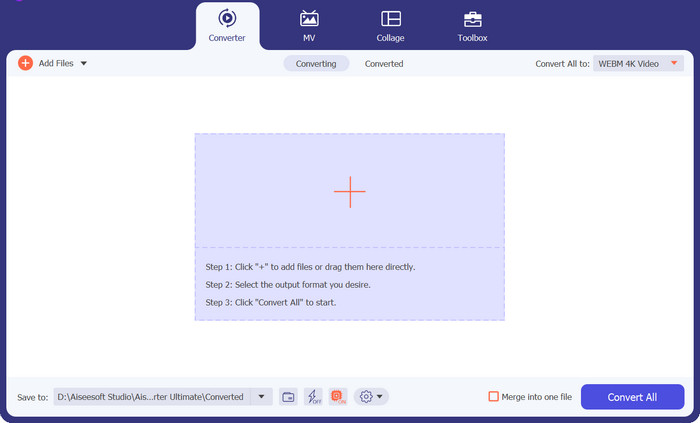
После установки программы нажмите кнопку Плюс в центре интерфейса. Когда откроется проводник, выберите файл MOV для загрузки. Кроме того, вы можете загрузить несколько файлов для пакетной конвертации.
Шаг 3. Выберите формат вывода
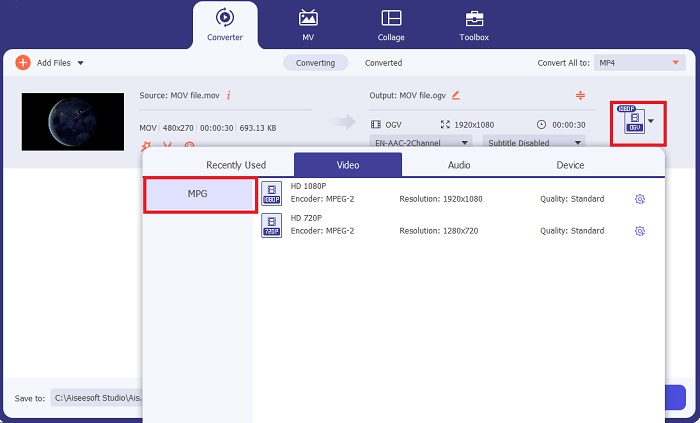
Миниатюра вашего файла MOV появится в программе, что подтверждает успешную загрузку. Чтобы выбрать выходной формат, разверните вкладку Вывод и нажмите панель Видео. Затем прокрутите список и выберите MPG.
Шаг 4. Запустите конвертацию
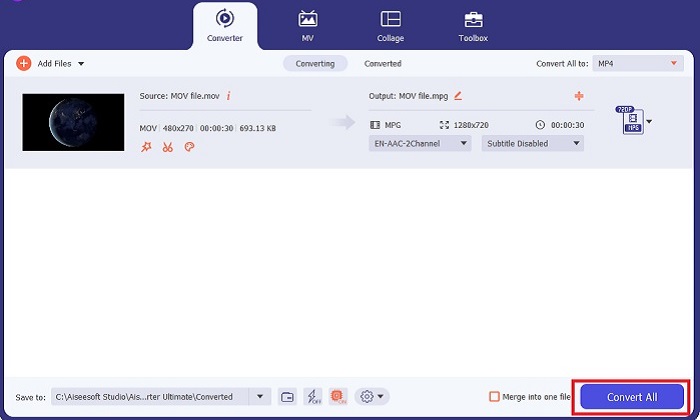
В завершение отредактируйте параметры качества, настроив выходные установки. Когда всё будет готово, нажмите кнопку Конвертировать, чтобы запустить процесс преобразования MOV в MPG.
Ключевые особенности
◆ Бесшовное преобразование MOV в MPG. Что нам нравится в Video Converter Ultimate, так это его удобный интерфейс. Этот инструмент лучше всего подходит для всех, будь то новичок или опытный пользователь.
◆ В 50 раз выше скорость преобразования: благодаря технологии кодирования с ускорением графического процессора Video Converter Ultimate превосходит любые другие автономные конвертеры благодаря быстрому преобразованию без задержек и сбоев.
◆ Функция массового преобразования: с помощью Video Converter Ultimate вы также можете преобразовать папку с файлами MOV в любой из более чем 1000 форматов, отличных от MPG.
2. Бесплатный онлайн-конвертер видео
Free Video Converter Online — ещё одно программное решение, которое упрощает процесс смены форматов. Хотя этот онлайн‑инструмент и не предлагает такого широкого набора функций, как офлайн‑ПО, он вполне надёжен, когда нужно конвертировать MOV в MPG онлайн. Сервис поддерживает пакетную конвертацию и предоставляет вам полный контроль над параметрами вывода.
Шаг 1. Сначала перейдите на основной сайт Free Video Converter Online. Перед загрузкой файла MOV нажмите кнопку Добавить файлы — сначала вам предложат запустить онлайн‑инструмент.
Шаг 2. Чтобы загрузить файл для конвертации, ещё раз нажмите кнопку Добавить файлы и выберите нужный файл. Также вы можете воспользоваться функцией перетаскивания (drag‑and‑drop).
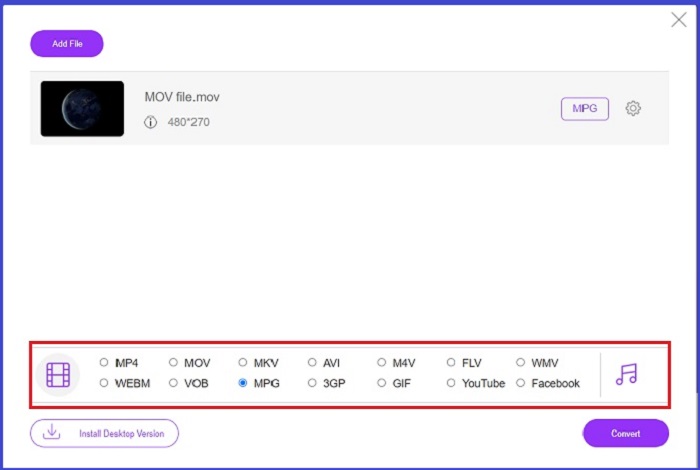
Шаг 3. Когда исходный файл появится на экране, выберите выходной формат в нижнем углу. В разделе Видео вы увидите все доступные форматы, и в нашем случае выберите MPG. Наконец, нажмите кнопку Конвертировать и подождите, пока файл будет загружен на ваш компьютер.
Ключевые особенности
◆ Многоплатформенный онлайн-конвертер. Независимо от того, работаете ли вы на своем телефоне, планшете или компьютере, этот инструмент отлично работает, что делает возможным преобразование видео или аудио.
◆ Гарантия конфиденциальности: кто хочет получить вторжение в частную информацию? С Free Video Converter Online вы не должны сталкиваться с дилеммами по этому поводу. Этот онлайн-инструмент позволяет пользователям конвертировать MOV в MPG бесплатно, не требуя регистрации.
◆ Нет требований к установке: этот инструмент является еще одним простым конвертером, который поможет вам избавиться от беспокойной установки, особенно если вам не хватает места на диске.
Часть 2. Преобразование MPG в MOV
1. Конвертер видео Ultimate
И снова Video Converter Ultimate остаётся лучшим решением, которое мы можем предложить для конвертации MOV в MPG на устройствах Mac и Windows. В этом инструменте поддерживается более 1000 видео‑ и аудиоформатов, включая форматы, специально оптимизированные для таких устройств, как Samsung, Apple, Sony и другие. Следуйте инструкции ниже, чтобы преобразовать любой из ваших файлов MPG в MOV.
Бесплатная загрузкаДля Windows 7 или более поздних версийБезопасная загрузка
Бесплатная загрузкаДля MacOS 10.7 или новееБезопасная загрузка
Шаг 1. Нажмите кнопку Добавить файлы, чтобы импортировать MPG в программу.
Шаг 2. После того как файл отобразится на экране, задайте формат вывода, нажав Вывод > Видео > MOV. Для улучшения качества вы также можете изменить параметры видео.
Шаг 3. Нажмите кнопку Конвертировать, чтобы программа начала преобразование файлов из MPG в MOV. После завершения конвертации вы сможете просмотреть результат прямо в программе.
2. AnyConv
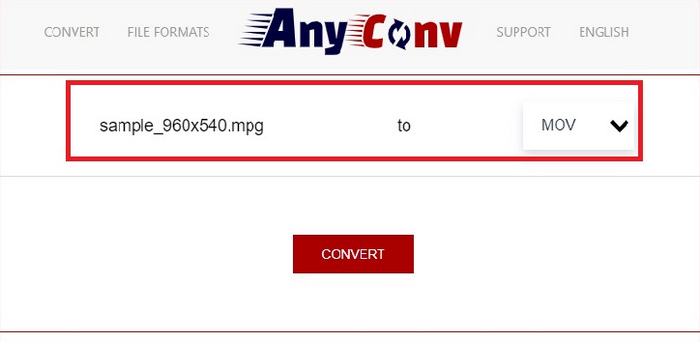
AnyConv — это бесплатный онлайн-конвертер MPG в MOV. Эта программа хорошо работает на любом устройстве и предлагает функцию перетаскивания при загрузке файлов MPG. Кроме того, это онлайн-решение защищает данные пользователей, удаляя преобразованные файлы через час. Помимо MOV, вы можете конвертировать файлы MPG в 3GP, AVCHD, MP4, MKV и другие форматы.
Шаг 1. Сначала откройте сайт AnyConv. Когда он загрузится, нажмите Choose File и выберите нужный видеоролик MOV для конвертации.
Шаг 2. После загрузки файла MOV выберите MPG из списка выходных форматов в колонке Output в центре экрана.
Шаг 3. Наконец, нажмите кнопку Convert и дождитесь, пока ваш файл будет готов к загрузке.
Дополнительные материалы:
3 лучших способа быстро конвертировать MPG в MP4
5 лучших конвертеров MOV в 3GP, которые нельзя пропустить
Часть 3. Часто задаваемые вопросы о том, как конвертировать MPG в MOV
Есть ли бесплатный конвертер MOV в MPG?
Определенно да! Онлайн-конвертеры — ваш лучший выбор, чтобы не платить комиссию. Вы можете выбрать бесплатный онлайн-конвертер видео, чтобы бесплатно конвертировать MOV в MPG.
MPG лучше, чем MOV?
MOV лучше, чем MPG из-за различий в их типах. MOV — это формат контейнера, который сохраняет все ваши исходные данные. В то же время MPG — это сжатый кодек, используемый для уменьшения размера видеофайла для более быстрой передачи файлов через Интернет.
В чем преимущество файла MOV?
Файлы MOV подходят для редактирования и считаются стандартом для выбора наилучшего формата видео. Одним из недостатков этого файла является то, что только несколько медиаплееров открывают этот формат.
Снижает ли MOV в MPG качество?
Да. Преобразование ваших файлов из MOV в MPG не только уменьшит размер файла вашего видео, но и снизит качество. Оба файла хороши в любом случае, если они вам понадобятся.
Могу ли я воспроизвести MOV в проигрывателе Windows Media?
К счастью, файлы MOV в проигрывателе Windows Media можно воспроизводить, если он имеет версию 12 или выше.
Заключение
Итак, теперь вы знаете возможные способы конвертировать MPG в MOV и наоборот. Оба формата по‑своему полезны и подойдут под разные задачи. Используя онлайн‑конвертеры, вы получите простой и быстрый процесс преобразования. С другой стороны, если вы хотите дополнительно улучшить свои файлы, изменяя их качество и даже редактируя видео, мы рекомендуем воспользоваться Video Converter Ultimate.
-
 FLV в MPG - Как конвертировать FLV в MPG на Mac, ПК и в Интернете бесплатно
 Как конвертировать FLV в MPEG? Могу ли я бесплатно конвертировать FLV в MPG? В этом посте рассказывается о 3 бесплатных видеоконвертерах, которые помогут вам конвертировать FLV в MPG без потери качества.
-
 Как конвертировать MPG в M4V на Mac и с помощью онлайн-инструмента
 Вы новый пользователь Mac и не знаете, как конвертировать MPG в M4V? Затем вы можете прочитать эту статью, чтобы узнать больше и узнать, как конвертировать файлы с помощью вашего Mac.
-
 8 лучших проигрывателей MOV для воспроизведения файлов QuickTime MOV с оригинальным качеством
 Просто узнайте больше о 8 лучших проигрывателях MOV, доступных как для Windows, так и для Mac. Вы можете выбрать нужный и подходящий для воспроизведения файлов MOV с исходным качеством.
