


 Видео конвертер Ultimate
 Устройство записи экрана
 Видео ремонт
 Безопасная загрузка
Как конвертировать AIFC в MP3 с помощью лучших аудиоконвертеров
AIFC, сокращение от Audio Interchange File Format, — это аудиоформат, первоначально разработанный Apple Inc. Это стандарт хранения аудиоданных, и файлы AIFF обычно можно найти в системах Mac. AIFC — это расширение AIFF, где сжатые варианты идентифицируются расширением файла .aifc.
Основная проблема файлов AIFC заключается в их ограниченной совместимости с различными устройствами и медиаплеерами. Кроме того, при редактировании AIFC-файлов вопросы совместимости могут стать серьёзной помехой, если используемый редактор не поддерживает этот формат. Чтобы решить эту задачу, мы собрали несколько эффективных способов, которые помогут вам конвертировать файлы AIFC в широко поддерживаемый формат MP3. Конвертация ваших файлов AIFC в MP3 обеспечивает лучшую совместимость с устройствами и более удобные возможности редактирования. Давайте рассмотрим эти методы конвертации, чтобы преодолеть проблемы совместимости с вашими аудиофайлами.

Часть 1. 5 способов конвертировать AIFC в MP3
1. Конвертер видео Ultimate
Video Converter Ultimate — это надёжный и профессиональный конвертер AIFC в MP3, разработанный для бесшовного преобразования формата AIFC в MP3 и множество других форматов. Эта программа позволяет легко и безопасно конвертировать видео- и аудиофайлы, улучшая ваш офлайн-досуг и обеспечивая максимальную совместимость. Воспользуйтесь её впечатляющими возможностями — скачайте программу и попробуйте бесплатную пробную версию уже сегодня.
Бесплатная загрузкаДля Windows 7 и новееБезопасная загрузка
Бесплатная загрузкаДля MacOS 10.7 и новееБезопасная загрузка
Выполните следующие простые шаги, чтобы конвертировать файлы AIFC в MP3 с помощью Video Converter Ultimate:
Шаг 1. Импортируйте файлы AIFC
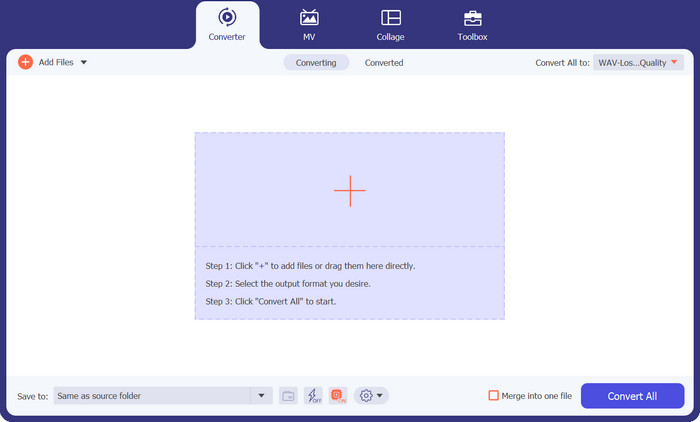
Запустите программу после установки Video Converter Ultimate на компьютер под управлением Windows или Mac. Нажмите кнопку Add Files на верхней панели и импортируйте файлы AIFC, которые вы хотите конвертировать.
Шаг 2. Выберите MP3 в качестве выходного формата
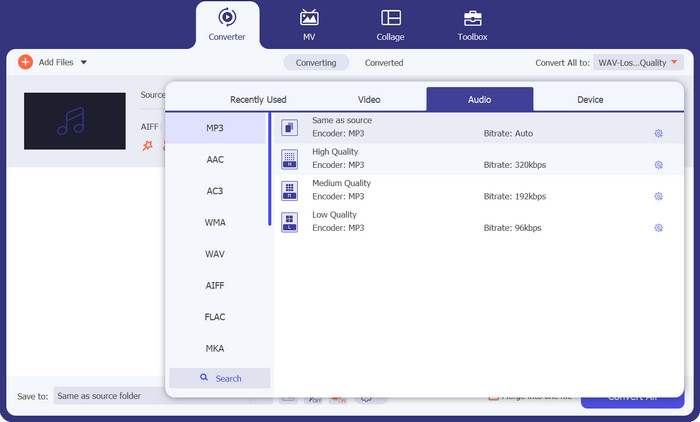
Найдите аудиофайл AIFC в библиотеке и нажмите раскрывающийся список Convert All to, расположенный справа. Откройте вкладку Audio и выберите MP3 как желаемый выходной формат. Затем нажмите выпадающее меню внизу, чтобы указать папку для сохранения конвертированных MP3-файлов.
Шаг 3. Конвертируйте AIFC в MP3
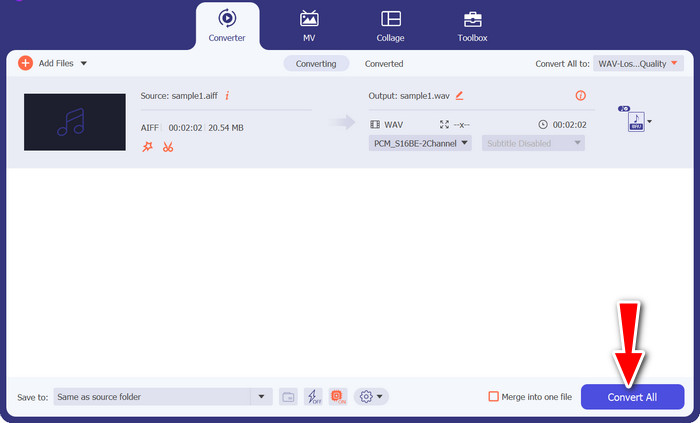
После настройки параметров вывода выделите в области библиотеки все файлы AIFC, которые хотите преобразовать. Нажмите кнопку Convert All в правом нижнем углу, чтобы запустить процесс конвертации и преобразовать ваши файлы AIFC в формат MP3. После завершения конвертации вы сможете легко перенести и прослушивать MP3-файлы на любом совместимом устройстве.
2. iTunes
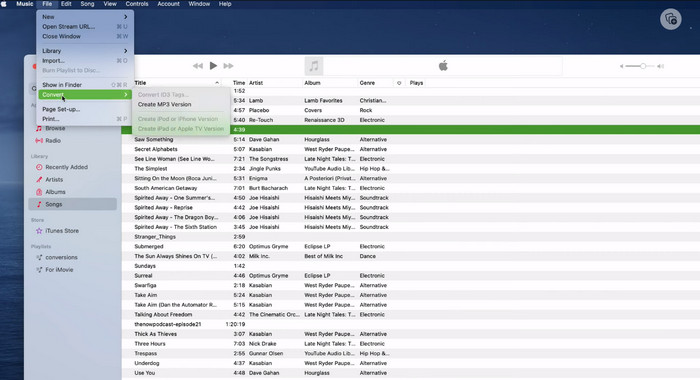
iTunes — это универсальная платформа для воспроизведения, управления и загрузки музыки и видео в ОС Mac OS X и Windows. Кроме того, он может похвастаться встроенной возможностью конвертировать аудиофайлы AIFC. Ниже вы найдете подробные пошаговые руководства по эффективному преобразованию AIFC в MP3 на Mac с помощью iTunes.
Шаг 1. Откройте iTunes на своём компьютере. На Mac запустите iTunes, выбрав в строке меню в верхней части экрана iTunes > Preferences.
Шаг 2. В окне настроек iTunes перейдите в раздел General, затем нажмите кнопку Import Settings внизу. В диалоговом окне Import Settings щёлкните раскрывающееся меню рядом с Import Using и выберите MP3 Encoder. Нажмите OK, чтобы подтвердить выбор. Если вы используете Mac, зажмите клавишу Option, выберите File > Convert > Convert to MP3 и укажите папку с песнями AIFC, которые вы хотите конвертировать.
Шаг 3. После завершения процесса преобразования песни будут конвертированы в формат MP3 и появятся в вашей библиотеке iTunes, готовые к воспроизведению или переносу на устройства. Таким образом, вы научитесь конвертировать AIFC в MP3 на Mac.
3. Бесплатный онлайн-конвертер MP3
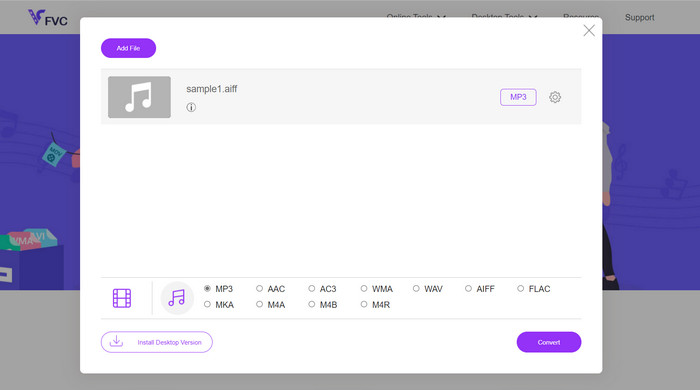
Самое простое и удобное решение — использовать надёжный онлайн-конвертер AIFC в MP3, и мой личный фаворит — это Free MP3 Converter Online. Этот веб-сервис не требует регистрации или указания e-mail, позволяя пользователям без лишних сложностей добавлять файлы для прямой конвертации. Отдельно стоит отметить его широкую поддержку различных форматов.
Шаг 1. Сначала перейдите на официальную страницу сервиса. Нажмите кнопку Add Files to Convert и выберите нужный файл AIFC на жёстком диске вашего компьютера.
Шаг 2. После добавления файла откройте меню форматов и выберите MP3 в качестве желаемого выходного формата.
Шаг 3. Наконец, нажмите кнопку Convert, чтобы запустить процесс преобразования. Через несколько секунд файл будет успешно конвертирован в формат MP3 и сохранён напрямую на ваш компьютер для удобного доступа.
4. Замзар
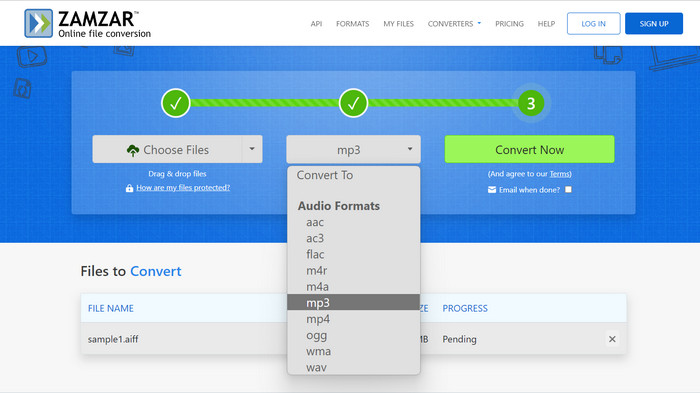
Выбор веб-приложений для конвертации аудио представляет собой заманчивую альтернативу конвертации AIFC в MP3. Эти приложения не требуют установки и эффективно справляются с задачей преобразования звука. Чтобы проиллюстрировать этот процесс, мы будем использовать Zamzar в качестве примера.
Шаг 1. Откройте страницу конвертации AIFC в MP3 в браузере. Загрузите файлы AIFC с жёсткого диска компьютера, по URL-адресу или напрямую из облачного хранилища.
Шаг 2. Чтобы изменить выходной формат, нажмите раскрывающееся меню форматов и выберите MP3 как целевой формат.
Шаг 3. После настройки параметров нажмите кнопку Convert Now, чтобы запустить процесс конвертации. Дождитесь окончания преобразования, затем скачайте конвертированные MP3-файлы на компьютер для немедленного использования.
5. Convertio
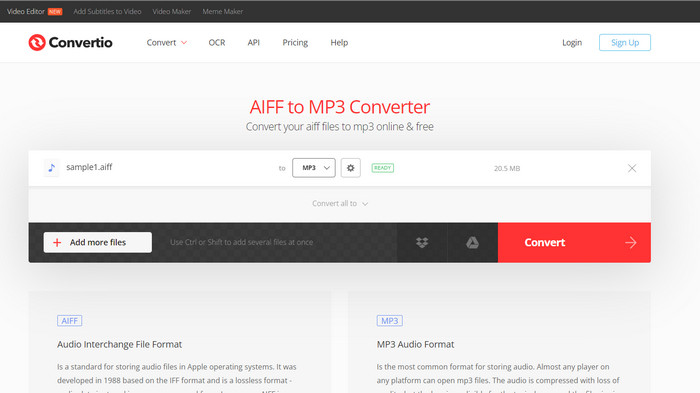
Convertio не ограничивается только преобразованием AIFC в MP3. Фактически, он предлагает широкий спектр возможностей для преобразования файлов AIFC в другие популярные форматы, включая WAV, WMA, AAC, AC3, FLAC, OGG, RA и другие. С помощью Convertio вы можете легко преобразовать файлы AIFC в предпочитаемый вами аудиоформат, что делает его универсальным и ценным инструментом для преобразования аудио.
Шаг 1. Перейдите на сайт Convertio (https://convertio.co/aifc-mp3/) в вашем браузере.
Шаг 2. Нажмите кнопку Choose Files, чтобы загрузить файлы AIFC с компьютера. В качестве альтернативы вы можете просто перетащить файлы на страницу сайта.
Шаг 3. После загрузки файлов AIFC откройте раскрывающееся меню выходного формата. Выберите MP3 из списка доступных аудиоформатов.
Шаг 4. Нажмите кнопку Convert, чтобы начать процесс преобразования AIFC в MP3. Дождитесь завершения конвертации.
Дополнительные материалы:
Обзор лучших программ для конвертации AIF в WAV [2023]
FLAC и MP3: какой аудиоформат правит балом
Часть 2. Часто задаваемые вопросы о конвертации AIFC в MP3
Конвертирует ли QuickTime AIFC в MP3?
Хотя QuickTime может читать файлы AIFC, он не имеет возможности конвертировать AIFC в MP3.
МФЦА лучше, чем AIFF?
AIFC — популярный вариант AIFF, в котором используется сжатие, что приводит к уменьшению размера файлов по сравнению с AIFF. Однако это сжатие также приводит к снижению качества звука по сравнению с исходным форматом AIFF.
Что лучше, MP3 или AIFC?
AIFC — формат с потерями, и его качество определяется выбранным битрейтом. Изменение битрейта может повлиять на то, будет ли AIFC превосходить или отставать от MP3 по качеству звука. Несмотря на это, MP3 обладает широкой совместимостью с устройствами. Лучший вариант между MP3 и AIFC зависит от ваших конкретных требований и предпочтений.
Могу ли я конвертировать файлы AIFC в MP3 на своем мобильном устройстве?
Да, некоторые мобильные приложения или онлайн-конвертеры для удобства предлагают преобразование AIFC в MP3 прямо на вашем мобильном устройстве.
Как я могу обеспечить наилучшее качество звука в процессе преобразования?
Чтобы добиться наилучшего качества звука, используйте более высокий битрейт во время преобразования. Однако имейте в виду, что больший размер файла приведет к более высокому битрейту.
Заключение
Конвертация AIFC в MP3 обеспечивает большую гибкость и более широкую совместимость с устройствами, что делает её популярным выбором для аудиоконвертации. Хотя AIFC может обеспечивать более высокое качество на больших битрейтах, MP3 остаётся практичным и повсеместно принимаемым вариантом для повседневного использования.
-
 Лучшие 4 способа конвертировать AIFF в MP3 на Mac и ПК
 Возникли трудности из-за того, что файлы AIFF слишком велики для сохранения? Итак, вы должны продолжить чтение, пока мы объясняем, как это исправить, преобразовав AIFF в формат MP3.
-
 Загрузка MP3-плеера — 10 лучших бесплатных музыкальных MP3-плееров 2023 года
 какой лучший MP3-плеер? Как записать музыку на MP3-плеер? Как загрузить музыкальный проигрыватель MP3? В этом посте представлен подробный обзор 10 лучших бесплатных MP3-плееров для ПК с Windows и Mac.
-
 5 MP3-резаков для легкой обрезки любого аудио [обновление 2023 г.]
 Вам нужен MP3-резак для обрезки аудио? В этом случае прочитайте эту статью, потому что мы предоставляем инструменты, на которые вы можете положиться и которые обеспечивают простую нарезку аудио.
