


 Видео конвертер Ultimate
 Устройство записи экрана
 Видео ремонт
Найдите лучшие конвертеры видео в MP3 для Интернета, настольных и мобильных телефонов
Музыка — одна из лучших форм развлечения, которую может подарить нам мир. Чтобы поддержать нашу любовь к музыке, особенно к любимым исполнителям, мы слушаем её каждый день. Бывают ситуации, когда вам очень хочется послушать любимую песню, но нет доступа к интернету. Не беда — вас выручит заранее скачанный клип. Однако размер файла с видеоклипом намного больше, чем у обычного аудиофайла. Чтобы решить эту проблему, давайте рассмотрим разные инструменты, с помощью которых можно конвертировать видео в формат MP3 и сэкономить место. На информацию из этой статьи можно положиться: она основана на убедительных фактах, так что не отвлекайтесь и давайте начнём.

Часть 1. Лучший конвертер видео в MP3 для Windows и Mac со сравнительной таблицей
Бесплатный конвертер MP3 FVC
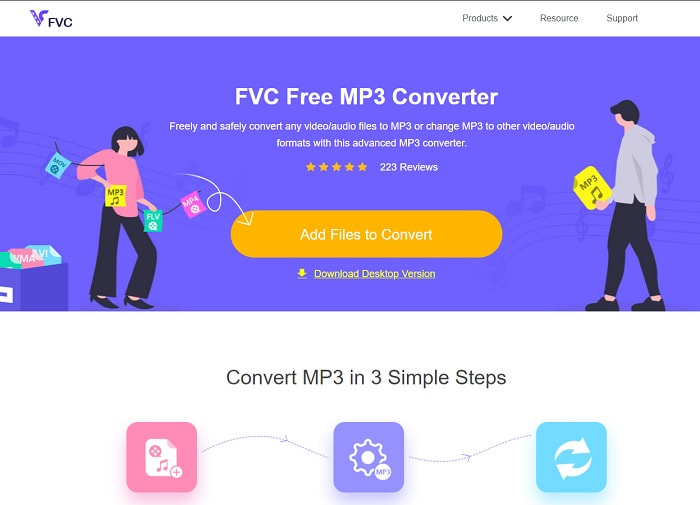
Если вам нужен бесплатный конвертер из видео в MP3, то с этим справится FVC Free MP3 Converter. Хотя этот инструмент предлагает множество функций, схожих с мобильными конвертерами и другими онлайн‑сервисами, он по‑прежнему считается одним из лучших веб‑конвертеров благодаря высокой скорости и точности преобразования. Правда, поддерживаемых форматов у него немного, что может ограничить ваши возможности свободно конвертировать файлы. Тем не менее это всё равно хороший конвертер. Чтобы узнать о нём больше, продолжайте читать и следуйте инструкциям ниже по его использованию.
Шаг 1. Нажмите на гиперссылку выше, чтобы перейти к основному веб‑инструменту.
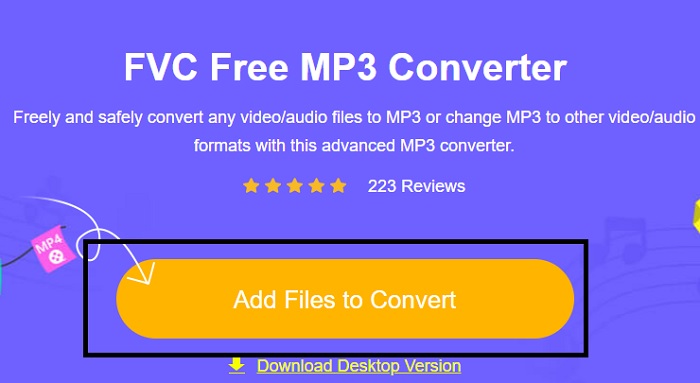
Шаг 2. Затем щёлкните Add Files to Convert, чтобы открыть и запустить инструмент.
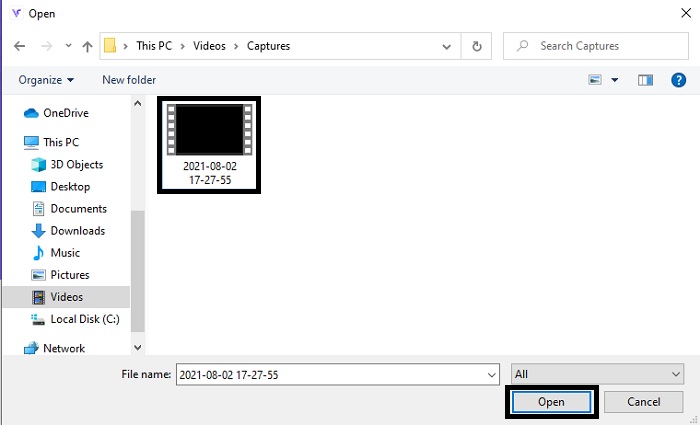
Шаг 3. Найдите видеофайл, который хотите конвертировать, и нажмите Open, чтобы добавить его.
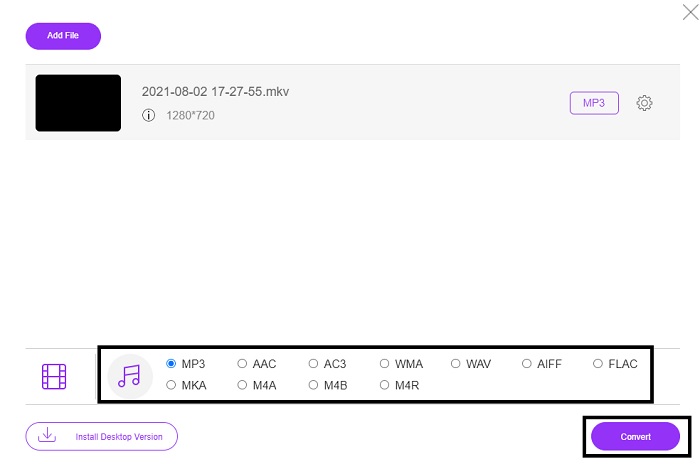
Шаг 4. Выберите здесь желаемый аудиоформат. Когда будете готовы начать конвертацию, нажмите Convert.
Шаг 5. Если хотите прослушать получившийся файл, нажмите на значок folder, чтобы открыть папку с файлом.
FVC Видеоконвертер Ultimate
Если первый инструмент не даёт нужного вам результата, можете воспользоваться FVC Video Converter Ultimate — это универсальный и любимый многими конвертер. В отличие от других программ, которыми вы уже пользовались или ещё нет, этот конвертер выделяется своим многообразием функций. Утверждается, что ни один другой инструмент не превосходит его по возможностям конвертирования, редактирования, создания, улучшения и т. д. Возможно, вы подумали, что он сложен в использовании, но это не так. Им очень легко пользоваться, и даже если вы не профессионал в конвертировании, вы сможете получить отличный результат. Итак, давайте разберёмся, как конвертировать видео в MP3 с помощью этого лучшего конвертера.
Шаг 1. Прежде всего скачайте эту настольную программу на диск. При необходимости измените параметры установки и нажмите Finish, чтобы сохранить изменения.
Бесплатная загрузкаДля Windows 7 или более поздних версийБезопасная загрузка
Бесплатная загрузкаДля MacOS 10.7 или более поздних версийБезопасная загрузка
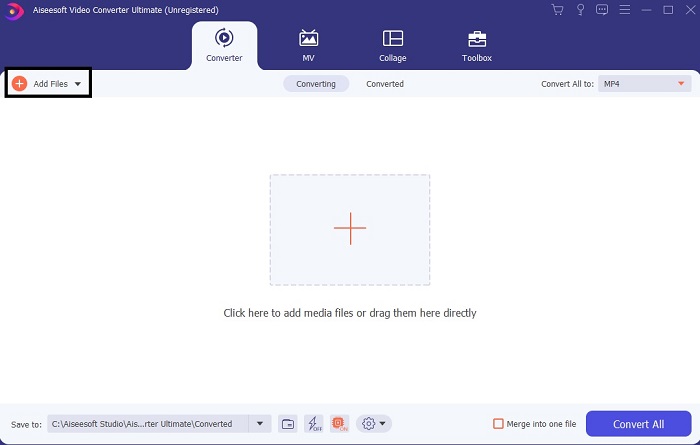
Шаг 2. На экране появится вот такой интерфейс. Нажмите Add Files или значок «плюс», чтобы добавить файл в программу.
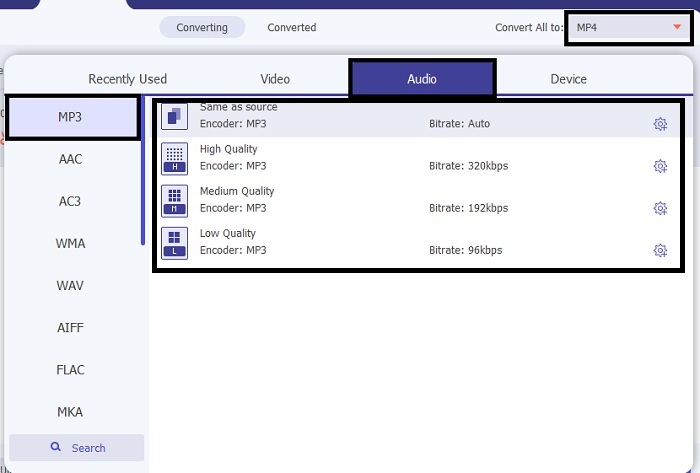
Шаг 3. После выбора файла, который нужно конвертировать, нажмите drop-down рядом с параметром Convert All to и выберите нужный формат из более чем 500 вариантов.
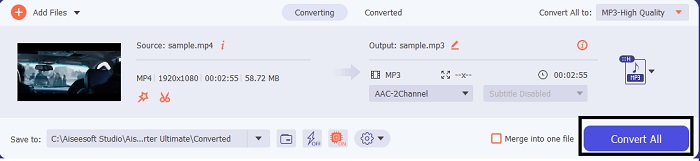
Шаг 4. Затем нажмите Convert All, чтобы начать конвертацию видео в MP3.
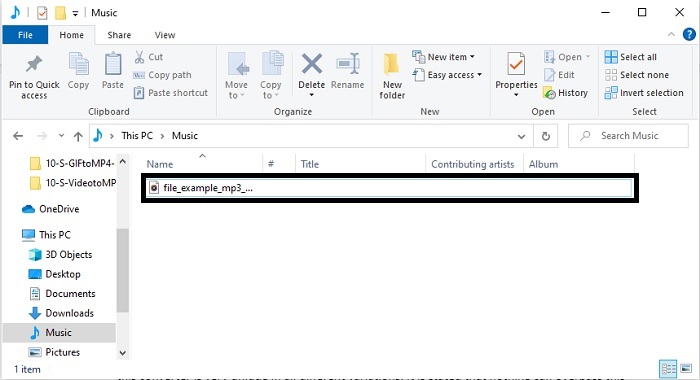
Шаг 5. Когда всё будет готово, на экране откроется менеджер файлов. Нажмите на сконвертированный файл, чтобы послушать и насладиться результатом.
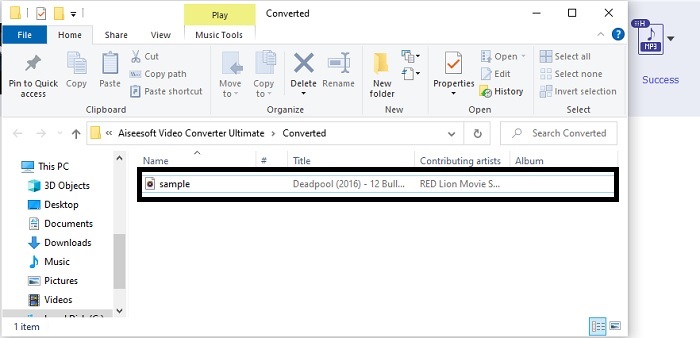
Дополнительные шаги для улучшения качества звука перед преобразованием с помощью FVC Video Converter Ultimate
Отредактируйте звук с помощью одной из функций программы FVC Video Converter Ultimate. Перед конвертацией видеофайла лучше улучшить качество аудио, чтобы потом слушать его с ещё большим удовольствием. Чтобы понять, как это делается, следуйте пошаговой инструкции по усилению звука с помощью функции Volume Booster.
Шаг 1. Если программа уже установлена, перейдите на вкладку Toolbar и нажмите Volume Booster.
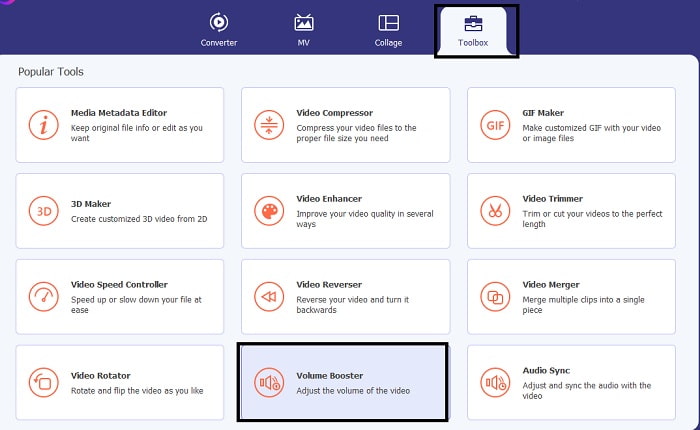
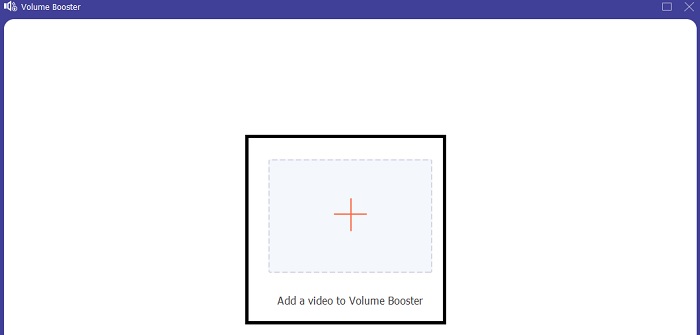
Шаг 2. Выберите видеофайл, который хотите улучшить, и нажмите Open, чтобы добавить его.
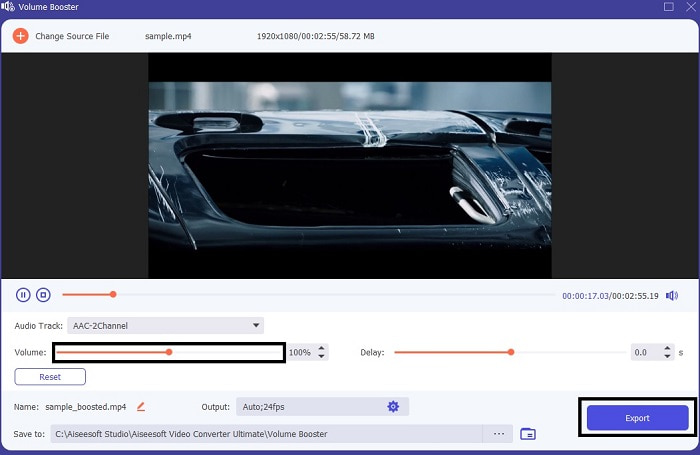
Шаг 3. Отрегулируйте volume slides по своему усмотрению. Затем нажмите на значок cog и при необходимости измените настройки вывода, после чего нажмите OK, чтобы сохранить изменения. Нажмите Export, чтобы сохранить итоговый файл, и наслаждайтесь результатом.
Сравнение FVC Free Video Converter и Video Converter Ultimate
Хотя оба инструмента дают то, что вам нужно, потому что они лучшие в своей области. Принятие решения о том, что использовать, может доставить вам трудности. Но чтобы разобраться в этом случае, вот сравнительная таблица между двумя инструментами. Давайте исследуем их слабые и сильные стороны как отдельные инструменты.
| особенности | Бесплатный конвертер MP3 FVC | Видео конвертер Ultimate |
| Преобразование аудио |  | |
| Функции редактирования |  | |
| Легко скачать или получить доступ | | |
| Удобный | | |
| Программа Поддерживается | Веб-инструмент | Настольный инструмент |
| Доступное программное обеспечение | Во всем программном обеспечении | Во всем программном обеспечении |
| Ценовой диапазон | Его бесплатный онлайн-инструмент | На 1 месяц: 1ТП2Т25.00 На год: 1ТП2Т31.20 Для бессрочной лицензии: $55.20 |
Часть 2. Приложения для видео в MP3 для устройств iPhone и Android
1. Конвертер видео в MP3
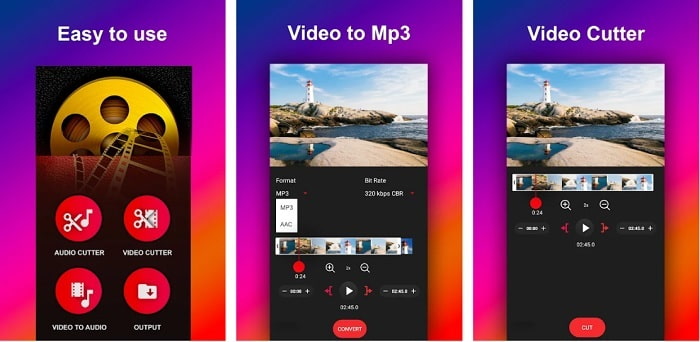
Если вы ищете конвертер видео в MP3 на Android, вам может подойти приложение Video to MP3 Converter. Этот инструмент специально создан для конвертации любых медиафайлов в формат MP3 или AAC. Кроме того, в нём можно менять битрейт и обрезать файлы. Несмотря на высокое качество выходного звука, конвертированные файлы не сохраняются напрямую в музыкальную папку, что немного неудобно: вместо того чтобы сразу слушать результат, вам придётся отыскивать его после завершения конвертации.
2. MP4 в MP3 - конвертируйте видео в аудио, вырезайте рингтоны
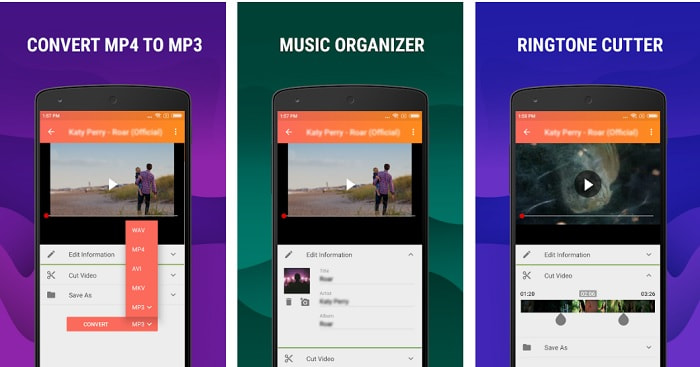
Хотя первый инструмент в этом списке и позволяет получить нужный вам MP3‑файл, приложение MP4 to MP3 - Convert Video to Audio, Cut Ringtones во многом может его превзойти. Это приложение предназначено только для пользователей Android, поэтому владельцы iOS‑устройств не смогут им воспользоваться. Его рейтинг в Play Store составляет 4,0 звезды, но активных пользователей не так много. Основная жалоба у всех одна и та же: после конвертации файл сложно найти, как и в первом приложении. Тем не менее некоторые по‑прежнему используют его как личный MP3‑конвертер, потому что оно позволяет конвертировать несколько файлов одновременно.
Связанный материал:
3. Аудиоконвертер
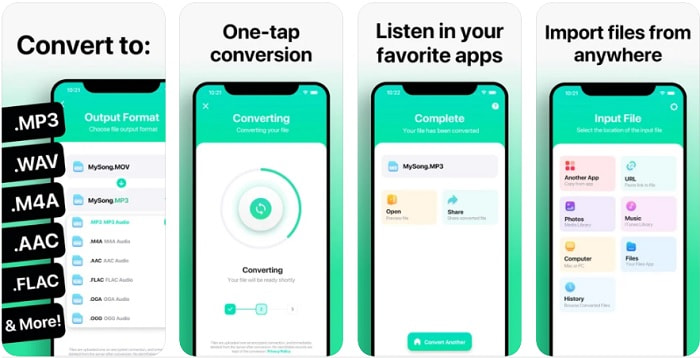
Если вы пользователь iOS и думаете, что не сможете качественно конвертировать аудио прямо на своём телефоне, вы ошибаетесь. Приложение The Audio Converter обеспечивает отличный процесс конвертации и многое другое. Конвертировать видео в MP3 на iPhone с его помощью очень просто. Но у бесплатной версии есть минус — ограничение по размеру файла. Если вы хотите конвертировать крупный файл, придётся оформить платную подписку. Более того, в некоторых случаях при желании отменить подписку вы не найдёте кнопки отмены. Будьте осторожны: при таком способе оплаты есть риск нежелательных списаний с вашей карты.
Часть 3. Сравнительная таблица
| особенности | Бесплатный конвертер MP3 FVC | FVC Видеоконвертер Ultimate | Конвертер видео в MP3 | MP4 в MP3 - конвертируйте видео в аудио, вырезайте рингтоны | Аудио конвертер |
| Аудио конвертер | | | | | |
| Поддерживаемые форматы | MP3, AAC, AC3, WMA, WAV, AIFF, FLAC, MKA, M4A, M4B, M4R | Доступно более 500 форматов мультимедиа | MP3 и AAC | MP3 | MP3 и AAC |
| Доступность инструмента | Веб-инструмент | Настольный инструмент | Приложение для телефона Android | Приложение для телефона Android | приложение для телефонов iOS |
| Ценовой диапазон | Его бесплатный онлайн-инструмент | На 1 месяц: 1ТП2Т25.00 На год: 1ТП2Т31.20 Для бессрочной лицензии: $55.20 | Бесплатное загружаемое приложение для Android | $6.49 - $19.99 за товар | Премиум-пропуск$3.99 Пожизненный пропуск$6.99 |
Часть 4. Часто задаваемые вопросы о видео в MP3
Почему мои видео не воспроизводятся на моем компьютере?
Иногда случается, что формат видео не поддерживается вашим стандартным медиапроигрывателем. В таком случае вам может пригодиться FVC Free Video Player для просмотра видео. Он поддерживает более 200 распространённых форматов, так что вы сможете смотреть практически любые видеоролики, не опасаясь, что файл не откроется.
MP3 - лучший аудиоформат?
Несмотря на то что MP3 считается универсальным аудиоформатом, который используют повсюду для воспроизведения, записи и хранения звука, есть формат, который в ряде случаев лучше — это AAC. Хотя он и обеспечивает более высокое качество, размер файлов всё же больше, чем у MP3, но не настолько большой, как, например, у AVI‑файлов. Чтобы конвертировать MP3 в AAC, можете использовать онлайн‑конвертер MP3 в AAC вместо небезопасных сервисов с плохим сжатием.
В чем минус аудио?
Аудиофайлы занимают гораздо меньше места, чем видео, но они менее наглядны, так как не дают зрительных образов. Поэтому, если вы ведёте подкаст, лучше выбрать лучший аудиорекордер — FVC Screen Recorder. Этот инструмент предоставляет широкие возможности по редактированию записи и поддерживает больше аудиоформатов, чем многие другие настольные и онлайн‑решения. Если запись звука вызывает у вас сложности, у вас есть одно решение — FVC Screen Recorder. Нажмите здесь, чтобы узнать больше о профессиональных MP3‑рекордерах.
Заключение
И вот мы подошли к концу статьи, и прежняя проблема теперь решена. Хотя сейчас наши пути расходятся, дальше всё зависит от вас. Поиск можно считать завершённым, как только вы выберете идеальный инструмент, на который можно положиться, например FVC Video Converter Ultimate. Каждый раз, используя этот конвертер, вы можете рассчитывать на быстрый, надёжный и безопасный процесс. Если у вас возникнут проблемы со звуком и вы захотите его улучшить, это тоже легко сделать. Мы надеемся, что вы продолжите знакомство с возможностями FVC Video Converter Ultimate, ведь этот инструмент обеспечивает действительно высокое качество конвертации. С опорой на точные «доказательства», которые мы привели специально для вас. Если вы довольны результатом, давайте считать дело закрытым.
-
 [2021] 6 лучших бесплатных онлайн-способов конвертировать M2TS в MP3
 Можно ли преобразовать файл M2TS в MP3? В этом посте мы перечислили 6 лучших бесплатных онлайн-способов конвертировать M2TS в MP3, AAC, AIFF и другие аудиоформаты.
-
 4 Методы работы 100% для преобразования видеофайлов FLV в формат MP3
 Как конвертировать FLV в файл MP3? Все, что вам нужно сделать, это внимательно прочитать эту статью, найти свой любимый метод и следовать нашему пошаговому руководству, чтобы получить то, что вы хотите.
-
 4 лучших метода конвертации OGG в MP3 без потери качества
 Как преобразовать файлы OGG в формат MP3 для прослушивания на компьютере или мобильном устройстве? Здесь мы расскажем о 5 самых простых способах сделать это на компьютере или в Интернете.
