


 Видео конвертер Ultimate
 Устройство записи экрана
 Видео ремонт
 Безопасная загрузка
Как конвертировать M2TS в совместимые с iPad форматы на Windows / Mac / онлайн
Можно ли воспроизводить M2TS напрямую на iPad? К сожалению, нет. Формат M2TS несовместим с iPad. Если вы хотите смотреть M2TS‑видео на iPad, нужно либо установить на iPad специальный проигрыватель M2TS, либо конвертировать M2TS в формат iPad. В этой статье выбран именно второй вариант. Просто прочитайте и узнайте, как изменить формат видео с M2TS на формат iPad.

Часть 1: Как конвертировать M2TS в iPad на Windows и Mac
Какие форматы поддерживает iPad? Фактически, iPad поддерживает распространенные форматы видео H.264, MP4, M4V, MOV, MPEG-4 и M-JPEG. Чтобы установить M2TS на iPad, вам необходимо сначала преобразовать видеоформат M2TS в iPad.
Как конвертировать M2TS в iPad на Windows бесплатно
FVC Free M2TS Converter — это полностью бесплатный пакетный конвертер M2TS в iPad. Вы можете массово конвертировать файлы M2TS в формат iPad со скоростью, в 50 раз превышающей работу обычных конвертеров M2TS. Поэтому неважно, нужно ли вам конвертировать большие M2TS‑файлы или целые партии видео для iPad — бесплатный конвертер M2TS в iPad отлично с этим справится.
Кроме того, вы можете объединять файлы M2TS и добавлять темы перед конвертацией M2TS в iPad. Окно предварительного просмотра в реальном времени мгновенно показывает применённые эффекты. Одним словом, вы можете редактировать и конвертировать AVCHD M2TS в iPad в Windows бесплатно и в одном месте.

Бесплатный конвертер M2TS
113,456+ Загрузки- Конвертировать M2TS в iPad H.264, MP4, MOV, MPEG-4 и другие совместимые форматы.
- Скорость в 50 раз выше благодаря поддержке пакетного преобразования.
- Поддерживайте высокий уровень качества при конвертировании на iPad со всех HD-видеокамер.
- Конвертер M2TS в iPad работает с компьютером под управлением Windows 10/8/7.
Скачать бесплатноДля Windows 7 и новееБезопасная загрузка
Скачать бесплатноДля MacOS 10.7 и новееБезопасная загрузка
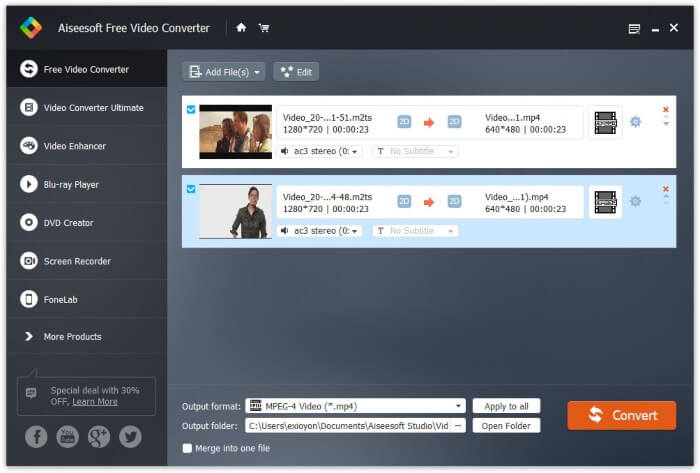
Шаг 1: Бесплатно скачайте, установите и запустите FVC Free M2TS Converter. Перетащите файлы M2TS в главное окно программы.

Шаг 2: Разверните список Output format (Выходной формат) в нижней части окна. Чтобы конвертировать M2TS в формат iPad в Windows, просто выберите нужный формат в категории Apple iPad.

Шаг 3: Нажмите на значок шестерёнки Settings (Настройки), чтобы отрегулировать кодек видео, частоту кадров и другие параметры. В конце нажмите Convert, чтобы конвертировать видео из M2TS в формат iPad.
Как конвертировать M2TS в iPad на Mac бесплатно
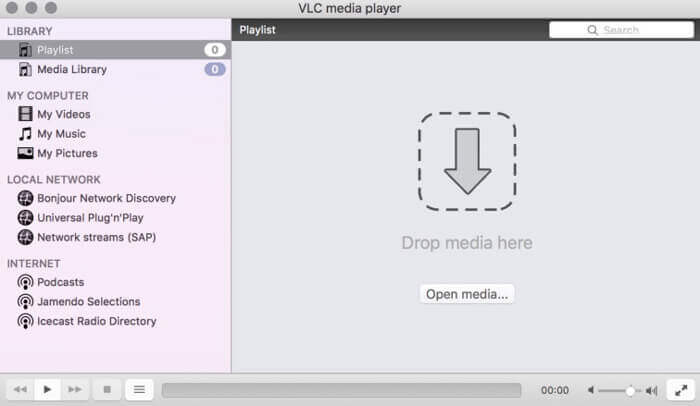
Если вы хотите бесплатно конвертировать видео M2TS в iPad на Mac, VLC Media Player может стать вашим хорошим выбором. Это бесплатный проигрыватель M2TS с открытым исходным кодом и конвертер для нескольких платформ.
Шаг 1: Откройте VLC Media Player на Mac. Выберите пункт Convert/Save в выпадающем меню Media.
Шаг 2: Нажмите Add, чтобы импортировать файл M2TS. Затем выделите файл и нажмите ниже кнопку Open, чтобы продолжить.
Шаг 3: Нажмите Convert/Save внизу окна, чтобы перейти к следующему шагу.
Шаг 4: Выберите формат iPad в выпадающем списке Profile. Можно нажать на значок Tools рядом, чтобы изменить настройки видео.
Шаг 5: Нажмите Start, чтобы начать конвертацию файла M2TS в формат iPad на Mac через VLC.
Часть 2: Как конвертировать M2TS в iPad онлайн
Для мобильных пользователей использование онлайн-конвертера M2TS в iPad также является хорошим выбором. Вы можете бесплатно конвертировать файл M2TS в iPad без необходимости загрузки, установки или регистрации.
Шаг 1: Откройте любой онлайн‑конвертер M2TS в iPad, например FVC Free Online Video Converter.

Шаг 2: Скачайте FVC launcher, нажав Add Files to Convert, и установите его.

Шаг 3: Найдите на компьютере файл M2TS для конвертации. Не забудьте выбрать выходной формат.

Шаг 4: Нажмите Start Converting, чтобы бесплатно конвертировать M2TS в формат iPad онлайн.
Часть 3: Часто задаваемые вопросы о преобразовании M2TS в iPad
Что происходит, если в файлах M2TS в iMovie вдруг отсутствует звук?
M2TS изначально не поддерживается устройствами Apple. Для решения проблемы вам необходимо преобразовать формат M2TS в Mac.
Как открыть файлы M2TS на iPhone и iPad?
AVCHD M2TS несовместим с устройствами iOS. Если вы настаиваете на воспроизведении видео M2TS на iPad, вы можете использовать приложение VLC Media Player для воспроизведения видео.
Есть какое-нибудь хорошее приложение для видеоплеера для iPad?
У iPad экран дисплея может быть больше, чем у iPhone. Так что впечатления от просмотра видео тоже будут лучше. Рекомендуемые видеоплееры включают PlayerXtreme Media Player, KMPlayer, VLC, AirPlayer и другие. Вы можете выбрать любой, чтобы гибко управлять видео.
Вот и всё, что нужно, чтобы конвертировать M2TS в iPad с помощью онлайн‑ и офлайн‑инструментов. Эти конвертеры M2TS бесплатны и безопасны в использовании. Независимо от того, сколько файлов M2TS вы хотите перевести в форматы, совместимые с iPad, здесь вы получите максимальную скорость.
-
 Как конвертировать M2TS в MP4 без снижения качества
 Хотите преобразовать видео с видеокамеры HD в обычный MP4? Вот 4 простых и бесплатных способа изменить файл M2TS на MP4 в Windows и Mac.
-
 Как конвертировать M2TS в MKV без потери качества
 Хотите конвертировать M2TS в MKV, сохранив исходное качество? В этом посте показаны бесплатные онлайн-методы для преобразования M2TS в MKV без потерь.
-
 В чем разница между МТС и М2ТС
 Что такое файл MTS или M2TS? В чем разница между М2ТС и МТС? Как я могу посмотреть записанный видеокамерой файл MTS или M2TS? Найдите все ответы в этом посте.
