


 Видео конвертер Ultimate
 Устройство записи экрана
 Видео ремонт
 Безопасная загрузка
4 лучших бесплатных способа конвертировать MTS в MOV
Я снял несколько видео на свою видеокамеру Sony, которая экспортировала файлы MTS. Я заметил, что мой медиаплеер и iMovie не поддерживают MTS. Я использую Mac и хочу отредактировать эти захваченные видео MTS. Любая помощь? Есть ли простой способ, особенно бесплатный способ конвертировать MTS в MOV?
MTS — это формат видео высокой чёткости, который широко используется видеокамерами Sony и Panasonic и является расширением файлов AVCHD (Advanced Video Coding High Definition). После записи видео на цифровую камеру вы, скорее всего, получите файл MTS. Он поддерживает HD 720p/1080i и обеспечивает более высокое качество изображения. Однако MTS не является популярным форматом, который поддерживается большинством медиаплееров и видеоредакторов.

Когда вам нужно отредактировать MTS в iMovie или воспроизвести его в медиаплеере, следует конвертировать MTS в MOV или MP4 для лучшей совместимости. В этом материале мы покажем вам 4 бесплатных конвертера MTS, которые помогут легко конвертировать MTS в MOV.
Часть 1. Лучший бесплатный способ конвертировать MTS в MOV без потери качества
В интернете доступно большое количество программ для конвертации MTS, которые позволяют конвертировать MTS в MOV с высоким качеством. Сначала мы хотим порекомендовать вам лучшую бесплатную программу для конвертации MTS в MOV — Free MTS Converter.
Он специально разработан для всех видов конверсий. Он совместим практически со всеми видео- и аудиоформатами, такими как MP4, MOV, MKV, MTS, AVI, FLV, WMV, MP3, AAC, FLAC и другими. Вы можете скачать его бесплатно и воспользоваться следующим руководством, чтобы бесплатно конвертировать MTS в MOV.
Бесплатная загрузкаДля Windows 7 или более поздних версийБезопасная загрузка
Бесплатная загрузкаДля MacOS 10.7 или более поздних версийБезопасная загрузка
Шаг 1. Во-первых, вам необходимо установить и запустить этот бесплатный конвертер MTS в MOV на вашем компьютере. Он предлагает для загрузки версии для Windows и Mac.
Шаг 2. Нажмите Add File(s), чтобы добавить файл(ы) MTS, который(е) вы хотите конвертировать. Вы можете конвертировать один или несколько файлов MTS одновременно.
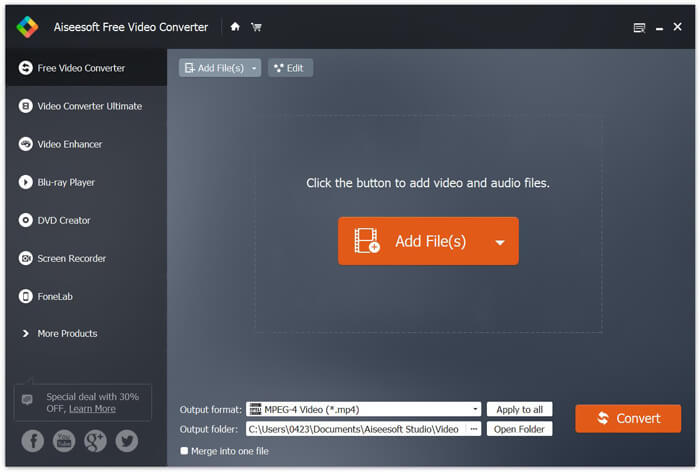
Шаг 3. Выберите MOV в качестве целевого формата в списке Output format. Затем нажмите кнопку Convert, чтобы запустить конвертацию из MTS в MOV.
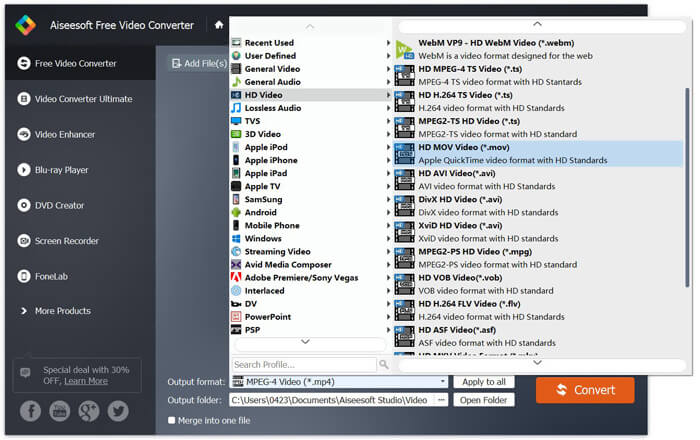
Как видно из вышеизложенного, этот бесплатный конвертер MTS в MOV также имеет некоторые базовые функции редактирования. Перед окончательным преобразованием вы можете использовать их для настройки вашего файла MTS. По сравнению с онлайн-конвертерами, этот бесплатный конвертер видео может дать вам более быструю скорость конвертирования и более высокое качество выходного видео. Вот почему мы делаем это нашей первой рекомендацией.
Часть 2. Бесплатный онлайн-конвертер помогает легко конвертировать видео
Если в Google искать, как конвертировать MTS в MOV, вы получите много результатов с бесплатными онлайн-конвертерами. Здесь мы представляем вам простой в использовании бесплатный онлайн-конвертер MTS в MOV — FVC Free Online Video Converter. Без установки какого-либо программного обеспечения вы можете бесплатно конвертировать любые популярные видеоформаты в MP4, AVI, MOV и другие. И вам не о чем беспокоиться, так как конвертация проходит безопасно и стабильно. В процессе конвертирования данные не теряются.
Шаг 1. Откройте ссылку выше и нажмите кнопку Add Files to Convert. Перед конвертацией скачайте и установите FVC launcher. Это займет всего несколько секунд.

Шаг 2. После установки и обновления лаунчера просто выберите видео, которое хотите конвертировать. Затем выберите нужный формат и нажмите Convert.

Шаг 3. Откройте ссылку выше и нажмите кнопку Add Files to Convert. Перед конвертацией скачайте и установите FVC launcher. Это займет всего несколько секунд.
Часть 3. Как конвертировать МТС в MOV бесплатно онлайн с ZAMZAR
ZAMZAR - одно из самых популярных онлайн-программ для конвертации видео, которое может помочь вам бесплатно конвертировать MTS в MOV. Он разработан с лаконичным интерфейсом и простой функцией преобразования. Вы можете воспользоваться следующим руководством, чтобы преобразовать видео МТС.
Шаг 1. Откройте браузер и перейдите на официальный сайт ZAMZAR. Здесь вы можете напрямую перейти на страницу https://www.zamzar.com/convert/mts-to-mov/. Здесь вам разрешено напрямую конвертировать MTS в MOV, не выполняя других настроек.
Шаг 2. Нажмите кнопку «Добавить файлы», чтобы загрузить файл MTS, который вы хотите преобразовать. Вы можете перетащить мышью для загрузки файла MTS. Вы должны знать одну вещь: этот бесплатный онлайн-конвертер MTS позволяет конвертировать только файлы MTS размером менее 150 МБ.
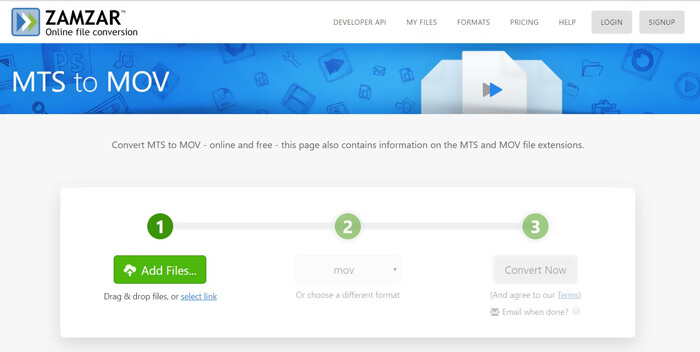
Шаг 3. После загрузки вы можете нажать кнопку Convert Now, чтобы начать бесплатную онлайн-конвертацию MTS в MOV.
Часть 4. Онлайн-способ конвертировать MTS в MOV с помощью FreeConvert
FreeConvert — ещё один популярный онлайн-видеоконвертер, который позволяет бесплатно конвертировать видео из MTS в MOV. Этот бесплатный конвертер MTS в MOV хорошо поддерживает форматы MTS и M2TS. Он даёт возможность загрузить файл MTS размером до 1 ГБ. Более того, он позволяет загружать до 20 файлов MTS одновременно для конвертации. Теперь выполните шаги ниже, чтобы конвертировать ваш MTS в MOV.
Шаг 1. Сначала откройте сайт FreeConvert.com в браузере. Для конвертации вы можете сразу перейти по адресу https://www.freeconvert.com/mts-to-mov.
Шаг 2. Нажмите большую синюю кнопку Choose MTS Files, чтобы загрузить файл MTS, который вы хотите конвертировать в MOV. Как уже упоминалось выше, здесь вы можете загрузить один или несколько файлов MTS для конвертации.
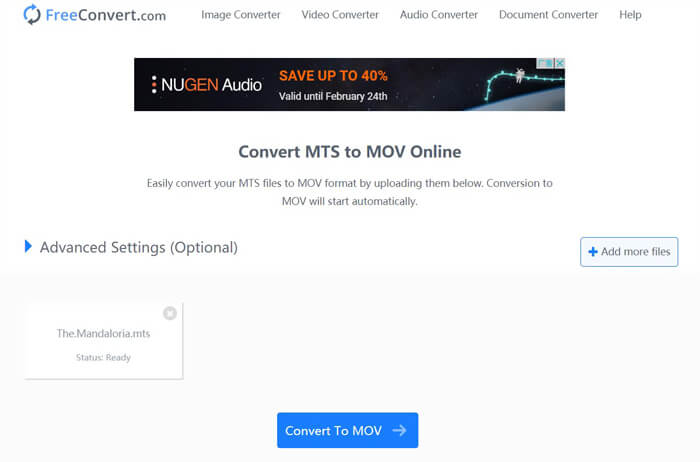
Шаг 3. Нажмите кнопку Convert To MOV, чтобы начать процесс загрузки и конвертации. После этого нажмите кнопку Download, чтобы сохранить конвертированный файл на компьютер.
Если вы выбираете бесплатные онлайн-конвертеры, чтобы конвертировать MTS в MOV, вам, как правило, потребуется довольно много времени на загрузку и конвертацию. Поэтому лучше конвертировать онлайн файлы MTS небольшого размера. Если вы хотите конвертировать большой файл MTS или M2TS, стоит воспользоваться высоко рекомендованной программой Free Video Converter.
-
 6 простых способов конвертировать TS в AVI / MKV / MOV / WMV на Windows / Mac
 Хотите быстро конвертировать файлы TS в AVI / MKV / MOV / WMV? В этой статье представлены онлайн и офлайн-конвертеры видео с полным руководством. Может быть, здесь вы найдете лучший бесплатный конвертер TS.
-
 MOV VS MP4 - что лучше
 MOV VS MP4, что лучше? В этом сообщении рассказывается о разнице между MP4 и MOV, чтобы вы могли лучше выбрать для своих видеофайлов.
-
 Как бесплатно присоединиться к файлам MOV (QuickTime)
 Новичкам может быть сложно объединить несколько видеоклипов MOV. Итак, есть ли простой и быстрый способ объединить файлы MOV? Если есть, то как им пользоваться? Этот пост поможет вам получить эти ответы.
