


 Видео конвертер Ultimate
 Устройство записи экрана
 Видео ремонт
 Безопасная загрузка
3 основных способа конвертировать FLV в MOV
По причине отсутствия поддержки некоторых форматов или по другим причинам вам может понадобиться конвертировать FLV в MOV, особенно если вы пользуетесь Mac.
Следует знать, что файлы FLV не поддерживаются QuickTime Player и iMovie на системном уровне. Поэтому вы не можете напрямую открывать или редактировать FLV на Mac. Какой бы ни была причина, в этой статье показано, как конвертировать FLV в MOV.

К счастью, существует множество видеоконвертеров, включая многие бесплатные онлайн‑сервисы, которые позволяют с лёгкостью преобразовать ваши FLV‑файлы в MOV. В этом посте мы представим 3 отличных конвертера FLV в MOV. Когда вы скачали какие‑то FLV‑видео с видеохостингов, вы можете воспользоваться ими для конвертации видео из FLV в MOV.
Часть 1. Конвертировать FLV в MOV онлайн бесплатно
Как уже упоминалось выше, на рынке представлено большое количество бесплатных онлайн‑конвертеров FLV в MOV. Если вы не знаете, какой из них выбрать, мы искренне рекомендуем популярный FVC Free Online Video Converter, чтобы конвертировать FLV в QuickTime MOV.
Шаг 1: Откройте браузер и перейдите на сайт этого онлайн‑конвертера FLV в MOV. Вы можете использовать его в любом веб‑браузере, включая Chrome, IE, Safari и Firefox.
Скачайте версию для ПК, чтобы конвертировать файлы пакетно.
Шаг 2: Нажмите кнопку Add Files to Convert, чтобы быстро установить лаунчер для конвертации FLV. После этого появится всплывающее окно, где вы сможете выбрать и загрузить свой FLV‑файл.

Шаг 3: Когда вы попадёте в главное окно конвертера, вы увидите список популярных видеоформатов, таких как MP4, MOV, AVI, FLV, M4V, MKV, VOB, MPG, WMV и другие. Здесь вам нужно выбрать MOV в качестве выходного формата.
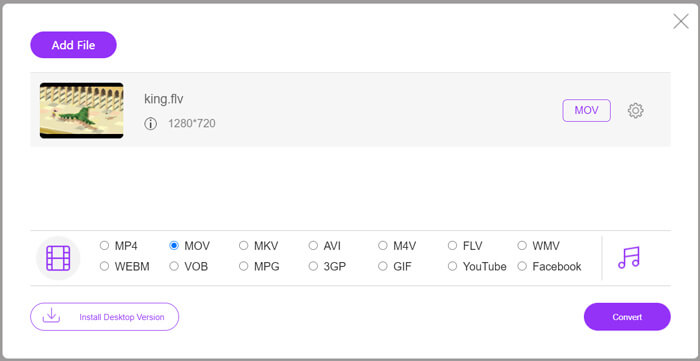
Шаг 4: Перед окончательной конвертацией FLV в MOV вы можете нажать значок Settings, чтобы настроить дополнительные параметры видео и аудио: разрешение, кодек, битрейт, частоту кадров, громкость звука, звуковой канал и т. д. После этого нажмите кнопку Convert, чтобы начать онлайн‑конвертацию FLV в MOV.
Часть 2. Измените FLV на MOV с помощью VLC
VLC — это медиаплеер с открытым исходным кодом, который также обладает базовыми функциями конвертации. Если на вашем Mac или ПК с Windows установлен VLC Media Player, вы можете использовать его для конвертации файлов FLV.
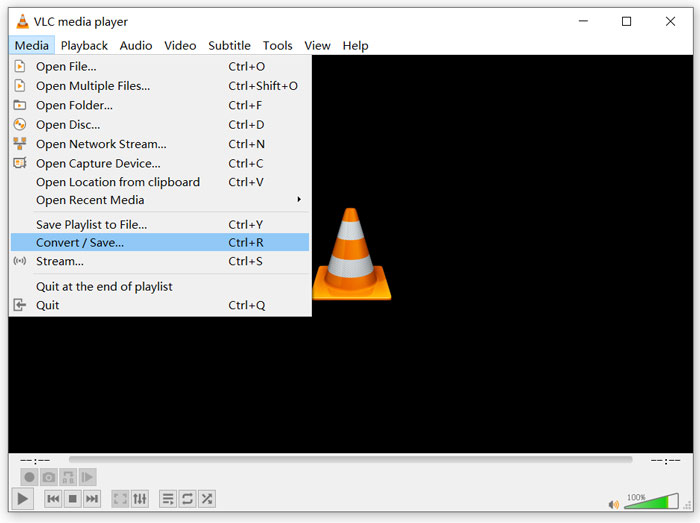
Шаг 1: Откройте VLC Media Player на компьютере и нажмите меню Media. В выпадающем списке выберите опцию Convert/Save. Если вы используете VLC на Mac, нажмите меню File и затем выберите опцию Convert/Stream.
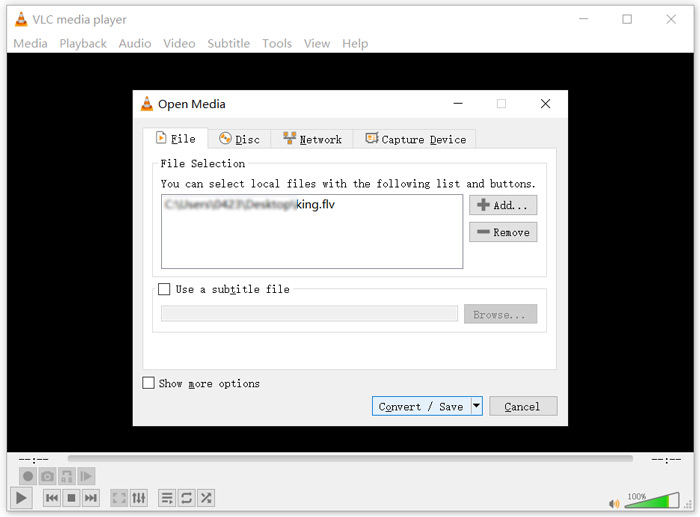
Шаг 2: Теперь вы находитесь в окне Open Media. Здесь нажмите кнопку Add, чтобы импортировать FLV‑файл, который вы хотите конвертировать. Затем нажмите кнопку Convert/Save, чтобы продолжить.
Шаг 3: В выпадающем списке Profile выберите подходящий выходной формат. Здесь вы можете конвертировать FLV в MP4, TS, OGG, WebM, YouTube HD, MP3, FLAC и другие форматы. Отметьте флажок перед опцией Display the output. Нажмите кнопку Browse, чтобы выбрать подходящую папку для сохранения конвертированного FLV. На этом этапе вы можете присвоить выходному видео расширение файла .mov.
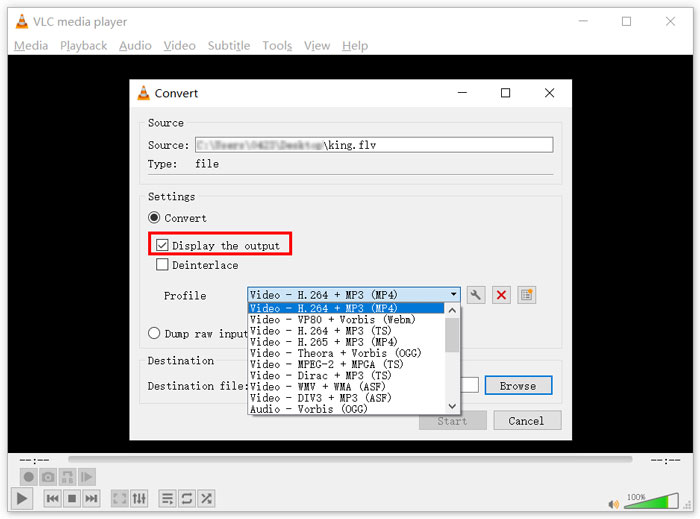
Шаг 4: После выполнения всех этих действий нажмите кнопку Start, чтобы запустить конвертацию FLV.
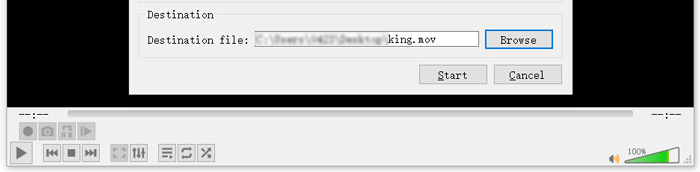
VLC Media Player автоматически начнёт воспроизведение выходного видео. В верхней части VLC вы увидите уведомление Converting file. Не закрывайте VLC полностью, пока конвертация не завершится.
Часть 3. Лучший способ преобразовать FLV в MOV без потери качества
Когда вам нужно конвертировать FLV в MOV, вы также можете обратиться к профессиональному решению. Здесь мы настоятельно рекомендуем многофункциональное программное обеспечение для конвертации FLV в MOV — Video Converter Ultimate. По сравнению с бесплатными онлайн‑конвертерами FLV в MOV и VLC, оно обладает более широким функционалом и поддерживает больше форматов. Что ещё важнее, оно позволяет конвертировать FLV в MOV с сохранением исходного качества.
- 1. Конвертируйте любое видео, такое как MKV, AVI, MP4, WMV, FLV, в MOV без потери качества.
- 2. Конвертируйте 8K / 5K / 4K, 1080p / 720p HD и SD-видео в более чем 500 форматов, таких как MOV, MP4, AVI, MP3 и другие.
- 3. Редактируйте видео, например вырезайте, вращайте, кадрируйте, объединяйте и т. Д., Добавляйте фильтры и эффекты и повышайте качество.
- 4. Toolbox может сжимать FLV, редактировать информацию метаданных FLV, создавать GIF из FLV и многое другое.
Бесплатная загрузкаДля Windows 7 или более поздних версийБезопасная загрузка
Бесплатная загрузкаДля MacOS 10.7 или более поздних версийБезопасная загрузка
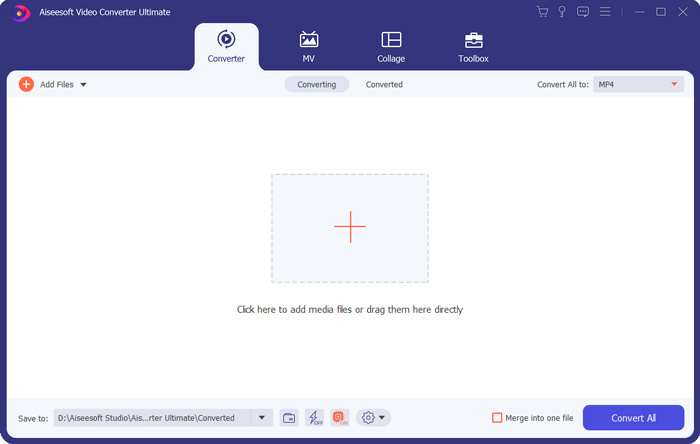
Шаг 1: Бесплатно установите и запустите этот конвертер FLV в MOV на своём Mac или ПК с Windows. Убедитесь, что вы используете раздел Converter. Затем нажмите большую иконку плюс, чтобы добавить ваш(и) FLV‑файл(ы).
Шаг 2: Нажмите на значок format справа от импортированного FLV‑файла. В выпадающем списке установите MOV в качестве выходного формата.
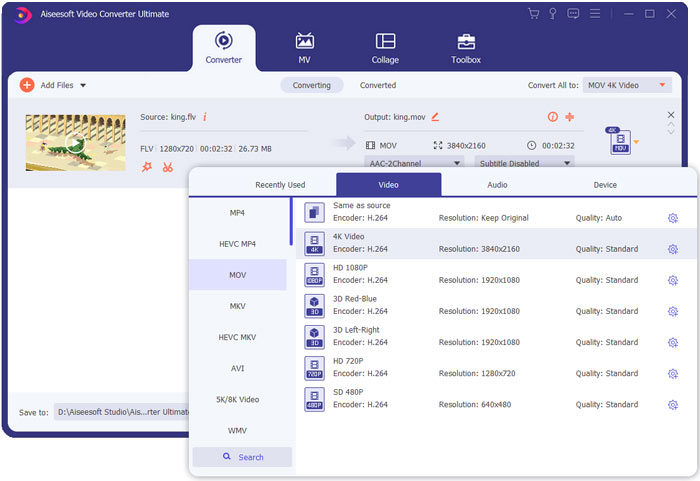
Шаг 3: Как видно выше, этот FLV‑конвертер оснащён множеством функций редактирования. Поэтому перед конвертацией FLV в MOV вы можете отредактировать видео, добавить фильтры, эффекты или настроить другие параметры в соответствии с вашими потребностями. После этого нажмите кнопку Convert All, чтобы запустить процесс конвертации.
FLV против MOV
Adobe Flash Player использовал FLV для доставки видеоконтента, такого как фильмы и телепередачи. В настоящее время Adobe больше не разрабатывает плеер и рекомендует пользователям удалить его из соображений безопасности. Однако вы по-прежнему можете использовать формат FLV во многих программах, отличных от Adobe/Macromedia.
Формат MOV можно использовать для хранения фильма, телепередачи, короткого видеоклипа или домашнего фильма. На самом деле он сохраняется в формате файлов QuickTime (QTFF), который был представлен Apple в 1991 году. Файлы MOV часто используются, когда люди хотят сохранить видео с высоким качеством.
Часть 4. Часто задаваемые вопросы о преобразовании FLV в MOV
FLV против MOV, в чем разница между FLV и MOV?
FLV (Flash Video File) — это совместимый с Flash видеофайл, разработанный компанией Adobe Systems. Он содержит короткий заголовок, чередующиеся пакеты видео, аудио и метаданных. Изначально формат FLV был создан для встраивания видеопотоков в приложения Adobe. Файл FLV обычно содержит видеопоток 640x360 и аудиопоток с частотой 44,1 кГц, 2 каналами, AAC.
MOV — это стандартный видеоформат для устройств Apple и связанных программ, таких как QuickTime Player и iMovie. Он лежит в основе формата файлов MPEG‑4, стандартизированного в Международной организации по стандартизации. Файлы MOV могут хранить видео, аудио, текст, субтитры, изображения и другие данные.
Формат FLV не поддерживается устройствами Apple, включая Mac, iPhone, iPad и iPod touch. Более того, по сравнению с MOV, FLV обеспечивает более низкое качество видео.
Может ли iMovie редактировать FLV?
Нет. Как вы можете узнать из вышесказанного, FLV не может поддерживаться устройствами и программным обеспечением Apple. Как видеоредактор по умолчанию для устройств Mac и iOS, iMovie также несовместим с файлами FLV.
Может ли проигрыватель Windows Media открывать файлы MOV?
Большинство версий проигрывателя Windows Media не поддерживают формат MOV. Но последняя версия Windows Media Player 12.0 может открывать файлы MOV.
Заключение
В этом посте рассказывается о трёх простых способах конвертации FLV в MOV. Когда ваши FLV‑файлы не воспроизводятся или не поддаются редактированию, вы можете воспользоваться рекомендованными конвертерами, чтобы преобразовать их в MOV или MP4.
-
 Как конвертировать видео FLV в аудиофайлы MP3 на рабочем столе и в Интернете
 Как конвертировать FLV в файл MP3? Все, что вам нужно сделать, это внимательно прочитать эту статью, найти свой любимый метод и следовать нашему пошаговому руководству, чтобы получить то, что вы хотите.
-
 10 лучших видеоплееров FLV для Windows 10/8/7, Mac, iOS и Android, которые вы должны попробовать (последняя версия на 2021 год)
 FLV-плеер помогает вам легко получить доступ к вашим FLV-файлам на вашем устройстве Windows, Mac, Android, iOS. Ознакомьтесь с лучшими проигрывателями файлов FLV, которые вы можете скачать прямо сейчас.
-
 Как бесплатно конвертировать MP4 в FLV онлайн / Mac / Windows
 Этот пост представляет собой подробное руководство по преобразованию MP4 в FLV. Вы можете использовать 3 лучших бесплатных конвертера, чтобы с легкостью преобразовать MP4 в FLV онлайн, на компьютере с Windows или Mac.

