


 Видео конвертер Ultimate
 Устройство записи экрана
 Видео ремонт
Автономные и онлайн-инструменты для преобразования TRP в FLV, о которых вы должны знать
TRP — это формат файлов для хранения записей телепередач. Поскольку немногие проигрыватели могут воспроизводить этот тип файлов в исходном виде, перед просмотром может потребоваться конвертировать файл в другой формат. Чтобы выполнить преобразование файлов TRP в файлы FLV, вам понадобится подходящее программное обеспечение. К счастью, сделать это гораздо проще с помощью нашей программы или её онлайн‑аналога, которые не доставят вам никаких неудобств на протяжении всего процесса конвертации. Следуйте шагам, которые мы приведём ниже, чтобы успешно конвертировать ваши TRP‑видео в формат FLV.

Часть 1. Автономный метод преобразования TRP в FLV
Формат TRP малоизвестен большинству пользователей видео и редко используется создателями контента. Из‑за этого большинство программ и онлайн‑инструментов не поддерживают данный тип видеофайлов. Поэтому именно Video Converter Ultimate стоит рассматривать в те моменты, когда нужно конвертировать видео из одного формата в другой. Эта программа позволяет в один клик преобразовать ваш файл TRP в любой нужный вам формат.
Этот инструмент для конвертации видео предоставляет расширенные функции редактирования и имеет графический интерфейс, который прост в использовании, даже если у вас нет технических знаний или навыков. С помощью этого приложения вы можете конвертировать файлы и получать выгоду от сверхбыстрого времени конвертации и высококачественного вывода. Здесь мы предлагаем вам простые шаги, которые вы должны выполнить:
Шаг 1: Скачайте .exe‑файл, нажав кнопку Бесплатная загрузка ниже в соответствии с используемой вами операционной системой. После завершения загрузки откройте файл и начните установку. Дождитесь окончания установки, затем запустите программу.
Бесплатная загрузкаДля Windows 7 или более поздних версийБезопасная загрузка
Бесплатная загрузкаДля MacOS 10.7 или более поздних версийБезопасная загрузка
Шаг 2. После запуска программы откроется интерфейс. В нём нажмите кнопку + в центре окна и начните импорт нужного для конвертации видеофайла или просто перетащите файл мышью в окно.
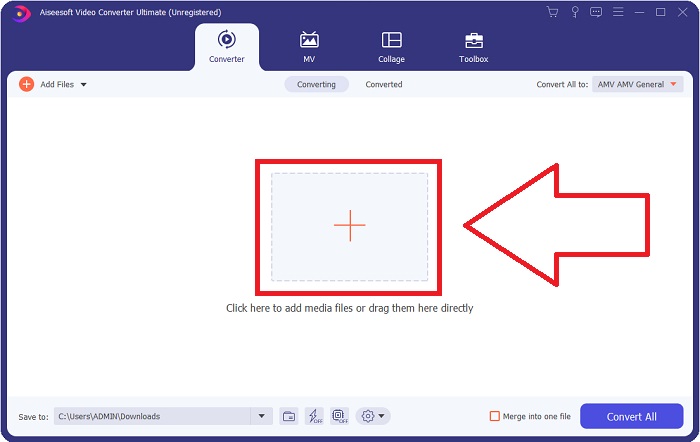
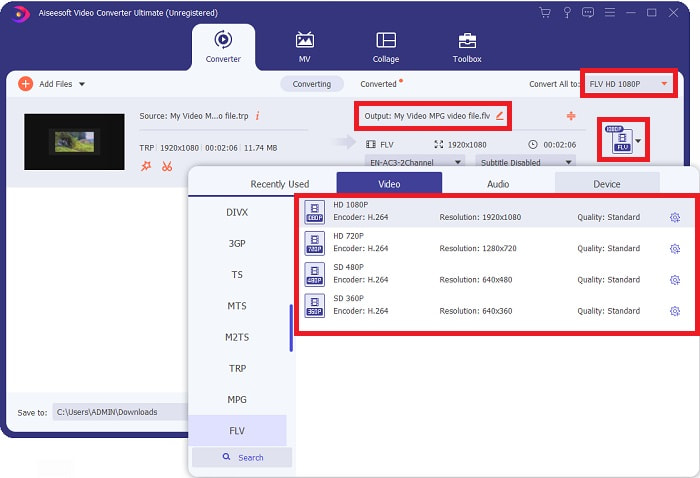
Шаг 3: Справа от файла вы увидите текущий формат вашего видео. Чтобы выбрать формат, в который будет выполняться конвертация, нажмите на него — отобразится список всех доступных форматов. Найдите FLV или просто введите его в строке поиска. Справа также можно выбрать нужное качество видео.
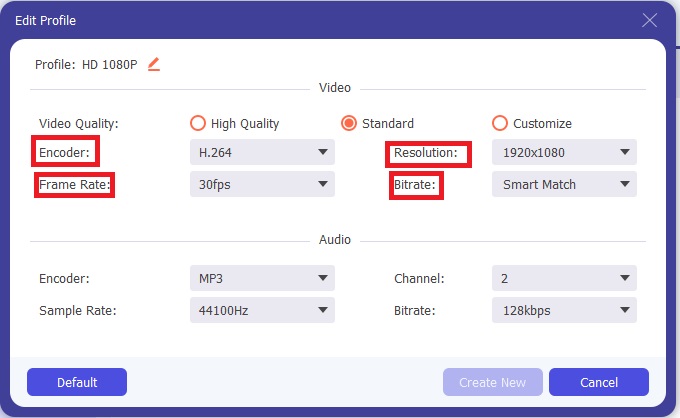
Шаг 4: Для дополнительных функций, о которых мы упоминали, нажмите значок шестерёнки справа от выбранного качества видео — откроется ещё одно окно. Там вы сможете отредактировать множество параметров видео и аудио в соответствии с вашими потребностями. Нажмите кнопку Создать новый, чтобы сохранить изменения.
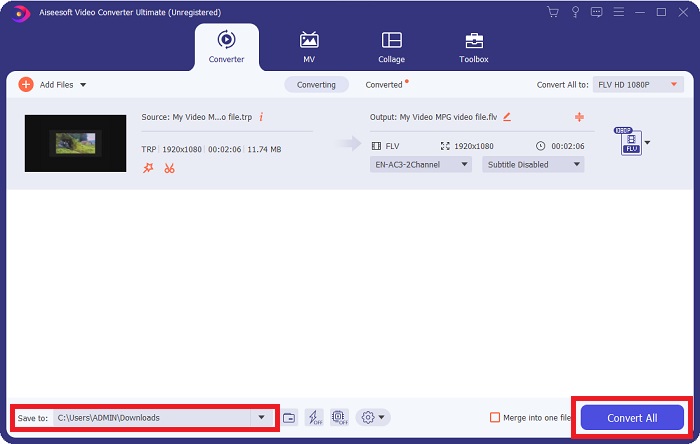
Шаг 5: Когда вы завершите все настройки и правки, нажмите кнопку Конвертировать всё в правом нижнем углу интерфейса, чтобы запустить процесс конвертации, и дождитесь его окончания.
Часть 2. Онлайн-метод преобразования TRP в FLV
Конвертирование видеофайлов можно выполнять и другим способом, если вы хотите воспользоваться веб‑инструментом без установки полноценной программы. В этом случае у нас есть онлайн‑версия программы — FVC Free Video Converter Online. Она также предоставляет дополнительные настройки, похожие на настольную версию, хотя и не включает абсолютно все её функции. Тем не менее, она отлично справляется со своей задачей за вполне разумное время. Чтобы воспользоваться этим веб‑инструментом, следуйте инструкциям ниже:
Шаг 1: Перейдите к конвертеру по этой ссылке. Там начните с загрузки лаунчера, который необходим для импорта файлов. Нажмите кнопку Добавить файлы для конвертации в середине страницы, чтобы начать процесс.
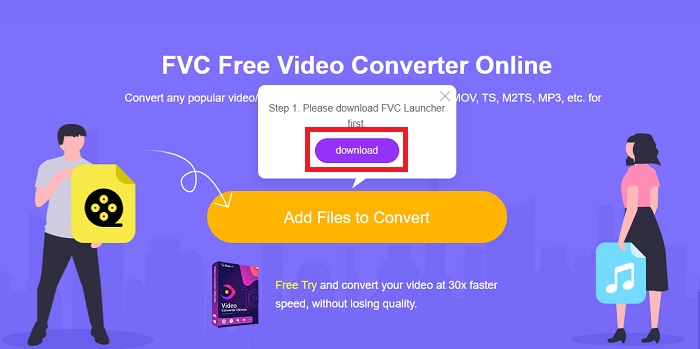
Шаг 2: Снова нажмите указанную кнопку и загрузите видеофайл, который хотите конвертировать. После импорта файла откроется новое окно, где будут показаны все доступные форматы для выбора. В нашем случае выберите FLV.
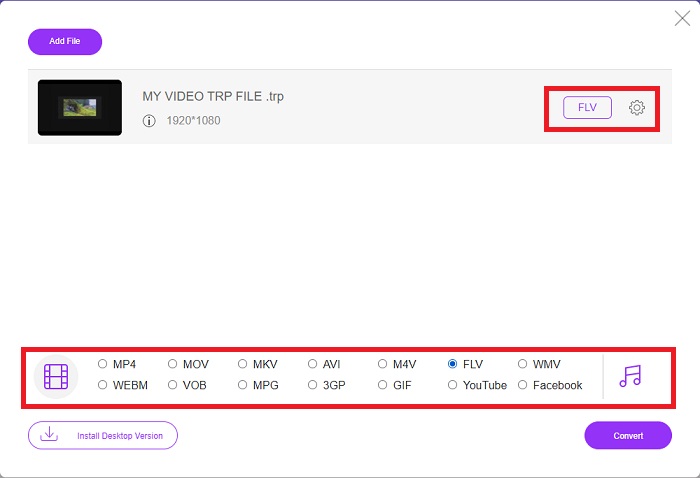
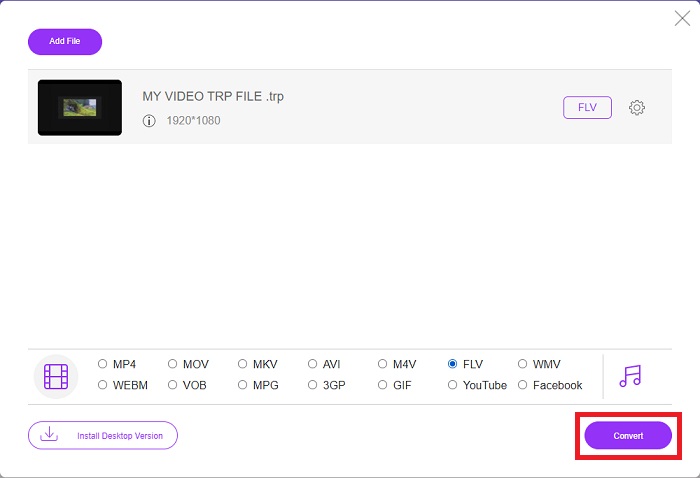
Шаг 3: Для дополнительных параметров, как и в настольной версии программы, нажмите значок шестерёнки справа. Появятся настройки видео и аудио, которые позволят дополнительно отредактировать видео по разрешению, частоте кадров и многим другим параметрам. По завершении нажмите OK, чтобы сохранить изменения. Наконец, запустите процесс конвертации, нажав кнопку Конвертировать в правом нижнем углу.
Связанный материал:
Часть 3. Расширенные знания о TRP и FLV
Чтобы узнать больше о двух упомянутых форматах, мы предоставим вам краткую информацию, а также их сравнение.
Файлы TRP обычно связаны с VLC VideoLAN. Расширение имени файла TRP может собираться с MPEG-2 Part 1, содержащим фильмы высокой четкости. Файлы TRP могут содержать и хранить пакеты данных, отправляемые в виде цифрового видео и аудио по сетям цифрового видеовещания, радиочастотам или линейным записывающим устройствам, таким как видеомагнитофоны. Несколько аудио- и видеопотоков, а также код исправления ошибок включены в файл TRP. Пользователи также могут включать в содержимое файла метаданные, такие как время захвата, идентификатор камеры и источник.
С другой стороны, файл с расширением .flv означает Flash Video. Расширение файла FLV относится к видео- или аудиофайлу, отправляемому через Интернет с помощью Adobe Flash Player или Adobe Air. Flash Video долгое время был основным видеоформатом почти для всех встроенных видео в Интернете, включая видео на YouTube, Hulu и других сайтах. Поставщики потоковой передачи и разработчики программного обеспечения, с другой стороны, отказались от Flash в пользу HTML5 и других форматов после официального прекращения Adobe.
| ГТО | FLV | |
| Расширение файла | .трп | .flv |
| Разработчик | Команда проекта ВидеоЛАН | Adobe Systems Инкорпорейтед |
| Вспомогательные программы | ◆ SMPlayer ◆ VLC Media Player ◆ Apple QuickTime Player | ◆ RealPlayer ◆ Apple QuickTime Player ◆ Мплеер ◆ VLC Media Player |
Часть 4. Часто задаваемые вопросы о преобразовании TRP в FLV
Как открыть формат видео TRP с помощью VLC?
После того, как VLC Media Player будет установлен на вашем компьютере, найдите видеофайл TRP на жестком диске и выберите его правой кнопкой мыши. Выберите «Медиаплеер VLC» в раскрывающемся меню «Открыть с помощью». Система откроет видеофайл, который будет воспроизводиться из этой программы, как только она будет запущена.
Как преобразовать файл FLV в проигрыватель Windows Media?
Сначала вы должны выбрать файл FLV, который вы хотите преобразовать. Вы можете выбрать WMV в качестве формата, в который вы хотите преобразовать файл FLV. Чтобы преобразовать файл FLV, выберите «Преобразовать» в раскрывающемся меню.
Могу ли я играть в TRP где угодно?
Преобразование TRP в широко известные форматы MP4, AVI, MOV, MKV, FLV, WMV и другие рекомендуется, если вы хотите воспроизводить файлы TRP везде и на любом устройстве или медиаплеере.
Заключение
В целом, Video Converter Ultimate и его аналог онлайн-инструмента — это то, что вам нужно, чтобы выполнить весь процесс преобразования, предоставляя все необходимые вам функции. Не доставляет неудобств, плюс доступна в любое время суток, если программа установлена на рабочем столе. Вы никогда не знаете, когда вам понадобится такой конвертер, поэтому мы рекомендуем использовать это программное обеспечение для вашего удобства.
-
 Самое простое руководство о том, как конвертировать TRP в AVI на Windows и Mac
 Может быть, вы не знакомы с видеоформатом TRP и задаетесь вопросом, как вы собираетесь конвертировать TRP в AVI? Прочтите эту статью, чтобы узнать подробности, касающиеся проблемы.
-
 3 решения для преобразования MTS в FLV бесплатно и онлайн
 Хотите конвертировать MTS в FLV? Вот 3 бесплатных программных конвертера MTS в FLV, которые вы можете попробовать конвертировать MTS в FLV на Mac OS X и Windows 10/8/7.
-
 Лучшие способы конвертировать VOB в FLV [бесплатно и онлайн]
 Хотите преобразовать файл VOB в файл FLV? Вы можете легко выполнить задачу с помощью настольных или онлайн-конвертеров. Прочтите это руководство и узнайте, как легко и быстро преобразовать VOB в FLV.
