


 Видео конвертер Ultimate
 Устройство записи экрана
 Видео ремонт
Советы и рекомендации по конвертации файлов WebM в FLV для Windows/Mac/онлайн
Возникают проблемы с воспроизведением видео с расширением WebM? Возможно, вы ищете оптимальное решение, чтобы конвертировать файл в формат, который без проблем воспроизводится на вашем устройстве. Если это так, вам повезло: в этой статье рассматриваются два лучших конвертера WebM, которыми можно пользоваться как онлайн, так и офлайн. Давайте перейдём к бесплатному конвертеру WebM в FLV, который вы можете установить на компьютер, и разберёмся, как на практике конвертировать WebM.

Часть 1. Первоклассный конвертер WebM в FLV на Windows и Mac
Первым в списке идёт выдающийся конвертер WebM в FLV, который вы можете скачать на свой компьютер, чтобы решить возникшую проблему. FVC Video Converter Ultimate — лучший выбор, если вы хотите добиться стопроцентного успеха при конвертации. Его специально разрабатывали для преобразования видео- и аудиофайлов в совместимые форматы — он поддерживает более 200 различных форматов на ваш выбор. Инструмент ещё более удобен за счёт простого процесса конвертации с очень высокой скоростью без ухудшения качества. Этот конвертер выводит преобразование файлов на новый уровень — хотите попробовать? Тогда давайте узнаем, как пользоваться этой программой, следуя подробным шагам ниже.
Шаги по конвертации файлов WebM в формат FLV с помощью FVC Video Converter Ultimate:
Шаг 1. Нажмите кнопку загрузки ниже и следуйте подсказкам установочного мастера.
Бесплатная загрузкаДля Windows 7 или более поздних версийБезопасная загрузка
Бесплатная загрузкаДля MacOS 10.7 или более поздних версийБезопасная загрузка
Шаг 2. Чтобы добавить файлы WebM, нажмите Add Files в левом верхнем углу интерфейса. Затем выберите файл с расширением .webm в своей папке и нажмите Open.
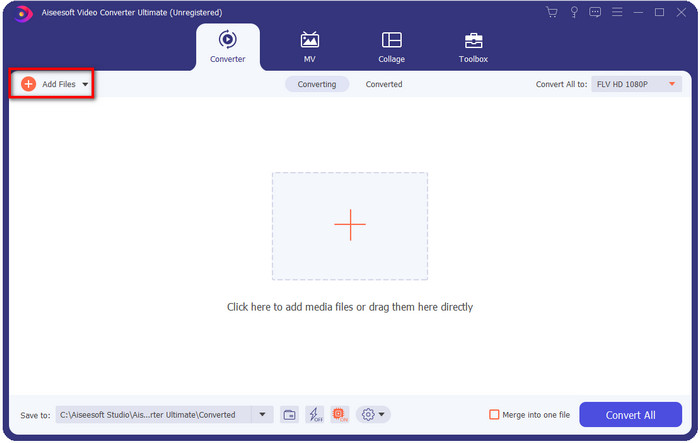
Вы можете перетаскивать файлы в интерфейс, если хотите добавить несколько файлов WebM или любых других файлов для пакетного преобразования.
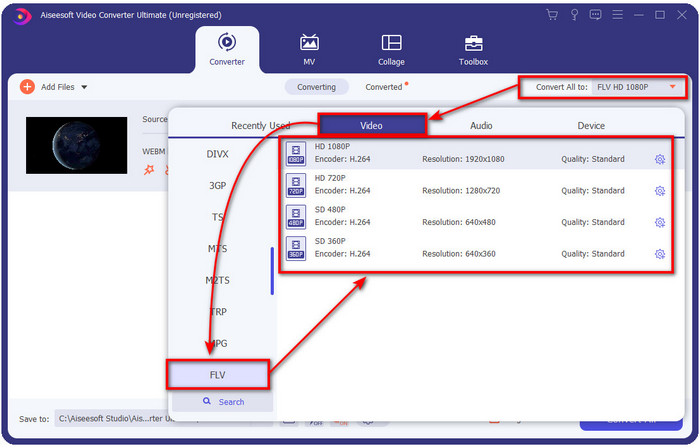
Шаг 3. Нажмите Convert All to в правом верхнем углу интерфейса и выберите формат FLV.
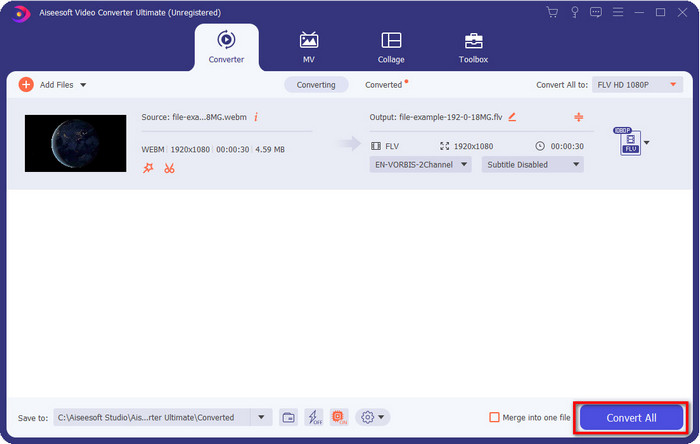
Шаг 4. Нажмите Convert All, чтобы запустить процесс и конвертировать WebM в FLV. После завершения на экране откроется папка с только что преобразованным файлом FLV.
Плюсы
- Он поддерживает бесчисленное множество профилей форматов, из которых вы можете выбирать.
- Поддерживает аппаратное ускорение и быстрое преобразование для более быстрого преобразования процедур.
- Он предлагает несколько расширенных функций редактирования, таких как вырезание, слияние, обрезка, добавление эффектов и многое другое.
- Конвертируйте файлы WebM в пакетном режиме.
- Доступно во всех операционных системах, таких как Windows и Mac.
Минусы
- Загрузите его на рабочий стол.
- Платный конвертер.
Часть 2. Конвертируйте WebM в FLV бесплатно онлайн
FVC Free Video Converter Online предлагает вам мощный онлайн‑конвертер WebM в FLV. Этим конвертером можно пользоваться через любой выбранный вами поисковый сервис и браузер. Вместо того чтобы устанавливать программу на компьютер, почему бы не использовать этот веб‑инструмент как альтернативу? Помимо того, что он бесплатный, здесь нет рекламы и вредоносного ПО. Однако в нём отсутствует множество функций, которые есть в FVC Video Converter Ultimate, особенно это касается поддерживаемых форматов. Хотите узнать, как пользоваться этим онлайн‑конвертером? Тогда следуйте шагам ниже.
Шаги по онлайн‑конвертации файлов WebM в формат FLV с помощью FVC Free Video Converter Online:
Шаг 1. Нажмите на ссылку FVC Free Video Converter Online, чтобы открыть сайт конвертера.
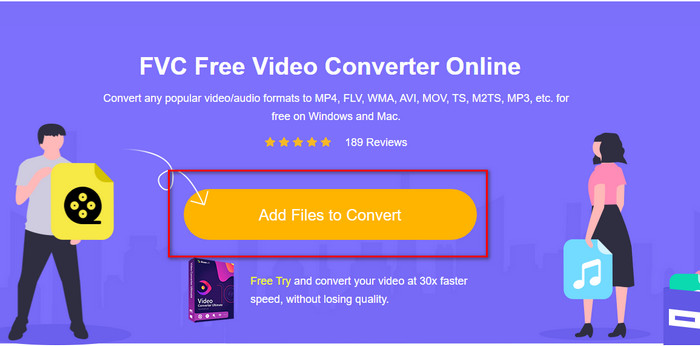
Шаг 2. На сайте конвертера нажмите Add Files to Convert, чтобы установить лончер веб‑инструмента. Нажмите эту кнопку ещё раз: откроется папка, найдите файл .webm и нажмите Open.
Шаг 3. Установите формат FLV, выбрав его в выпадающем списке.
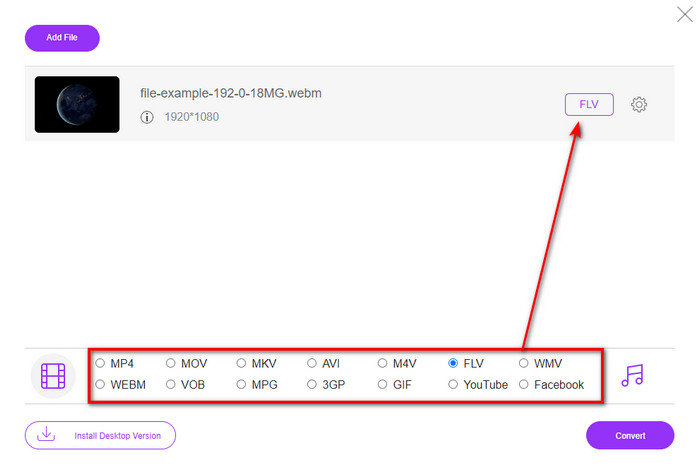
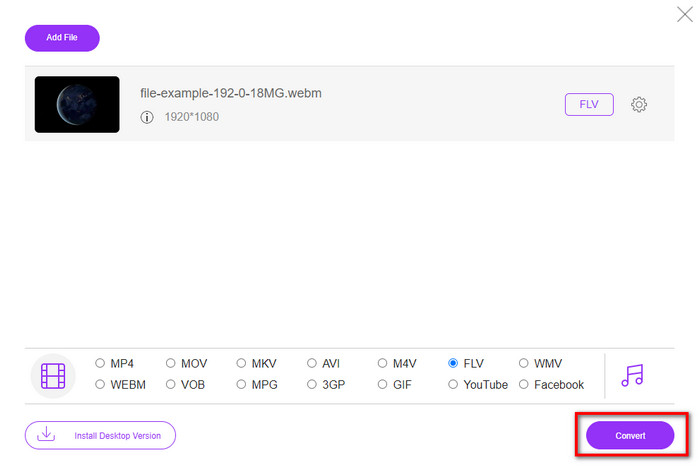
Шаг 4. Чтобы конвертировать файл, нажмите Convert.
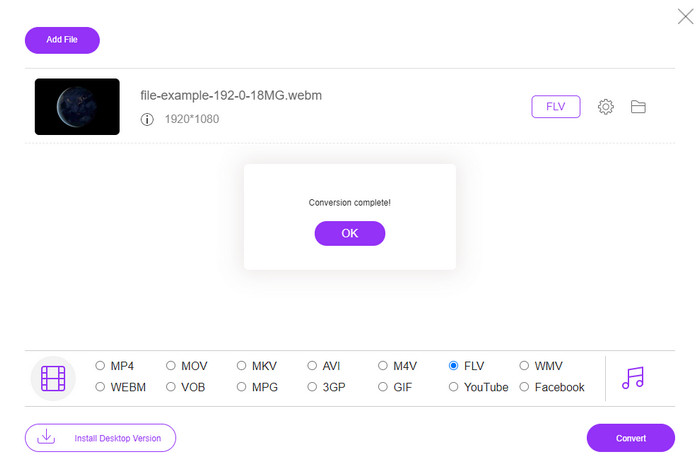
Шаг 5. После завершения конвертации на экране откроется папка.
Плюсы
- Доступно и бесплатно для доступа во всех веб-браузерах.
- Нет надоедливой рекламы и нет вредоносных программ.
- Он поддерживает формат среднего диапазона.
Минусы
- Требуется подключение к Интернету.
- Специальные функции недоступны в этом конвертере.
Часть 3. WebM против FLV
WebM можно воспроизводить в большинстве браузеров, работающих под HTML5. Цель этого формата — сделать его бесплатным и доступным во всех веб-браузерах для воспроизведения видео и аудио. Более того, он может адаптироваться к любым ситуациям с пропускной способностью, которые есть у пользователей. В основном он воспроизводит видео и аудио, не влияя на качество, хотя у пользователей ужасное подключение к Интернету. Еще одна фантастическая особенность этого формата — использование отдельного кодека для видео- и аудиопотоков. Хотя этот формат может содержать видео высокого качества, некоторые смартфоны и медиаплееры не могут воспроизводить видео в этом формате. Есть много причин, по которым вы не можете воспроизвести файл, и одна из них заключается в том, что ваша версия ОС устарела.
В отличие от WebM, целью FLV является доставка видеоконтента через Интернет с помощью Adobe Flash Player или Adobe Air. Также этот формат может содержать не только видеоконтент, но и такие элементы, как метаданные, короткий заголовок, аудио- и видеопотоки. Хотя формат имеет плагины, он вам не понадобится для воспроизведения файла на медиаплеере или сохранения его на телефоне. Как и в случае с WebM, этот формат также использует отдельные кодеки сжатия видео и аудио.
Чтобы сделать ваш файл WebM совместимым, вам нужно будет преобразовать ваш WebM в FLV. Даже если вы можете хранить файлы WebM на своем устройстве, это все равно пустая трата памяти, если вы не можете ее использовать. Кроме того, преобразование вашего файла WebM в воспроизводимый формат даст вам возможность просматривать файл на нескольких устройствах.
Часть 4. Часто задаваемые вопросы о преобразовании WebM в FLV
Поддерживает ли VLC формат WebM?
VLC — один из многофункциональных медиаплееров, который можно установить на Windows, Mac и даже смартфоны. Он поддерживает воспроизведение самых разных видео- и аудиоформатов, включая файлы .webm. Но если вы хотите просматривать WebM‑файлы в другом, более удобном плеере, прочитайте эту статью о пяти лучших программах для воспроизведения WebM.
Как конвертировать WebM в GIF?
Преобразовать ваши WebM‑файлы в анимированный GIF можно всего за минуту. Хотите узнать, как конвертировать WebM в GIF? Тогда нажмите на эту ссылку, чтобы узнать подробнее.
Могу ли я сжать файл WebM?
Безусловно, да: вы можете уменьшить размер файла WebM, чтобы отправить его по электронной почте или освободить место на диске. Если у вас ещё нет подходящей программы, вам повезло — мы отобрали 2 бесплатных компрессора WebM, которыми вы можете воспользоваться.
Заключение
Теперь, когда мы узнали, как конвертировать файлы WebM в формат FLV, пришло время выбрать конвертер, которым вы будете пользоваться. Хотя оба представленных здесь конвертера WebM гарантируют успешный результат, их возможности отличаются. Например, если вы хотите конвертировать WebM онлайн без ограничений и рекламы, стоит выбрать FVC Free Video Converter Online. Но если вам нужно нечто большее, чем просто конвертация файлов, вашим выбором должен стать FVC Video Converter Ultimate. Всё ещё сомневаетесь в возможностях этого «ультимативного» конвертера? В таком случае скачайте его прямо сейчас на свой компьютер и оцените весь функционал на практике.
-
 3 способа конвертировать WebM в MP3 без потери качества звука
 Возникла проблема из-за того, что файлы WebM нельзя использовать для воспроизведения сохраненного аудио? Тогда прочитайте эту статью, так как мы предоставляем эффективную помощь в преобразовании WebM в MP3.
-
 3 потрясающих программного обеспечения, используемых для преобразования файла WebM в формат AVI
 Не знаете, как конвертировать WebM в AVI? Тогда приступим к чтению этой статьи. Поскольку мы указываем все детали на WebM и трех конвертерах, которые вы можете использовать для преобразования.
-
 Простые методы преобразования WEBM в MOV
 Считаете ли вы сложным, что ваши видео WebM нельзя воспроизводить с помощью сафари, и вы не хотите переключаться на браузер, поддерживающий этот формат? Прочтите эту статью, чтобы узнать, как с легкостью преобразовать WebM в MOV.
