


 Видео конвертер Ultimate
 Устройство записи экрана
 Видео ремонт
Как конвертировать GIF в WebM с помощью подробных инструкций и инструментов [бесплатно и дорого]
GIF-файлы стали популярны благодаря забавному контенту, который они нам дают. Вместо того чтобы использовать статичные изображения для придания выразительности текстовым сообщениям, мы используем GIF, которые добавляют движение и преувеличенные эмоции. Но не все платформы поддерживают GIF, потому что этот формат существует уже более 30 лет. И в некоторых случаях, когда вы добавляете GIF-файл на свой сайт, его качество может не поддерживаться. Поэтому лучший способ поделиться GIF — это конвертировать его в формат WebM. Формат WebM обладает гораздо более высокой степенью сжатия, меньшим размером и при этом обеспечивает высокое качество, что идеально для всех. Этот тип формата — лучший долгосрочный заменитель GIF, потому что, как и GIF, он может хранить статичные изображения и анимацию. Чтобы узнать, какие существуют лучшие конвертеры GIF в WebM, продолжайте читать и выбирайте то, что вам больше подходит.

Часть 1. Как конвертировать GIF в WebM для бесплатного Интернета и рабочего стола
1. Бесплатное видео FVC для GIF Maker
Чтобы эффективно выполнить задачу, нужно подобрать подходящий инструмент. И если ваша задача — конвертировать GIF в WebM, вам может понравиться программа FVC Free Video to GIF Maker. Создавать GIF с помощью этого ПО, а также конвертировать GIF, очень просто. Процесс освоения инструмента тоже несложен, и все это благодаря понятной пошаговой инструкции FVC. Поэтому как новичок, так и опытный пользователь легко сможет с ним работать и получать отличный результат. Чтобы узнать, как пользоваться этим инструментом, следуйте приведённым ниже шагам, подготовленным специально для вас.
Шаг 1. Установите эту бесплатную программу на свой диск. Выберите подходящую операционную систему.
Бесплатная загрузкаДля Windows 7 и новееБезопасная загрузка
Бесплатная загрузкаДля MacOS 10.7 и новееБезопасная загрузка
Шаг 2. Нажмите на значок скачанного инструмента, чтобы запустить его. Если программа уже запущена в фоновом режиме, интерфейс должен выглядеть примерно так.
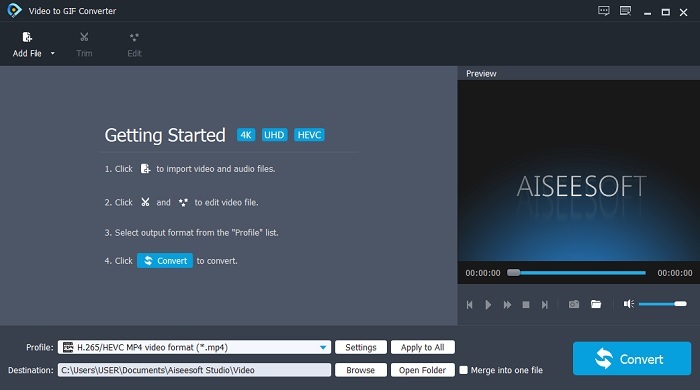
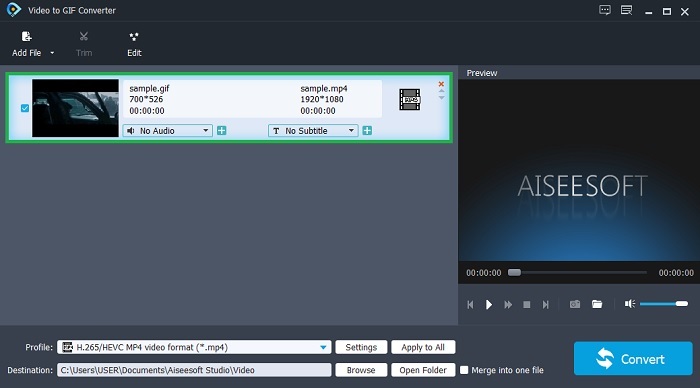
Шаг 3. Нажмите Add File и выберите GIF, который нужно конвертировать. В интерфейсе вы также можете отредактировать видео или обрезать его.
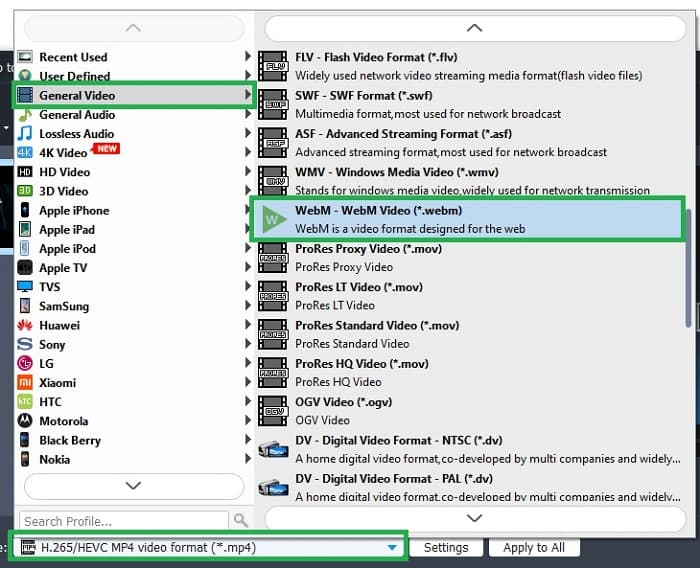
Шаг 4. В раскрывающемся списке выберите формат WebM или любой другой формат, в который хотите выполнить конвертацию. Когда будете готовы начать процесс, нажмите Convert.
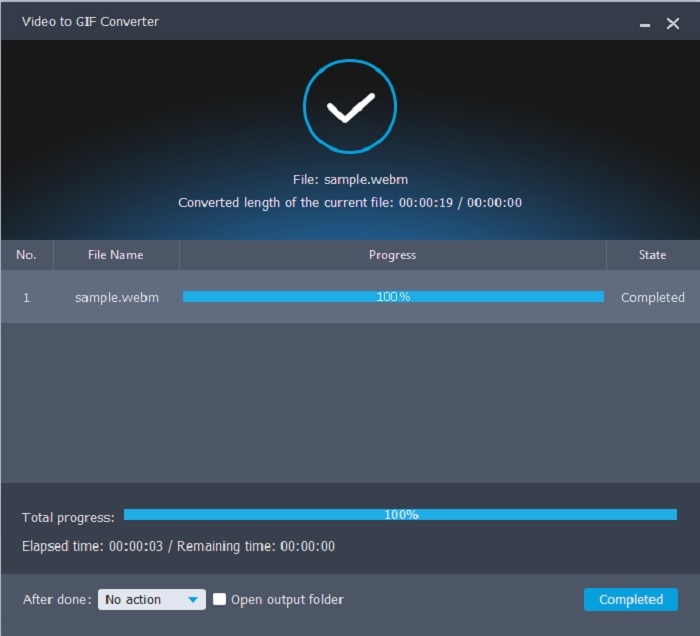
Шаг 5. Процесс конвертации займёт меньше минуты. Когда конвертация завершится, вы сможете проверить итоговый файл в проводнике.
Плюсы
- Он отлично подходит для создания и преобразования GIF-файлов.
- Специальные инструменты, поэтому процесс обучения тому, как использовать этот инструмент, очень прост в любом возрасте.
- Для использования инструмента не требуется Интернет.
Минусы
- Большинство основных функций универсального инструмента здесь недоступны.
- Его необходимо установить на рабочий стол.
2. OnlineConverter.com
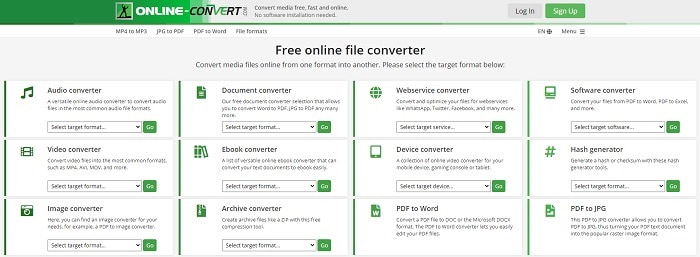
Преобразуйте свой .webm в .gif с помощью сервиса OnlineConverter.com. Если вам нужен инструмент, который занимается исключительно конвертацией, обязательно попробуйте этот сайт. Он поддерживает разные типы конвертации, такие как документы, электронные книги и архивы. Но его недостаток в том, что он не предлагает функций редактирования, даже самых базовых. Если вы хотите узнать, как пользоваться этим сервисом, следуйте шагам ниже.
Шаг 1. Найдите официальный сайт сервиса с помощью вашего любимого поисковика.
Шаг 2. Откройте раздел видеоконвертера и загрузите файл.
Шаг 3. Чтобы начать конвертацию, нажмите кнопку запуска конвертирования и дождитесь завершения процесса.
Плюсы
- Легкий доступ, которым может пользоваться кто угодно в сети.
- Никаких дополнительных файлов использовать не нужно.
- Он также поддерживает различные преобразования.
Минусы
- Процесс конвертации через Интернет занимает больше времени, чем настольные инструменты.
- В нем есть несколько рекламных объявлений и скучный веб-интерфейс.
3. Convertio
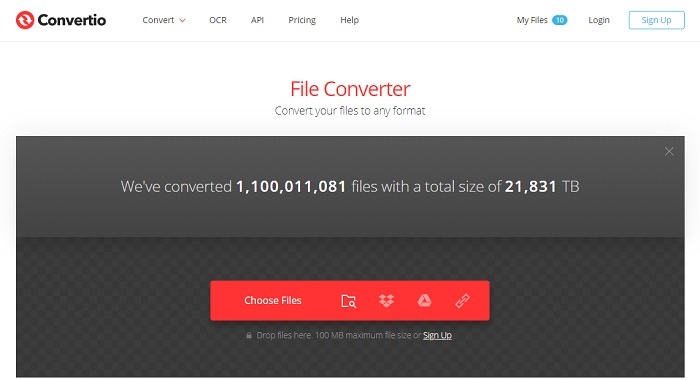
Если вы хотите узнать, как преобразовать WebM в GIF или наоборот, просто воспользуйтесь онлайн-сервисом Convertio — с его помощью можно конвертировать практически всё. Если у вас возникают сложности с конвертацией, этот инструмент может стать решением. Хотя на сайте есть реклама и отсутствуют функции редактирования, это всё равно один из лучших онлайн-конвертеров, которые вы можете найти. Если вы хотите опробовать этот сервис, следуйте приведённым ниже шагам.
Шаг 1. Найдите официальный сайт Convertio и перейдите по ссылке.
Шаг 2. На главном экране выберите GIF, который нужно конвертировать.
Шаг 3. Чтобы запустить процесс, нажмите кнопку конвертации.
Плюсы
- Легко использовать, потому что точно знает, как им пользоваться.
- Он также поддерживает разные платформы.
- Можно легко получить доступ через Интернет.
Минусы
- Имеет большой шанс потерять данные при конвертации, если интернет был прерван.
- Реклама на самом сайте, которая может немного раздражать.
Часть 2. Лучший способ превратить GIF в WebM с помощью Ultimate Tool
Видео конвертер Ultimate
Но вы можете рассмотреть возможность использования Video Converter Ultimate, разработанного FVC. Если бесплатная версия этого инструмента дает вам лучший результат, этот инструмент намного больше. Это может улучшить качество видео, а также добавить в него эффекты. Если вы хотите улучшить качество звука, вы также можете использовать этот инструмент для его улучшения. Итак, если вы хотите вывести конверсию на новый уровень, вы должны использовать этот инструмент как свой личный выбор. Потому что это правильный инструмент, который обеспечивает окончательный результат, чтобы произвести впечатление на ваших друзей, семью или кого-либо еще. Прочтите подробные инструкции ниже, чтобы узнать, как использовать этот идеальный инструмент для создания окончательного результата.
Шаг 1. Чтобы начать работу с программой, скачайте подходящую версию на свой компьютер. Нажмите кнопку загрузки, выполните установку и измените параметры при необходимости. Нажмите «Finish», чтобы запустить программу.
Бесплатная загрузкаДля Windows 7 или более поздних версийБезопасная загрузка
Бесплатная загрузкаДля MacOS 10.7 или более поздних версийБезопасная загрузка
Шаг 2. На экране появится небольшое окно-интерфейс, похожее на это.
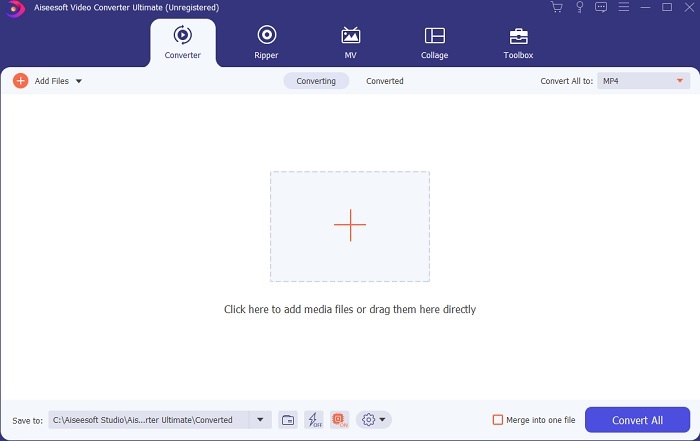
Шаг 3. Нажмите значок плюс в центре интерфейса, чтобы добавить файл. Если вы хотите конвертировать много GIF-файлов, удобнее перетащить их в окно программы мышью (drag-and-drop).
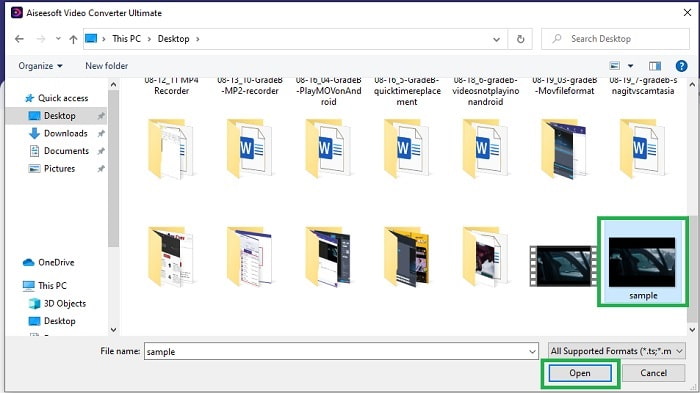
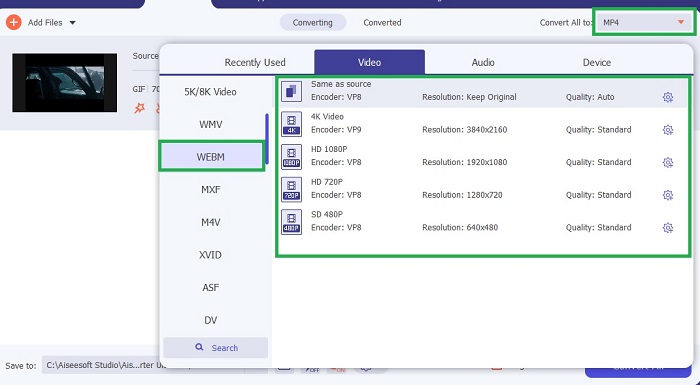
Шаг 4. После раскрытия меню Convert All выберите нужный формат. Когда будете готовы, нажмите Convert All, чтобы запустить процесс конвертации.
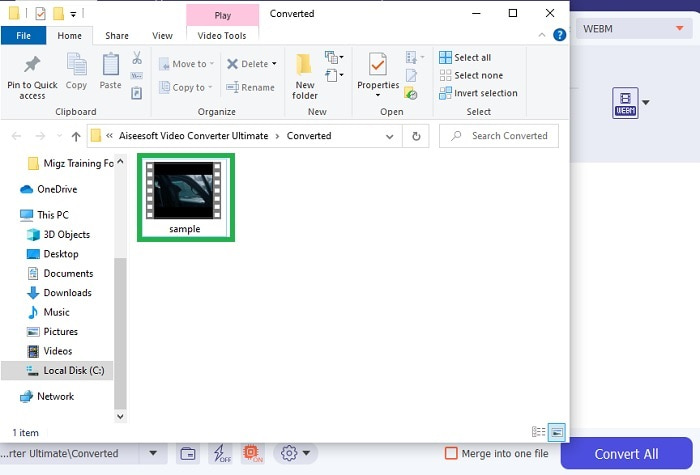
Шаг 5. Процесс конвертации не займёт у вас много времени, так как он идёт в 30 раз быстрее, чем в бесплатном инструменте, и в 100 раз быстрее, чем в других программах. Когда процесс завершится, на экране всплывёт окно с проводником — нажмите на видео, чтобы его просмотреть. При желании вы сможете позже улучшить итоговый файл с помощью панели инструментов.
Плюсы
- Предоставляет дополнительные функции для улучшения преобразованного видео.
- Он предоставляет все форматы, которые вам известны или неизвестны.
- Процесс конвертации происходит очень быстро, по сравнению с любыми инструментами конвертации, доступными здесь.
Минусы
- Вам необходимо загрузить дополнительные файлы перед запуском инструмента, иначе он не будет запускаться.
- Это платный инструмент перед использованием.
Часть 3. Часто задаваемые вопросы о GIF в WebM
Почему мой WebM не воспроизводится через Интернет?
Это очень просто: ваш браузер устарел. WebM не воспроизводится в старых версиях веб-обозревателей, например в Internet Explorer. Нажмите здесь, чтобы узнать больше о доступных WebM-плеерах.
Что лучше: GIF или WebM?
Если вы хотите содержать видео со звуком, WebM - гораздо лучший формат. Но если вы предпочитаете статические изображения в формате GIF.
Кто разработал формат WebM?
Первыми являются On2, Xiph и Matroska, а позже его разрабатывает Google.
Заключение
Теперь нам гораздо яснее, что конвертация GIF в WebM необходима, особенно если вы хотите получить небольшой по размеру, но при этом качественный видеоролик. А лучшим инструментом для такой конвертации является Video Converter Ultimate. Более того, он также поддерживает конвертацию WebM в GIF быстро и без лишних сложностей. Если вы сомневаетесь в бесплатном инструменте, лучше воспользоваться этим премиум-решением. Помимо безопасности, оно обеспечивает почти стопроцентный успех при конвертации и редактировании. Этот инструмент — ваш универсальный помощник, всё предельно просто. Пользуйтесь лучшим конвертером, который обеспечивает отличный результат.
-
 Выберите лучший инструмент для обрезки GIF в Интернете и в автономном режиме, чтобы кадрировать GIF [2021]
 Выбор лучшего инструмента обрезки является обязательным, и некоторые производители GIF не предусмотрели эту функцию. Но какой инструмент для обрезки GIF лучше всего использовать и как его использовать?
-
 5 лучших вариантов записи формата GIF с помощью устройств записи GIF для ПК и Mac
 Какое устройство записи GIF лучше всего использовать для записи GIF? В приведенном ниже списке приведены доказательства того, какой из них является лучшим средством записи экрана.
-
 Как конвертировать MPG в формат GIF [онлайн и офлайн]
 Хотите выразить гораздо лучшие эмоции? Тогда вы должны использовать вместо этого GIF. В этой статье вы узнаете, как преобразовать файл MPG в GIF, чтобы лучше выразить свои чувства.
