


 Видео конвертер Ultimate
 Устройство записи экрана
 Видео ремонт
 Безопасная загрузка
7 простых способов быстро конвертировать HEIC в PNG за считанные секунды
Хотите сделать ваш HEIC‑файл широко совместимым с другими устройствами? У нас есть то, что вам нужно! В этой статье мы покажем лучшие способы конвертировать файл HEIC в PNG без лишних сложностей. Итак, пристегните ремни — сейчас мы разберём самые удобные способы конвертации HEIC в PNG без усилий.

Часть 1. Зачем конвертировать HEIC в формат PNG
Формат файла HEIC — это формат изображения, созданный Apple. Это формат изображения, который обычно используют устройства Apple. Несмотря на то, что он имеет качественное разрешение, он не занимает слишком много места на вашем устройстве. Однако файлы HEIC несовместимы с устройствами сторонних производителей. Напротив, PNG, что означает Portable Graphics Format, представляет собой формат файла изображения, созданный для замены форматов GIF.
Это наиболее часто используемый несжатый формат изображения, что означает, что он имеет огромный размер файла. Тем не менее, почти все устройства поддерживают этот формат файла изображения. Поэтому, если вы хотите открыть изображение HEIC на других устройствах, кроме Apple, лучше конвертируйте его в формат файла PNG.
Часть 2. 5 простых способов конвертировать файл HEIC в файл PNG онлайн
Искать лучшие способы конвертации HEIC в PNG довольно сложно. Тем не менее, мы искали для вас самые лучшие и простые способы преобразования HEIC в формат файла PNG.
Используйте бесплатный конвертер FVC HEIC в PNG
Лучший способ конвертировать HEIC в PNG — использовать специальный конвертер. И лучший инструмент, который мы нашли в интернете, — это FVC Free HEIC to PNG Converter. Этот конвертер — онлайн‑инструмент, который удобно преобразует ваш HEIC‑файл в формат PNG. Кроме того, если вы хотите пакетно конвертировать HEIC‑файлы в PNG, в этом инструменте есть и такая возможность.
Он также доступен почти во всех распространенных браузерах, что делает его инструментом без ограничений браузера. Кроме того, он имеет простой программный интерфейс и не имеет ограничений по размеру файла, поэтому вы можете конвертировать файлы HEIC, не задумываясь о размере файла. Поэтому следуйте простому руководству ниже, если вы заинтересованы в использовании этого онлайн-конвертера HEIC в PNG.
Шаг 1. В браузере введите запрос FVC Free HEIC to PNG Converter. Также вы можете нажать на эту ссылку, чтобы перейти прямо на их веб‑страницу. Вот как выглядит первый интерфейс:

Шаг 2. Затем нажмите кнопку Add HEIC/HEIF File(s). Откроется окно с папками на вашем компьютере, где вы выберете свой HEIC‑файл.
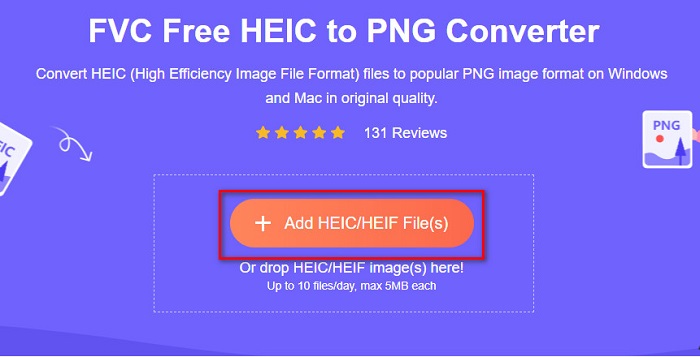
Шаг 3. После этого откроется окно с папками на вашем компьютере, где вы выберете HEIC‑файл. Нажмите Open. Затем начнётся конвертация вашего файла из HEIC в PNG.

Шаг 4. Наконец, в интерфейсе программного обеспечения нажмите кнопку Download, чтобы загрузить PNG‑файл.

Просто, не так ли? Вы можете преобразовать файл HEIC в файл PNG, выполнив следующие простые шаги.
Используйте Xconvert.com
Xconvert — это бесплатный онлайн‑конвертер HEIC в PNG, который легко преобразует файлы HEIC в файлы PNG. У этого онлайн‑конвертера простой и понятный интерфейс, что удобно для начинающих пользователей. Более того, при работе с этим конвертером вы можете изменять разрешение изображения. Однако, поскольку это инструмент, зависящий от интернета, при медленном соединении процесс конвертации может идти медленно. Кроме того, на сайте есть реклама, которая может вам мешать.
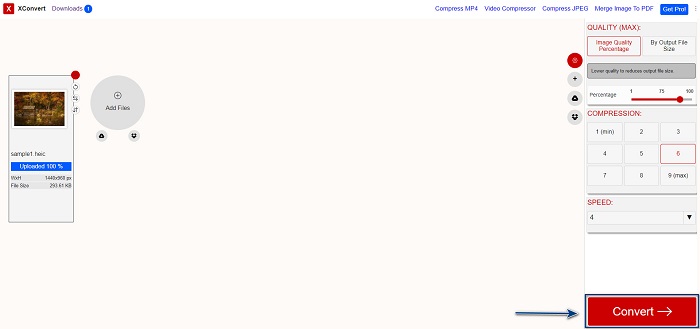
Шаг 1. В браузере откройте сайт Xconvert.com. На их сайте нажмите кнопку Add Files, затем откроются файлы на вашем компьютере, и вы сможете выбрать свой HEIC‑файл.

Шаг 2. Ваше изображение будет загружено в интерфейс программы. После загрузки нажмите кнопку Convert, расположенную в правом нижнем углу интерфейса. Затем дождитесь, пока файл будет готов к скачиванию, и переходите к следующему шагу.
Шаг 3. Когда файл будет готов, нажмите кнопку Download, чтобы загрузить ваш PNG‑файл. Над кнопкой загрузки вы также увидите итоговый размер файла и время, затраченное на конвертацию.

Используйте Замзар
Ещё один способ конвертировать HEIC в PNG онлайн — использовать онлайн‑конвертер Zamzar. Скорее всего, вы уже видели этот конвертер, когда искали средства для преобразования HEIC в PNG. Этот сервис доступен практически во всех популярных браузерах. Кроме того, у него простой интерфейс, что делает его удобным для пользователей. Однако, если во время процесса конвертации произойдёт сбой интернет‑соединения, ваш файл может быть повреждён. Тем не менее, многие пользователи используют этот конвертер, чтобы поменять формат HEIC на PNG.
Шаг 1. В используемом вами браузере введите в поиске Zamzar. На их сайте нажмите кнопку Add Files. Откроются файлы на вашем компьютере, затем загрузите своё HEIC‑изображение.

Шаг 2. После загрузки HEIC‑файла нажмите кнопку drop-down и выберите PNG в качестве формата выходного файла.

Шаг 3. В завершение нажмите кнопку Convert Now, чтобы конвертировать HEIC‑файл в формат PNG. Затем скачайте ваш PNG‑файл. Просто подождите несколько секунд — и всё готово!

Используйте инструменты преобразования.io
Conversion Tool — это онлайн‑конвертер HEIC в PNG с простым интерфейсом. Он может конвертировать ваш HEIC‑файл в PNG на высокой скорости. Кроме того, на сайте не так много рекламы по сравнению с другими онлайн‑конвертерами. Но есть и недостаток: вы можете конвертировать только десять файлов в день, и существует ограничение по размеру файла. Если же вы обрабатываете небольшие файлы, этот инструмент может вам подойти.
Шаг 1. В браузере найдите сайт Conversion Tools.io. Затем нажмите кнопку Browse на главном интерфейсе программы или перетащите свой HEIC‑файл на кнопку Browse.

Шаг 2. После этого нажмите кнопку Run Conversion, чтобы начать конвертацию вашего HEIC‑файла в PNG. Затем дождитесь, пока ваш файл загрузится, и переходите к следующему шагу.

Шаг 3. В завершение нажмите кнопку Download, чтобы загрузить PNG‑файл.

Использовать CDKM
Последний инструмент, который мы вам представим, — это CDKM. Этот сервис позволяет конвертировать HEIC‑файлы в PNG всего в несколько кликов. Однако при использовании этого онлайн‑конвертера преобразование может занять несколько секунд — в зависимости от скорости вашего интернета. На сайте также есть реклама, которая может раздражать. Тем не менее, у него нет ограничений по размеру файла, поэтому сервис определённо стоит попробовать.
Шаг 1. В браузере найдите онлайн‑конвертер CDKM. В главном интерфейсе программы нажмите кнопку Choose Files. Откроются папки на вашем компьютере, затем выберите файл HEIC для загрузки.

Шаг 2. Затем нажмите кнопку Start Conversion, чтобы запустить процесс конвертации.

Шаг 3. Наконец, прокрутите страницу немного вниз, и вы увидите кнопку Download. Нажмите кнопку Download, чтобы загрузить ваш PNG‑файл.

Часть 3. Преобразование HEIC в PNG на Mac
Устройства Apple поддерживают форматы файлов HEIC, а с помощью Mac вы можете открывать файлы HEIC по умолчанию. Но если вы хотите преобразовать файл HEIC в PNG, вы можете изменить его с помощью приложения Photo на Mac. Соответственно, если вы пользователь Mac, лучше прочитайте эту часть.
Шаг 1. Сначала перетащите ваш HEIC‑файл в Приложение Фото (Photo App). Затем откройте для просмотра HEIC‑фотографию и нажмите Файл > Экспорт > Экспортировать 1 фото (File > Export > Export 1 Photo).

Шаг 2. Затем в разделе Photo Kind выберите формат вывода. Укажите формат файла PNG.

Шаг 3. Потом нажмите кнопку Export, а затем выберите папку для сохранения выходного файла. Вы увидите, что ваш HEIC‑файл был преобразован в формат PNG.

Часть 4. Преобразование файла HEIC в PNG на iPhone
Если вы используете iPhone, вы можете открыть файл HEIC на своем устройстве. Но если вы хотите преобразовать файл HEIC в PNG с помощью устройства iPhone, у нас есть для вас способ. Следуя этим простым и легким шагам, приведенным ниже, вы сможете легко преобразовать HEIC в PNG.
Шаг 1. В приложении Фото (Photo App) на iPhone нажмите кнопку «Выбрать» (Select) в верхней части экрана. Затем выберите ваш HEIC‑файл и нажмите значок Поделиться (Share).
Шаг 2. Сдвиньте экран вверх, вы увидите опцию Copy Photo («Копировать фото»), затем нажмите на неё.
Шаг 3. Затем откройте приложение Файлы (Files), нажмите кнопку Обзор (browse) и укажите желаемое место для сохранения (iCloud Drive или «На iPhone» — On my iPhone). Затем вставьте туда ваш HEIC‑файл.

После того, как вы вставите свой файл, вы увидите, что ваш файл будет автоматически преобразован в файл PNG.
Часть 5. Расширенные знания о файлах HEIC и PNG
Если вы все еще сомневаетесь, хотите ли вы преобразовать файл HEIC в PNG, мы предоставим вам сравнительную таблицу, которая поможет вам различить различия между этими двумя файлами. Кроме того, он дает вам четкое представление о характеристиках HEIC и PNG. Внимательно прочитайте, чтобы узнать разницу между файлами HEIC и файлами PNG.
| HEIC | PNG | |
| Совместимость | Только устройство Apple поддерживает этот формат файла. | Почти все устройства поддерживают этот файл, включая устройства Apple. |
| Размер файла | Небольшой размер файла. | Может достигать огромного размера файла. |
| Качество изображения | Высокое качество изображения. | Имеет хорошее качество, но не лучше, чем файл HEIC. |
| Сжатый/несжатый | Сжатый | несжатый |
| Редактирование | Сохраняет качество изображения при редактировании. | Качество может ухудшиться при редактировании. |
Часть 6. Часто задаваемые вопросы о преобразовании HEIC в PNG
Повлияет ли преобразование HEIC в PNG на размер файла?
Да. Когда вы конвертируете HEIC в PNG, размер файла увеличивается, хотя он не будет высоким.
Можете ли вы открыть файлы PNG в Adobe Photoshop?
Безусловно. Вы можете открывать файлы PNG в Adobe Photoshop, поскольку Adobe Photoshop поддерживает формат файлов PNG.
Можете ли вы открыть формат файла PNG на устройствах Apple изначально?
Да. Когда вы делаете снимки экрана со своего iPhone, они автоматически сохраняются в папке «Фотопленка» в виде файла PNG.
Заключение
Наконец‑то! Мы подошли к концу нашего небольшого путешествия. В этой статье мы показали вам лучшие решения для конвертации HEIC‑файлов в формат PNG. Все онлайн‑конвертеры HEIC в PNG, перечисленные выше, позволяют легко и эффективно преобразовать ваши файлы. Кроме того, мы рассмотрели и другие варианты, если вы пользуетесь Mac или iPhone. А если вы ищете лучший конвертер HEIC в PNG с выдающимися возможностями, то конвертер FVC Free HEIC to PNG — это лучший выбор для вас.
-
 Как открыть файл HEIC в Windows, Mac и в Интернете
 Вы ищете способ, как открыть файлы HEIC? В этой статье представлены лучшие решения для открытия файлов HEIC в Windows, Mac и в Интернете.
-
 JPG VS GIF: 3 простых способа конвертировать JPG в GIF
 Хотите узнать разницу между JPG и GIF? Или вы хотите переключить JPG в анимированный формат GIF? Тогда прочитайте эту статью, чтобы иметь представление.
-
 5 лучших способов превратить изображение в анимированный GIF [обновлено в 2022 г.]
 Нужен конвертер изображения в GIF? В этой статье представлены пять лучших преобразователей, которые мы можем найти на рынке. Итак, давайте узнаем об этих инструментах, прочитав эту статью.
