


 Видео конвертер Ultimate
 Устройство записи экрана
 Видео ремонт
 Безопасная загрузка
Пошаговое руководство о том, как исправить размытые изображения
У вас есть размытые фотографии? Получить идеально чёткий кадр удаётся не всегда. Малейшее движение камеры может привести к смазу, который портит резкое изображение. Иногда это движение заметно и у самого объекта съёмки — например, когда человек дёрнулся или порыв ветра шевельнул листья на дереве. В любом случае полезно иметь возможность улучшить фотографию и увидеть её «лучшую версию». В таком случае это руководство предложит вам оптимальное решение, как исправить размытые фотографии на ваших устройствах. Мы поделимся самыми надёжными и проверенными способами. Читайте дальше, чтобы узнать всё, что вам нельзя упускать.

Часть 1: лучший способ исправить размытые изображения онлайн
Вы можете пользоваться множеством онлайн‑инструментов, чтобы исправить размытые изображения. Но проблема в том, что некоторые из них сложны в использовании. Если вам нужен инструмент с простым алгоритмом работы, воспользуйтесь FVC Free Image Upscaler. Этот мощный онлайн‑увеличитель изображений использует технологию AI Super Resolution. Модель обучена на миллионах примеров. Сервис находит размытые области и улучшает их, внося точечные изменения. Он может восстанавливать отсутствующие пиксели, цвета, текстуры и другие элементы. Кроме того, он легко распознаёт и восстанавливает портреты. Что касается сложности, этот увеличитель вполне прост в обращении. Им может пользоваться каждый, так как у него интуитивно понятный интерфейс, который быстро становится ясным. Также процесс устранения размытия очень прост. Вы можете бесплатно 'размылить» фотографии, что удобно для всех пользователей. Беспокоитесь о слишком маленьком размере снимков? Вы можете воспользоваться этим онлайн‑увеличителем. Он позволяет увеличивать фотографии в 2, 4 или 8 раз и одновременно повышать качество. Выберите нужный вариант и увеличьте изображение до точного размера в пикселях. После обработки вы сможете использовать улучшенные и увеличенные снимки в самых разных целях. Для работы с этим онлайн‑сервисом не нужно создавать учётную запись — он сразу доступен. Следуйте инструкции ниже, чтобы узнать, как исправить размытое фото в браузере.
Шаг 1: Откройте браузер на компьютере и зайдите на официальный сайт FVC Free Image Upscaler. Затем нажмите кнопку Upload Photo на главной странице, чтобы загрузить размытое изображение. Ещё один способ добавить фото — просто перетащить файл в выделенную область.

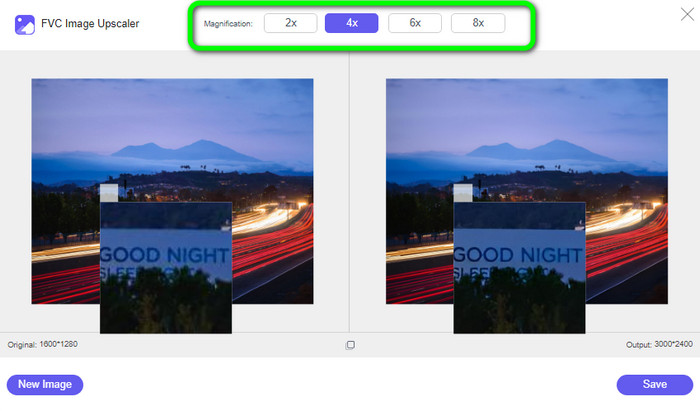
Шаг 2: После загрузки фотографии вы можете убрать размытость, увеличив её. Выберите один из вариантов масштабирования, чтобы улучшить размытое изображение. Вы можете увеличить снимок в 2×, 4×, 6× или 8×. Параметры масштабирования находятся в верхней части интерфейса инструмента.
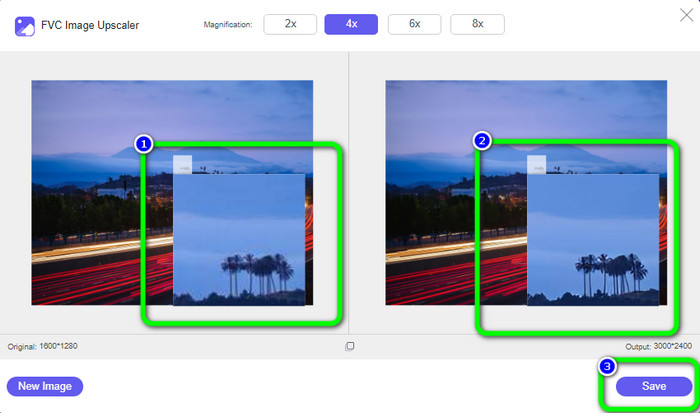
Шаг 3: Как вы увидите, результат впечатляет. Фотография справа будет улучшена, а размытые области — устранены. Нажмите кнопку Save, чтобы автоматически сохранить изображение.
Часть 2: Как исправить размытые изображения на компьютере
Вы будете рады, что узнали, как редактировать «мутные» снимки — будь вы профессиональный редактор, активный пользователь Instagram или просто человек, который хранит тонны фото в галерее. Вернуть получится не каждую фотографию: если она настолько размыта, что черты почти не различимы, ИИ тоже может не помочь. Если же требуется лишь лёгкая доработка, достаточно обычного фоторедактора. В этом разделе вы узнаете хороший способ, как сделать картинку менее размытой с помощью Movavi Picverse. Эта программа надёжно улучшает фотографии, в том числе делает размытые снимки гораздо лучше. Она использует ИИ для обработки изображений, благодаря чему всё проходит быстро и плавно. Приложение доступно и для Windows, и для Mac, что удобно для пользователей. После редактирования вы сможете получить отличные результаты, которые удовлетворят большинство требований. Однако у бесплатной версии есть ограничения — вы не сможете использовать все функции, поэтому для полного доступа нужна подписка. Кроме того, работать с программой непросто, особенно новичкам: чтобы уверенно пользоваться ею, требуется некоторый опыт. Если вы только начинаете, вам может быть сложно улучшить свои размытые фотографии.
Шаг 1: Скачайте программу на Mac или Windows. После запуска откройте меню File > Open, чтобы добавить размытое изображение.
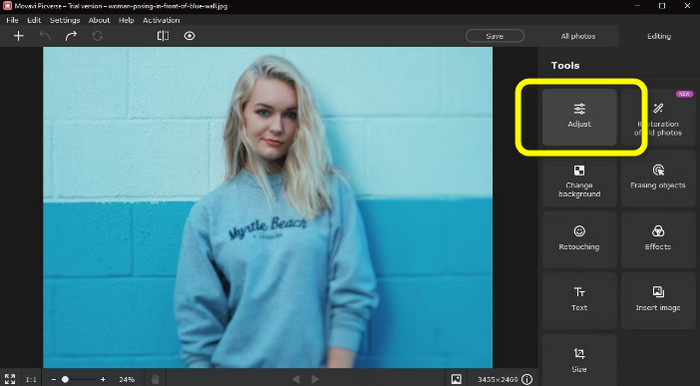
Шаг 2: Найдите вкладку Adjust на панели инструментов справа. Если выбрать Automatically, система ИИ Picverse постарается автоматически исправить проблемы на снимке. Однако результат может не совпасть с тем, на который вы рассчитывали.
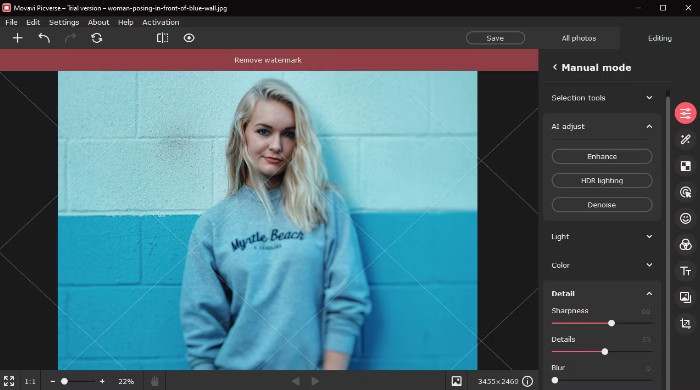
Шаг 3: Если вы выберете режим Manually, станут доступны различные ползунки для ручной настройки. Пролистайте вниз до вкладки Detail. Здесь нас интересуют инструменты резкости и детализации.
Шаг 4: Увеличьте значение ползунка Sharpness. Не поднимайте его слишком высоко, иначе картинка может снова выглядеть неестественно. Затем увеличьте значение ползунка Details. Этот инструмент прорабатывает детали по всему изображению, словно маленькая волшебная палочка. Затем сохраните фото через меню File > Save.
Часть 3: Как исправить размытые фотографии с помощью Android и iPhone
Если вы хотите узнать, как исправить размытые фотографии на Android и iPhone, используйте Remini. Это мощное приложение. Его продвинутый ИИ может улучшать практически всё, в отличие от некоторых других инструментов. Оно улучшает как композицию, так и основной объект съёмки. Интерфейс при этом остаётся интуитивно понятным, так что пользоваться приложением легко. Процедура устранения размытия проста, что делает Remini удобным для всех — и для опытных пользователей, и для новичков. Кроме того, у Remini больше функций, чем может показаться: помимо исправления размытых фото, можно применять фильтры, менять цвета и многое другое. Однако бесплатный период длится всего 7 дней, после чего потребуется довольно дорогая подписка. К тому же во время редактирования постоянно появляются рекламные объявления, что отвлекает и раздражает. Один из способов избавиться от лишней рекламы — оформить платную подписку.
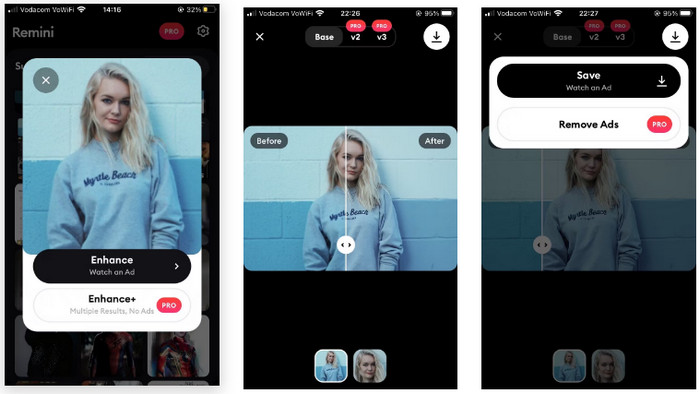
Шаг 1: При открытии приложения вы можете выбрать снимок из раздела Suggested. Если нужного фото там нет, нажмите Other Photos, чтобы найти его в вашей галерее.
Шаг 2: Появится всплывающее окно. Нажмите нижнюю вкладку Enhance Plus, чтобы приобрести Pro‑версию. Если же вы готовы просмотреть 30‑секундную рекламу, выберите верхнюю вкладку Enhance и выполните те же действия бесплатно.
Шаг 3: После завершения показа рекламы нажмите небольшой значок X Reward granted в верхнем углу. Пока шла реклама, Remini «творил чудеса» в фоновом режиме. Затем вы попадёте в окно с результатами обработки.
Шаг 4: Чтобы сравнить изображение «до» и «после», проведите ползунок с маленькими стрелками. Для детального просмотра результата нажмите на вторую иконку предпросмотра внизу экрана. Затем нажмите на маленькую стрелку в правом верхнем углу и выберите Save, чтобы сохранить снимок. К сожалению, вам придётся посмотреть ещё одну 30‑секундную рекламу, но результат того стоит.
Относится к:
Подавление шума на изображении: откуда берётся шум и как сразу от него избавиться
5 улучшателей разрешения изображений, которые стоит попробовать в 2023 году [актуальная подборка]
Часть 4. Часто задаваемые вопросы об исправлении размытой фотографии
1. Почему фотографии становятся размытыми?
Больше света попадает в камеру при длинной выдержке. Это делает медленную скорость затвора идеальной для съемки в условиях низкой освещенности или в ночное время. Наиболее часто используются выдержки от 1/500 до 1/60. Тем не менее, выдержки ниже 1/60 не рекомендуются, если вы хотите делать резкие снимки, удерживая камеру в руках, поскольку при этом трудно поддерживать устойчивость. Кроме того, одной из основных причин размытых фотографий может быть то, как вы держите камеру. Попрактикуйтесь, чтобы стать официальным фотографом для максимальной стабильности.
2. Может ли плохое качество объектива вызывать размытие изображения?
Даже обладая исключительными фотографическими навыками, некоторые зум-объективы и недорогие фиксированные объективы лишь иногда позволяют получать фотографии с высоким разрешением. По этой причине вы должны научиться очищать нечеткие фотографии.
3. Какой самый простой способ исправить размытые фотографии?
Вы можете использовать FVC Free Image Upscaler. Он работает проще, чем многие другие конвертеры. И вы можете пользоваться его богатыми возможностями, не оформляя подписку.
Заключение
Ни одному пользователю не нравятся размытые фотографии. Поэтому в этой статье мы собрали для вас самые эффективные способы, с помощью которых вы можете научиться исправлять размытые фотографии онлайн, офлайн, а также на Android и iPhone. Но если вам нужен максимально простой вариант, воспользуйтесь FVC Free Image Upscaler.
-
 Сделайте фото HD с лучшими способами, которые вы можете найти на рынке
 Вам интересно или хотите сделать фото HD? Вы можете следовать руководству, которое мы добавляем ниже, с различными решениями, которые вы можете использовать.
-
 Официальные способы масштабирования изображения до 4k с помощью практического руководства
 Для масштабирования изображения до 4k вам понадобится программное обеспечение на вашем устройстве. Если у вас его нет, вам нужно будет выбрать инструмент, который мы включили здесь.
-
 Как повысить резкость изображения онлайн и офлайн с помощью 4 простых способов
 Есть много методов, которые вы можете использовать, если хотите повысить резкость изображения. Ниже мы обсудим лучшие и самые простые способы повышения резкости изображений онлайн и офлайн.
