


 Видео конвертер Ultimate
 Устройство записи экрана
 Видео ремонт
 Безопасная загрузка
4 самых простых способа удалить водяные знаки iFunny
iFunny — одно из самых популярных приложений, если вы хотите читать забавные сообщения с картинками (мемами). Однако на некоторых из этих картинок есть водяной знак iFunny, что раздражает. Но если вы хотите узнать самые эффективные способы удаления этих водяных знаков, вы попали по адресу. Мы познакомим вас с множеством приложений, с помощью которых можно убрать надоедливые элементы с ваших фотографий. Эти инструменты протестированы и проверены, так что вам не нужно сомневаться в их легитимности. Готовы узнать лучшие методы, как убрать водяные знаки iFunny? Тогда читайте эту статью от начала до конца.

Часть 1. Удаление водяных знаков iFunny с помощью инструмента обрезки
Один из лучших способов удалить водяные знаки iFunny — использовать инструмент обрезки. Этот метод применим, если водяной знак размещен на краю или в углу вашего изображения. Вы можете разрезать изображение из стороны в сторону и вверх-вниз. Если вы хотите обрезать водяной знак iFunny со своих изображений, выполните следующие простые шаги.
Шаг 1: Откройте фото с водяным знаком iFunny. Выберите параметр Изменить изображение, чтобы использовать инструмент кадрирования. Также вы можете нажать Ctrl+E.

Шаг 2: Затем нажмите инструмент Кадрирование. После этого вы уже можете обрезать фото, чтобы удалить водяной знак iFunny с изображения.
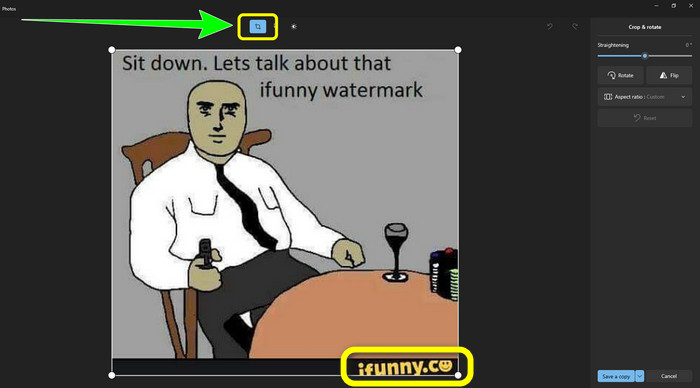
Шаг 3: Когда вы закончите обрезку фотографии, нажмите кнопку Сохранить копию. Дождитесь окончания сохранения и поместите финальное фото в нужную вам папку.
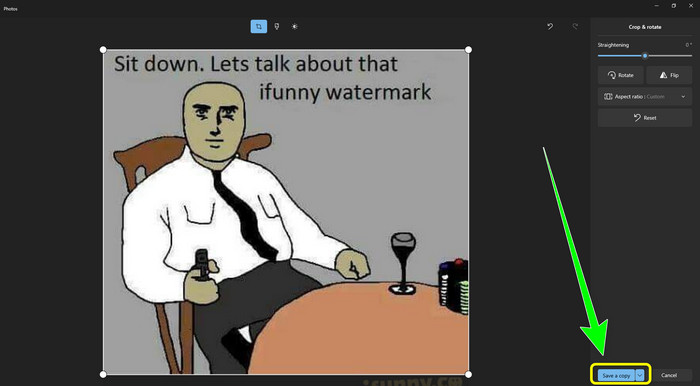
Это самый простой способ удалить водяные знаки iFunny с помощью инструмента «Обрезка».
Часть 2: Лучшие способы удалить водяной знак iFunny без обрезки
Использование бесплатного средства для удаления водяных знаков FVC
Если вы ищете средство для удаления водяных знаков iFunny, вы можете использовать FVC Free Watermark Remover. С помощью этого приложения вы легко и мгновенно можете удалить любые водяные знаки с изображений. Кроме того, на этот инструмент можно положиться, даже если на фото несколько водяных знаков. Дополнительно этот онлайн‑инструмент поддерживает почти все форматы изображений, включая JPG, PNG, BMP, TIFF и другие. Для удаления ненужных объектов и водяных знаков с изображений он предлагает три разных инструмента: «Лассо», «Кисть» и «Многоугольник». С их помощью вы легко удалите всё, что не хотите видеть на фотографии. Кроме того, FVC Free Watermark Remover имеет понятный интерфейс, доступный всем пользователям — как новичкам, так и профессионалам. Более того, ваши файлы в безопасности, поскольку это средство гарантирует конфиденциальность: редактировать фото можете только вы. Наконец, это бесплатное ПО, поэтому вы можете пользоваться им постоянно и загружать неограниченное количество файлов для улучшения.
Шаг 1: Откройте FVC Free Watermark Remover в браузере. Затем нажмите кнопку Upload Image, чтобы добавить фотографию с водяным знаком iFunny.

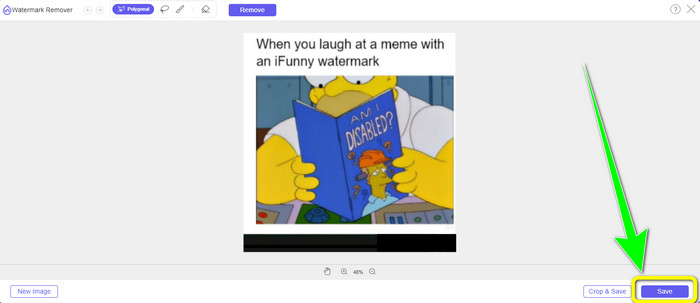
Шаг 2: После того как вы добавили фото, выделите водяной знак iFunny с помощью инструментов удаления водяных знаков.
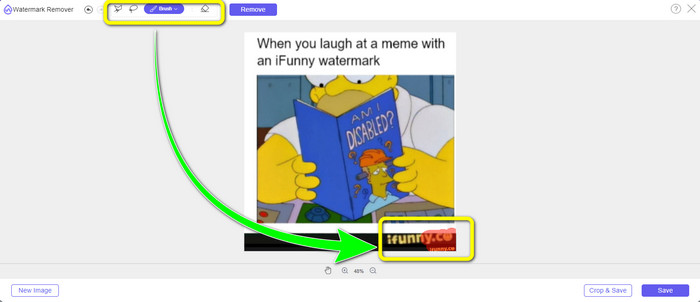
Шаг 3: Далее нажмите кнопку Remove, чтобы стереть водяные знаки iFunny с фотографии.
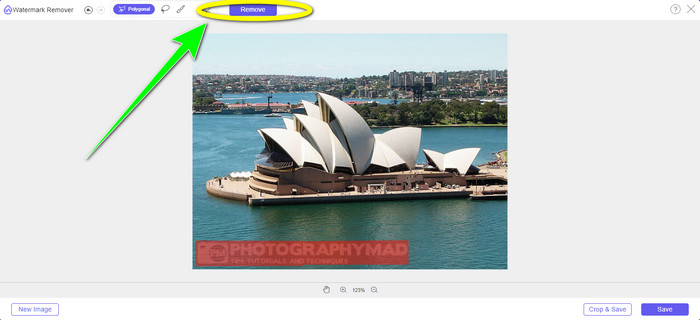
Шаг 4: После завершения процесса удаления ваш последний шаг — нажать кнопку Save, чтобы скачать фото без водяного знака iFunny на ваше устройство.
Использование WatermarkRemover.io
Используйте WatermarkRemover.io, если вы хотите воспользоваться другим веб‑приложением для удаления водяных знаков iFunny с ваших фотографий. Этот бесплатный инструмент может убрать любые лишние элементы с изображений, включая логотипы, подписи, штампы и другое. Кроме того, вы можете удалять сразу несколько водяных знаков с фотографий. Он также предлагает простой в использовании интерфейс, что отлично подходит для новичков. С помощью этого веб‑сервиса поддерживаются различные форматы изображений, включая PNG, JPG, WEBP и JPEG. Однако в бесплатной версии есть ограничения: можно загрузить только 50 фотографий за раз, а объём хранилища — всего 25 ГБ. Если вы хотите загружать больше фото и получить больше памяти, нужно оформить подписку, которая стоит довольно дорого. Чтобы воспользоваться этим эффективным средством удаления водяных знаков iFunny, следуйте шагам ниже.
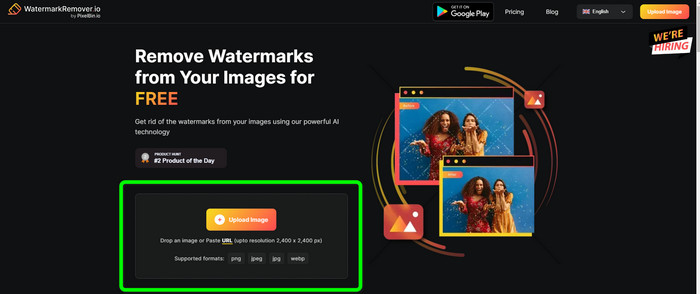
Шаг 1: Откройте браузер и перейдите на сайт WatermarkRemover.io. Нажмите кнопку Upload Image, чтобы загрузить фотографию с водяным знаком iFunny. Также вы можете перетащить файл в окно.
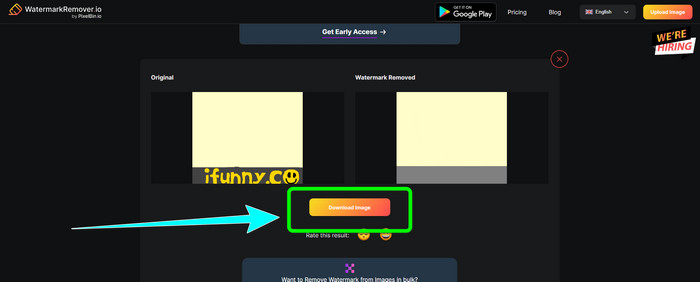
Шаг 2: После загрузки фото водяной знак iFunny будет удалён автоматически. Когда изображение отобразится уже без водяного знака, нажмите кнопку Download.
Использование Apowersoft Watermark Remover онлайн
Чтобы мгновенно удалить водяные знаки iFunny с фотографии, вам также подойдёт онлайн‑сервис Apowersoft Watermark Remover Online. Он может стирать нежелательные элементы с изображений, включая подписи, текст, логотипы и другое. Также он поддерживает различные форматы файлов изображений, такие как JPEG, JPG, PNG, TIFF и другие. Новички могут использовать этот инструмент, даже не обладая особыми навыками, поскольку Apowersoft Watermark Remover Online предоставляет простые шаги и интуитивно понятный интерфейс. Кроме того, файл автоматически удаляется с сервера после удаления водяного знака и скачивания фото, так что никто не сможет увидеть вашу работу. Помимо удаления водяных знаков с фотографий, этот инструмент может убирать их и с видео, что удобно для пользователей. Он поддерживает различные форматы видео, такие как MOV, WMV, MP4, 3GP, AVI и др. Однако этот онлайн‑инструмент для удаления водяных знаков работает довольно медленно, что не всегда устраивает пользователей. Также он не функционирует без подключения к интернету. Если вы хотите воспользоваться этим инструментом, выполните простые шаги ниже.
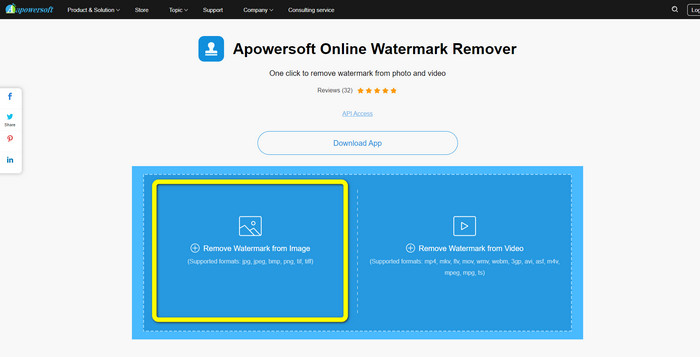
Шаг 1: Найдите в поиске Apowersoft Online Watermark Remover. Затем нажмите кнопку Remove Watermark from Image, чтобы добавить фотографию с водяным знаком iFunny.
Шаг 2: После добавления файла вы можете использовать синее окно, чтобы закрыть водяной знак iFunny на фото.
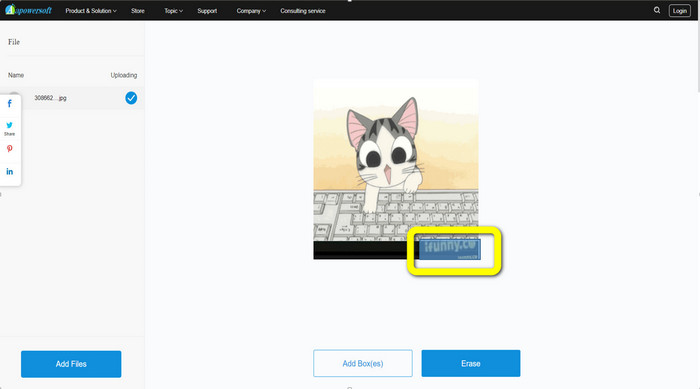
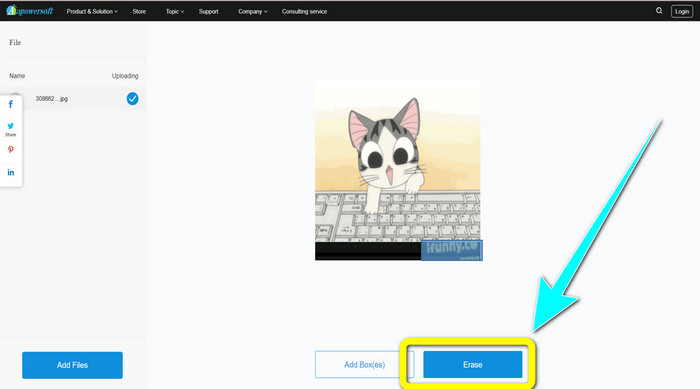
Шаг 3: Затем нажмите кнопку Erase. Дождитесь завершения процесса удаления и скачайте итоговый файл.
Связанные материалы:
Честный обзор Inpaint Watermark Remover и его альтернативы
Простые способы удалить водяной знак с JPG онлайн
Часть 3: Часто задаваемые вопросы об удалении водяных знаков iFunny
Какое лучшее приложение для удаления водяного знака iFunny?
Лучшее приложение, которое вы можете использовать, — это FVC Free Watermark Remover. Этот инструмент легко удалит водяной знак iFunny с вашего изображения. Кроме того, у него быстрый процесс обработки и самые простые методы, что делает его лучшим средством для удаления водяных знаков.
Могу ли я также удалить водяные знаки из своего видео?
Определённо да. Вы можете использовать множество онлайн‑ и офлайн‑приложений, чтобы удалить водяные знаки с ваших видео. Вот лучшие инструменты, которые стоит попробовать.
1. Video Converter Ultimate.
2. Media.io
3. HitPaw
4. Online Video Cutter
5. Apowersoft Online Watermark Remover.
Есть ли инструмент обрезки, который я могу использовать в FVC Free Watermark Remover?
Да. FVC Free Watermark Remover имеет два способа удаления водяных знаков с фотографии. Первый — использовать различные инструменты для удаления водяных знаков, такие как «Лассо», «Кисть» и «Многоугольник». Второй использует инструмент обрезки.
Заключение
Как видно из приведённой выше информации, вы можете воспользоваться множеством простых методов, чтобы удалить водяные знаки iFunny, например с помощью специальных инструментов и функции кадрирования. Однако если вы хотите убирать отвлекающие элементы с изображений максимально просто, начните пользоваться FVC Free Watermark Remover уже сейчас.
-
 Отличные способы, как удалить наклейку с фото и видео
 Хотите легко удалить наклейки с видео и фотографий? Вот эффективные способы, в том числе самые надежные и простые, которые вы можете попробовать.
-
 Способы легкого удаления водяных знаков Reddit с изображений
 Если вы здесь, возможно, вы ищете отличное средство для удаления водяных знаков Reddit. В этом случае мы покажем вам самый простой способ удалить водяные знаки Reddit.
-
 Как удалить водяной знак в Lightroom Mobile [решено]
 Хотите узнать, как убрать водяные знаки с фотографий в лайтрум? Вот самые простые способы, которые вы можете попробовать, используя свои мобильные телефоны и компьютеры.
