


 Видео конвертер Ultimate
 Устройство записи экрана
 Видео ремонт
 Безопасная загрузка
Удивительное средство для удаления водяных знаков Photobucket [Простые способы]
Photobucket — это приложение, которое люди используют для хостинга изображений и как «кошелёк» для фотографий в личных и деловых целях. Это программное обеспечение позволяет встраивать ваши фотографии где угодно, а также добавлять к изображениям фильтры, стикеры, аннотации и обрезку. Кроме того, когда вы сохраняете свои фото с помощью Photobucket, качество изображения не ухудшается. Однако, поскольку изображения в Photobucket представляют собой картинки Shutterstock, вы не можете скачать их без водяного знака. К счастью, у нас есть инструмент, с помощью которого вы можете убрать водяной знак Photobucket с вашего изображения. Прочитайте эту статью, чтобы узнать о самом эффективном средстве для удаления водяного знака Photobucket.

Часть 1. Как удалить водяные знаки Photobucket с помощью бесплатного средства для удаления водяных знаков
Многие люди испытывают трудности с поиском простого в использовании средства для удаления водяных знаков. Использование средства для удаления водяных знаков сложно; мы искали лучшее приложение для удаления водяных знаков Photobucket с ваших фотографий. Вот бесплатный инструмент для удаления водяных знаков Photobucket с вашего изображения без лишних слов.
FVC Free Watermark Remover — это онлайн‑приложение, которое позволяет удалять водяные знаки с изображений или видео. Этот онлайн‑удалитель водяных знаков прост в использовании, так как имеет интуитивно понятный интерфейс и подробную инструкцию. Кроме того, он удаляет водяные знаки не только с изображений Photobucket, но и с любых фотографий в форматах JPEG, JPG, PNG и BMP. Также при удалении водяного знака с помощью этого инструмента изображение будет сохранено в том же формате. Замечательно и то, что вы можете выбрать тип инструмента для удаления: многоугольный, лассо или кисть. А если вы ошиблись при удалении водяного знака, можно отменить действие.
Плюсы
- Это удобный инструмент.
- В отличие от других онлайн-инструментов, он не содержит рекламы.
- Он имеет функцию ластика, когда вы совершаете ошибку.
- Доступно во всех браузерах, включая Google, Firefox и Safari.
Минусы
- Вы можете столкнуться с медленным рабочим процессом, когда ваше интернет-соединение медленное.
Шаги по удалению водяного знака Photobucket с помощью FVC Free Watermark Remover:
Шаг 1. В браузере найдите FVC Free Watermark Remover. Затем нажмите на страницу, которая будет первой в результатах поиска. Их веб‑страница выглядит так:
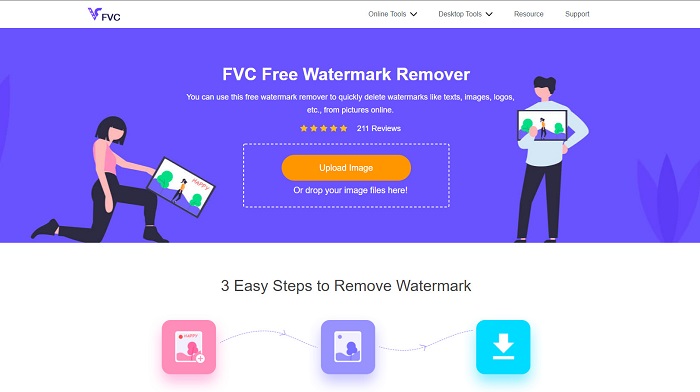
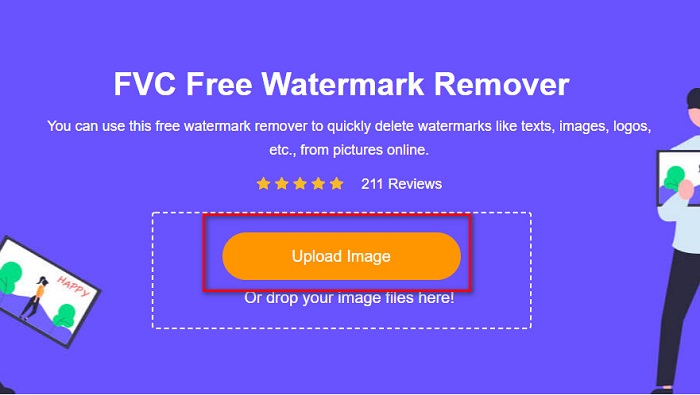
Шаг 2. Затем в главном интерфейсе программы нажмите кнопку Upload Image, чтобы загрузить изображение из Photobucket. Появятся папки вашего компьютера, где вы выберете нужное изображение из Photobucket, затем нажмёте Open.
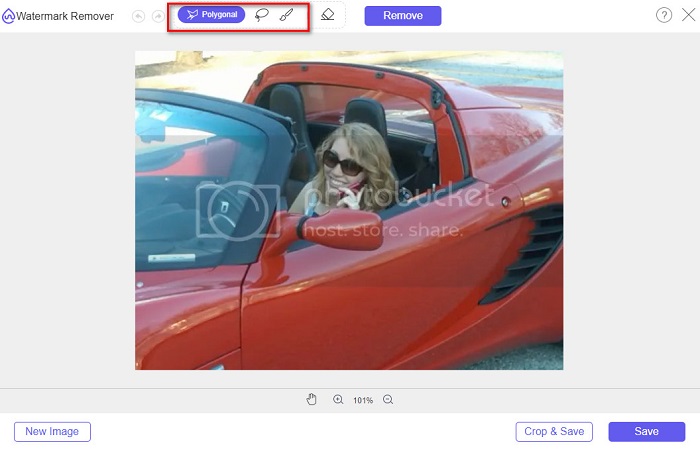
Шаг 3. Далее выберите инструмент удаления в верхней панели. Вы можете выбрать polygonal, lasso или brush.
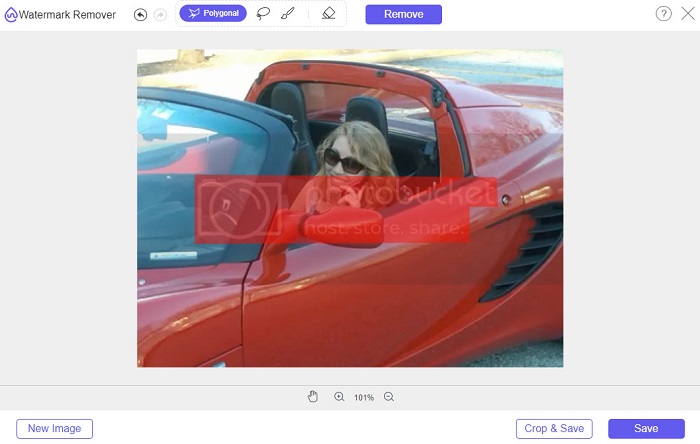
Шаг 4. Используя вариант polygonal, обведите участок, который хотите удалить, затем нажмите Remove.
Шаг 5. Нажмите кнопку Save, после чего ваш файл автоматически сохранится на компьютер.

Легко не так ли? Вы можете удалить водяной знак с фотографии Photobucket всего за пять простых шагов.
Часть 2. Как удалить водяной знак Photobucket с помощью Photoshop
Adobe Photoshop — это один из самых популярных инструментов для редактирования изображений. Вы также можете использовать Adobe Photoshop, чтобы удалить водяной знак с изображения. Ниже описано, как удалить водяной знак с ваших изображений Photobucket с помощью Photoshop.
Плюсы
- Он имеет множество функций редактирования для использования.
- Это самое популярное приложение для редактирования изображений.
- Отредактируйте свое изображение и удалите водяные знаки профессионально.
Минусы
- Это не для начинающих.
Шаг 1. Установите Adobe Photoshop на компьютер и запустите приложение. Затем откройте изображение в Photoshop.
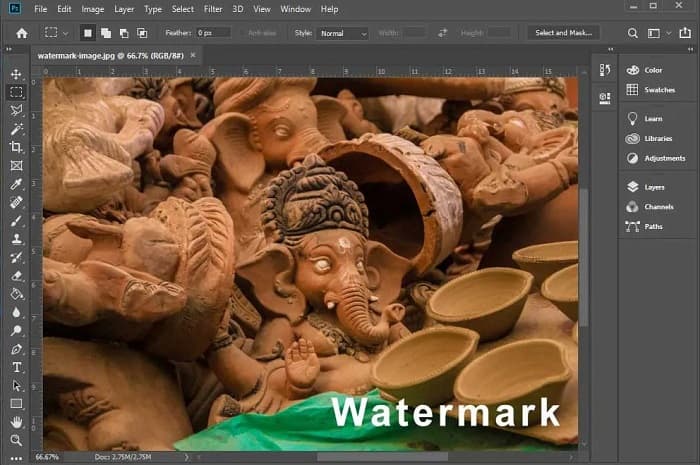
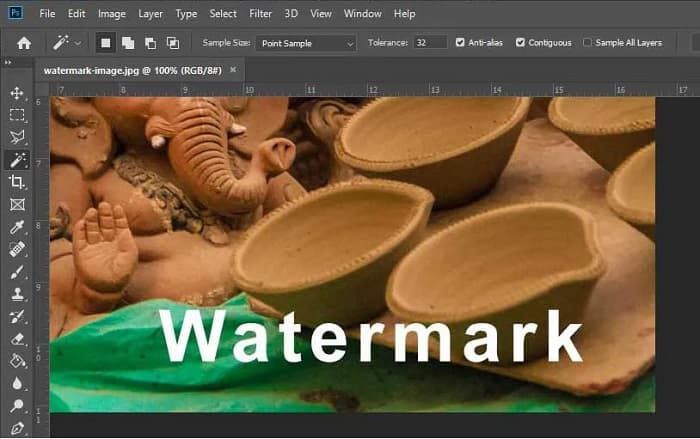
Шаг 2. Затем нажмите Magic Wand Tool (W), приблизьте область с водяным знаком, нажав CTRL +. С помощью Magic Wand Tool выделите водяной знак, который хотите удалить.
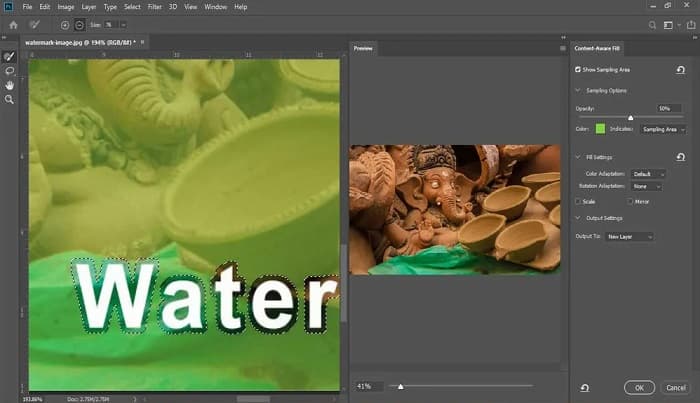
Шаг 3. Наконец, перейдите в меню Edit и выберите Content-Aware Fill. Функция Content-Aware Fill автоматически удалит водяной знак.
Часть 3. Как удалить водяной знак Photobucket с помощью PixlR
Другим средством для удаления водяного знака Photobucket, которое вы можете использовать, является PixlR. PixlR — это онлайн‑фоторедактор, которым можно пользоваться бесплатно. Этот онлайн‑инструмент подходит не только для редактирования фотографий, но и позволяет удалять водяные знаки с ваших снимков. Этот удалитель водяных знаков поддерживает множество форматов изображений, таких как PSD, PXD, JPEG, PNG, SVG и др. Интерфейс PixlR простой, поэтому удалить водяной знак можно всего в несколько кликов. Кроме того, вы можете использовать это приложение на мобильных устройствах.
Плюсы
- Он имеет простой пользовательский интерфейс.
- Это позволяет вам установить качество и размер вашего изображения.
- Вы можете получить к нему доступ бесплатно.
Минусы
- Иногда может наблюдаться медленный рабочий процесс.
Шаг 1. Откройте фоторедактор PixlR. Чтобы загрузить фотографию, нажмите кнопку Open Image. Также можно использовать URL для загрузки изображения.
Шаг 2. Нажмите Retouch > Clone Stamp. Затем кликните по водяному знаку и, ведя мышью, удалите его с фотографии.
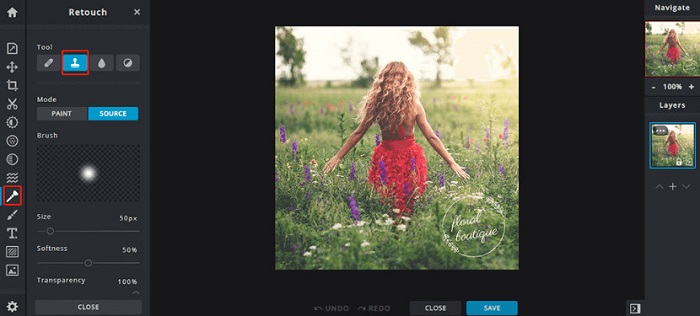
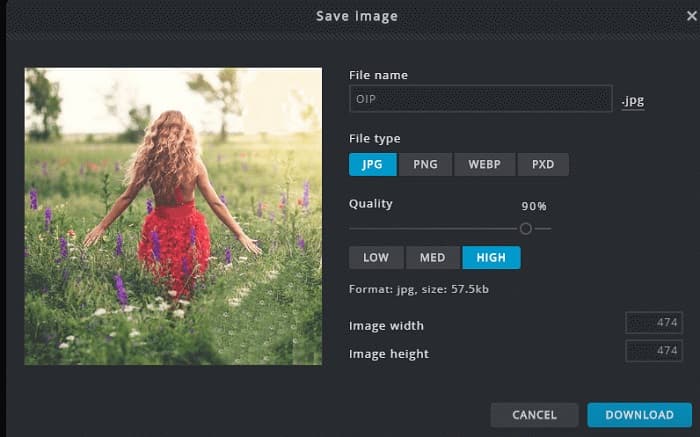
Шаг 3. В конце нажмите кнопку Save, чтобы сохранить фотографию на своё устройство. На этом этапе вы также можете выбрать качество и размер изображения.
Часть 4. Еще один способ удалить водяной знак Photobucket онлайн.
Есть больше онлайн-средств для удаления водяных знаков, которые вы увидите в Интернете. Однако не все онлайн-средства для удаления водяных знаков безопасны и имеют простой пользовательский интерфейс. Поэтому мы ищем альтернативу для удаления водяного знака Photobucket.
Media.io
Media.io — это удобный онлайн‑удалитель водяных знаков. У него простой интерфейс, и использовать его безопасно. Вы также можете легко удалять логотипы с видео, текст и штампы. Кроме того, можно удалить водяной знак с изображения любого формата, такого как PNG, JPEG, SVG и др. Что ещё более впечатляет — этот инструмент позволяет удалять водяные знаки с видео практически любого формата.
Плюсы
- Это позволяет удалять водяные знаки с ваших фотографий и видео.
- Это онлайн-редактор видео.
- Он не содержит рекламы.
Минусы
- Это интернет-зависимость.
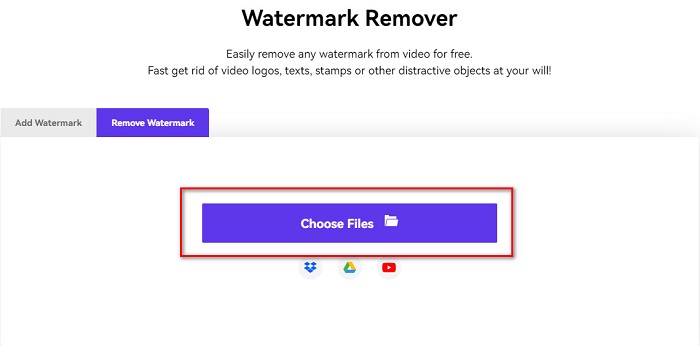
Шаг 1. В браузере найдите онлайн‑удалитель водяных знаков Media.io. Затем нажмите кнопку Choose Files в главном интерфейсе программы.
Шаг 2. Затем перетащите свою фотографию в окно программы, чтобы загрузить изображение из Photobucket.

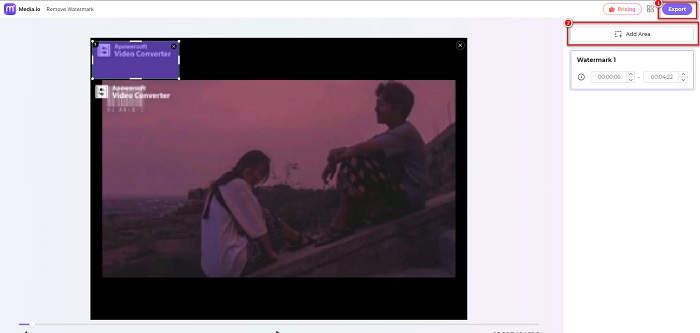
Шаг 3. Наконец, нажмите опцию Add Area и выделите область с водяным знаком. Затем нажмите кнопку Export, чтобы удалить водяной знак.
Связанный:
Добавление фона к фото на iPhone, Android, компьютере и онлайн
Преобразование HEIC в JPG: 6 эффективных офлайн‑ и онлайн‑способов
Часть 5. Часто задаваемые вопросы об удалении водяных знаков Photobucket
Могу ли я удалить водяной знак с изображений JPEG?
Да. Вы можете использовать упомянутое выше средство для удаления водяных знаков, чтобы удалить водяные знаки с изображений JPG/JPEG.
Можно ли удалить водяные знаки с видео?
К счастью, да. Вы можете удалить водяные знаки из своего видео. Некоторые инструменты позволяют удалять водяные знаки из любого видеоформата, например FVC Video Converter Ultimate.
Есть ли приложение для Android для удаления водяных знаков?
PicLab — это приложение для редактирования, которое может удалять водяные знаки с ваших фотографий. Это приложение доступно на платформах Android и iOS.
Заключение
Использование перечисленных выше инструментов для удаления водяного знака Photobucket поможет вам легко удалить водяные знаки с изображений Photobucket. Однако если вы хотите более удобный и простой способ удаления водяных знаков с фотографий, пользуйтесь FVC Free Watermark Remover.
-
 Как конвертировать JPG в HEIC на Mac и Windows
 Хотите знать, как конвертировать JPG в HEIC? В этой статье вы найдете лучшие способы конвертировать JPG в HEIC, используя лучшие и бесплатные конвертеры JPG в HEIC.
-
 Обзор CopyTrans HEIC, функции и альтернативы
 Если вы хотите узнать, на что способен CopyTrans HEIC, мы предоставим вам функции, преимущества и альтернативы этого инструмента.
-
 Топ 5 лучших конвертеров PNG в HEIC, которые вы не должны пропустить
 Если вы хотите узнать о самых популярных конвертерах PNG в HEIC, мы предоставим вам лучшие онлайн-конвертеры PNG в HEIC. Прочитайте эту статью для получения дополнительной информации.
