


 Видео конвертер Ultimate
 Устройство записи экрана
 Видео ремонт
 Безопасная загрузка
Лучшие способы удаления водяных знаков Pond5 [Простые шаги]
Pond5 — это онлайн-платформа, содержащая различные видеоклипы, саундтрек, звуковые эффекты, 3D-модели и т. д. Pond5 — это компания, базирующаяся в Нью-Йорке, и это известный веб-сайт, предоставляющий высококачественные видео- и аудиофайлы. Кроме того, это сервис видеоматериалов, где создатели контента могут загружать свои видео, музыку и иллюстрации и продавать их в Интернете. Итак, если вы ищете качественные стоковые видеоматериалы в Интернете, то Pond5 — это то, что вам нужно. Однако многие начинающие пользователи этой платформы начинают с бесплатной предварительной версии.
Бесплатные предварительные просмотры содержат водяной знак, встроенный в ваше видео, аудио или изображение, что может испортить внешний вид продукта. В этом посте вы узнаете, как удалить водяной знак Pond5 с вашего изображения.

Часть 1. Почему Pond5 размещает водяные знаки на изображениях
Водяной знак — это логотип, текст или изображение, помещенное в ваше видео, аудио или изображение. Водяные знаки накладываются друг на друга, чтобы затруднить нарушение прав и предотвратить копирование выходных данных. Многие компании, предлагающие платные медиафайлы своим пользователям, позволяют им иметь бесплатный предварительный просмотр, но встраивают их с водяными знаками. Pond5 — именно такая компания. Тактика Pond5 заключается в том, чтобы побудить потребителей покупать версии их продуктов без водяных знаков.
Кроме того, Pond5 размещает водяные знаки на своих продуктах, чтобы другие пользователи, которые не воспользовались их предложением, не могли загрузить его и использовать продукты как свои собственные. Но если у вас есть изображение Pond5 и вы хотите удалить этот надоедливый водяной знак на своем изображении, продолжайте читать этот пост.
Часть 2. Как удалить водяной знак Pond5 онлайн с изображений
Многие ищут способ удалить водяные знаки Pond5 со своих изображений. Но другие люди не знают, что звуковые клипы или звуковые эффекты от Pond5 также содержат водяной знак (звуковой водяной знак). Итак, сначала мы научим вас, как удалить звуковой водяной знак Pond5.
Немногие программные приложения предлагают удалить звуковые водяные знаки из вашего аудио или загруженных звуковых эффектов. Многие люди используют Adobe Audition для удаления звукового водяного знака Pond5. Чтобы удалить звуковой водяной знак, вам необходимо импортировать файл MP3 в свой проект.
Вот шаги по удалению звукового водяного знака с помощью Adobe Audition:
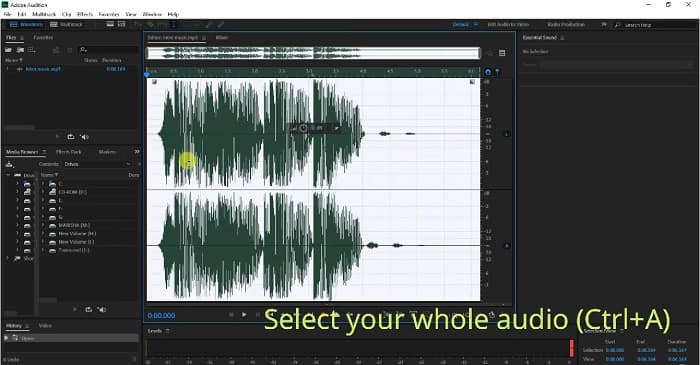
Шаг 1. Выберите аудиофайл, нажав на клавиатуре Ctrl+A.
Шаг 2. Затем нажмите кнопку Effects и перейдите в раздел Stereo Imagery>Center Channel Extractor.
Шаг 3. Появится новая вкладка, где вы увидите опцию Presets.
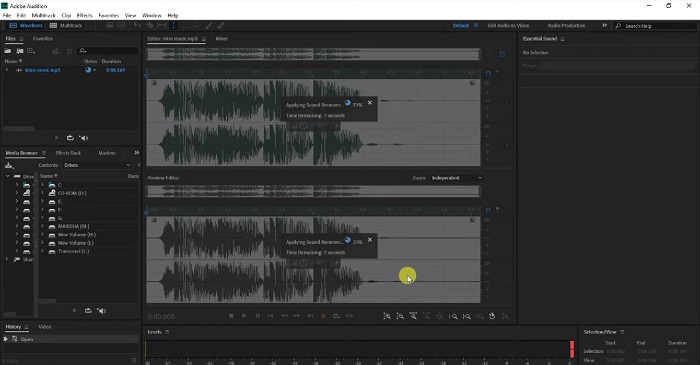
Шаг 4. Далее выберите опцию Vocal Remover, чтобы удалить голосовой водяной знак.
Шаг 5. Перед тем как нажать Apply option, вы можете прослушать звук аудио и убедиться, что аудиоводяной знак удалён.
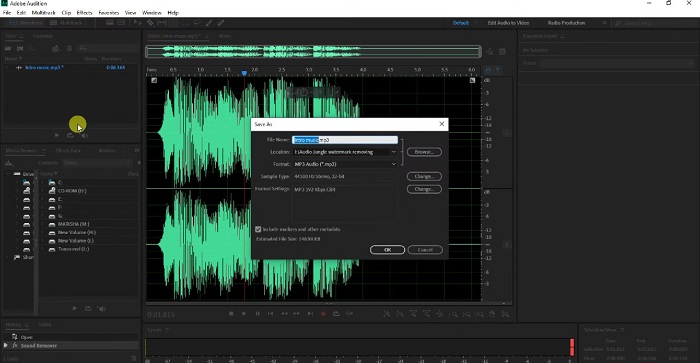
Шаг 6. Наконец, сохраните файл, перейдя в File>Save as, затем введите имя File и выберите место сохранения файла.
Часть 3. 3 способа удалить водяной знак Pond5 онлайн с изображений
В этой части вы познакомитесь с процессом удаления водяного знака Pond5, используя лучшие онлайн-инструменты для удаления водяного знака Pond5 с вашего изображения.
FVC бесплатное средство для удаления водяных знаков
FVC Free Watermark Remover — один из лучших и самых известных онлайн‑инструментов для удаления водяных знаков, который позволяет легко удалять любые водяные знаки (логотипы, изображения или текст) с ваших изображений. Кроме того, он поддерживает большинство распространённых форматов изображений, таких как PNG, JPEG, JPG, BMP и другие. Сервис также подойдёт новичкам, поскольку имеет интуитивно понятный интерфейс. Вы можете выбирать различные инструменты выделения для удаления водяных знаков с изображения. Более того, в нём есть инструменты выделения, которые можно использовать для удаления водяных знаков, такие как Polygonal tool, Lasso tool и Brush tool. Если вы хотите воспользоваться этим инструментом, следуйте простой инструкции ниже.
Шаги по удалению водяного знака Pond5 на вашем изображении:
Шаг 1. В браузере найдите FVC Free Watermark Remover или нажмите на эту ссылку, чтобы перейти непосредственно на их веб‑страницу.
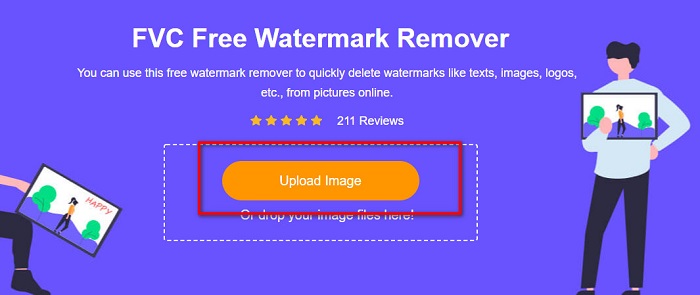
Шаг 2. В главном интерфейсе программы нажмите кнопку Upload Image, чтобы загрузить изображение Pond5, с которого вы хотите удалить водяной знак.
Шаг 3. После загрузки изображения выберите инструмент выделения, который хотите использовать. В данном случае мы будем использовать Polygonal Tool.
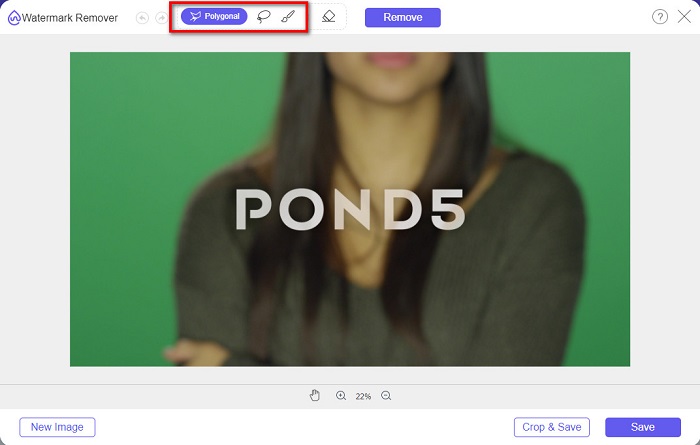
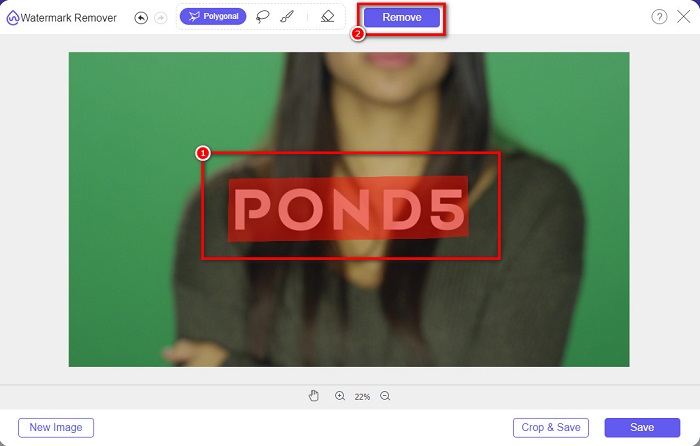
Шаг 4. Затем обведите водяной знак на изображении и нажмите кнопку Remove, чтобы стереть водяной знак.
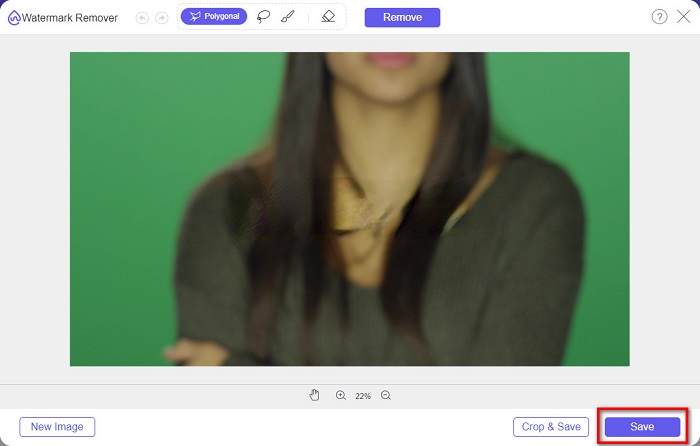
Шаг 5. В конце нажмите кнопку Save, чтобы сохранить изображение на своё устройство. Кроме того, вы также можете использовать этот онлайн‑инструмент, чтобы легко удалять водяные знаки Deviantart.
Удаление водяных знаков.io
Watermark Remover.io — это онлайн‑сервис для удаления водяных знаков, который позволяет убирать любые водяные знаки с ваших изображений. Если у вас есть текстовый водяной знак, например Pond5, на изображении, этот инструмент поможет избавиться от надоедливого водяного знака. У него простой интерфейс, и он поддерживает большинство стандартных форматов изображений, таких как PNG, JEPG, JPG, WEBP и т.д. Однако он зависит от подключения к интернету, поэтому у вас могут возникнуть проблемы при загрузке или сохранении изображения.
Шаг 1. Откройте браузер и в строке поиска наберите Watermark Remover.io. В главном интерфейсе сервиса нажмите кнопку Upload Image, чтобы загрузить своё изображение Pond5.
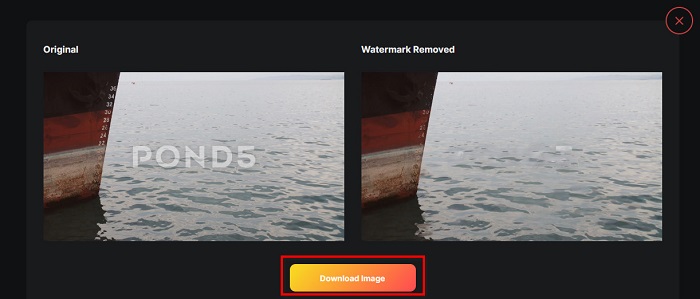
Шаг 2. После загрузки изображения Watermark Remover.io автоматически удалит водяной знак Pond5 с вашего изображения.
Шаг 3. Нажмите кнопку Download Image, чтобы сохранить изображение на своём устройстве.
imgkits
imgkits — это также онлайн‑приложение, с помощью которого можно удалять текстовые водяные знаки с изображений Pond5. Преимущество этого инструмента в том, что вы можете выбирать разные инструменты выделения, с помощью которых удаляете водяной знак на изображении. Кроме того, это удобный для пользователя сервис с простым интерфейсом. Недостаток инструмента в том, что он оставляет размытую область на месте удалённого водяного знака.
Как удалить водяной знак Pond5 с помощью imgkits:
Шаг 1. Введите imgkits в поиске браузера и перейдите на их сайт. Затем нажмите Upload Image в главном интерфейсе, чтобы загрузить изображение.
Шаг 2. Затем выберите selection tool, который хотите использовать, в левой части интерфейса и обведите водяной знак Pond5 на своём изображении.
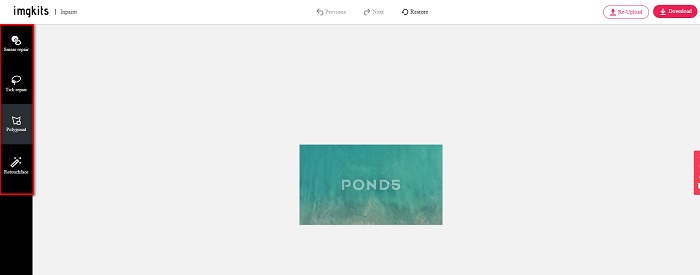
Шаг 3. Наконец, нажмите кнопку Download, чтобы сохранить изображение. Нажмите здесь, чтобы узнать, как убрать водяные знаки Lomotif.
Часть 4. Часто задаваемые вопросы об удалении водяных знаков Envato Pond5
Оставляет ли удаление водяного знака размытие в области водяного знака?
Не все инструменты оставляют размытую область на месте удалённого водяного знака. Если вы хотите быть уверены, что на месте удалённого водяного знака не останется размытого следа, используйте FVC Free Watermark Remover.
Можно ли удалить водяные знаки в After Effects?
Да. Adobe After Effects — самое популярное приложение для редактирования, которое позволяет удалять любые водяные знаки с изображений или видео. Отслеживайте водяной знак, который хотите удалить. Поместите маркер трекинга на водяной знак. Перейдите в панель Layer и создайте Null objects. Затем нажмите Save Frame as. Импортируйте отредактированное изображение и отрегулируйте Opacity. Используйте Pick‑up whip, чтобы завершить процесс.
Влияет ли удаление водяных знаков на размер файла вашего видео?
Удаление водяных знаков с видео не обязательно повлияет на размер файла. Однако некоторые программы для удаления водяных знаков влияют на качество видео. Поэтому используйте FVC Video Converter Ultimate, чтобы удалить водяные знаки с видео без потери качества.
Заключение
При использовании подходящего инструмента несложно удалить водяной знак Pond5 с вашего изображения. Все онлайн‑сервисы, представленные выше, помогут вам быстро убрать водяной знак Pond5 с изображения. Однако если вы предпочитаете онлайн‑инструмент, который прост и безопасен в использовании, попробуйте FVC Free Watermark Remover.
-
 Как удалить туристов с фотографий с помощью удаления водяных знаков
 Как убрать туристов с фотографий? Если вы хотите научиться удалять ненужные элементы с фотографии, эти инструменты помогут вам. Прочтите эту статью, чтобы узнать больше.
-
 Средство для удаления водяных знаков 123rf — подробный обзор лучших инструментов
 Если вы хотите узнать, какие самые выдающиеся средства для удаления водяных знаков 123rf, внимательно прочитайте эту статью. В этой статье представлен подробный обзор инструментов.
-
 Простые способы удалить водяной знак с выпускных фотографий
 Хотите узнать, как лучше всего удалить водяные знаки с выпускных фотографий? Прочитав эту статью, вы сможете узнать, как легко удалить водяные знаки с фотографий выпускников.
