


 Видео конвертер Ultimate
 Устройство записи экрана
 Видео ремонт
 Безопасная загрузка
Как быстро убрать пиксели с изображения с помощью 3 лучших решений
Размытие пикселизации изображения — это решение, которое вам нужно, чтобы «сделать макияж» снимку, который получился пикселизированным, или если ваше изображение стало растровым с заметными маленькими квадратиками. Многие пользователи считают, что изменять, настраивать, править и улучшать изображение хлопотно; по правде говоря, так и было, но это в прошлом. С современными технологиями, которые нам доступны, эта задача стала легко решаемой, если использовать правильный инструмент.
У вас нет подходящего инструмента для удаления пикселизации на вашей фотографии? К счастью, в этой статье вы найдете три лучших найденных нами программного обеспечения, которые могут помочь вам отредактировать пикселизацию фотографии, а также руководство по каждому из них для решения проблемы.

Часть 1. Как расшифровать изображение онлайн с помощью лучшего фоторедактора [рекомендуется]
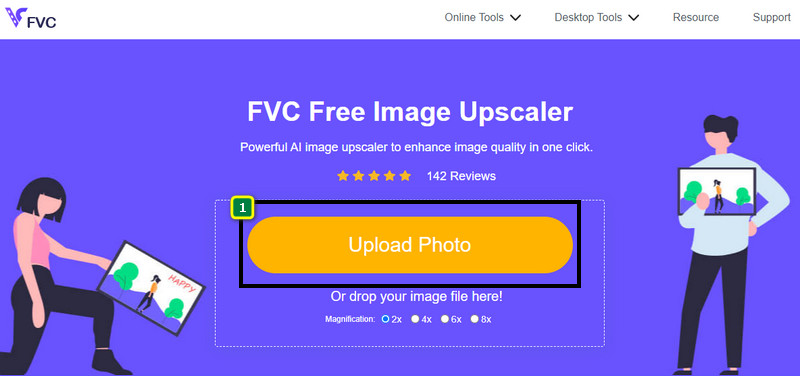
FVC Free Image Upscaler — это полностью автоматизированный онлайн‑инструмент, с помощью которого вы можете бесплатно убрать пикселизацию с изображений в интернете. Вы можете открыть его в любом веб‑браузере, который у вас под рукой, — нет необходимости скачивать отдельный лаунчер, чтобы его запускать, так что вы можете пользоваться этим инструментом сразу после входа на сайт. Несмотря на то что это программное обеспечение работает в браузере, его мощность и эффективность при устранении пикселизации сопоставимы с возможностями самых профессиональных графических редакторов — как онлайн, так и офлайн. Возможно, вы думаете, что вам будет сложно пользоваться этим инструментом, но это не так. Всё ещё сомневаетесь? Тогда прочитайте или выполните пошаговую инструкцию ниже — она проведёт вас по всем этапам работы с этим инструментом.
Шаг 1. Откройте этот веб‑инструмент в любом браузере на вашем устройстве: введите его название в поиске или нажмите эту ссылку, чтобы попасть на главный сайт.
Шаг 2. Когда вы окажетесь на странице веб‑инструмента, нажмите Add Image, чтобы загрузить пикселизированное изображение. На экране откроется окно проводника; найдите нужный файл на локальном диске и нажмите Open для загрузки.
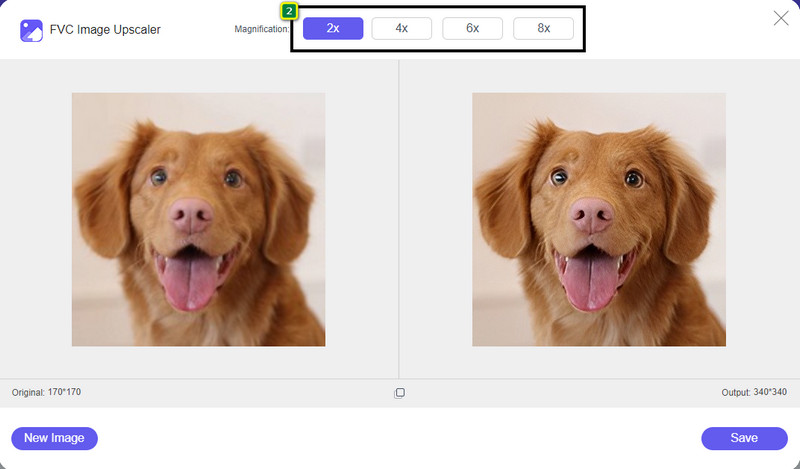
Шаг 3. Затем выберите вариант увеличения масштабирования, который вы хотите применить к изображению, чтобы сгладить его внешний вид, и оно больше не выглядело растрированным с маленькими квадратиками.
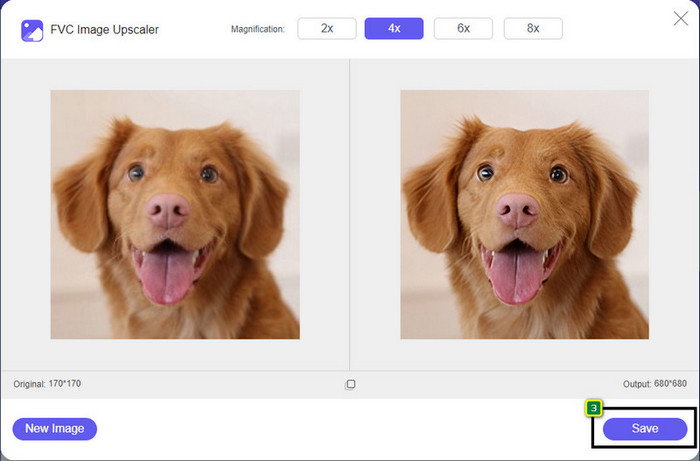
Шаг 4. Всё так же просто: нажмите Save, чтобы скачать версию изображения без пикселизации на свой локальный диск.
Часть 2. Как убрать пиксели с изображения в автономном режиме двумя способами на Windows и Mac [Просто]
Pixbim — Unpixelate фотографии в Windows
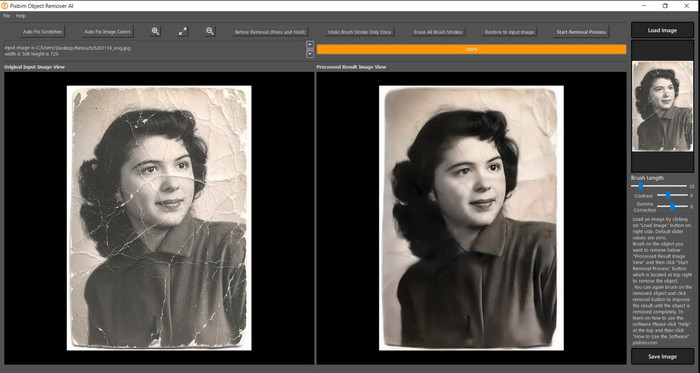
Pixbim — один из самых мощных и поддерживаемых ИИ инструментов для устранения пикселизации, который вы можете скачать на Windows, чтобы решить эту проблему. Этот редактор заслуживает упоминания в статье, потому что он быстро и эффективно исправляет пикселизированные изображения. Благодаря ИИ параметры подстраиваются автоматически, так что у вас не возникнет сложностей при работе с программой. Из‑за широкого набора функций и возможностей вам нужно приобрести лицензионный ключ, чтобы продолжить пользоваться ей после окончания бесплатного пробного периода. Для многих пользователей, которые хотели бы иметь её на своём ПК, цена может показаться высокой.
Шаг 1. После того как вы скачали программу, запустите её, чтобы мы могли перейти к следующему шагу.
Шаг 2. Нажмите Load Image, чтобы добавить сюда пикселизированное изображение, которое вы хотите улучшить.
Шаг 3. Затем настройте параметры, перетаскивая ползунки до нужных значений.
Шаг 4. Когда вы закончите настройку изображения, сохраните результат, чтобы экспортировать его.
Фоторедактор Movavi [Windows и Mac]
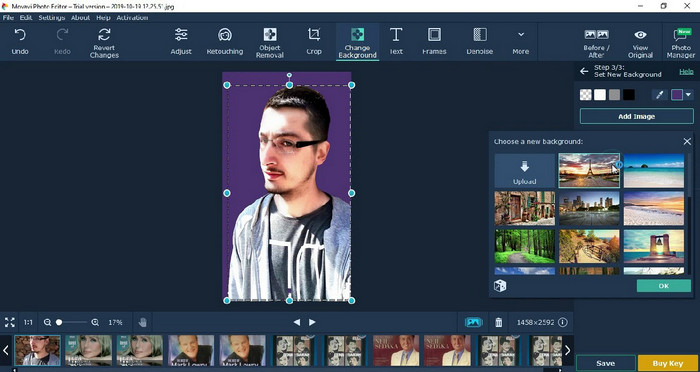
Многие пользователи уже пробовали Movavi Photo Editor благодаря его универсальности при редактировании фотографий. Как и Pixbim, он может восстановить утраченные пиксели изображения с помощью нейросетей ИИ. С этим редактором вы можете выполнять базовую и продвинутую корректировку внешнего вида: обрезку, поворот, добавление фильтров, исправление пикселей и многое другое. Однако все эти возможности будут доступны не полностью, если вы не приобретёте премиум‑версию программы для своего компьютера.
У него почти такая же цена, как у Pixbim, что для многих довольно дорого. Но если у вас есть бюджет на покупку редактора, это может быть именно то, что вам нужно. Узнайте, как убрать пиксели с изображений с помощью этого приложения, следуя инструкциям.
Шаг 1. Скачайте приложение для Windows или macOS.
Шаг 2. Запустите программу, затем загрузите сюда фотографию, с которой хотите убрать пикселизацию.
Шаг 3. После загрузки изображения нажмите Magic Enhance, чтобы автоматически откорректировать фото с помощью ИИ.
Шаг 4. Экспортируйте изображение и наслаждайтесь результатом.
Часть 3. Часто задаваемые вопросы о том, как повысить пикселизацию изображения
Почему на экспортированном непиксельном изображении есть водяной знак?
Когда вы используете бесплатную пробную версию приложения, есть вероятность, что оно оставит водяной знак при экспорте. Итак, если вы хотите экспортировать изображение без водяного знака, вы можете приобрести лицензию приложения или использовать FVC Free Image Upscaler, так как он не оставит водяной знак на экспортированном изображении.
В чем разница между размытым и пиксельным?
Многие статьи доказывают, что размытие и пикселизация — это не одно и то же из-за некоторых факторов. Размытые изображения — вот почему вы снимаете высокоскоростное движение или делаете снимок трясущейся камерой. При пикселизации, когда вы увеличиваете снимок, он начнет пикселизацию, и вы увидите растровое изображение с крошечным квадратом.
Что является фактором, который делает изображение пиксельным?
Некоторые причины превращают изображения в пиксели; частой причиной является увеличение растрового изображения. Растровые форматы, такие как PNG, JPG, GIF и другие, состоят из маленьких квадратов, формирующих внешний вид объекта, хранящегося в этих контейнерах. Обычно, когда вы увеличиваете изображение, вы видите, что есть квадраты, известные как пиксели, которые содержат данные о цвете, которые становятся визуально представленными. Это может быть проблемой для многих редакторов, особенно когда происходит пикселизация.
Как исправить шум изображения?
Это ещё одна распространённая проблема, с которой вы можете столкнуться на своих снимках, и решение, которое вам может понадобиться, есть в этой статье. Нажмите на эту ссылку, чтобы легко прочитать, разобраться и узнать, как убрать шум на изображении.
Заключение
Вот и всё — теперь вы можете без труда убирать пикселизацию с изображений с помощью лучших графических редакторов, которые можно скачать или использовать онлайн. Проблема решена! Так что если вы снова столкнётесь с пикселизацией, вы можете обратиться к этой статье за помощью. Лучший инструмент, который вам может понадобиться, уже здесь и готов помочь вам, например FVC Free Image Upscaler. Лучше всего скорректировать внешний вид, устранив пикселизацию, чтобы она не бросалась в глаза окружающим. Скажите «прощай» пикселизации, пользуясь этим онлайн‑редактором изображений.
-
 7 средств повышения качества изображения, которые можно использовать для улучшения качества каждого изображения [2022]
 Вам нужен апскейлер изображения? К счастью, в этой статье рассказывается о лучшем программном обеспечении, к которому вы можете получить доступ и загрузить на свой рабочий стол.
-
 5 усилителей разрешения изображения, которые вы должны использовать в 2022 году [последние выборы]
 Не знаете, какой усилитель разрешения изображения вам следует использовать? Прочтите эту статью, поскольку мы рассматриваем пять инструментов для использования и улучшения разрешения изображений.
-
 4 приложения для увеличения разрешения изображения на мобильных устройствах [лучший выбор]
 Вам понадобятся приложения для увеличения разрешения фотографий, если вы хотите достичь 1080p, 4k или подобного. Со списком ниже вы можете сделать это легко!
