


 Видео конвертер Ultimate
 Устройство записи экрана
 Видео ремонт
Узнайте, как преобразовать AMV в MOV без снижения качества
AMV — это проприетарный видеоформат, который используется для хранения видеозаписей на медиаплеерах S1 MP3 и MP4. Расширение файла .amv подразумевает низкое разрешение и сильное сжатие, чтобы файл занимал меньше места на переносимом медиаплеере. Хотя формат всё ещё существует, найти медиаплеер на телефон, совместимый с ним, уже сложно, потому что формат устарел. Вместо того чтобы искать совместимый проигрыватель, проще конвертировать файлы AMV в более современный формат с широкой поддержкой, например MOV. Поэтому, если вы хотите узнать лучший способ конвертировать AMV в MOV, давайте приступим к подробному разбору.

Часть 1. Краткое введение в AMV и MOV
Идея Action Media Video или AMV состоит в том, чтобы заменить MP4 как универсальный формат, потому что этот формат лучше и более сжат. Кроме того, этот формат является лучшей версией формата AVI. Но в эту новую эру формат игнорировался, потому что он не получает никаких обновлений для улучшения качества разрешения. И теперь, если вы храните этот формат на наших мобильных устройствах и воспроизводите его, вы не сможете воспроизвести его, потому что формат не поддерживается. Поэтому, если вы хотите воспроизвести видео в этом формате, вы должны загрузить сторонний медиаплеер для AMV. В то время как MOV, этот формат получает широкую поддержку, потому что это собственный формат файлов, разработанный QuickTime.
Часть 2. Преобразование AMV в MOV с помощью Ultimate Desktop Software
FVC Видеоконвертер Ultimate
Конвертируйте AMV в MOV с помощью этого профессионального видео‑конвертера, который обеспечивает выдающееся качество результата, с которым трудно сравниться, — FVC Video Converter Ultimate. Этот конвертер доступен для ПК и Mac, и на обеих платформах он предоставляет одинаково продвинутый набор функций. Кроме того, быстрая конвертация и аппаратное ускорение, доступные на ПК, также работают и на Mac. Многие пользователи уже выбрали это ПО своим основным конвертером для решения подобных задач. Перед тем как пользоваться программой, вам потребуется приобрести её у FVC. Хотя это платный продукт, вам не придётся тратить сотни долларов, а потраченные деньги себя оправдают. Итак, без лишних слов давайте протестируем этот инструмент и проверим, удастся ли нам достичь «ультимативного» результата конвертации, как обещает название.
Шаги по конвертации AMV в MOV с помощью FVC Video Converter Ultimate:
Шаг 1. Скачайте FVC Video Converter Ultimate на компьютер, нажав кнопку ниже, и установите программу после завершения загрузки.
Бесплатная загрузкаДля Windows 7 или более поздних версийБезопасная загрузка
Бесплатная загрузкаДля MacOS 10.7 или более поздних версийБезопасная загрузка
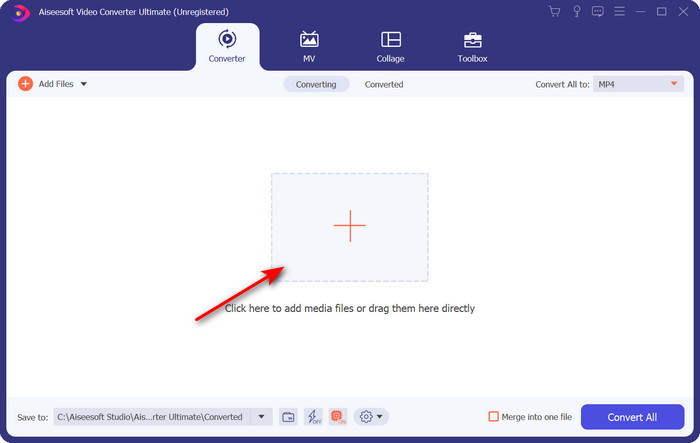
Шаг 2. Откройте программу и, чтобы загрузить файл .amv, нажмите на значок +. Найдите нужный файл в папке и нажмите Open, чтобы добавить его.
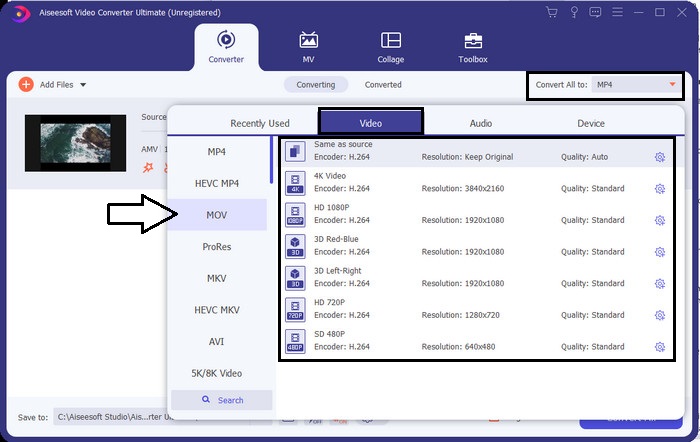
Шаг 3. Чтобы изменить формат на MOV, нажмите Convert All to: и выберите MOV или любой другой желаемый формат.
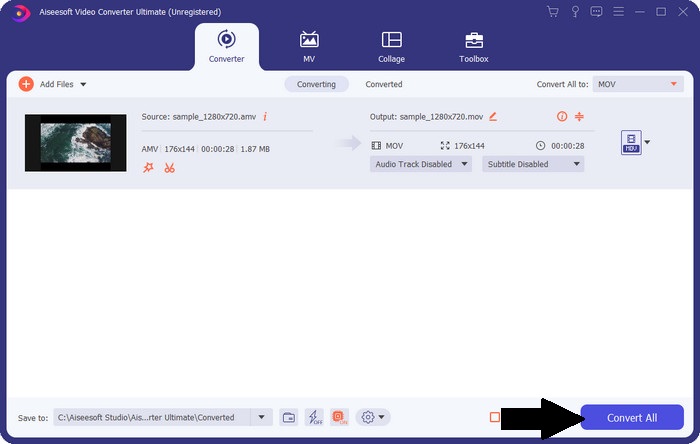
Шаг 4. Чтобы преобразовать файл AMV в MOV, нажмите Convert All и запустите процесс конвертации.
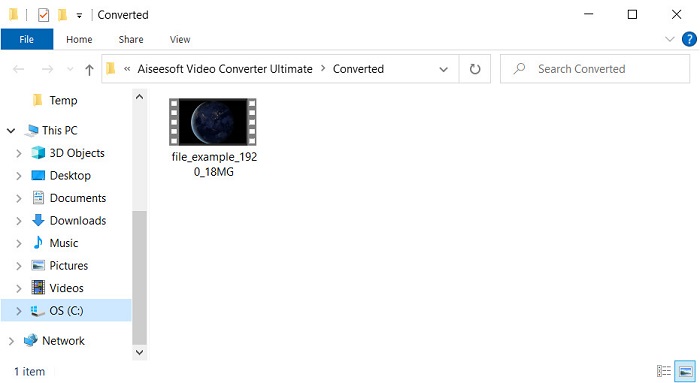
Шаг 5. Конвертация файла займёт всего несколько секунд. Затем дождитесь, пока откроется папка с созданным файлом .mov; нажмите на него, чтобы просмотреть видео в вашем стандартном медиаплеере.
Часть 3. Преобразование AMV в MOV с помощью доступного онлайн-конвертера 2
1. ConvertFiles
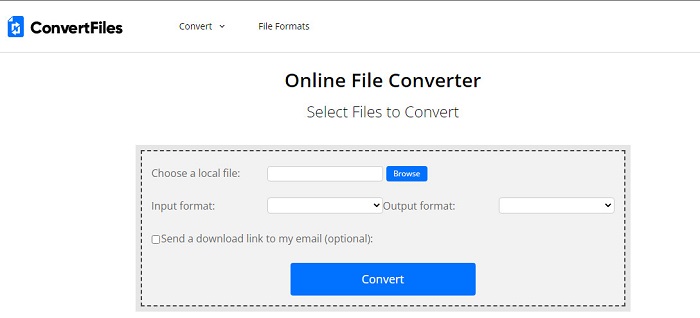
Одним из лучших онлайн‑конвертеров, доступных в вашем любимом браузере, является ConvertFiles. Этот онлайн‑инструмент позволяет без труда преобразовывать файлы из одного формата в другой. Также сервис поддерживает небольшой набор форматов, из которых вы можете выбрать нужный. Однако загрузка уже конвертированного файла может занять много времени, так как быстрой конвертацией сайт не отличается. Ещё один минус — большое количество рекламы на странице. Несмотря на трудности с загрузкой и обилием объявлений, этот сервис вполне достойно справляется со своей задачей как бесплатный онлайн‑инструмент.
Шаги по конвертации AMV в MOV с помощью ConvertFiles:
Шаг 1. Откройте ваш любимый браузер и найдите сайт ConvertFiles.
Шаг 2. После открытия сайта нажмите Browse, чтобы найти файл в папке; в поле Output Format выберите MOV и нажмите Convert.
Шаг 3. По завершении конвертации нажмите выделенную синим ссылку, чтобы скачать файл на компьютер.
2. MConverter
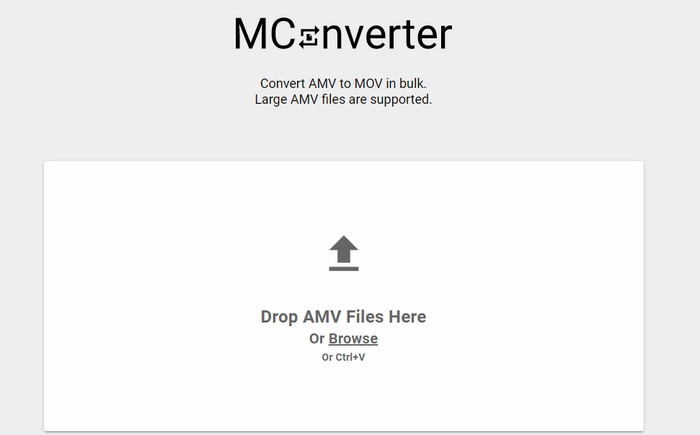
Не хотите видеть рекламу на экране и желаете спокойно конвертировать AMV в MOV? Тогда попробуйте использовать MConverter, доступный прямо в браузере. Этот инструмент также поддерживает пакетную конвертацию, чтобы сделать процесс более эффективным, как и FVC Video Converter Ultimate. Но есть и недостаток: размер файла не должен превышать 200 МБ. Поэтому, если вы хотите конвертировать длинное видео и его размер превышает лимит, этот вариант вам не подойдёт. Но если вы хотите получить более комфортный опыт конвертации, чем в ConvertFiles, следуйте инструкциям ниже.
Шаги по конвертации AMV в MOV с помощью MConverter:
Шаг 1. Найдите MConverter в поисковой системе и откройте сайт.
Шаг 2. Нажмите кнопку Upload, чтобы добавить файл, подождите немного, пока веб‑инструмент его загрузит, найдите формат MOV и нажмите на него. Конвертация начнётся сразу после выбора формата MOV.
Шаг 3. Нажмите Download All, чтобы сохранить файл.
Часть 4. Часто задаваемые вопросы об AMV и MOV
Могу ли я превратить свой MP4 в AMV?
Вы можете конвертировать MP4 в AMV, чтобы быстрее передавать файл через Интернет. Особенно если видео длится около часа, мы рекомендуем конвертировать файлы .mp4 в .amv, потому что по размеру .amv заметно меньше по сравнению с .mp4.
Поддерживает ли VLC AMV?
К счастью, вы можете использовать VLC Media Player для воспроизведения файлов .amv, даже несмотря на то, что этот формат устарел. Но знаете ли вы, что существуют медиаплееры, которые превосходят VLC? Если хотите узнать, что это за программы, нажмите на ссылку и ознакомьтесь с 5 альтернативными медиаплеерами вместо VLC.
Как мне превратить мой AMV в AVI?
AMV — улучшенная версия AVI, однако, если говорить о качестве, AVI обеспечивает куда более впечатляющий результат по сравнению с этим старым форматом. Кроме того, AVI очень хорошо совместим практически со всеми платформами. Поэтому, если вы хотите смотреть свои AMV в более качественной версии и на любых устройствах, вам стоит узнать, как конвертировать AMV в AVI.
Заключение
На этом обсуждение должно закончиться; Несмотря на то, что мы хотим сохранить файл AMV на нашем диске, проблема совместимости является одной из причин, по которой нам необходимо его преобразовать. В конце концов, AMV раньше считался популярным из-за того, как этот контейнер сжимает файл. Однако сегодня вы должны подумать о преобразовании его в новый формат, чтобы использовать его по-прежнему. Более того, предлагаемые здесь решения эффективно конвертируют. Тем не менее, FVC Video Converter Ultimate работает феноменально по сравнению с двумя другими инструментами. Итак, если вы хотите испытать лучший инструмент, вам необходимо загрузить его на свой компьютер и скопировать шаги, указанные выше.
-
 4 лучших способа легко конвертировать MOV в MP3 на Windows и Mac
 Если вы хотите извлечь аудиофайлы MP3 из файлов MOV, вы можете узнать больше о 4 самых эффективных конвертерах MOV в MP3, чтобы получить нужные файлы из статьи.
-
 MKV в MOV - Как конвертировать MKV в MOV
 Как преобразовать MKV в MOV на Mac? Может ли iMovie читать MKV? Что означает формат MOV? В этом посте рассказывается о двух простых способах конвертировать MKV в MOV с помощью бесплатных онлайн и профессиональных видео конвертеров.
-
 FLV в MOV - Как конвертировать FLV в MOV на Mac / ПК / онлайн бесплатно
 Как конвертировать FLV в MOV? Как преобразовать FLV в MOV на Mac? Есть ли бесплатный способ конвертировать YouTube FLV в MOV онлайн? В этом посте рассказывается о 3 конвертерах FLV в MOV для преобразования файлов FLV в MOV.
