


 Видео конвертер Ultimate
 Устройство записи экрана
 Видео ремонт
2 конвертера, используемые для преобразования DV в MOV без ухудшения качества
Файлы DV являются самым распространённым типом файлов на всех видеокамерах, потому что они дают лучшее качество видео для последующего монтажа и просмотра. Возможно, вы задаётесь вопросом, можно ли использовать этот формат в iMovie для редактирования или воспроизведения его в QuickTime. Однако вы не можете использовать этот «сырой» файл, так как он является неподдерживаемым и устаревшим форматом. Тем не менее, волноваться не о чем, поскольку вы можете конвертировать свои DV‑файлы в поддерживаемый на Mac формат, например MOV. По мере чтения этой статьи вы получите чёткое понимание, зачем вам нужно конвертировать DV в MOV на Mac.

Часть 1. Преобразование файлов DV в MOV на Mac с помощью мощного автономного конвертера
FVC Video Converter Ultimate — это выдающийся инструмент, который вы будете использовать, чтобы конвертировать DV в MOV как на Mac, так и на ПК. Без всяких сомнений, этот конвертер поможет вам преобразовать файлы в новый формат без малейших усилий. Более того, некоторые пользователи нуждаются в быстром способе преобразования файла в новый формат; к счастью, с этой задачей программа справляется очень быстро. В дополнение к конвертации здесь также можно редактировать видео: обрезать кадр, объединять файлы, вырезать фрагменты и многое другое. Поэтому, если вы хотите испытать возможности этого мощного конвертера, выполните следующие действия из данной инструкции.
Как конвертировать DV в MOV с помощью удобного FVC Video Converter Ultimate:
Шаг 1. Загрузите DV‑конвертер на ваш Mac или ПК, выполните установку и нажмите «Start Now», чтобы открыть программу.
Бесплатная загрузкаДля Windows 7 или более поздних версийБезопасная загрузка
Бесплатная загрузкаДля MacOS 10.7 или более поздних версийБезопасная загрузка
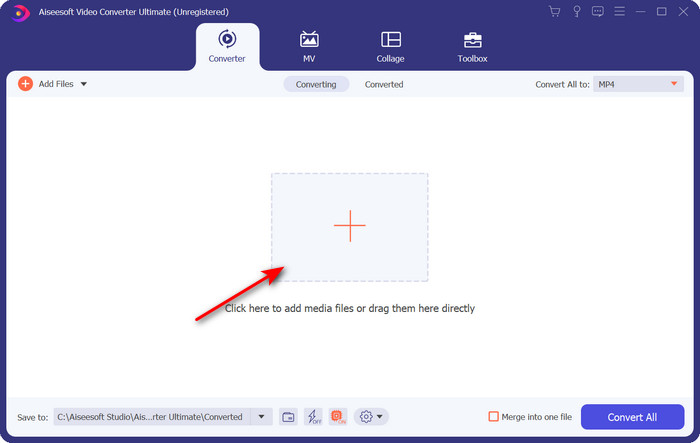
Шаг 2. После запуска загрузите файл, который хотите конвертировать, нажав кнопку «+»; откроется папка, найдите нужный файл и нажмите Open.
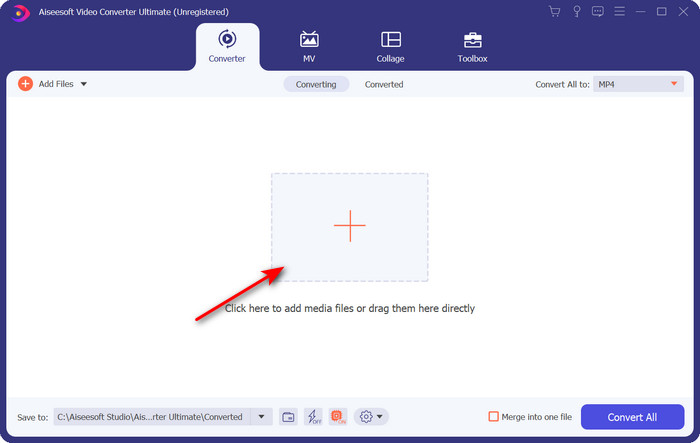
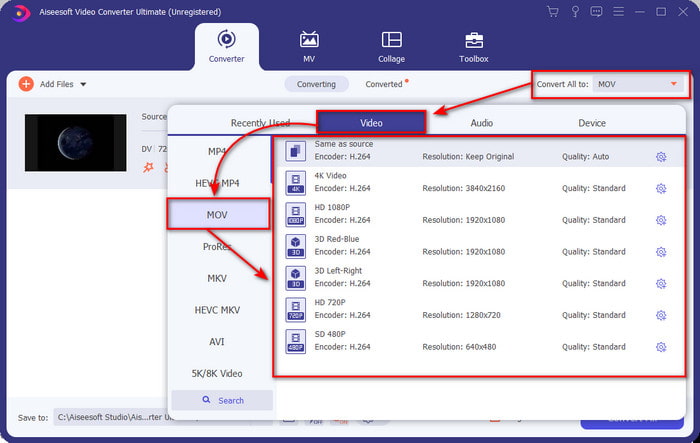
Шаг 3. Чтобы выбрать формат, нажмите кнопку drop-down, выберите формат MOV и желаемое разрешение. Качество результирующего файла можно установить высоким, но тогда его размер будет существенно больше по сравнению с исходным.
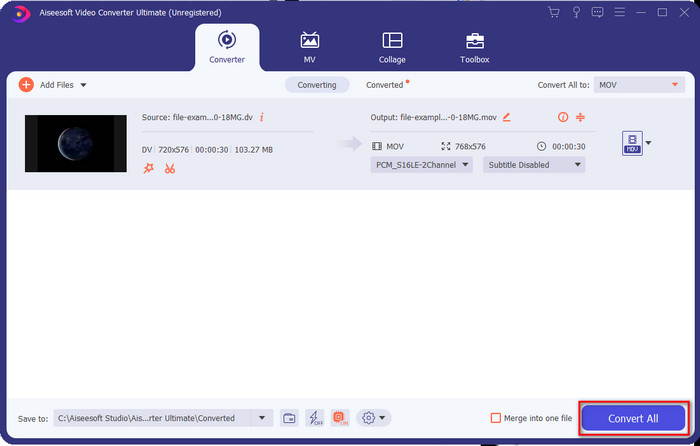
Шаг 4. Нажмите Convert All, чтобы начать процесс конвертации DV в MOV и сразу же загрузить полученный файл.
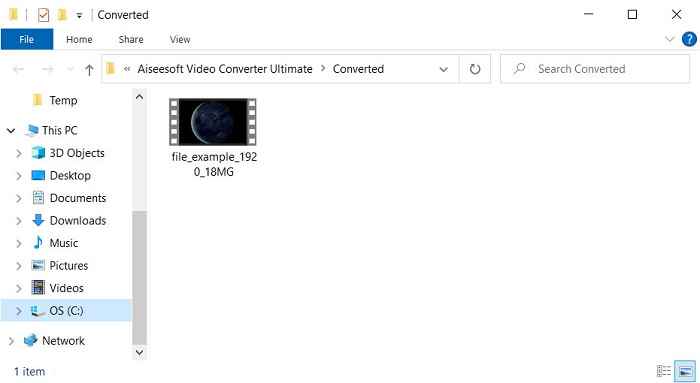
Шаг 5. Появится папка с местоположением конвертированного файла; теперь вы можете просматривать или редактировать файл на Mac, не беспокоясь о том, что он не откроется.
Часть 2. Конвертируйте DV в MOV бесплатно с помощью онлайн-конвертера
Хотите конвертировать видео прямо в браузере? Тогда вам стоит использовать FVC Free Video Converter Online, чтобы бесплатно конвертировать DV в MOV. Помимо конвертации, вы можете изменять разрешение, битрейт и частоту кадров — как и в FVC Video Converter Ultimate. Хотя этим инструментом можно пользоваться бесплатно онлайн, его возможности значительно отличаются от возможностей офлайн‑конвертера, описанного выше. Но если вам нужно выполнить простую конвертацию бесплатно, это ваш лучший онлайн‑вариант. Итак, перейдём к шагам по использованию сервиса.
Как конвертировать файлы DV в MOV с помощью полезного бесплатного онлайн-конвертера видео FVC;” /]Шаг 1. Чтобы открыть онлайн‑инструмент, нажмите эту ссылку, после чего откроется новое окно браузера.
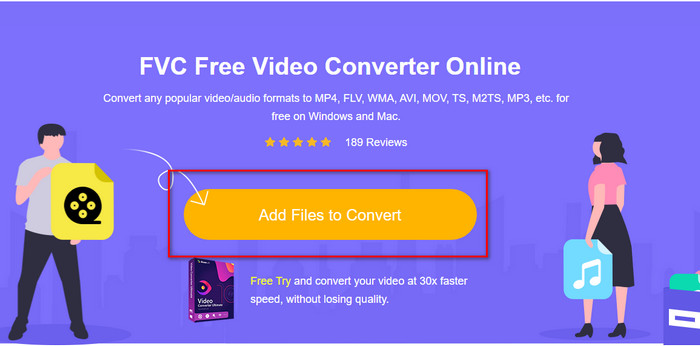
Шаг 2. Нажмите Add Files to Convert, чтобы запустить онлайн‑конвертер, затем в открывшейся папке выберите .dv‑файл, который хотите конвертировать.
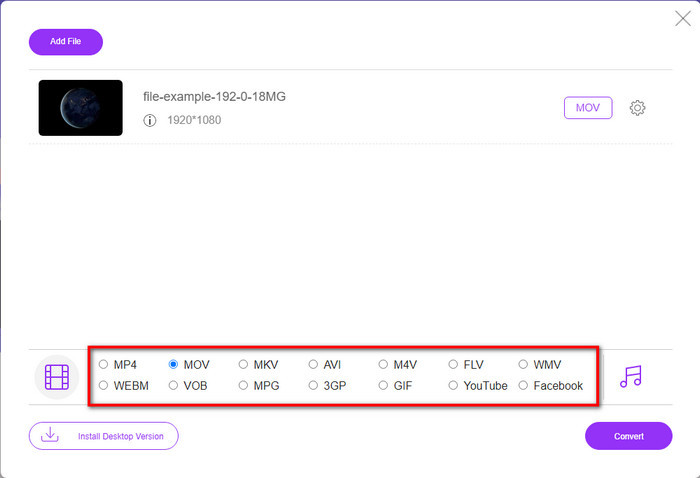
Шаг 3. Выберите формат MOV или другой нужный формат из списка ниже.
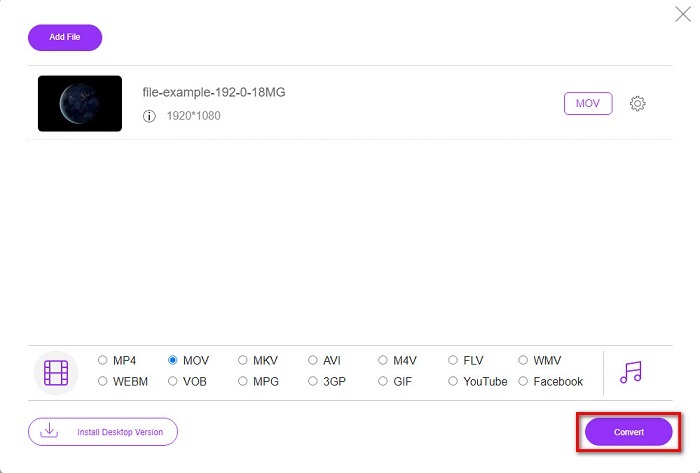
Шаг 4. Чтобы запустить конвертацию, нажмите Convert и дождитесь окончания процесса.
Шаг 5. После завершения появится новая папка с конвертированным файлом на вашем экране.
Часть 3. DV против MOV
Формат DV идеально подходит для сохранения видео и аудио, поскольку использует тот же алгоритм, что и MPEG. Но это сильно отличается от MPEG, поскольку не полагается на сжатие предыдущей частоты кадров. Таким образом, вместо того, чтобы полагаться на внутрискоростное сжатие, он использует независимое сжатие для более быстрого редактирования воспроизведения. В результате файлы DV были введены в конце 1995 года в качестве стандартного видеоформата для всех видеокамер. Но сегодня мы увидим меньше ленточных видеокамер, потому что теперь мы используем жесткий диск, твердотельные накопители и карты памяти для хранения записей.
С другой стороны, формат MOV был разработан Apple для хранения высококачественного медиафайла, который можно использовать во всех редакторах или воспроизводить с помощью медиаплеера. Этот формат пользуется большим уважением, поскольку он может содержать коллективные элементы мультимедиа, и каждый из них может собирать данные для видео, аудио и текста. Как и в случае с DV, сжатие, обеспечиваемое этим форматом, основано на алгоритме.
В довершение всего, вы не можете загружать файлы DV напрямую в приложение Mac, потому что этот формат устарел. Теперь есть лучшие форматы, чем .dv. Но если ваши видео в этом формате, вы можете использовать конвертер DV в MOV и преобразовать файл, чтобы воспроизвести его в Quicktime или отредактировать в iMovie.
Часть 4. Часто задаваемые вопросы о преобразовании DV в MOV
Почему я не могу воспроизводить файлы DV на Mac?
В этом случае могут быть разные причины, особенно файлы DV, которые менее совместимы практически со всеми операционными системами. Но мы перечисляем две возможные причины, по которым вы не можете этого сделать, и первая из них заключается в том, что используемый вами медиаплеер не поддерживает этот формат. Это наиболее распространенная проблема в большинстве форматов из-за соображений совместимости и ее решения для преобразования. Во-вторых, ваши файлы .dv могут быть сломаны или повреждены. Поскольку он поврежден или испорчен, файл не будет воспроизводиться.
Является ли файл DV идеальным форматом?
Раньше он идеально подходил для записи и редактирования медиафайлов, но сегодня формат не самый лучший. Основная причина в том, что есть форматы лучше, чем .dv, а вторая причина — в совместимости.
Как сжать файлы DV?
Хотя файлы DV уже являются сжатыми, их размер в мегабайтах может сильно вырасти, если длительность видео слишком велика. Поэтому сжатие файла необходимо, чтобы проще его передавать и экономить место. Чтобы узнать, как сжимать DV‑файлы или другие медиафайлы, прочитайте эту статью и узнайте, как сжимать видео без потери качества.
Заключение
Подводя итог, раньше DV‑файлы были одним из лучших форматов для записи аудио и видео, но сегодня у них появились преемники. Кроме того, этот формат значительно уступает MOV по совместимости, особенно если вы хотите редактировать или просматривать видео на Mac. Поскольку формат устарел, имеет смысл конвертировать его онлайн или офлайн с помощью инструментов, упомянутых выше. В целом, FVC Free Video Converter Online — лучший онлайн‑конвертер, который мы нашли в сети. Помимо того, что он бесплатный, его производительность заметно отличается от других веб‑инструментов. Но мы также должны отметить выдающийся конвертер — FVC Video Converter Ultimate. Этот инструмент не нуждается в представлении и без сомнений поможет вам решить любую проблему, связанную с конвертацией. Теперь выбор за вами — решите, какой вариант лучше всего подходит именно вам.
-
 Как конвертировать AVI в MOV с помощью простых шагов и инструментов
 Вы хотите знать, как преобразовать AVI в воспроизводимый MOV? Вы должны следовать этой статье, чтобы узнать, как это сделать, и узнать, как добиться успешного преобразования.
-
 4 способа бесплатно конвертировать DivX в MOV [онлайн и офлайн]
 Вы боретесь с ограничениями DivX или у вас нет медиаплееров для доступа к видео в этом формате? Если вы хотите преобразовать его в формат MOV, продолжайте читать эту статью, чтобы заполнить пробелы.
-
 Бесплатный конвертер M4V в MOV - Как конвертировать M4V в MOV
 Если ваш медиаплеер не поддерживает формат M4V, сталкивались ли вы когда-нибудь с трудностями при просмотре фильма на своем iPhone? Основная тема этой статьи — преобразовать его в видеофайл MOV.
