


 Видео конвертер Ultimate
 Устройство записи экрана
 Видео ремонт
Лучшие и простые в использовании конвертеры, которые конвертируют MOV в WMV, которые вы должны попробовать!
Apple создала формат файлов MOV, и он является одним из самых распространённых форматов наряду с WMV, MP4 и AVI. Файлы MOV можно воспроизводить в Windows с помощью QuickTime. Поэтому, если вы хотите конвертировать свой файл MOV, мы рекомендуем преобразовать его в файл WMV, так как система Windows обычно воспроизводит именно этот формат. Итак, если вы хотите узнать, как конвертировать MOV в WMV, эта статья идеально вам подойдёт.

Часть 1. Конвертируйте MOV в WMV с помощью лучшего автономного конвертера
Когда речь заходит о конвертации файлов, нет сомнений, что FVC Video Converter Ultimate справляется с этим лучше всего. Этот конвертер — офлайн‑инструмент, который позволяет конвертировать ваш файл MOV в WMV, AVI, MP4, M4V, WebM и другие форматы. В нём также есть отличные функции для редактирования, улучшения, объединения и сжатия файлов MOV. Кроме того, у этого конвертера есть режим ультрабыстрой конвертации, позволяющий быстро преобразовать MOV в WMV.
Как конвертировать MOV в WMV с помощью FVC Video Converter Ultimate:
Шаг 1. Установите FVC Video Converter Ultimate, нажав на значок Бесплатная загрузка ниже. Вы можете скачать этот конвертер как для Windows, так и для MacOS. Затем следуйте инструкции по установке и запустите приложение.
Бесплатная загрузкаДля Windows 7 или более поздних версийБезопасная загрузка
Бесплатная загрузкаДля MacOS 10.7 или более поздних версийБезопасная загрузка
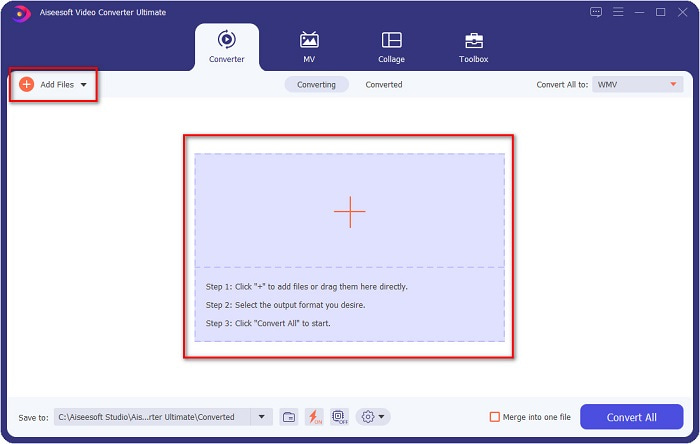
Шаг 2. После запуска программы вы увидите главный интерфейс конвертера. Нажмите Add Files (Добавить файлы) или перетащите ваш файл MOV на значок +, чтобы начать конвертацию вашего файла MOV в файл WMV.
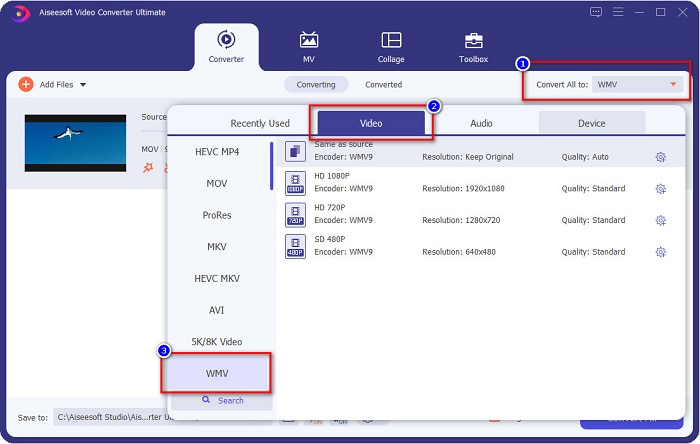
Шаг 3. Затем нажмите кнопку Convert All to (Конвертировать всё в). Появится список форматов файлов, где вы можете выбрать нужный формат. После этого нажмите формат файла WMV.
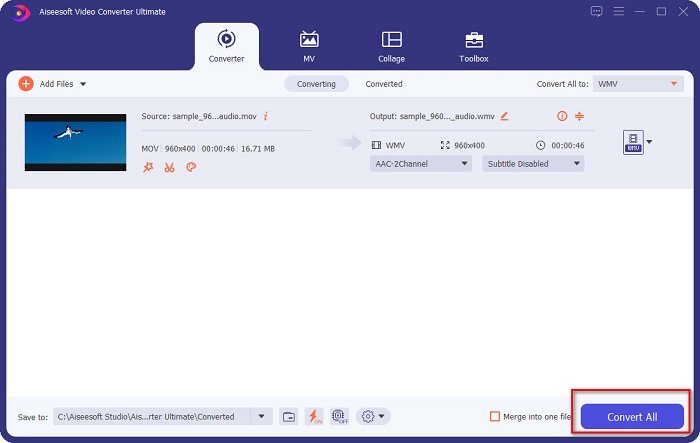
Шаг 4. После того как вы выбрали формат WMV, щёлкните по кнопке Convert All (Конвертировать всё) в правом нижнем углу, чтобы начать конвертацию. Затем начнётся преобразование вашего файла MOV в WMV. Наконец, просто подождите несколько секунд — и всё! С помощью этих простых шагов вы можете легко конвертировать файлы MOV в WMV.
Плюсы
- Имеет опцию, где вы можете иметь сверхбыстрое преобразование.
- Позволяет редактировать, улучшать и сжимать файл.
- Может конвертировать различные форматы файлов, включая MOV, WMV, AVI, MP4, M4V, VOB, MPG и другие.
Минусы
- Чтобы получить доступ к его специальным функциям, вам необходимо сначала приобрести приложение.
Часть 2. Преобразование MOC в WMV с помощью бесплатного программного обеспечения
При преобразовании файла MOV в WMV вы также можете использовать бесплатное программное обеспечение, уже установленное на вашем рабочем столе. Один из известных бесплатных конвертеров, доступных сегодня, использует медиаплеер VLC в качестве конвертера. Медиаплеер VLC — это мультимедийный проигрыватель, который позволяет воспроизводить различные медиаформаты. Кроме того, это бесплатное программное обеспечение также может конвертировать файлы. Поэтому прочитайте приведенные ниже шаги, если вы хотите конвертировать MOV в WMV с помощью бесплатного программного обеспечения с использованием VLC.
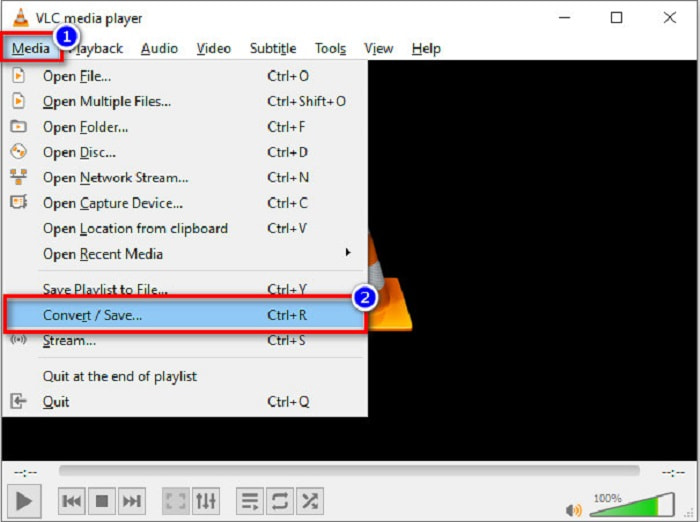
Шаг 1. Откройте VLC Media Player, нажмите на пункт Media (Медиа) в верхней части интерфейса программы и выберите Convert/Save (Конвертировать/Сохранить).
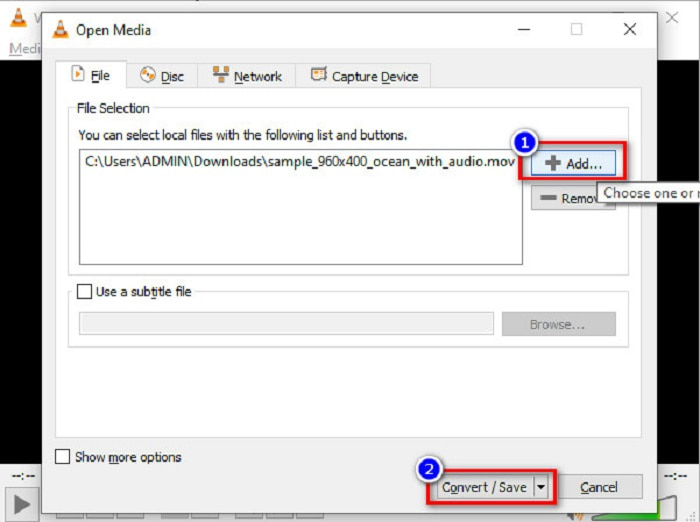
Шаг 2. Затем нажмите кнопку Add (Добавить), чтобы выбрать файл формата MOV. Формат файла отобразится в списке. Затем нажмите кнопку Convert/Save (Конвертировать/Сохранить), чтобы перейти к следующему шагу.
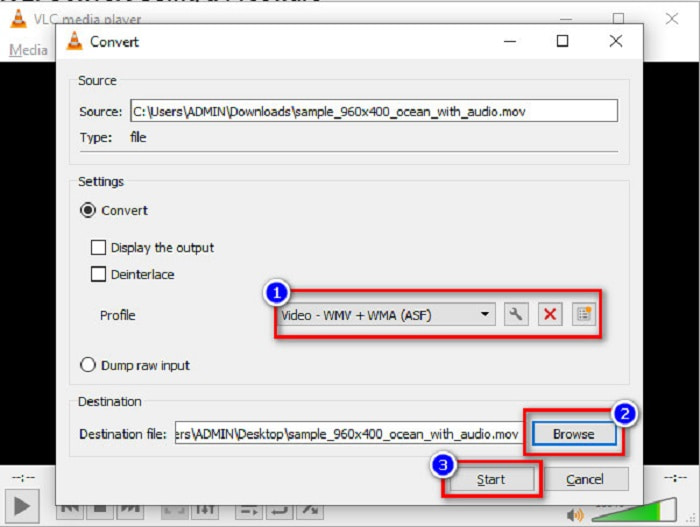
Шаг 3. Наконец, выберите WMV и укажите папку для сохранения, нажав Browse (Обзор), затем нажмите кнопку Start (Пуск), чтобы начать конвертацию.
Часть 3. Преобразование MOV в WMV с помощью онлайн-конвертера
Если вы хотите узнать, как конвертировать файлы MOV в WMV онлайн, у нас есть для вас подходящий онлайн‑инструмент. FVC Free Video Converter Online — это онлайн‑конвертер, который позволяет преобразовывать ваши файлы MOV в WMV, MP4, AVI, MPG и другие форматы. Этот конвертер прост в использовании, поэтому у вас не возникнет сложностей с конвертацией файлов. Однако вы можете столкнуться с медленной скоростью преобразования, поскольку этот конвертер работает через интернет. Тем не менее это эффективный инструмент для онлайн‑конвертации видео из MOV в WMV, и им пользуются многие.
Вот шаги о том, как вы можете конвертировать с помощью этого онлайн-конвертера:
Шаг 1. Сначала откройте браузер и найдите FVC Free Video Converter Online.
Шаг 2. После открытия конвертера в браузере нажмите Add Files to Convert (Добавить файлы для конвертации). Затем конвертер начнёт запускаться. После этого вы будете перенаправлены к файлам на вашем компьютере, где нужно выбрать файл MOV для конвертации.
Скачайте версию для ПК, чтобы конвертировать файлы пакетно.
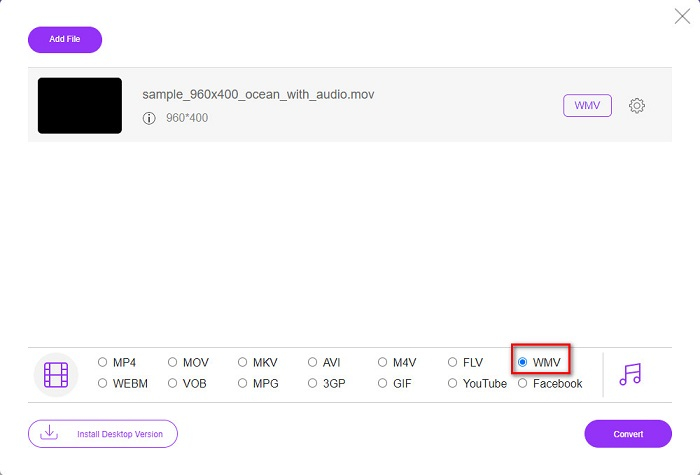
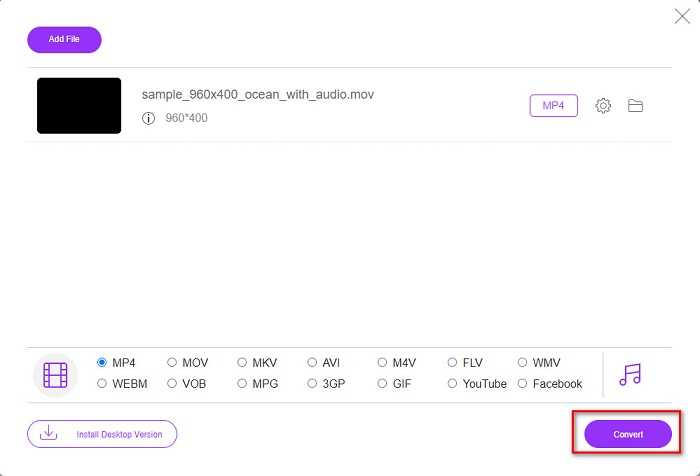
Шаг 3. На втором экране программы в нижней части вы увидите список форматов файлов, где можно выбрать нужный формат WMV.
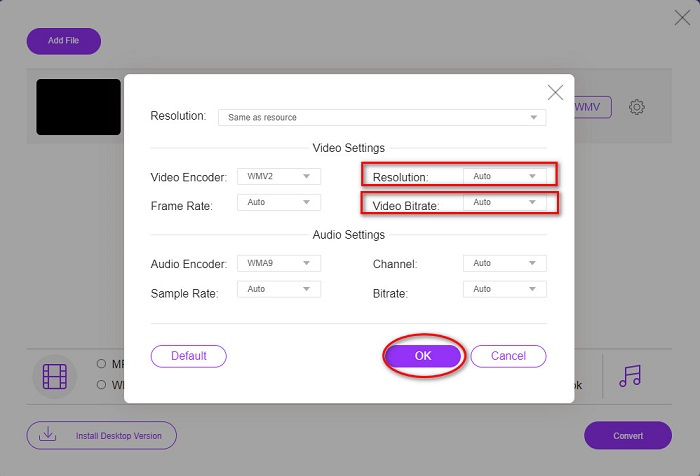
Необязательно. Нажав кнопку setting (настройки), вы можете изменить разрешение и битрейт видео вашего файла. Затем нажмите OK, чтобы сохранить изменения.
Шаг 4. После выбора формата WMV щёлкните по кнопке Convert (Конвертировать), чтобы преобразовать ваш файл MOV в файл WMV. Наконец, дождитесь завершения конвертации. Вот и всё! Так просто вы можете конвертировать MOV в WMV.
Часть 4. Расширенные знания о файлах MOV и WMV
Формат MOV широко поддерживается в MacOS. Хотя вы можете воспроизводить файлы MOV в Windows, вам всё же нужна поддержка QuickTime. Кроме того, файлы MOV сохраняются в формате QuickTime File Format. Поскольку он в основном поддерживается платформами QuickTime и Mac, этот формат стал одним из самых распространённых на сегодняшний день. Для сравнения, WMV или Windows Media Video поддерживается многими устройствами, преимущественно системой Windows. Более того, этот формат использует сжатие, которое позволяет уменьшить размер файла без заметной потери качества.
MOV против WMV
Формат MOV можно использовать для хранения фильма, телепередачи, короткого видеоклипа или домашнего фильма. На самом деле он сохраняется в формате файлов QuickTime (QTFF), который был представлен Apple в 1991 году. Файлы MOV часто используются, когда люди хотят сохранить видео с высоким качеством.
Созданный Microsoft, WMV был одним из самых распространенных видеоформатов еще в 2000-х годах. Его можно просмотреть в Интернете и воспроизвести с помощью различных медиаплееров в Windows. И это также формат видеофайла по умолчанию для проигрывателя Windows Media. Но в последнее время его захватили другие форматы.
Часть 5. Часто задаваемые вопросы о том, как конвертировать MOV в WMV
Влияет ли преобразование MOV в WMV на качество моего файла?
В некоторых случаях качество вашего файла будет зависеть от конвертера, который вы будете использовать. Существуют конвертеры, которые не поддерживают высококачественное пиксельное видео.
Поддерживает ли QuickTime файлы WMV?
Проигрыватель QuickTime не поддерживает файлы WMV. Однако вы можете конвертировать ваши файлы WMV в форматы, поддерживаемые QuickTime, включая MOV, MP4, M4V и другие. Для получения дополнительной информации о конвертации WMV в MOV перейдите по этой ссылке.
Можете ли вы сжать файлы MOV?
Использование ZIP‑архива может сжать файлы MOV и другие файлы. Однако сжатие MOV через ZIP уменьшит размер лишь незначительно. Поэтому мы рекомендуем конвертировать ваш файл в формат с меньшим размером, используя конвертеры, представленные выше.
Заключение
Как показано выше, существует множество конвертеров на выбор. Вы можете решить, хотите ли вы онлайн‑конвертер, офлайн‑программу или бесплатное ПО. Эти конвертеры имеют разные особенности и функции, которые вы можете опробовать. Однако мы рекомендуем использовать FVC Video Converter Ultimate, потому что он обладает большим количеством функций по сравнению с другими конвертерами. Кроме того, он конвертирует видео сверхбыстро и эффективно. Скачайте его сейчас, чтобы оценить все замечательные возможности, которые предлагает этот конвертер.
-
 [Бесплатно и онлайн] 4 метода конвертации MOV в MP4
 Хотите конвертировать файлы MOV (Apple QuickTime Movie) в MP4? В этом посте рассказывается о 4 бесплатных методах преобразования ваших видеофайлов MOV в формат MP4 в Windows 10/8/7 / XP и Mac OS X.
-
 4 лучших способа легко конвертировать MOV в MP3 на Windows и Mac
 Если вы хотите извлечь аудиофайлы MP3 из файлов MOV, вы можете узнать больше о 4 самых эффективных конвертерах MOV в MP3, чтобы получить нужные файлы из статьи.
-
 2 простых способа конвертировать файлы MOV в FLV на Windows / Mac
 Как конвертировать MOV в FLV бесплатно? Вот лучшие видео конвертеры для настольных компьютеров и онлайн, которые позволяют конвертировать ваш MOV-файл в FLV за считанные секунды, не платя ни копейки.

