


 Видео конвертер Ultimate
 Устройство записи экрана
 Видео ремонт
Исчерпывающий обзор программного обеспечения для записи звука для эффективной записи звука
Если вы профессионал или любитель, вам обязательно нужно иметь программное обеспечение для записи аудио, чтобы обрабатывать и улучшать звук для конкретных задач. К тому же выбор подходящего аудиорекордера для вашего устройства может быть сложным, так как на рынке представлено множество решений. Вместо того чтобы по очереди испытывать разные программы для записи звука, мы представим четыре рекордера, которые посчитали наиболее подходящими для ваших нужд, чтобы уберечь вас от скачивания или запуска вредоносного ПО. Приведённый ниже список аудиорекордеров тщательно отобран, чтобы предложить вам только лучшее, исключив плохо работающие программы для записи звука.

Часть 1. 4 лучших программы для записи звука в Windows и macOS
1. Устройство записи экрана FVC
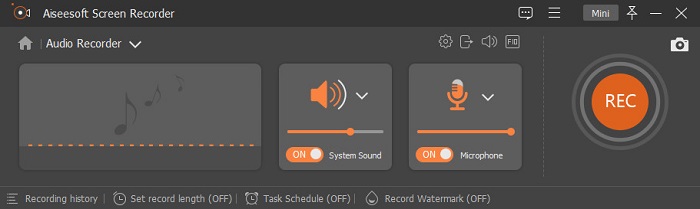
Нужно записать звук с компьютера, но вы не знаете, что использовать? В таком случае мы представляем лучший и, безусловно, один из самых популярных рекордеров на рынке — FVC Screen Recorder. У него отличный пользовательский интерфейс, позволяющий работать с программой, не выполняя сложных действий. Кроме того, у многих пользователей возникают проблемы с фоновым шумом, поэтому с помощью новой встроенной функции шумоподавления вы сможете записывать без помех от мелких фоновых звуков. Более того, в нём есть множество функций, которые помогут вам эффективно записывать аудио. Хотите узнать, какие именно? Тогда давайте кратко рассмотрим ключевые возможности FVC Screen Recorder.

Устройство записи экрана
4 988 518+ загрузок- Он записывает звуки со сверхвысоким качеством звука.
- Записывайте аудио 24/7, если на диске вашего компьютера достаточно места.
- Вы можете одновременно записывать системный звук с помощью микрофона.
- Улучшение микрофона доступно для гораздо лучшего опыта записи вашего голоса.
- Вы можете проверить звук микрофона, если вам нужно.
Бесплатная загрузкаДля Windows 7 и новееБезопасная загрузка
Бесплатная загрузкаДля MacOS 10.7 и новееБезопасная загрузка
Плюсы
- Программа позволяет пользователям получать удовольствие от записи звука на Mac или Windows.
- Доступны основные функции редактирования, такие как вырезание или обрезка звука.
- Он имеет встроенную историю записи, чтобы легко найти записанный звук.
Минусы
- Он не поддерживает добавление эффектов к звуку во время записи.
- Покупка перед использованием.
2. Наглость
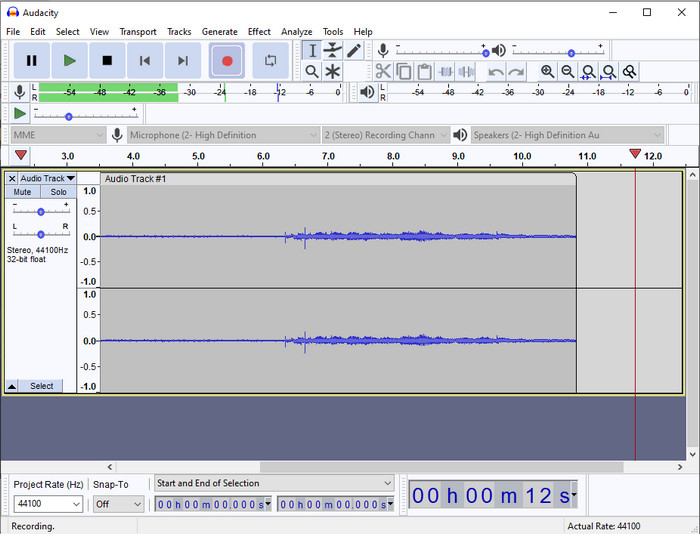
Если вам нужен профессиональный инструмент для работы с записью звука, то Audacity станет хорошим помощником. Этот профессиональный аудиорекордер уже помог миллионам подкастеров в их работе с записью аудио. Если вы ищете продвинутый, но бесплатный рекордер, эта программа — один из таких вариантов. Хотя у неё есть профессиональные возможности записи, с инструментом непросто быстро подружиться из‑за неудачного графического интерфейса. И даже при том, что он подходит для профессиональной записи, некоторые его функции, например шумоподавление, всё ещё нуждаются в доработке. Тем не менее Audacity позволяет записывать системный звук на профессиональном уровне, чего не могут обеспечить многие другие рекордеры.
Плюсы
- Бесплатная загрузка на всех настольных платформах.
- Он предлагает экспертные функции редактирования для профессионалов.
- Он имеет некоторые дополнительные функции, которые вам понадобятся для создания подкаста.
Минусы
- Графический интерфейс программы устарел.
- Требуется обновление некоторых его функций.
- Не лучший выбор для любителей и тех, кто не умеет записывать.
3. Плеер QuickTime
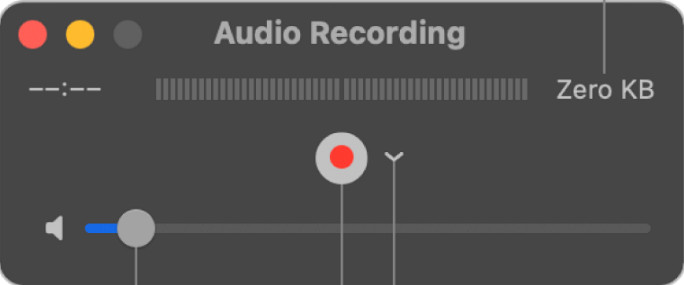
QuickTime Player на Mac тоже можно использовать как аудиорекордер при необходимости. Хотя этот плеер не слишком мощный и эффективный в плане записи, вы можете столкнуться с задержками и сниженным качеством звука на выходе. Однако если вам нужно быстро сделать аудиозапись на Mac, это приемлемый вариант, так как ничего не нужно скачивать, и пользоваться им однозначно безопасно. Но если вы профессионал в поиске лучшего программного обеспечения для записи звука, это не тот инструмент, который вам нужен.
Плюсы
- Он уже доступен на каждой macOS.
- Бесплатный, безопасный и простой в использовании.
Минусы
- Он не так эффективен, как другой диктофон в этом списке.
- Окончательное качество звука на выходе низкое.
- Не лучший выбор для профессиональной записи и редактирования.
Связанный материал:
Как записать экран с озвучкой на Mac с помощью QuickTime
Как конвертировать QuickTime в MP4
4. Окенаудио
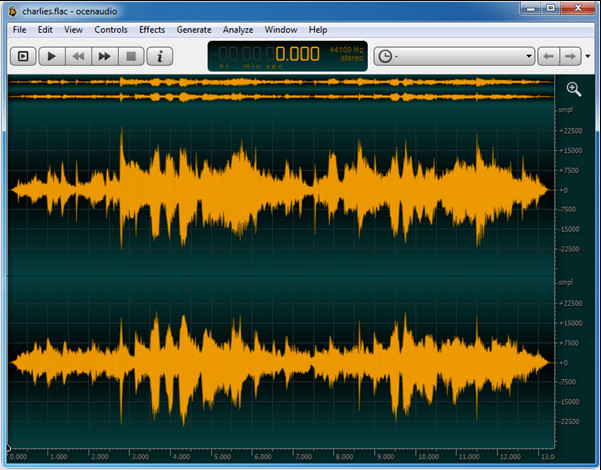
Если вам нужен многофункциональный рекордер для записи аудио в Windows 10 и более поздних версиях, то Oceanaudio вам поможет. У этого инструмента интерфейс во многом похож на Audacity, однако графический интерфейс здесь проще для понимания. Более того, этот рекордер предоставляет достаточно сложный функционал и дополнительные возможности, необходимые для работы со звуком. Хотя пользоваться им не так просто, и, возможно, придётся посмотреть обучающее видео, в итоге он себя оправдывает. Поэтому, если вам нужен редактор с более удобным интерфейсом, чем в Audacity, стоит выбрать именно его.
Плюсы
- Он использует передовые технологии для записи.
- Это экспертный выбор, чтобы сделать аудиозапись.
- Вы можете слушать свой голос во время записи.
Минусы
- Это не удобно.
- Новички могут запутаться при использовании этого инструмента.
Часть 2. Сравнительная таблица программного обеспечения для записи звука
| Функции | Регистратор экрана FVC | Мужество | QuickTime Player | Ocenaudio |
| Запись системного звука и микрофона |  | | | |
| Отредактируйте запись | | |  | |
| Аппаратное ускорение | | | | |
| Предварительное прослушивание в реальном времени | | | | |
| Сохранить исходное качество | | | | |
| Лучший пользовательский интерфейс | | | | |
Часть 3. Часто задаваемые вопросы о программном обеспечении для записи звука
Является ли Cinch Audio Recorder лучшим аудиорекордером?
У нас есть свежий обзор Cinch Audio Recorder. Если вы хотите узнать больше об этом аудиорекордере, нажмите на эту ссылку и ознакомьтесь с подробной информацией о программе.
Каковы качества хорошего аудио рекордера?
Вам нужно будет знать основные стандарты, прежде чем выбрать хороший аудио рекордер. Во-первых, он должен легко записывать звук с вашего микрофона. Во-вторых, это безопасно и не содержит вредоносных программ. В-третьих, если вам нужно будет приобрести инструмент, сам инструмент должен обеспечивать превосходство для пользователей. В-четвертых, показатель эффективности означает, что инструмент должен быть очень эффективным при записи. В-пятых, для помощи пользователям в записи должны быть доступны базовые или расширенные функции. Прежде чем выбрать аудиомагнитофон, который поможет вам, вы можете положиться на эти стандарты.
Как записать звук в Windows 10?
Перед записью в Windows 10 вам нужно выбрать лучший рекордер, например FVC Video Recorder: скачайте его на компьютер, быстро установите и запустите. Затем выберите режим Audio Recorder и нажмите на него. Теперь вы можете легко добавить к записи системный звук или микрофон, просто включив их на плавающей панели инструментов. Когда будете готовы к записи, нажмите круглую красную кнопку для старта. Чтобы завершить запись, нажмите квадратную кнопку остановки; после этого откроется новое окно со списком сделанных вами аудиозаписей.
Заключение
Теперь мы знаем, какое программное обеспечение для записи звука доступно на вашем компьютере. Все представленные здесь инструменты помогут вам в работе с записью. Однако если вы ищете рекордер, который превосходит остальные, вам стоит обратить внимание на FVC Screen Recorder. Всё ещё сомневаетесь в этом аудиорекордере? Тогда скачайте его и попробуйте сами — это единственный способ убедиться, что он действительно работает так, как мы описали в этой статье.
-
 4 лучших бесплатных аудиорекордера AIFF для воспроизведения звука высокого качества
 В этой статье рассказывается об AIFF и некоторых из самых популярных инструментов, которые вы можете использовать для создания высококачественного формата AIFF.
-
 3 лучших метода записи звука на iPhone
 Возникли трудности из-за того, что вы не можете правильно записать звук на iPhone? Затем прочитайте эту статью, чтобы узнать, как записывать звук на iPhone и какие есть доступные инструменты.
-
 7 великолепных диктофонов, доступных на всех платформах
 Хотите научиться делать аудиозапись? Тогда перейдите к этой статье, поскольку мы говорим о лучшем аудиорекордере, который может соответствовать вашим потребностям.
