


 Видео конвертер Ultimate
 Устройство записи экрана
 Видео ремонт
 Безопасная загрузка
3 лучших регистратора звонков в Facebook - как записывать видеозвонки в Facebook
Как записывать видеозвонки в Facebook, чтобы сохранить драгоценные моменты общения с друзьями и семьёй? После того как Facebook получил функцию видеозвонков, всё больше пользователей предпочитают связываться через звонки в Facebook, а не по телефону. Но, будучи дополнительной функцией общения в рамках социальной платформы, он не имеет встроенной возможности записи, как обычные телефонные звонки. При этом и отдельное приложение Facebook Messenger не оснащено встроенным рекордером. В таком случае вы можете познакомиться с 3 простыми в использовании рекордерами звонков в Facebook для компьютера, устройств iOS и телефонов Android с подробными инструкциями в этой статье.

Часть 1: лучший онлайн-регистратор звонков Facebook для Windows / Mac
Не устанавливая стороннее ПО, вы можете использовать FVC Free Screen Recorder, чтобы бесплатно онлайн записывать видеозвонки в Facebook. Это удобный рекордер звонков Facebook с лаконичным интерфейсом и набором всех необходимых функций.
- 1. Записывайте звонки и видео Facebook онлайн бесплатно с помощью простых шагов.
- 2. Запись аудио и видео без потерь для сохранения видео высокого качества.
- 3. Нет водяных знаков для защиты вашей собственности.
- 4. Записи будут автоматически сохраняться в медиатеке, и вы можете свободно удалять, загружать и публиковать их в социальных сетях.
Шаг 1: Перейдите на сайт FVC Free Screen Recorder в любом браузере. Нажмите кнопку Start Recording, чтобы за несколько секунд установить лаунчер, затем снова нажмите кнопку Start Recording, чтобы запустить рекордер.

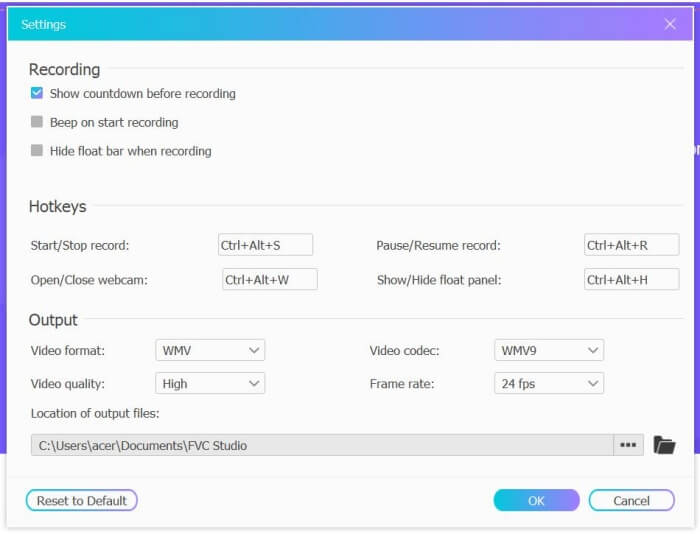
Шаг 2: Нажмите меню Recording Area, чтобы выбрать запись на весь экран или произвольно выделенную область. Затем включите звук Microphone и Speaker. Для настройки параметров видео нажмите значок Setting. Можно выбрать формат MP4, высокое качество и 24 кадра в секунду, чтобы сохранить высокое качество записей. После этого нажмите кнопку REC, чтобы начать запись звонка в Facebook.
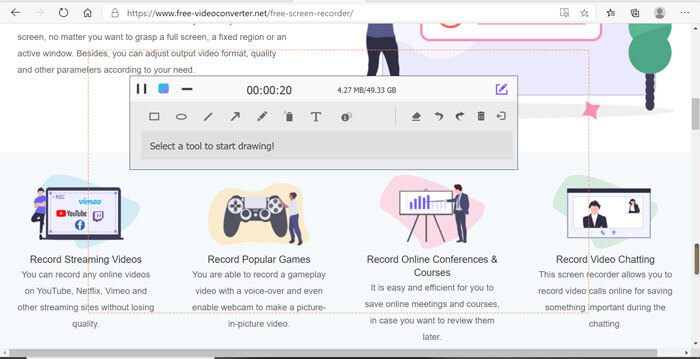
Шаг 3: Появится панель инструментов с несколькими функциями редактирования. При необходимости вы можете добавлять фигуры, текст и линии. Затем нажмите значок Stop, чтобы сохранить запись в облако. Щёлкните правой кнопкой мыши, чтобы загрузить файл на компьютер.
Использование этого бесплатного онлайн-рекордера видеозвонков Facebook - лучший способ для пользователей компьютеров записывать видеозвонки Facebook онлайн. Заранее настроив параметры записи, он может сохранять звонки Facebook в формате MP4 с небольшим размером и высоким качеством. Если вы привыкли звонить в Facebook с мобильных устройств, продолжайте читать эту статью.
Часть 2: Как записать звонок Facebook для iOS через рекордер по умолчанию
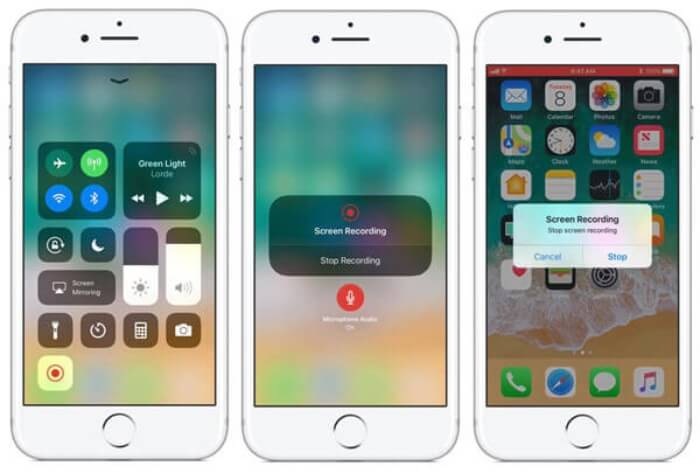
Обновленная iOS 11 или более поздняя версия имеет новый рекордер по умолчанию на вашем iPhone и iPad, который является лучшим выбором для записи видеозвонков Facebook без загрузки каких-либо приложений. Здесь вы можете узнать, как добавить регистратор звонков Facebook к ярлыкам в центре управления и как его использовать.
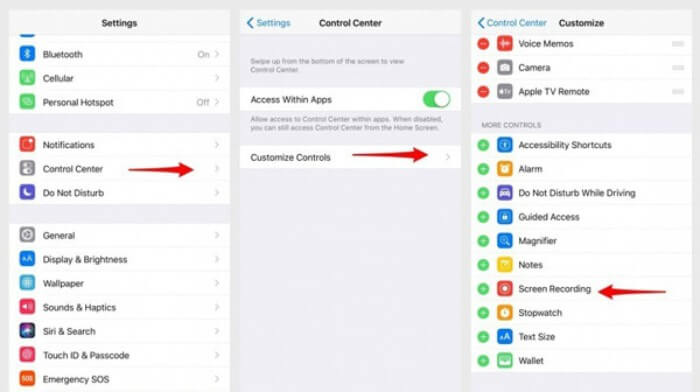
Шаг 1: Откройте приложение Settings на iPhone/iPad и пролистайте вниз до пункта Control Center. Затем нажмите вкладку Customize Controls и найдите функцию Screen Recording. Нажмите значок Plus, чтобы добавить эту функцию в «Пункт управления».
Шаг 2: Проведите вниз от верхней части экрана, чтобы открыть 'Пункт управления', и вы увидите значок записи в нижней части. Нажмите значок Screen Recording, чтобы начать запись; можно выбрать захват видео или запись только звуковой дорожки. Чтобы остановить запись, коснитесь красной Status Bar вверху экрана и нажмите Stop во всплывающем окне.
Часть 3: простой регистратор сообщений Facebook для Android
Некоторые телефоны Android не имеют встроенных рекордеров, и есть слишком много рекордеров видеозвонков Facebook, из которых Android может выбирать. Таким образом, вы можете изучить один из лучших рекордеров для мобильных телефонов Android, выполнив подробные инструкции в следующей части.
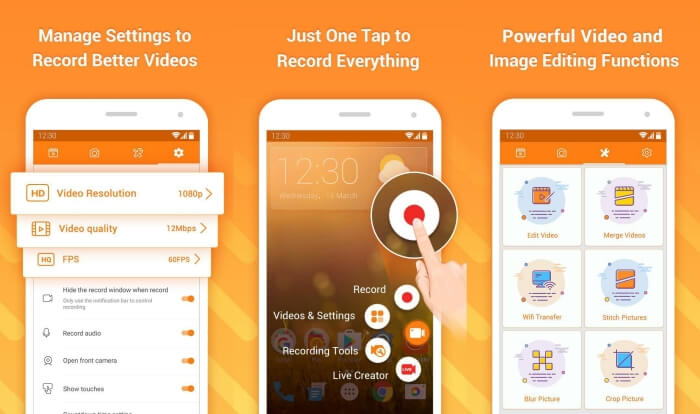
DU Recorder — это простой в использовании рекордер звонков в Facebook для Android, известный своей плавной записью. Без получения прав root каждый пользователь может в один тап записывать звонки в Facebook Messenger.
Шаг 1: Запустите рекордер — вы увидите четыре раздела: записи, снимки экрана, инструменты редактирования и настройки. Сначала откройте меню Settings, чтобы задать параметры видео. Для высокого качества можно выбрать разрешение 1080p и частоту 30 кадров в секунду.
Шаг 2: Не закрывая рекордер, запустите Facebook Messenger. Значок рекордера останется на экране. Нажмите на него и выберите значок Recording, чтобы начать запись экрана и звука. Нажмите значок ещё раз, чтобы остановить запись. Затем можно нажать значок Editing, чтобы обрезать запись и добавить к ней музыку.
Вам также может понравиться:
Часть 4: Часто задаваемые вопросы о Facebook Call Recorder
1. Есть ли у Facebook рекордер по умолчанию для записи видеозвонков на ПК?
Нет, это не так. Таким образом, вам придется полагаться на другие профессиональные регистраторы вызовов Facebook. Если вы не хотите загружать другое программное обеспечение, которое будет занимать место на вашем компьютере, FVC Free Screen Recorder - ваш лучший выбор.
2. Как начать чат с другом в приложении Facebook Messager?
Сначала откройте Facebook Messenger на своем мобильном телефоне, затем выберите чат друга, которому хотите позвонить в Facebook. И теперь вы можете увидеть значок видео, поэтому вы можете щелкнуть его, чтобы начать видеозвонок.
3. Какой формат мне выбрать для сохранения записей при использовании рекордеров Facebook Messenger?
Независимо от того, используете ли вы регистратор звонков Facebook на компьютере или мобильном телефоне, лучший формат для сохранения видеозвонков Facebook - MP4. Он может сэкономить больше места для хранения и совместим со всеми устройствами.
Заключение
В этой статье представлены 3 рекордера видеозвонков в Facebook. Для iPhone, iPad и некоторых телефонов Android вы можете без труда использовать встроенный рекордер. В остальных случаях можно выбрать любой рекордер, в том числе DU Recorder из Google Play. Для ПК лучшим выбором для записи звонков в Facebook будет FVC Free Screen Recorder. Если у вас возникли другие вопросы по использованию рекордеров звонков в Facebook, оставьте комментарий ниже.
-
 Обзор Snagit 2021 - плюсы, минусы и лучшая альтернатива
 Какая лучшая альтернатива Снагиту? Есть ли такой инструмент для захвата экрана, как Snagit? В этом посте мы рассмотрим Snagit и расскажем о лучшей альтернативе Snagit для захвата экрана.
-
 6 лучших WAV-рекордеров, которые нельзя пропустить на компьютере и в Интернете
 Лучшее программное обеспечение для записи WAV, о котором мы рассказываем в этой статье, имеет множество полезных функций, которые помогут вам записывать звук и голос, как профессионалы.
-
 4 лучших бесплатных аудиорекордера AIFF для воспроизведения звука высокого качества
 В этой статье рассказывается об AIFF и некоторых из самых популярных инструментов, которые вы можете использовать для создания высококачественного формата AIFF.
