


 Видео конвертер Ultimate
 Устройство записи экрана
 Видео ремонт
Подробное руководство о том, как конвертировать AMV в WMV с помощью шагов [решено]
Хотите с удовольствием просматривать файлы видео AMV на Windows или использовать их для онлайн‑трансляций? Тогда вам обязательно стоит прочитать эту статью, чтобы узнать, как конвертировать AMV в WMV, улучшить качество и сделать файлы совместимыми. В этом обзоре вы узнаете, какие программы можно использовать для преобразования файлов AMV. Итак, без лишних промедлений, пристегните ремни и узнайте гораздо больше о форматах AMV и WMV.

Часть 1. Преобразование AMV в WMV с помощью FVC Video Converter Ultimate
FVC Video Converter Ultimate — наш первый выбор для конвертации AMV в WMV, потому что он позволяет перекодировать медиафайлы и форматы, ориентированные на конкретные устройства. Более того, он способен конвертировать не один, два или три файла одновременно, а гораздо больше. Кроме того, этот конвертер нацелен на то, чтобы давать пользователям только отличный результат преобразования. Хотите узнать почему? Тогда прочитайте ключевые особенности ниже.

FVC Видеоконвертер Ultimate
4 355 888+ загрузок- Это может помочь вам с проблемой преобразования AMV в WMV, AVI, FLV, SWF, MP4, AVI.
- Он поддерживает сверхбыстрое преобразование, чтобы преобразовать формат еще быстрее.
- Редактируйте свои видео AMV с помощью уникальных функций редактирования, которые предоставляет этот инструмент.
- Помочь вам стать экспертом в течение нескольких кликов.
- Он поддерживает все платформы, такие как Windows и macOS.
Бесплатная загрузкаДля Windows 7 или более поздних версийБезопасная загрузка
Бесплатная загрузкаДля MacOS 10.7 или более поздних версийБезопасная загрузка
Вы поражены возможностями инструмента? Если это так, давайте прочитаем процедуру преобразования файлов AMV и скопируем шаги для успешного преобразования.
Шаг 1. Скачайте FVC Video Converter Ultimate на жесткий диск компьютера, нажав кнопку загрузки ниже. Затем щёлкните по установщику, чтобы выполнить установку, и нажмите Start Now, чтобы запустить программу.
Бесплатная загрузкаДля Windows 7 или более поздних версийБезопасная загрузка
Бесплатная загрузкаДля MacOS 10.7 или более поздних версийБезопасная загрузка
Шаг 2. После запуска программы вы можете добавить один или несколько файлов, нажав кнопку Add Files. На экране откроется проводник, найдите файл AMV и нажмите Open, чтобы загрузить его.
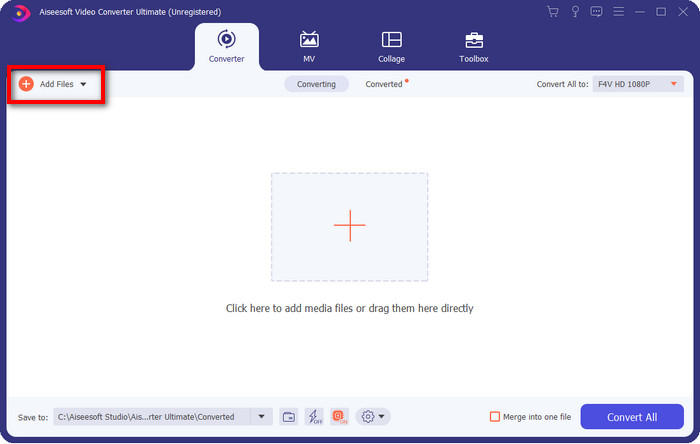
Шаг 3. Нажмите кнопку Convert All to, после чего отобразится список форматов. Найдите формат WMV и выберите желаемое разрешение, кодировщик и качество.
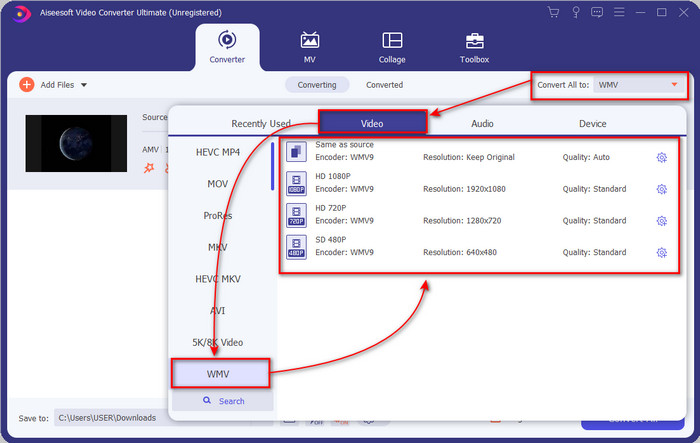
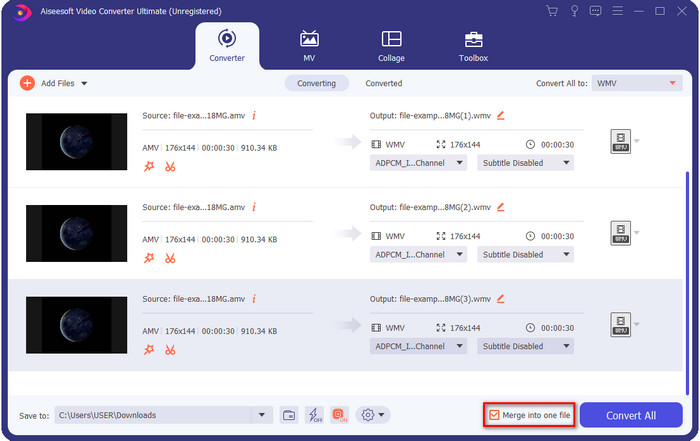
Необязательно. Хотите объединить ваши файлы AMV в один файл WMV? Тогда отметьте флажок «merge into one file» (объединить в один файл).
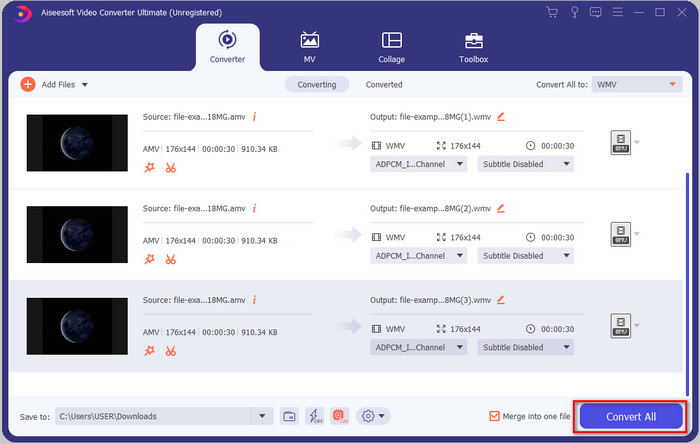
Шаг 4. Нажмите Convert All, чтобы запустить процесс конвертации. По завершении на экране откроется папка с конвертированным файлом WMV.
Часть 2. Преобразование AMV в WMV онлайн
Не хотите скачивать офлайн‑конвертер, потому что на диске недостаточно свободного места? Тогда используйте FVC Free Online Video Converter. Вам не нужно загружать полноценный конвертер; потребуется только небольшой лаунчер, который практически не повлияет на свободное место на компьютере. Кроме того, этот веб‑конвертер позволяет конвертировать AMV в WMV с возможностью изменения разрешения. Однако скорость конвертации будет зависеть от скорости вашего интернета. Есть доступ в сеть? Тогда обязательно попробуйте этот сервис и оцените онлайн‑конвертацию.
Шаг 1. Перейдите по этой ссылке, чтобы открыть основной сайт конвертера.
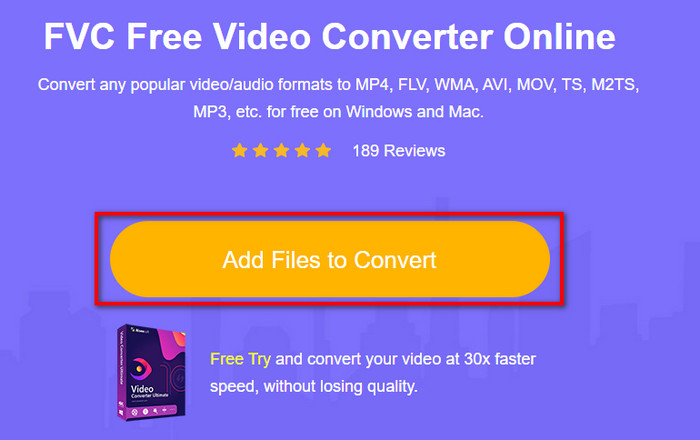
Шаг 2. Нажмите Add Files to Convert, после чего откроется папка, где вы сможете найти файл AMV, и нажмите Open.
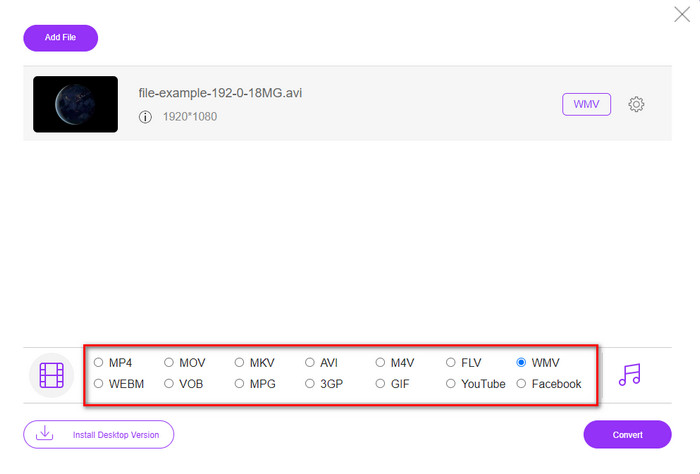
Шаг 3. Выберите формат WMV, который отобразится на экране.
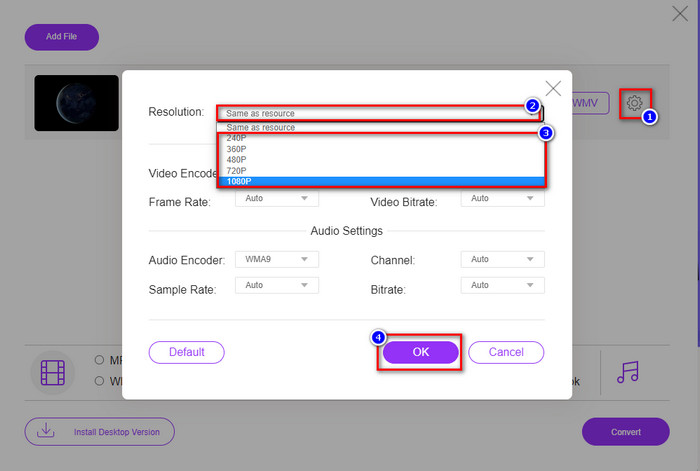
Необязательно. Как уже говорилось выше, здесь можно настроить разрешение. Давайте изменим его, нажав кнопку с изображением шестерёнки. В верхней части нажмите кнопку drop-down (выпадающий список), затем появится перечень разрешений; выберите нужное и нажмите OK для продолжения.
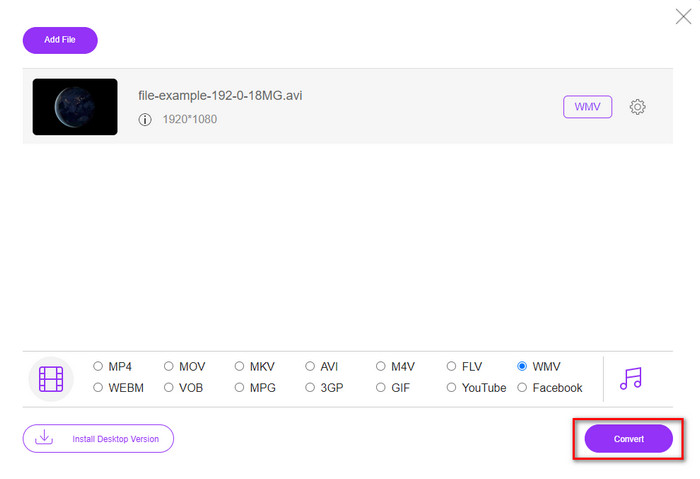
Шаг 4. Теперь, если вы готовы начать конвертацию, нажмите кнопку Convert, и процесс запустится.
Часть 3. В чем разница между AMV и WMV
Во-первых, эти два медиаконтейнера стали популярными из-за их уникальных возможностей в качестве формата. Но сегодня мы изучим преимущества и недостатки самого формата. Кроме того, мы укажем три аспекта, задав вопрос, чтобы узнать больше об AMV и WMV.
Какой формат имеет лучшее медиа-разрешение?
Между этими двумя форматами, без сомнения, WMV имеет лучшее качество. Файл WMV может хранить и транслировать видео с разрешением до 300 000 пикселей для более детального визуального вывода. Но можно поставить скорость при разрешении экрана 528х576. И для AMV качество, которое он может содержать, составляет от 96x96 до 320x240, что довольно низко по сравнению с низким разрешением WMV. Одна из причин, по которой AMV имеет меньшее разрешение, заключается в том, что он должен помещаться на экране китайского медиаплеера.
Какой формат имеет меньший размер файла?
Эта победа достанется AMV, потому что этот формат суперсжатый. Хотя у WMV есть компрессор, размер AMV более экономичен, особенно на диске вашего компьютера, чем WMV.
Какой формат более совместим?
Если говорить о совместимости, можно сказать, что у форматов разные сильные стороны, потому что WMV ориентирован в основном на программы под Windows. Если вы пользователь Mac, вы не сможете просто взять этот формат и воспроизвести его в QuickTime или отредактировать в iMovie. Вам нужно будет конвертировать WMV в MOV, чтобы сделать его совместимым. Что касается AMV, этот формат изначально предназначался для воспроизведения на китайских портативных медиаплеерах. Но сейчас вместо покупки отдельного AMV‑плеера вы можете использовать обычный портативный медиаплеер. Однако найти AMV‑плеер — та ещё морока, потому что устройств, поддерживающих этот формат и его кодек, очень мало. Можно сказать, что WMV обладает значительно более широкой совместимостью, чем AMV, особенно при передаче файлов на Windows.
И теперь, когда мы знаем причину, в этом случае необходимо преобразовать файл в новый формат. По этой причине вы должны научиться конвертировать AMV в WMV, чтобы сделать медиафайл совместимым с программным обеспечением Windows.
Часть 4. Часто задаваемые вопросы о преобразовании AMV и WMV
Как превратить мой AMV в MOV?
Существует множество приёмов и методов, которые можно найти и опробовать, если поискать в интернете. Но сложно выбрать, какой инструмент лучше всего подойдёт для конвертации AMV в MOV. Чтобы не растягивать объяснение, просто нажмите на эту ссылку и узнайте, как конвертировать AMV в MOV и сделать его совместимым с macOS.
Могу ли я использовать медиаплеер VLC для просмотра и воспроизведения AMV?
Да, вы можете скачать медиаплеер VLC на свой компьютер и воспроизводить файлы AMV без установки дополнительных кодеков. Но если хотите узнать больше о VLC и его альтернативах, прочитайте эту статью, перейдя по этой ссылке.
Зачем мне сжимать AMV?
Мы сжимаем наши медиафайлы, в том числе AMV, потому что нам нужно освободить место на жёстком диске. Хотите узнать, как сжать файлы AMV? Тогда нажмите эту ссылку.
Заключение
Эти два решения позволяют легко и успешно преобразовать формат AMV в формат WMV. Кроме того, это лучшие решения, которые мы можем найти в Интернете. Итак, теперь вы можете выбрать, какой конвертер использовать для преобразования файла AMV в WMV. Чтобы добиться успеха, вы должны использовать инструменты FVC, представленные выше.
-
 Лучший метод преобразования AMV в AVI [Утверждено]
 У вас возникли трудности с преобразованием видеофайла в формате AMV в AVI? Вот несколько советов, которые вы можете найти только в этой статье.
-
 [Проверено] 2 способа преобразования AMV в FLV в автономном режиме и в Интернете
 Вы когда-нибудь задумывались о том, чтобы попробовать конвертер для преобразования файлов AMV в формат FLV. Чтобы решить вашу проблему при просмотре видео AMV, прочтите эту статью, чтобы узнать, какие конвертеры вам следует использовать.
-
 Бесплатно | 3 лучших метода конвертации MP4 в WMV без потери качества
 В этом посте рассказывается, как конвертировать видео MP4 в формат WMV на Mac или Windows. Мы также предложим вам несколько вариантов, включая как настольное программное обеспечение, так и веб-конвертеры онлайн. Готовы узнать о лучших инструментах для преобразования MP4 в WMV?
