


 Видео конвертер Ultimate
 Устройство записи экрана
 Видео ремонт
 Конвертируйте MOD в любой формат, такой как MP4, MOV, AVI, MP3 и т. д.
7 бесплатных конвертеров MOD, доступных на вашей платформе, для простого преобразования формата MOD
Нужно изменить ваш файл MOD? Если так, вам больше не нужно переживать и мучительно подбирать разные конвертеры. Не нервничайте, потому что сегодня мы полностью решим эту задачу. Прямо сейчас мы покажем вам лучшие способы конвертировать MOD в MP4, MOV, MPEG2, DVD или в любой другой видеоформат, который вам нужен, с пошаговыми инструкциями для удобства.

Часть 1. 7 лучших бесплатных конвертеров MOD для конвертации файлов MOD онлайн и офлайн
1. FVC Video Converter Ultimate — лучший конвертер MOD для Windows и Mac
Первым в нашем списке идёт самый популярный MOD‑конвертер, доступный на разных платформах, — FVC Video Converter Ultimate. Этот конвертер предлагает пользователям сверхбыструю скорость преобразования и, как всегда, не подводит. Несмотря на высокую скорость работы, качество видео не ухудшается, так как оно сохраняется при изменении формата.
Что может быть больше, чем его молниеносный процесс? Он также поддерживает множество форматов, которые вы можете импортировать или экспортировать, таких как MOD, MP4, MOV, MKV, FLV, WMV и многие другие. Из-за поддерживаемого формата этот инструмент полюбился клиентам, и многие из них рекомендуют его другим пользователям, которым необходимо преобразовать их формат. Поэтому, если вам нужна помощь в преобразовании MOD в MP4 или любой другой формат видео, который вы хотите, этот инструмент станет отличным подспорьем, выполнив указанные ниже шаги.
Шаг 1. Чтобы скачать конвертер на компьютер, нажмите кнопку загрузки ниже и выберите платформу, которую вы используете. Затем быстро пройдите процесс установки и запустите программу. Если вы впервые занимаетесь конвертацией, не переживайте: шаги, описанные здесь, помогут вам правильно конвертировать файл MOD.
Бесплатная загрузкаДля Windows 7 или более поздних версийБезопасная загрузка
Бесплатная загрузкаДля MacOS 10.7 или более поздних версийБезопасная загрузка
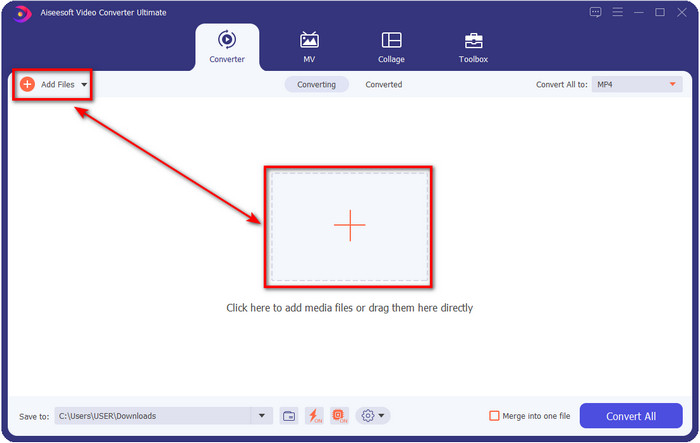
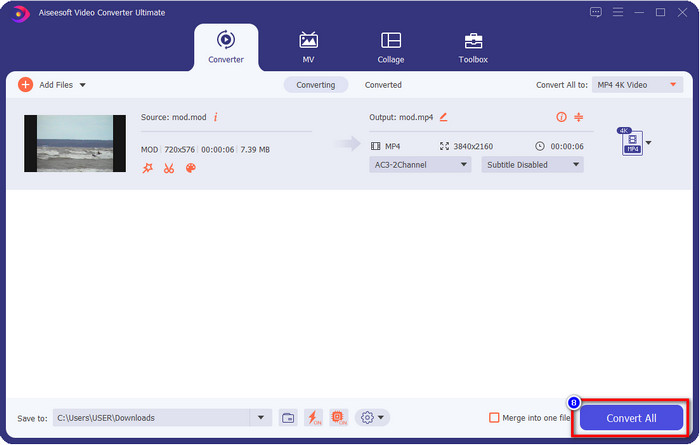
Шаг 2. Загрузите файл MOD, нажав «Add Files» или большую кнопку с плюсом в центре интерфейса. После этого на экране откроется окно проводника; теперь найдите и выберите файл MOD и нажмите «Open», чтобы перейти к следующему шагу.
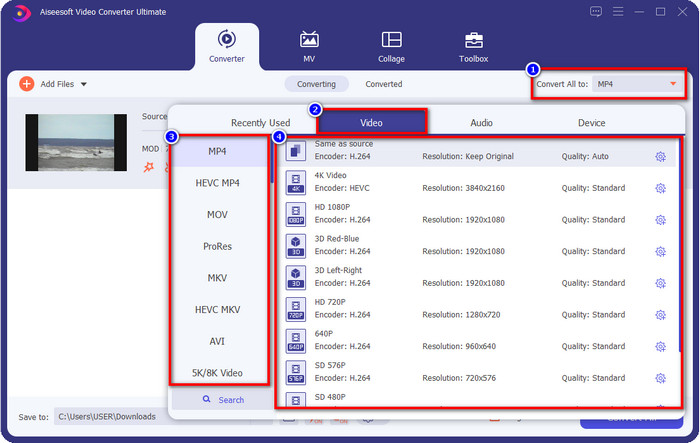
Шаг 3. Чтобы изменить формат на MP4, MOV, MKV или любой другой нужный формат, нажмите «Convert All to» и выберите вариант.
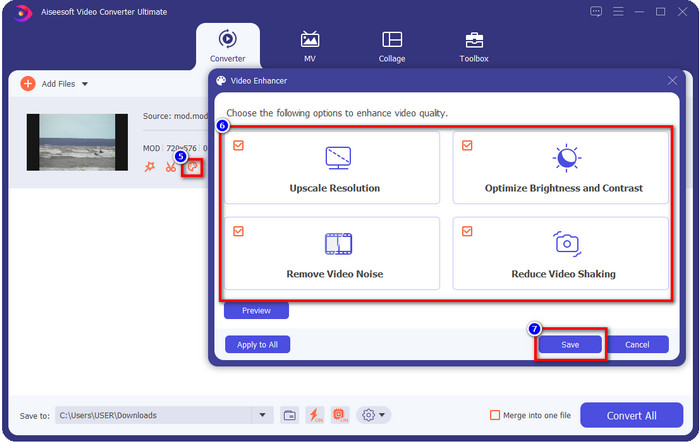
Необязательно. Одна из впечатляющих функций этого инструмента — улучшение видео. Если нажать на палитру, откроется новое небольшое окно; здесь вы сможете внести серьёзные изменения в видео, устанавливая нужные флажки. Нажмите Save, чтобы применить изменения, внесённые в ваш MOD‑файл.
Шаг 4. После выполнения всех процедур можно приступать к конвертации MOD, нажав Convert All. Так просто, как раз‑два‑три, вы уже умеете конвертировать формат MOD в новый формат.
Плюсы
- Конвертируйте MOD в MP4, MOV, MKV, FLV, AVI или в более чем 200 доступных форматов.
- Расширенные функции редактирования включают обрезку, обрезку, обрезку и многое другое.
- Это безопасно и не содержит вредоносных программ для загрузки.
- Доступно для загрузки на всех настольных платформах, таких как Windows и Mac.
Минусы
- Чтобы воспользоваться всеми расширенными функциями, вам необходимо приобрести инструмент.
2. iMovieSoft Бесплатный конвертер TOD
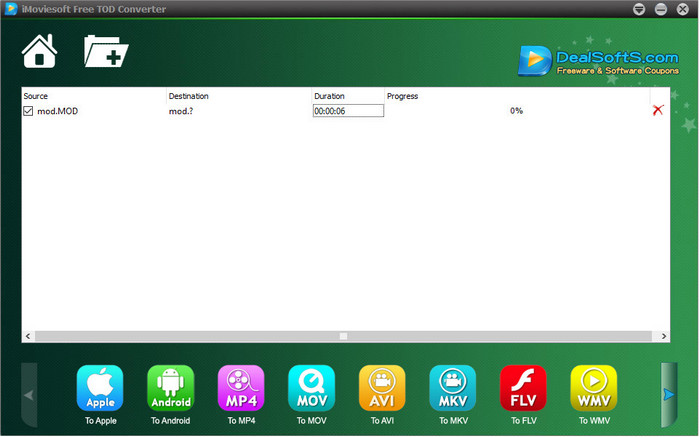
Ещё один конвертер, который можно установить на компьютер, — это iMoiveSoft Free TOD Converter. С его помощью вы можете легко конвертировать формат MOD в доступные форматы. Однако поддерживаемых форматов не так много, хотя основные распространённые варианты есть. Кроме того, основной сайт инструмента не имеет защищённого соединения; несмотря на предупреждение, мы всё же скачали его на свою систему, чтобы показать шаги по конвертации файлов MOD в MOV, MP4, AVI и др.
Шаг 1. Скачайте конвертер на компьютер и откройте его.
Шаг 2. Нажмите Folder и найдите файлы MOD для добавления.
Шаг 3. Выберите формат внизу и нажмите Convert.
Плюсы
- Его можно бесплатно загрузить на Windows и Mac.
- Легко использовать.
- Доступны основные функции редактирования.
Минусы
- Основной веб-сайт не является безопасным соединением.
- У него есть опция формата, которую вы можете выбрать.
- Пользовательский интерфейс нуждается в улучшении.
3. Конвертер iOrgSoft
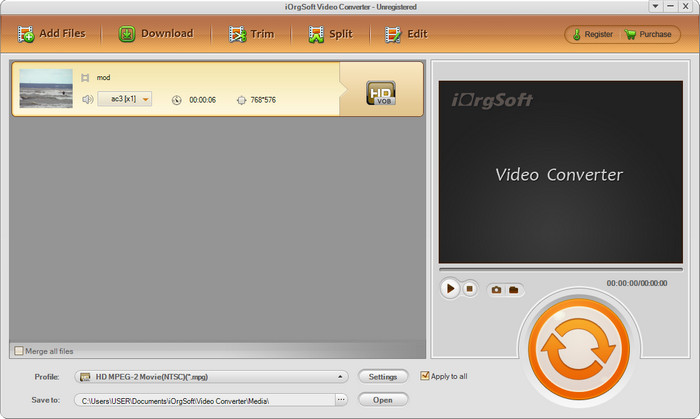
iOrgSoft Converter — хороший вариант, если вам нужно легко конвертировать MOD в MPEG2. Главная страница этого конвертера также работает по незащищённому соединению, как и сайт iMovieSoft. Вы можете использовать и внешнюю ссылку для скачивания программы. Хотя инструмент предлагает некоторые настройки, его интерфейс проработан слабее, поэтому не стоит ожидать эффектный внешний вид. Кроме того, при конвертации возможны вылеты и сбои.
Шаг 1. Найдите официальный сайт конвертера и скачайте его оттуда.
Шаг 2. Откройте конвертер, нажмите Add Files, чтобы добавить файлы MOD, затем откройте список форматов и выберите нужный.
Шаг 3. Нажмите кнопку конвертации, чтобы начать процесс.
Плюсы
- Он поддерживает больше форматов, чем iMovieSoft.
- Простой в использовании и легкий для понимания.
- Загрузите его на Windows и Mac.
Минусы
- Незащищенное подключение к основному сайту.
- Пользовательский интерфейс ужасен.
4. FFmpeg
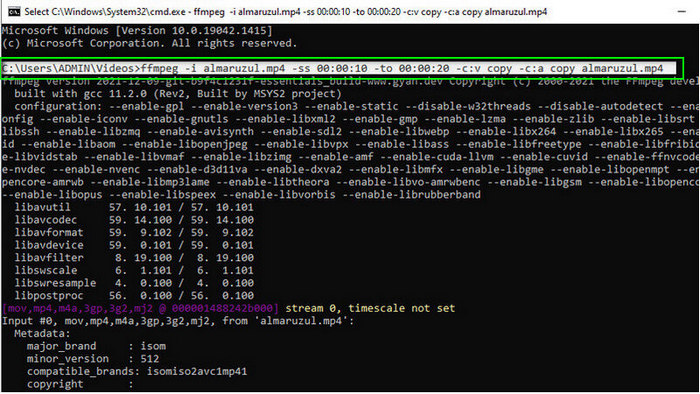
Предположим, вам нужен бесплатный конвертер MOD в MOV — тогда вам поможет FFmpeg. В отличие от других конвертеров в этом списке, он использует интерфейс на базе командной строки (CLI): для работы с инструментом вы вводите текстовые команды. Хотя такой способ знаком не всем, многие пользователи по‑прежнему используют его как конвертер. Если этот вариант вас заинтересовал, следуйте шагам ниже.
Шаг 1. Скачайте FFmpeg и запустите exe‑файл.
Шаг 2. Откройте CMD; через него вы сможете взаимодействовать с инструментом.
Шаг 3. Найдите расположение файла с помощью командной строки. После этого скопируйте и вставьте текст ffmpeg -i input.mod -vn -ar 44100 -ac 2 -b:a 192k output.mp4 для вывода в MP4. Вы также можете изменить формат на MOV, MKV, AVI и другие. Чтобы запустить процесс, нажмите Enter на клавиатуре.
Плюсы
- Уникальный конвертер видео, доступный на большинстве платформ.
- Безопасен в использовании.
- Это надежно в преобразовании вашего формата.
Минусы
- Это не очень легко использовать.
- Это не лучший выбор для начинающих или начинающих конвертировать формат.
5. Облакоконвертировать
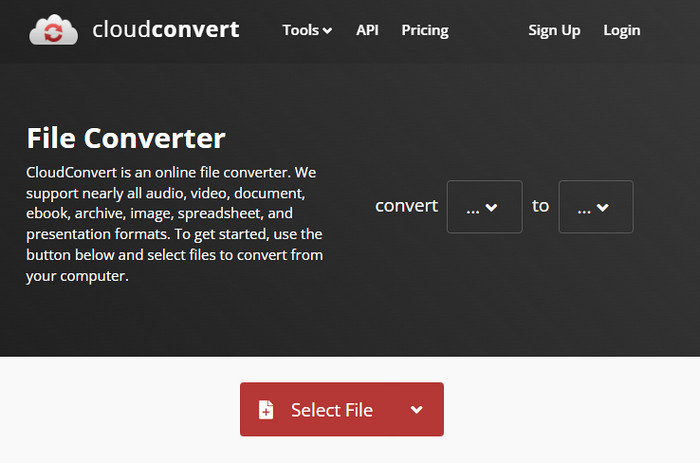
Не хотите скачивать конвертер на компьютер? В таком случае вы всё равно можете конвертировать формат MOD онлайн с помощью CloudConvert. Этот онлайн‑инструмент предоставляет простой, но эффективный процесс конвертации. Он также поддерживает преобразование других типов файлов, таких как PDF, архивы, электронные книги и др., в новый формат.
Шаг 1. Найдите CloudConvert в вашем любимом браузере.
Шаг 2. Нажмите Select File и загрузите файл MOD. Щёлкните по кнопке drop-down и выберите нужный формат. Затем нажмите Convert.
Шаг 3. После завершения загрузки нажмите Download, чтобы сохранить файл нового формата на диск.
Плюсы
- Загрузка инструмента не требуется.
- Бесплатный онлайн-инструмент.
- Дружественный интерфейс.
Минусы
- Зависит от сети.
- Ход процесса будет зависеть от скорости вашего интернета.
6. Конвертер365
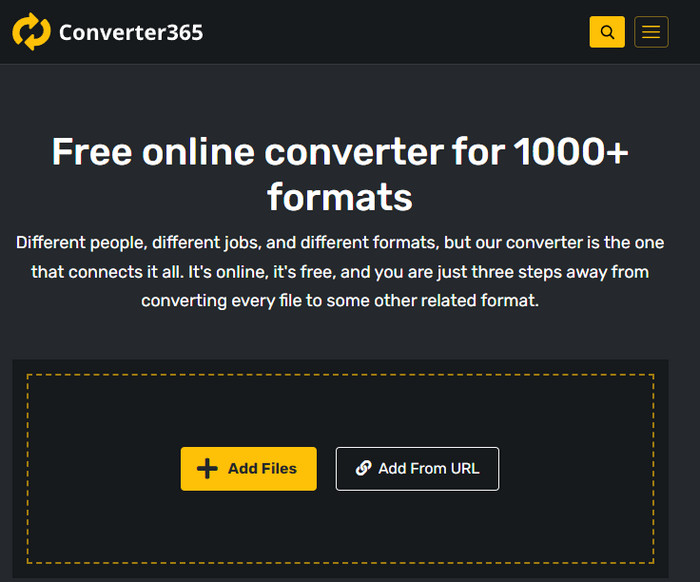
Ещё один бесплатный онлайн‑конвертер MOD в MP4 — Converter365. Это один из онлайн‑инструментов с действительно приятным, «стильным» интерфейсом. Благодаря этому пользоваться сервисом комфортно и «по‑профессиональному»; однако у нас возникли проблемы при конвертации видеофайлов — происходили сбои. Тем не менее, если вам нужно быстро конвертировать файл MOD, этот сервис может пригодиться.
Шаг 1. Откройте браузер и найдите Converter365.
Шаг 2. Нажмите Add Files, затем найдите файл с расширением .mod. После того как вы его выберете, укажите формат, щёлкнув по кнопке drop-down.
Шаг 3. Нажмите Start Conversion, и начнётся процесс конвертации.
Плюсы
- Конвертер доступен через Интернет.
- Он обеспечивает простое, но эффективное преобразование.
- Пользовательский интерфейс выглядит профессионально.
Минусы
- Для использования требуется подключение к Интернету.
- Иногда возникают ошибки при преобразовании формата.
7. Замзар
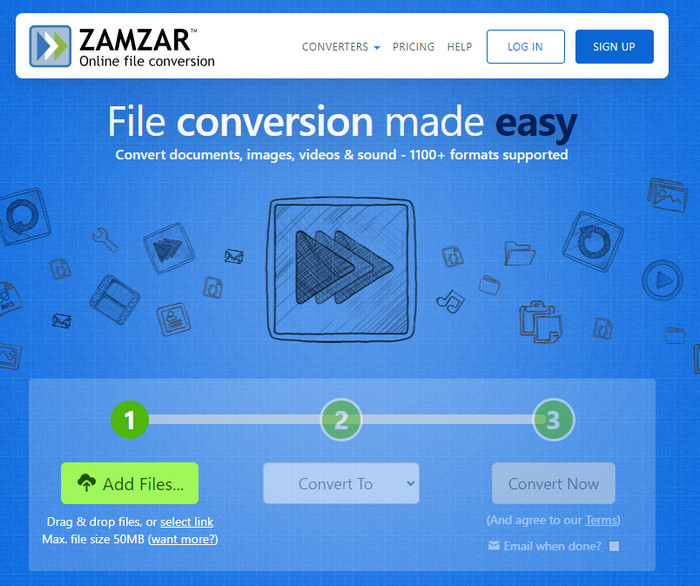
Если вам нужен простой и удобный онлайн‑конвертер MOD, вам поможет Zamzar. Этот инструмент предлагает предельно понятный процесс преобразования ваших .mod‑файлов. Более того, это один из самых безопасных конвертеров, доступных в интернете. Если вы хотите его попробовать, выполните шаги ниже.
Шаг 1. Откройте Zamzar, найдя его в любимом браузере.
Шаг 2. Нажмите Add File, чтобы добавить файл MOD, который нужно конвертировать. Щёлкните Convert To и выберите требуемый формат.
Шаг 3. Нажмите Convert Now и дождитесь завершения процесса. Затем нажмите «Download», чтобы сохранить файл на жёсткий диск компьютера.
Плюсы
- Один из лучших вариантов, если вам нужно преобразовать формат.
- Он обеспечивает простой процесс преобразования.
- Доступен во всех веб-браузерах.
Минусы
- Интернет-зависимый, без интернета вы не можете его использовать.
- Он поддерживает меньше вариантов формата.
Связанный материал:
Часть 2. Часто задаваемые вопросы о MOD конвертерах
Что такое МОД?
MOD — это двусторонний формат, который можно использовать в качестве аудио для стандартных приложений для отслеживания цифровой музыки. Он содержит образцы нот, номера инструментов и контроллеры сообщений с различными дорожками для образцов звуков. Как уже упоминалось, он двусторонний; вы также можете использовать его в качестве видеоформата для цифровых видеокамер производства Panasonic и JVC. Хотя этот формат поддерживается известными брендами, он немного устарел, если сравнивать его с другим видеоконтейнером.
Поддерживают ли медиаплееры расширение .mod?
Не все медиаплееры поддерживают этот формат, особенно если в вашем плеере нет встроенного видеокодека MPEG-2. Это настоящая проблема для всех; вы можете загрузить видео расширение MPEG-2, если оно вам нужно для воспроизведения. Но вы также можете конвертировать файл в поддерживаемый формат под свои платформы, это пока самый простой и безопасный способ. Итак, теперь, если вам нужно преобразовать файл MOD, вы можете вместо этого использовать FVC Video Converter Ultimate. Не имеет никакого представления об инструменте? В этом случае читайте подробности выше.
Совместим ли мод с DVD-плеером?
Он не совместим с DVD-плеером; однако вы можете записать его на DVD, чтобы сделать его совместимым с DVD-плеером.
Заключение
Эти семь инструментов — лучший выбор, если вам нужен MOD‑конвертер благодаря их производительности и эффективности. Мы тщательно протестировали всё программное обеспечение и выяснили, что FVC Video Converter Ultimate обеспечивает поразительное качество результата и такие функции, которых нет у других инструментов. Поэтому, если вы хотите оценить все его преимущества, сначала скачайте его на свой компьютер и используйте так, как вам удобно.

FVC Видеоконвертер Ultimate
2 999 368+ загрузок- Конвертируйте MOD в любой популярный формат.
- Улучшайте качество видео естественным образом
- Плавно создавайте видеоколлажи с высоким качеством вывода
- Редактируйте видео как профессионал, включая кадрирование, поворот, добавление фильтров и т. д.
Бесплатная загрузкаДля Windows 7 или более поздних версийБезопасная загрузка
Бесплатная загрузкаДля MacOS 10.7 или более поздних версийБезопасная загрузка
-
 2 Ultimate MPG Converters для бесплатного преобразования MPG в WMV
 Вы хотите конвертировать MPG в WMV бесплатно? В этом случае вам повезло, потому что мы обнаружили, что есть два инструмента, которые вы можете использовать для преобразования файлов MPG.
-
 Как быстро изменить iTunes M4V на MKV на Mac и Windows
 Если вам нужно конвертировать M4V в MKV на Mac, вы должны прочитать эту статью. Поскольку мы предоставляем факты о преобразователях, которые помогут вам в процессе преобразования.
-
 5 лучших бесплатных конвертеров MPEG в MKV, доступных на всех платформах
 Какие есть конвертеры MPEG в MKV? Хотите узнать больше о конвертерах MPEG, доступных на вашей платформе? Тогда эта статья для вас.
