


 Видео конвертер Ultimate
 Устройство записи экрана
 Видео ремонт
Детали, которые вам нужно знать при преобразовании MPG в AVI
Вообще говоря, файл MPG — это типичный видеофайл, использующий цифровой видеоформат, стандартизированный группой Moving Picture Experts Group (MPEG). В одном чередующемся файле он хранит видео, аудио и метаданные. MPG‑файлы часто используются для создания фильмов, которые распространяются через Интернет. Такой формат видео непросто конвертировать, если у вас нет знаний о конвертерах, поддерживающих или выполняющих преобразование MPG в AVI. Продолжайте читать эту статью, чтобы разобраться в деталях и вариантах, которые стоит учитывать, чтобы выполнить нужное вам преобразование.
Часть 1. MPG и AVI — обзор
MPEG — это формат видеофайла, разработанный группой Moving Picture Experts Group, теми же специалистами, которые создали такие форматы, как MP3 и MP4. В зависимости от области применения MPEG использует либо сжатие MPEG‑1, либо MPEG‑2.
MPEG-1 был создан для сжатия необработанного видео уровня VHS и музыки с CD до 1,5 мегабита в секунду без существенной потери качества. В результате он стал одним из самых популярных и широко совместимых форматов аудио и видео в мире. Видео для MPEG‑1 обычно передаётся со скоростью 30 кадров в секунду при разрешении примерно 352×240 пикселей.
Однако на компьютерах под управлением Windows в качестве формата видео по умолчанию используется AVI. В мультимедийном контейнере, таком как DivX или XviD, аудио и видео могут храниться с использованием различных кодеков. Многие другие видеоформаты, такие как MPEG и MOV, обеспечивают меньшую степень сжатия и требуют больше места на диске, чем файл AVI. Также возможно создавать AVI‑файлы без сжатия. В результате получаются колоссально большие файлы — примерно по 2–3 ГБ за каждую минуту видео, поскольку такие файлы являются полностью несжатыми (lossless). Независимо от того, сколько раз вы открываете или сохраняете такой файл, его качество не ухудшается. Дополнительным преимуществом является возможность воспроизведения без установки кодеков.
Часть 2. Наиболее эффективное программное обеспечение для преобразования MPG в AVI
Если вы когда‑либо задумывались, как бесплатно конвертировать видеофайл MPG в AVI, это новое и лучшее программное обеспечение — именно то, что в этой статье рекомендуется использовать. Video Converter Ultimate — это бесплатная для скачивания программа для Windows и Mac, которая может конвертировать ваш файл MPG в AVI гораздо быстрее, чем онлайн‑конвертеры. Помимо этих двух видеоформатов, программа поддерживает множество других форматов на выбор. Она считается лучшей благодаря высокому качеству выходного файла, которое вы получите, используя её. Теперь, когда вы имеете общее представление о возможностях этой программы, приступим и разберёмся, как она работает:
Шаг 1. Для начала просто нажмите кнопку Free Download, расположенную ниже. После завершения загрузки выберите установку программы для Windows или Mac. Как только программа будет установлена на рабочем столе вашего компьютера, вы можете начать работу, нажав кнопку Start Now.
Бесплатная загрузкаДля Windows 7 или более поздних версийБезопасная загрузка
Бесплатная загрузкаДля MacOS 10.7 или более поздних версийБезопасная загрузка
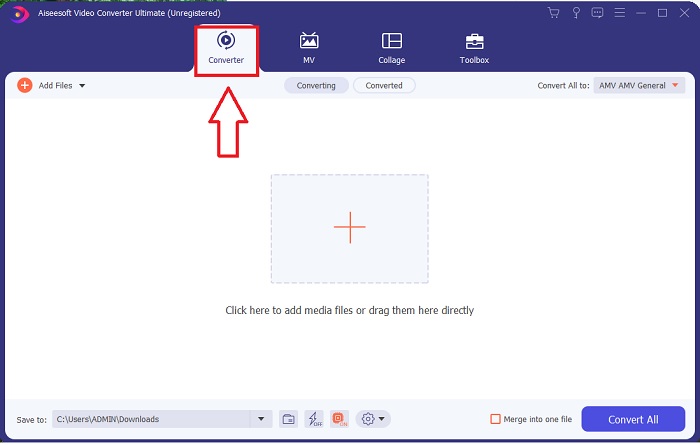
Шаг 2. Откройте программу, которую вы только что загрузили. При первом запуске откроется окно с интерфейсом Converter. Именно здесь вы начнёте процесс транскодирования вашего видео.
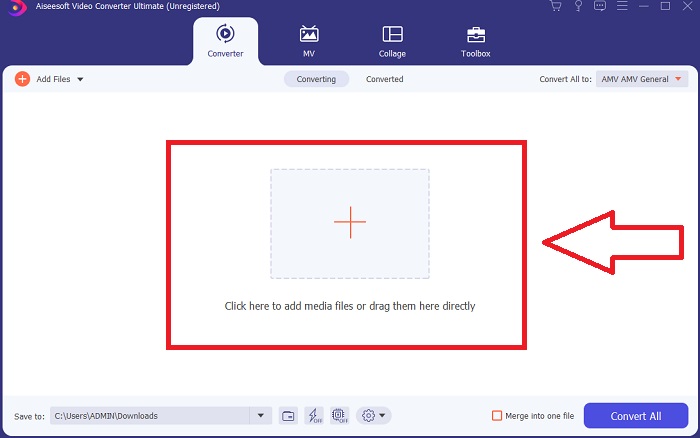
Шаг 3. Вы можете начать процесс конвертации, импортировав файлы в программу. Конвертировать видео так же просто, как перетащить его на значок Plus.
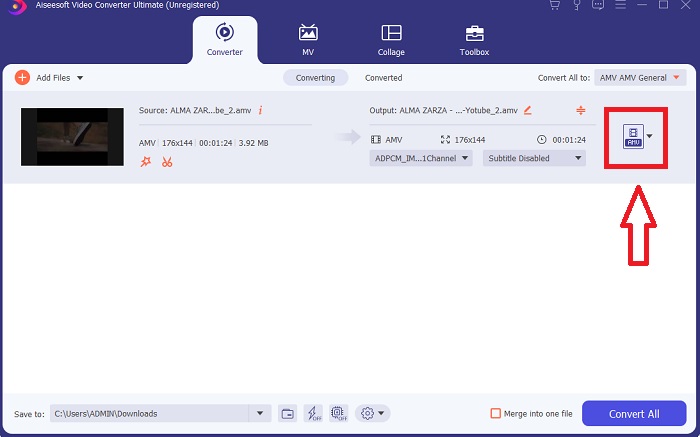
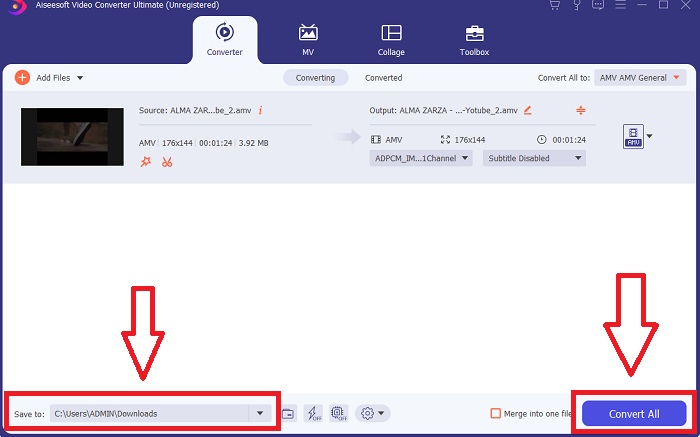
Шаг 4. Щёлкните правой кнопкой мыши по формату видео и выберите Save to или Save to external storage. В раскрывающемся списке найдите и выберите тип файла AVI. После выбора формата AVI будет доступно множество настроек качества видео. Если нужный вариант качества отсутствует, вы можете изменить параметры качества самостоятельно. Нажав на значок шестерёнки, вы можете изменить разрешение, частоту кадров и качество звука. Чтобы сохранить изменения, нажмите кнопку Create New.
Шаг 5. Нажмите Convert All, когда редактирование выбранного видео завершено и оно готово к сохранению на компьютер.
Часть 3. Краткие советы: другие эффективные инструменты, которые вы должны рассмотреть
Способ 1. Используйте CloudConvert
CloudConvert — онлайн-конвертер видео. Этот онлайн-конвертер также поддерживает MP4, WEBM и AVI среди других форматов. Вы можете выбрать качество, разрешение и размер файла видео. Если вы думаете о том, как конвертировать MPG в AVI с помощью этого онлайн-инструмента, вот процедура его использования:
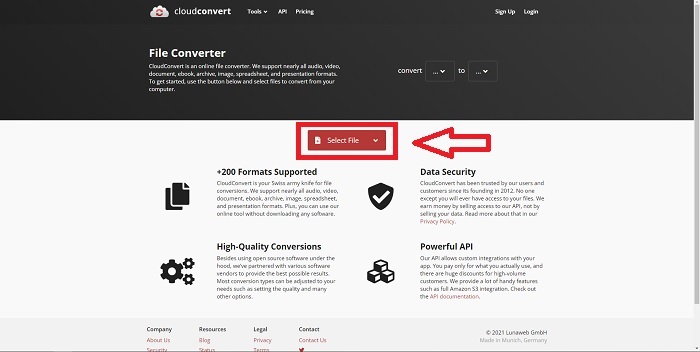
Шаг 1. Загрузите файл с вашего компьютера, нажав Select the File.
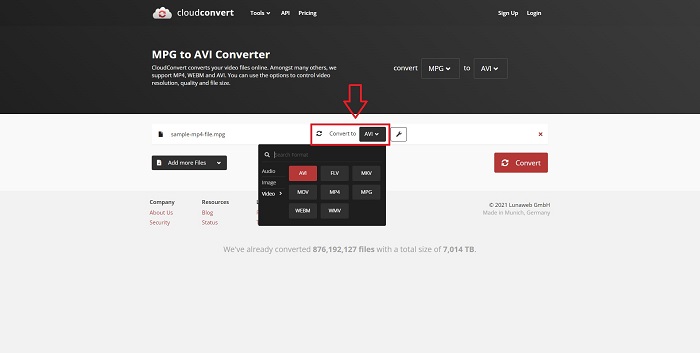
Шаг 2. Затем выберите, в какой формат будет конвертирован ваш файл, нажав на раздел форматов рядом со значком гаечного ключа. У вас также есть возможность добавить дополнительные файлы для конвертации.
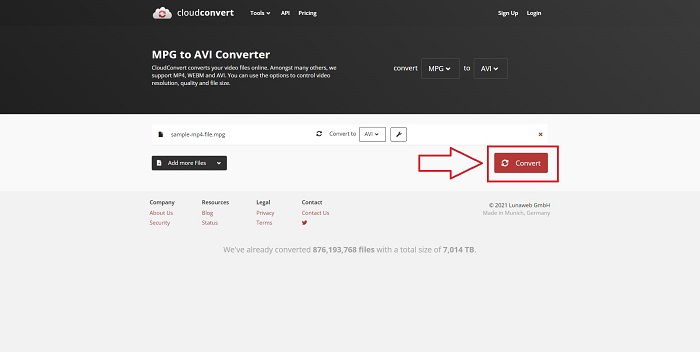
Шаг 3. Нажмите Convert, чтобы конвертировать все загруженные файлы.
Способ 2. Используйте Замзар
Zamzar — это веб-инструмент для преобразования файлов. Преобразование может быть выполнено в различных форматах без необходимости загрузки какого-либо программного обеспечения. Zamzar может преобразовать файл из одного формата в другой, например, из Adobe PDF в документ Microsoft Word, введя URL-адрес или загрузив один или несколько файлов (при условии, что все они имеют один и тот же формат). Чтобы получить знания об этом онлайн-инструменте, выполните следующие шаги:
Шаг 1. Найдите Zamzar в любой поисковой системе. После перехода на сайт вы сможете загрузить файл в интерфейсе, нажав Add Files.
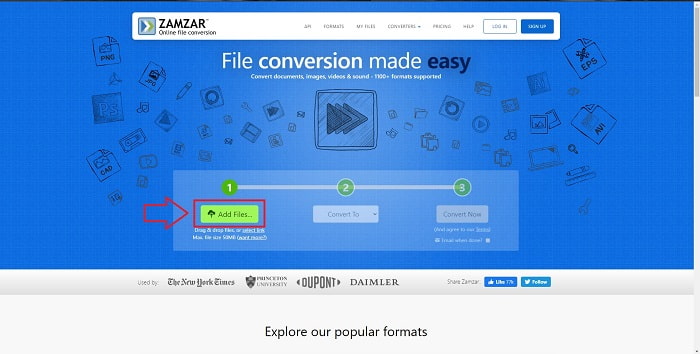
Шаг 2. Затем вы можете приступить к конвертации файла, выбрав нужный вам формат. Нажмите Convert To, чтобы увидеть все форматы, поддерживаемые этим онлайн‑сервисом.
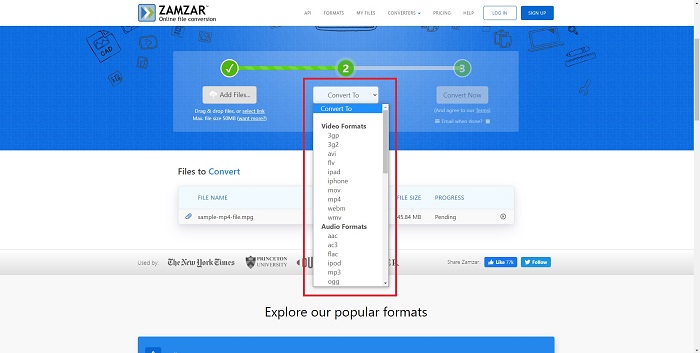
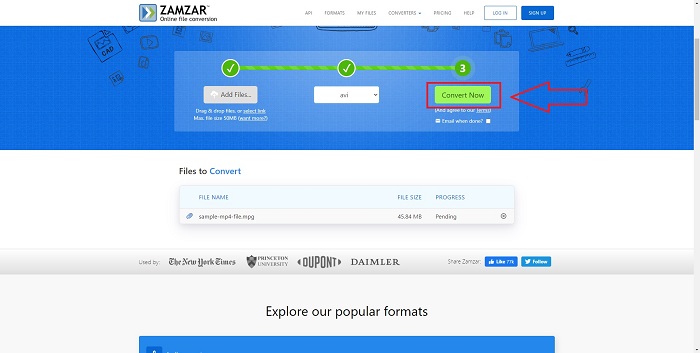
Шаг 3. Чтобы конвертировать файл, нажмите Convert Now.
Часть 4. Часто задаваемые вопросы о MPG и AVI
Что лучше AVI или MPG?
Хранение возможно с файлами AVI, тогда как запись видео осуществляется с файлами MPEG. AVI немного превосходит MPEG; однако, если используется формат MPEG, вы хотите записывать видео на DVD. Microsoft Windows разработала формат файла AVI в ответ на формат файла MOV от Apple, тогда как Moving Picture Group разработала формат MPG.
Каковы преимущества и недостатки AVI?
По сравнению с файлами других форматов файлы AVI могут быть очень большими, если их не сжимать. Вы должны быть готовы отказаться от некоторого дискового пространства в обмен на преимущества файла AVI, поскольку вы не сможете хранить столько файлов, сколько в противном случае. Если вы сжимаете AVI-файл онлайн больше определенного момента, в результате качество видео снизится.
Какой размер меньше AVI или MPG?
В интернете более крупные файлы загружаются дольше. Поэтому имеет смысл кодировать видео в файлы меньшего размера, даже если это приводит к некоторой потере качества. При воспроизведении формат AVI по‑прежнему предпочтительнее MPG, потому что большее количество бытовых плееров поддерживает AVI, чем MPG. Если вы хотите проигрывать файлы MPG на своём компьютере, нажмите здесь, чтобы узнать больше.
Заключение
Подводя итог всему сказанному, Video Converter Ultimate — лучший конвертер из всех онлайн‑сервисов для преобразования MPG в AVI, перечисленных выше, который стоит взять на заметку. Эта программа распространяется бесплатно и обеспечивает более быструю конвертацию, чем онлайн‑инструменты. Она также поддерживает множество форматов и обеспечивает высокое качество видео на выходе. При этом у вас не останется причин не пользоваться этой программой.
-
 Как конвертировать файлы MPEG в MP4 бесплатно на Windows, Mac, в Интернете
 Прочтите и получите 3 бесплатных способа конвертировать MPEG в файлы MP4 на вашем компьютере. Вы можете использовать онлайн-конвертеры и конвертеры видео для настольных компьютеров, чтобы легко преобразовать MPEG в формат MP4.
-
 [2025] Лучшие инструменты и простые способы конвертации MPEG в MP3
 В этой статье в основном рассказывается о том, как конвертировать видео MPEG в MP3 с использованием самых надежных инструментов из списка.
-
 4 эффективных способа конвертации MOV в AVI на ПК и Mac [2025]
 Вы хотите знать, какой лучший конвертер MOV в AVI в Интернете? И почему FVC Ultimate Video Converter может быть тем, что вам нужно.
