


 Видео конвертер Ultimate
 Устройство записи экрана
 Видео ремонт
Изучите 4 различных метода преобразования файла MXF в AVI
MXF хранит видео- и аудиоданные высокого качества, которые любят использовать многие профессиональные видеографы. Кроме того, этот формат может содержать метаданные, описывающие содержимое файла. Более того, SMPTE создала MXF для того, чтобы быстро передавать видео на другое устройство и редактировать его. Но некоторые редакторы и медиаплееры не поддерживают HD‑качество, которое обеспечивает этот формат. В этом случае лучше всего преобразовать ваш MXF‑файл в формат, который получил более широкую поддержку, чем MXF, например AVI или другие видеоформаты. Итак, давайте классифицируем все конвертеры и узнаем, как конвертировать MXF в AVI.
Часть 1. Как бесплатно конвертировать MXF в AVI на Windows и Mac
FVC Видеоконвертер Ultimate
Этот инструмент известен как один из продвинутых офлайн‑конвертеров, который вы можете скачать на свой компьютер, не пожалев об этом. FVC Video Converter Ultimate уже несколько лет присутствует на рынке. Благодаря этому многие его пользователи уже получили помощь с помощью этого ПО. Также общая производительность этого инструмента всегда была отличной — до, во время и после конвертации. Еще один плюс в том, что все его продвинутые функции упрощены, поэтому даже если вы не профессионал, вы получите потрясающий результат. Насколько бы впечатляющим он ни казался, давайте теперь проверим, справится ли этот конвертер, если вы будете конвертировать MXF в AVI, следуя шагам ниже.
Шаги по конвертации MXF в AVI с помощью FVC Video Converter Ultimate
Шаг 1. Сначала нажмите кнопку скачивания ниже и выберите платформу, которой вы сейчас пользуетесь. После загрузки установите программу, выполните быструю настройку, чтобы перейти к следующему шагу.
Бесплатная загрузкаДля Windows 7 или более поздних версийБезопасная загрузка
Бесплатная загрузкаДля MacOS 10.7 или более поздних версийБезопасная загрузка
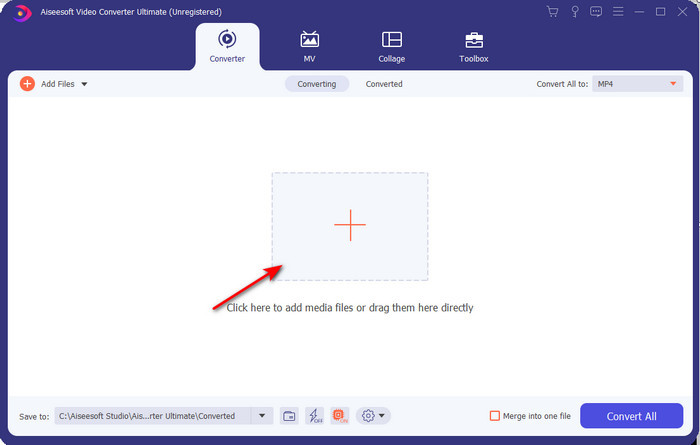
Шаг 2. Откройте конвертер, чтобы получить к нему доступ, нажмите значок Add Files, чтобы найти MXF‑файл в папке, затем нажмите Open, чтобы импортировать его.
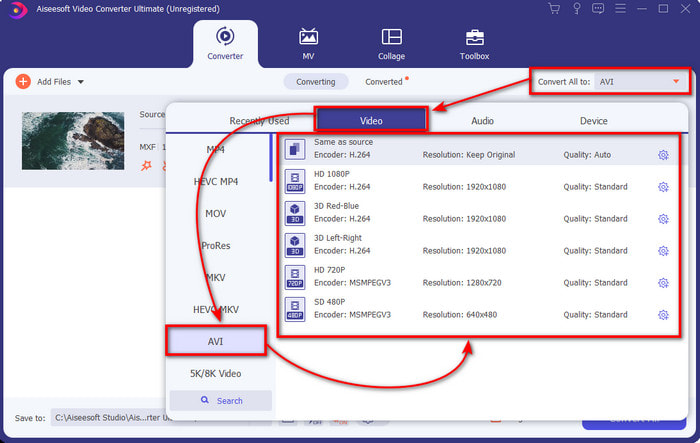
Шаг 3. Чтобы выбрать выходной формат, нажмите кнопку drop-down; под ней вы увидите формат AVI и другие доступные форматы.
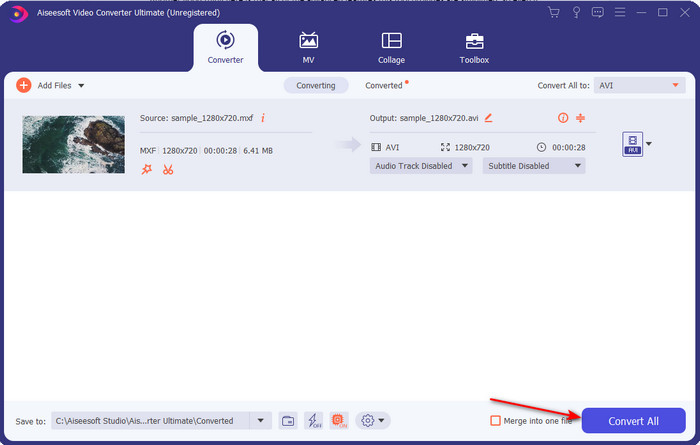
Шаг 4. Чтобы начать процесс конвертации, нажмите Convert All и подождите несколько секунд.
Шаг 5. После конвертации на экране появится папка с преобразованным файлом. Откройте его и посмотрите видео.
Часть 2. 3 онлайн-конвертера, используемые для бесплатного преобразования MXF в AVI
1. Бесплатный онлайн-конвертер видео FVC

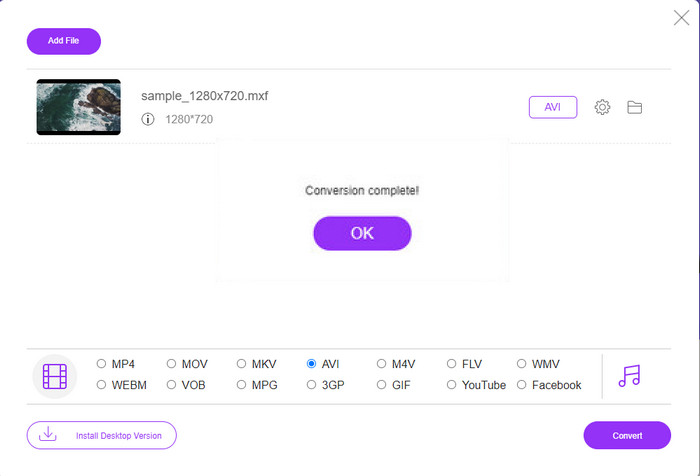
Если вы ищете лучшие способы конвертировать MXF в AVI онлайн, то FVC Free Video Converter Online — лучший вариант в списке онлайн‑конвертеров. Этот инструмент поддерживает различные форматы на выбор и по возможностям превосходит два других онлайн‑сервиса ниже. Кроме того, вы можете пользоваться им в браузере на ПК или Mac бесплатно и без ограничений по количеству конвертаций. Однако здесь нельзя конвертировать файлы пакетно, поскольку эта функция не поддерживается. Некоторые функции редактирования, которые вы могли бы захотеть использовать, здесь также недоступны. Тем не менее, если вы хотите максимально простой способ конвертации и не хотите устанавливать программу, этот вариант вам подойдет. Теперь перейдем к шагам, чтобы попробовать конвертировать ваш .mxf в новый формат.
Шаг 1. Нажмите эту ссылку, чтобы открыть сайт конвертера.
Шаг 2. После открытия сайта нажмите Add Files to Convert, затем на экране появится папка; найдите в ней .mxf‑файл и нажмите Open.
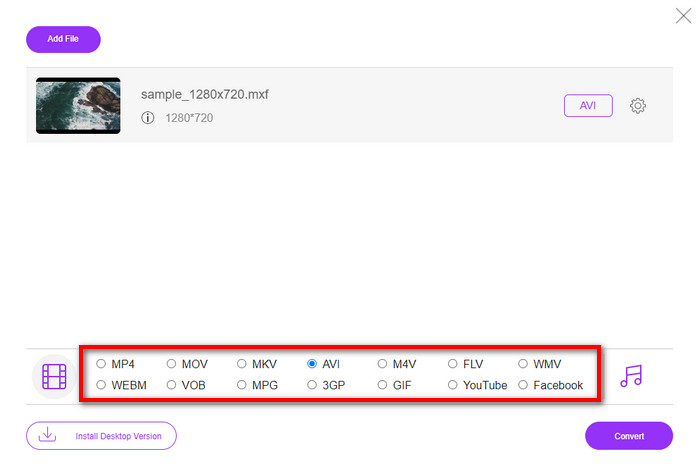
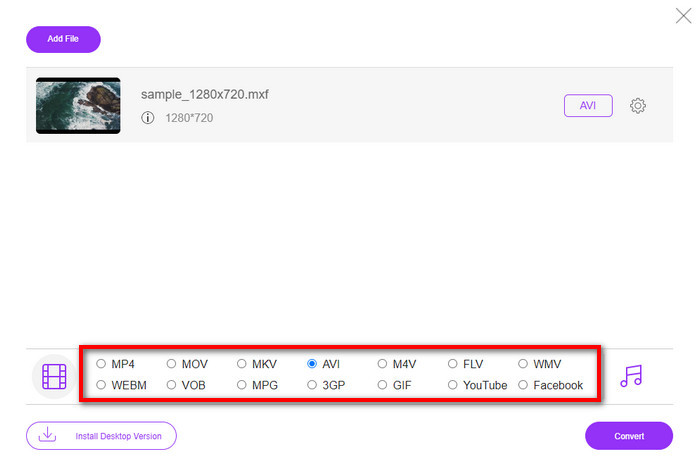
Шаг 3. После выбора файла укажите формат AVI из доступных ниже форматов.
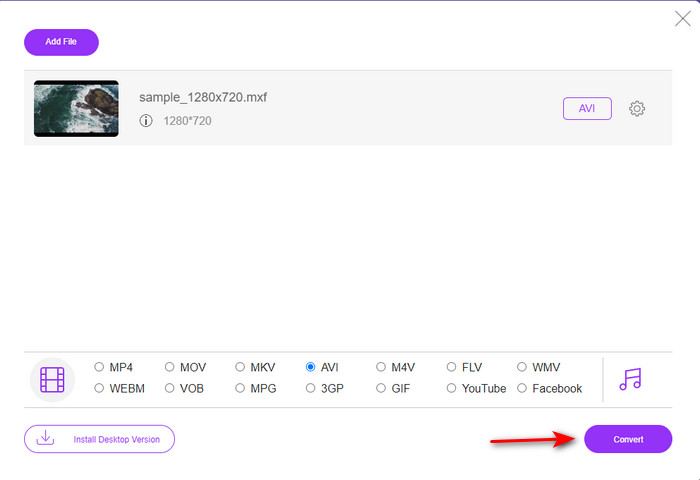
Шаг 4. Когда вы будете готовы начать процесс конвертации, нажмите Convert, чтобы запустить его.
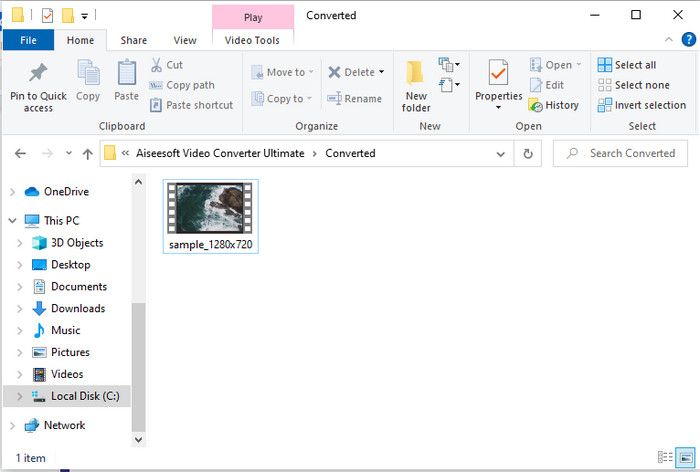
Шаг 5. После конвертации появится папка, затем откройте новую версию вашего MXF‑файла и посмотрите его.
2. Freefileconvert.com
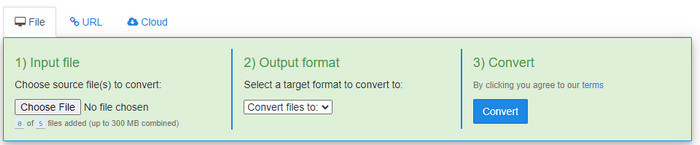
Еще один онлайн‑конвертер MXF в AVI, который вы можете использовать, — это Freefileconvert.com. Одна из функций этого инструмента — пакетная конвертация до 5 файлов одновременно. Однако вы не можете конвертировать эти пять файлов в разные форматы — только в один и тот же выходной формат. Кроме того, на сайте есть раздражающая реклама; еще один тревожный момент — срабатывание антивирусного предупреждения, когда мы попытались конвертировать формат здесь. Итак, если вы хотите конвертировать свой MXF здесь, выполните следующие шаги.
Шаг 1. Откройте любимый браузер и найдите Freefileconvert.com.
Шаг 2. Чтобы загрузить файл, нажмите Choose File. Чтобы изменить формат, нажмите Convert Files to и выберите AVI.
Шаг 3. Нажмите Convert, чтобы начать процесс конвертации.
3. Файлзигзаг
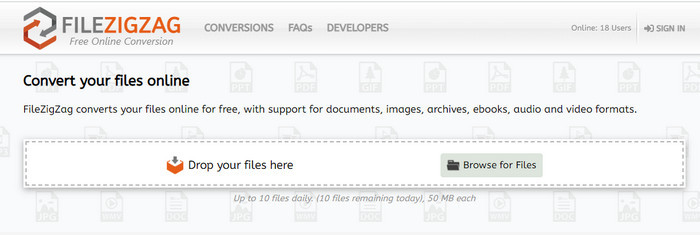
Если вы хотите бесплатно конвертировать MXF в AVI, вы можете использовать Filezigzag. Этот веб‑инструмент обеспечивает простой процесс конвертации и является удобным для пользователя. Все веб‑инструменты, упомянутые здесь, удобны, но этот значительно отличается от двух других. Интерфейс сервиса отличный и, как и у FVC Free Video Converter Online, не содержит вирусов. Хотя инструмент выглядит очень впечатляюще, он все же ограничивает количество файлов и их размер. А именно, вы можете конвертировать только десять файлов в день, и каждый из них должен быть меньше 50 МБ. Итак, перейдем к шагам по использованию этого инструмента.
Шаг 1. Откройте веб‑браузер и найдите Filezigzag; убедитесь, что это официальный сайт.
Шаг 2. Нажмите Browse for File, чтобы найти файл через веб‑интерфейс, затем установите Target Format в значение AVI.
Шаг 3. Нажмите Start Converting, чтобы начать процесс.
Часть 3. Сравнительная таблица
| Функции | FVC Видеоконвертер Ultimate | Бесплатный конвертер видео FVC | Freefileconvert.com | Файлзигзаг |
| Преобразование |  | | | |
| Пакетное преобразование | |  | | |
| Без вредоносного ПО | | | | |
| Доступность Интернета | | | | |
| Функции редактирования | | | | |
| Быстрое преобразование и аппаратное ускорение | | | | |
Часть 4. Часто задаваемые вопросы о MXF и AVI
Могу ли я сохранить файл MXF на своем Mac?
Да, вы можете сохранить его на диске Mac, но помните, что вы не можете смотреть его в QuickTime Player. Также вы не можете редактировать этот формат в iMovie, потому что он не поддерживается. Итак, если вы хотите, чтобы ваш MXF работал на вашем Mac, идеально было бы преобразовать его в новый формат, который поддерживается на Mac. Так же, как MOV, AVI, MP4, MKV и многие другие.
Почему файлы .mxf такие большие?
Причина, по которой файлы MXF большие, заключается только в том, что они не сжаты. Он имеет ту же структуру, что и FOURCC, реализованную с помощью универсального контейнера, чтобы улучшить запись, редактирование и потоковую передачу на видеокамерах. К счастью, вы можете использовать некоторые видеокомпрессоры, чтобы уменьшить размер файлов MXF.
Могу ли я использовать файл MXF на YouTube?
YouTube поддерживает ряд форматов, а на YouTube представлено более 15 форматов. И в этот список не включены файлы .mxf. Итак, чтобы было понятнее, ваши файлы MXF не поддерживаются на YouTube, и публикация вашего видео с расширением файла .mxf означает преобразование файла MXF в MP4 или AVI.
Заключение
Когда мы завершаем все детали, мы обнаружили, что файлы MXF действительно содержат высококачественное видео на каждой видеокамере. Кроме того, в этом контейнере также сохраняется некоторая информация, такая как метаданные. Однако этот формат получил небольшую поддержку по сравнению с другим форматом. Итак, теперь лучший способ воспроизвести или отредактировать видео в формате .mxf — преобразовать его в формат .avi. Все онлайн- и офлайн-инструменты хорошо справляются с преобразованием файла. Но больше всего впечатляет FVC Video Converter Ultimate. Чтобы испытать максимальные возможности этого инструмента, вы должны загрузить его прямо сейчас.
-
 4 бесплатных способа конвертировать видеокамеру MXF в MP4 для универсального воспроизведения
 Этот пост представляет собой подробное руководство по конвертации MXF в MP4 на компьютере. Вы можете получить 4 бесплатных конвертера MXF в MP4 для перекодирования видеокамеры из MXF в MP4 за несколько простых шагов.
-
 3 простых метода преобразования FLV в AVI на компьютере и в Интернете
 Вот три метода, которые помогут вам эффективно преобразовать видеофайлы FLV в формат AVI в Windows и Mac, чтобы вы могли смотреть их с высоким качеством.
-
 4 эффективных способа конвертировать MOV в AVI на ПК и Mac [2021]
 Вы хотите знать, какой лучший конвертер MOV в AVI в Интернете? И почему FVC Ultimate Video Converter может быть тем, что вам нужно.
