


 Видео конвертер Ultimate
 Устройство записи экрана
 Видео ремонт
 Безопасная загрузка
Самый быстрый способ конвертировать MXF в M4V на рабочем столе и в Интернете
Файл MXF — это промышленный стандартный формат для аудио и видео. Однако этот формат не поддерживается проигрывателем Apple QuickTime Player, поэтому воспроизвести ваш файл MXF с помощью этой программы невозможно. Если вы не можете проиграть файл MXF в Apple QuickTime Player, вам нужно конвертировать его в другой формат, например M4V. Вам повезло, потому что у нас есть для вас лучшее решение. В этой статье вы найдёте самые эффективные и полезные способы конвертации MXF в M4V с помощью надёжных офлайн- и онлайн‑конвертеров. Кроме того, мы подскажем, как сделать ваши видео более привлекательными с помощью несложного редактирования. Прочтите эту статью прямо сейчас и получите нужную вам информацию.

Часть 1: отличный способ конвертировать MXF в M4V онлайн
Один из лучших онлайн‑конвертеров, который вы можете использовать для преобразования MXF в M4V, — это FVC Free Video Converter Online. Этот онлайн‑сервис способен конвертировать различные видеофайлы, такие как MOV, MKV, AVI, FLV, MP4, WEBM, VOB и другие. Также вы можете конвертировать множество файлов за один раз, поскольку этот конвертер поддерживает пакетную обработку. Кроме того, перед конвертацией видео вы можете изменить их разрешение, битрейт и частоту кадров в соответствии со своими предпочтениями. Интерфейс у сервиса понятный и простой, а процесс конвертации — лёгкий. Таким образом, этим онлайн‑конвертером сможет пользоваться каждый — и опытные, и начинающие пользователи. Более того, он доступен во всех популярных браузерах, таких как Google Chrome, Mozilla Firefox, Microsoft Edge и других, что делает его удобным для большинства пользователей.
Кроме того, помимо конвертации видео, вы также можете конвертировать множество аудиоформатов, включая AAC, MP3, M4A, M4B, FLAC и другие. Он также имеет настройку звука, которая позволяет вам настраивать их скорость выборки и битрейт. Благодаря этим функциям вы можете сказать, что FVC Free Video Converter Online надежен.
Функции
◆ Преобразование различных форматов видео, таких как MP4, AVI, M4V, MXF, MOV, WMV, MKV, FLV и другие.
◆ Возможность редактирования разрешения видео, битрейта и частоты кадров.
◆ Предлагает процесс пакетного преобразования.
◆ Конвертируйте аудиофайлы, такие как MP3, AAC, AC3, M4B, FLAC и другие.
◆ Можно редактировать частоту дискретизации и битрейт аудио.
См. шаги ниже, чтобы узнать о преобразовании файла MXF в формат M4V с помощью FVC Free Video Converter Ultimate.
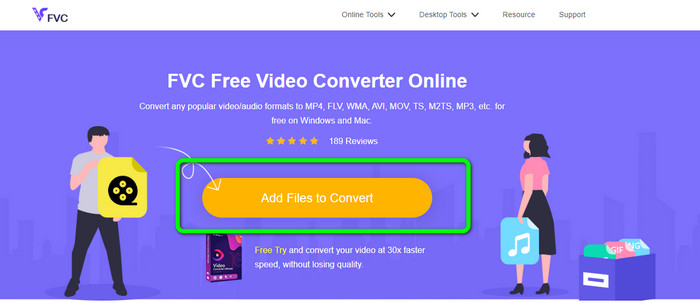
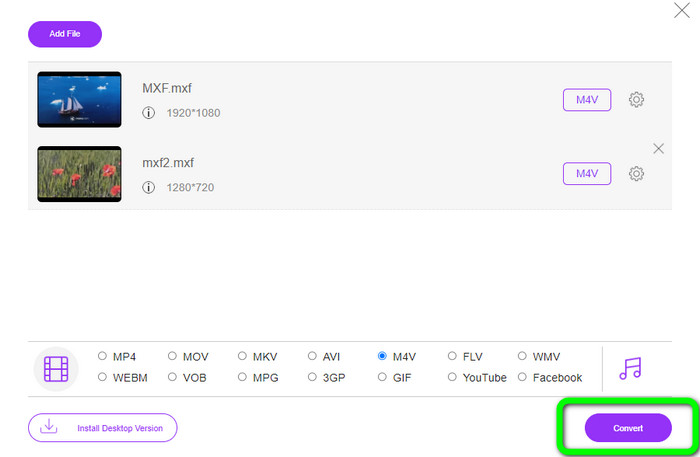
Шаг 1: Откройте браузер и перейдите на сайт FVC Free Video Converter Online. Когда вы окажетесь на главной странице, нажмите Add Files to Convert, чтобы загрузить MXF‑видеофайл, который хотите конвертировать.
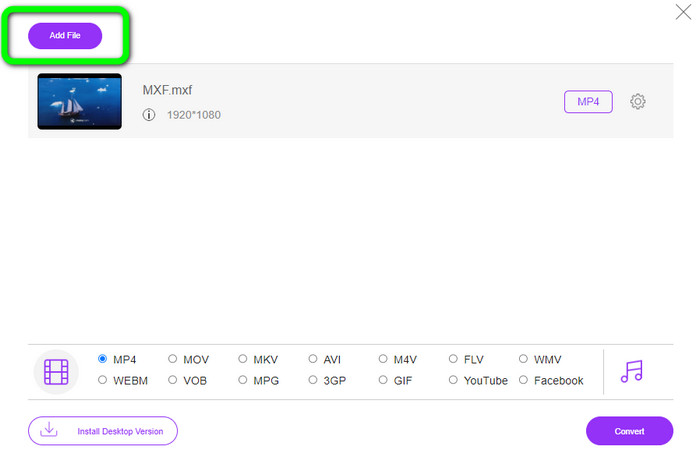
Шаг 2: Этот конвертер поддерживает пакетную конвертацию. Поэтому, если вы хотите загрузить больше файлов MXF, нажмите кнопку Add File.
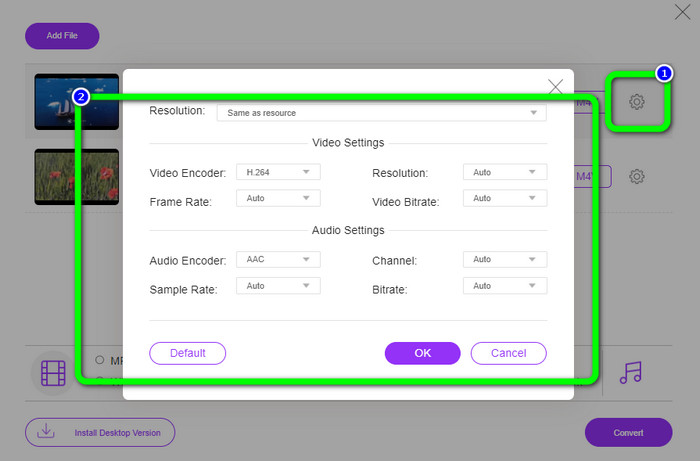
Шаг 3: На этом этапе вы можете отредактировать своё видео, нажав на значок Setting. После нажатия этой иконки вы сможете изменить частоту кадров, разрешение и битрейт видео. Также можно изменить частоту дискретизации и битрейт аудио. Затем нажмите кнопку OK.
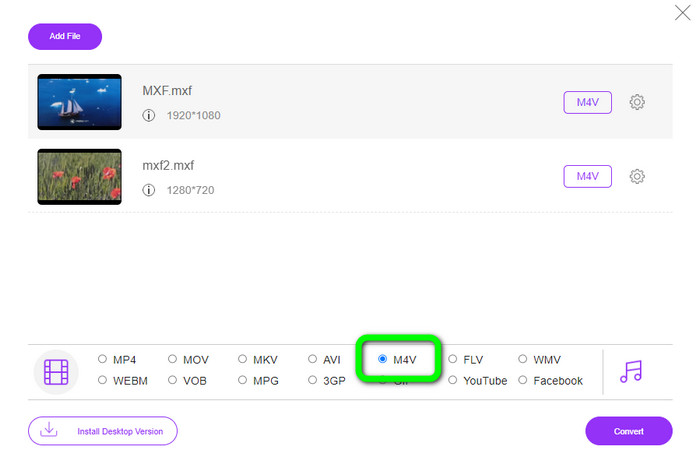
Шаг 4: После редактирования видео вы можете изменить выходной формат, выбрав формат M4V среди вариантов форматов в нижней части интерфейса.
Шаг 4: На заключительном этапе нажмите кнопку Convert. Дождитесь окончания процесса конвертации и сохраните видео в нужную вам папку.
Часть 2: Самый быстрый способ конвертировать MXF в M4V без потерь
Если вам нужен устанавливаемый на компьютер инструмент для без потерь конвертации MXF в M4V, Video Converter Ultimate — лучший выбор. Этот мощный конвертер способен очень быстро обрабатывать различные файлы, поскольку скорость его конвертации выше средней не в 10, не в 20, а в 30 раз. Кроме того, в нём есть ещё одна замечательная функция: вы можете конвертировать несколько файлов одновременно, так как программа поддерживает пакетную обработку. Также, помимо MXF и M4V, этот инструмент поддерживает множество других видеоформатов, включая MP4, FLV, AVI, MKV, MOV, WMV, VOB и другие. Более того, Video Converter Ultimate доступен как для Windows, так и для Mac, что удобно и для пользователей Mac, и для пользователей Windows.
Кроме того, это загружаемое приложение имеет больше замечательных функций, помимо конвертации видео. Если вы хотите создать музыкальное видео для своего партнера, семьи, друзей и т. д., вы можете использовать этот инструмент. Video Converter Ultimate предлагает создатель музыкального видео, в котором вы можете создавать замечательные фильмы с музыкой. Он также предоставляет бесплатные темы, такие как счастливые, шикарные, простые, снежные ночи, романтические и другие. Кроме того, если у вас есть видео с большим размером файла, вы можете сжать его с помощью Video Compressor. С помощью этого инструмента вы можете легко изменить размер вашего видео.
Функции
◆ Преобразование более 100 форматов видеофайлов, включая M4V, MXF, FLV, AVI, MP4, XVID, VOB, MOV, SWF, MKV и другие.
◆ Преобразование нескольких файлов одновременно.
◆ Создатель музыкального видео.
◆ Создайте фантастический коллаж.
◆ Предлагайте инструменты для редактирования видео, такие как видеотриммер, компрессор, усилитель, цветокоррекция и т. д.
◆ Преобразование файлов изображений в такие форматы, как BMP, PNG, JPG и другие.
Следуйте подробным инструкциям ниже, чтобы конвертировать MXF в M4V без потерь с помощью FVC Video Converter Ultimate.
Шаг 1: Скачайте Video Converter Ultimate на своё устройство, нажав кнопку Download. Ниже расположены две кнопки загрузки. Если вы пользователь Windows, нажмите кнопку для Windows‑версии. Если пользуетесь Mac, нажмите кнопку для версии Mac. Затем запустите приложение.
Бесплатная загрузкаДля Windows 7 или более поздних версийБезопасная загрузка
Бесплатная загрузкаДля MacOS 10.7 или более поздних версийБезопасная загрузка
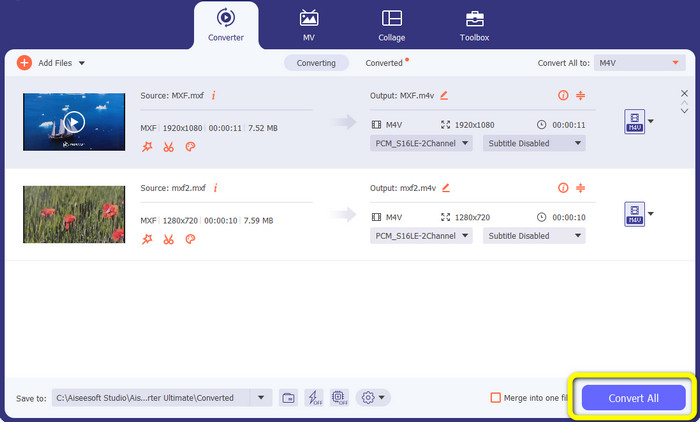
Шаг 2: Затем выберите вкладку Converter. Нажмите значок + или кнопку Add File, чтобы импортировать MXF‑видеофайл.
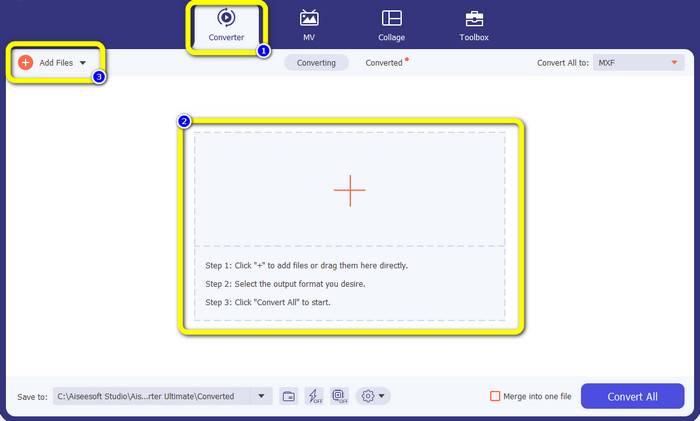
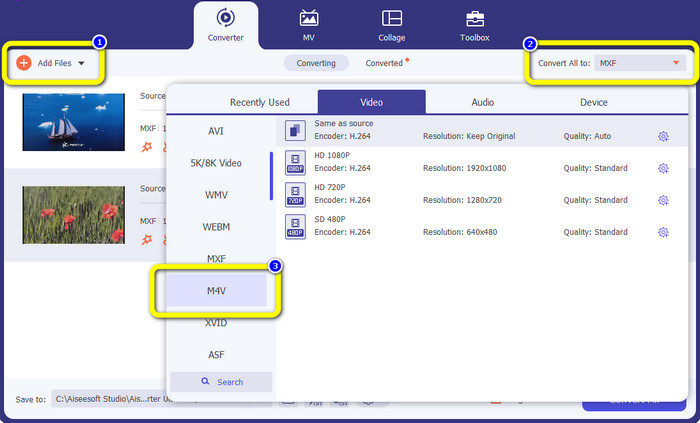
Шаг 3: Если вы хотите конвертировать несколько файлов одновременно, нажмите кнопку Add File. Затем нажмите кнопку Convert All и выберите формат файла M4V. Вы также можете выбрать желаемое разрешение для своего видео.
Шаг 4: Если вы хотите отредактировать свои видео до конвертации, вы можете это сделать. Нажмите на инструменты редактирования в первом окне. Затем выберите значок video enhance. Отметьте все пункты, чтобы улучшить разрешение, оптимизировать яркость и контрастность, а также уменьшить шум и дрожание видео.
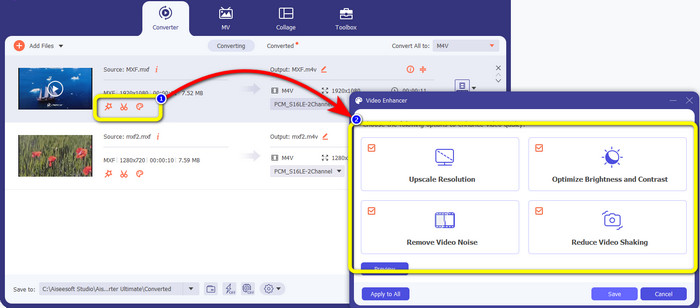
Шаг 5: Когда вы закончите редактирование и выбор выходного формата, нажмите кнопку Convert All и сохраните видео на своём устройстве.
Часть 3: Что такое MXF?
Ассоциация SMPTE создала медиаконтейнер MXF для коммерческого использования. MXF реализует часть схемы данных Advanced Authoring Format (AAF) и недавно стал отраслевым стандартом для нелинейного профессионального редактирования видео. Файлы MXF можно легко преобразовать в любой распространенный видеоформат и сжать с использованием практически любого кодека. Важно отметить, что реализация этого формата Sony, Panasonic и Canon имела многочисленные несовместимости, что является основной слабостью этого контейнера. Редакция стандарта 2009 г. решает эти проблемы.
Часть 4: Что такое M4V?
M4V — это тип видеоконтейнера, используемый файлами iTunes для хранения аудио- и видеоданных. Лучше всего приобретать аудио- или видеофайлы в магазине iTunes, если они защищены Apple FairPlay DRM от несанкционированного просмотра и копирования. Поскольку формат основан на структуре MPEG-4, практически любой современный проигрыватель может отображать незащищенные файлы.
Дополнительные материалы:
Лучшие MXF в WMV‑конвертеры для бесплатной конвертации MXF в WMV
4 лучших решения для конвертации MXF в MKV [Решено]
Часть 5. Часто задаваемые вопросы о преобразовании MXF в M4V
Насколько велик файл MXF?
MXF поддерживает файлы размером до 2 гигабайт. Кроме того, MXF поддерживает более длинные файлы. Максимальное время захвата медиафайла для формата OMF составляет три часа. MXF может обрабатывать 12 часов аудио на двух каналах с частотой 48 кГц.
Кто использует файлы MXF?
Он использовался в нескольких рекламных роликах, в том числе в видеомагнитофонах SONY MSW 2000 Series IMX. Кроме того, монтажное оборудование Avid поддерживает определенный вариант MXF.
Как преобразовать MXF в MOV?
Вы можете использовать FVC Free Video Converter Online. Загрузите файл MXF, выберите формат MOV в списке форматов и нажмите кнопку Convert. Таким образом вы сможете мгновенно конвертировать MXF в MOV.
Заключение
Существует множество способов конвертации MXF в M4V. Но если вам нужны лучшие и действительно стоящие конвертеры, используйте упомянутые выше приложения: Video Converter Ultimate и FVC Free Video Converter Online. Эти два конвертера конвертируют файлы быстрее, чем многие другие решения, и при этом вы можете пользоваться ими бесплатно.
-
 Различные методы изменения формата файла MOV в M4V
 Вам нужен эффективный способ преобразования файла MOV в формат M4V? Тогда эта статья исполнит ваше желание. Вот лучшие конвертеры, которые вы можете использовать.
-
 Отличные методы мгновенного преобразования GIF в M4V
 В этом руководстве представлены наиболее эффективные стратегии преобразования GIF в M4V. Кроме того, мы познакомим вас с двумя лучшими конвертерами, которые вы можете попробовать.
-
 2 лучших исключительных способа конвертировать M2TS в M4V
 Как вы думаете, возможно ли преобразование файла M2TS в другой формат? Мы покажем вам, как конвертировать M2TS в формат файла M4V, если вам нужно лучшее решение.
