


 Видео конвертер Ultimate
 Устройство записи экрана
 Видео ремонт
5 самых популярных редакторов тегов видео AVI в системах Windows и Mac [простой в использовании]
Тег AVI может помочь вам определить, что находится внутри файла, проверив его. Однако не все теги в ваших AVI‑файлах верны, поэтому вам понадобится средство, чтобы исправить их самостоятельно. Но рынок редакторов тегов в интернете слишком широк, разве это не печально? Мы знаем, каково это — искать идеальный инструмент, которым стоит пользоваться. К счастью, мы отобрали лучший редактор метаданных, который вы можете использовать для редактирования, добавления или удаления тегов в AVI. В сегодняшнем обзоре мы позаботимся о том, чтобы вы нашли идеальный редактор видео‑тегов AVI для своего компьютера.

Часть 1. 5 лучших редакторов тегов AVI, доступных на Windows и Mac
Video Converter Ultimate [Лучший редактор метаданных AVI на 2023 год]
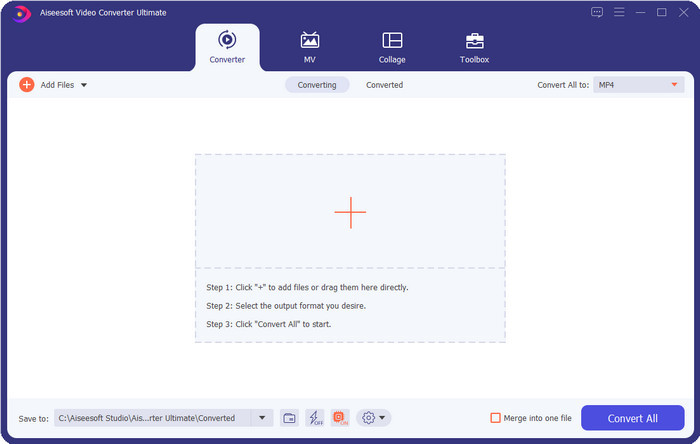
Это лучший редактор видео‑тегов AVI, с помощью которого вы сможете легко изменять или удалять теги в своих AVI‑файлах. Если вам нужно максимально продвинутое, но простое в освоении программное обеспечение с действительно интересными функциями, то Video Converter Ultimate — ваш выбор. Кроме того, здесь доступны многочисленные функции редактирования метаданных, позволяющие упорядочивать, корректировать или обновлять теги должным образом. Прежде чем скачивать и пробовать другие настольные редакторы, мы настоятельно рекомендуем вам именно этот инструмент, потому что, установив его, вы получите многофункциональное решение «всё в одном». Хотите узнать, почему стоит использовать именно его? Ниже мы перечислили 5 причин, которые помогут вам решить, стоит ли его скачивать.

FVC Видеоконвертер Ultimate
5 689 200+ загрузок- Это лучшее программное обеспечение, которое вы можете использовать, оно поддерживает множество форматов, таких как MP4, MOV.
- Для быстрого процесса редактирования метаданных этот инструмент отлично подходит.
- Научитесь добавлять важные теги к своим файлам или удалять их всего за несколько кликов.
- Он поддерживает все настольные платформы, такие как Windows и Mac.
Бесплатная загрузкаДля Windows 7 или более поздних версийБезопасная загрузка
Бесплатная загрузкаДля MacOS 10.7 или более поздних версийБезопасная загрузка
AVI метаредактирование
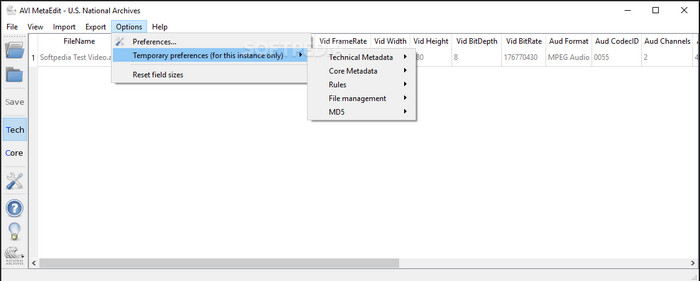
Если вы ищете редактор метаданных AVI для Mac и Windows, то AVI Meta Edit может оказаться тем самым инструментом. Эта программа позволяет пользователям редактировать теги или сведения внутри медиафайла, в частности AVI. С её помощью вы можете по отдельности изменять технические метаданные и основные (Core) метаданные ваших файлов, и каждый тип содержит разную информацию о файле. Хотя этот инструмент и предлагает детальные возможности редактирования, пользоваться им всё же непросто из‑за множества сокращений и специальных обозначений в интерфейсе.
Видеоредактор Мачете Lite
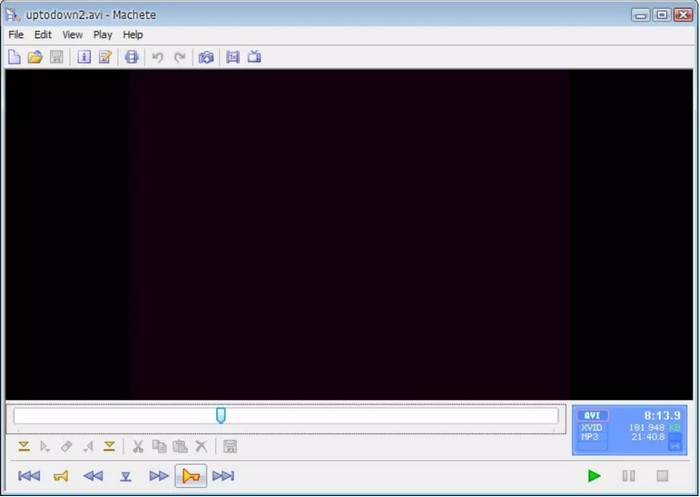
Предположим, вы хотите отредактировать метаданные AVI в Windows 10 — тогда вам обязательно стоит попробовать Machete Video Editor Lite. С этой программой вы можете легко редактировать теги в AVI‑ и WMV‑файлах. Кроме того, она предлагает простой, автоматически формируемый интерфейс, помогающий пользователям понять, какие функции здесь доступны. Из‑за такой простоты интерфейса немногие выбирают её, разве что при отсутствии других вариантов для редактирования метаданных. К тому же объём метаданных, которые вы можете заполнить в этой программе, ограничен — как и список поддерживаемых форматов.
Редактор тегов abcAVI
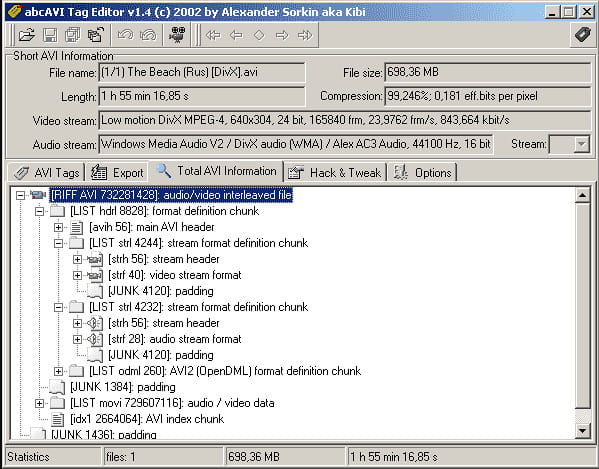
Вы можете скачать ещё один открытый AVI‑редактор тегов для Windows — abcAVI Tag Editor. С его помощью можно без труда настраивать метаданные ваших AVI‑файлов, но он поддерживает только формат AVI. Более того, вы можете добавлять или обновлять нужные вам теги всего в несколько щелчков. Несмотря на то, что программа работает хорошо, её графический интерфейс, на наш взгляд, очень неудачен: его структура сильно уступает тому, что предлагают другие инструменты. Плюс к этому, он не поддерживает загрузку других форматов, кроме AVI.
FFmpeg
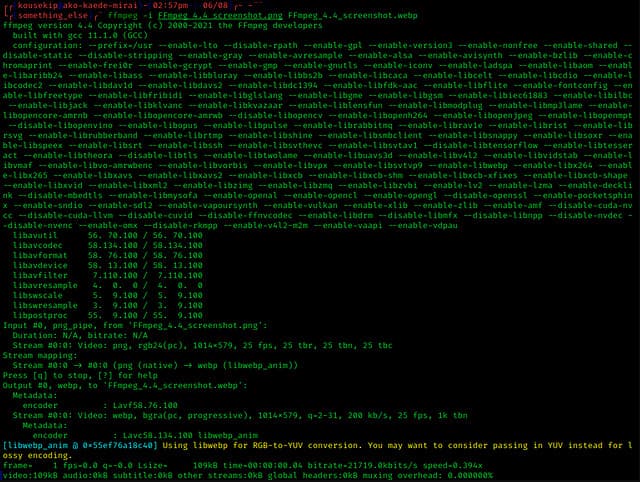
Последним в списке идёт FFmpeg — основанная на командной строке программа, которую можно использовать для редактирования свойств AVI‑файлов в Windows и Mac. Этот инструмент предназначен для конвертации, редактирования и просмотра медиакомпонентов, а сегодня с его помощью можно также изменять метаданные любых медиафайлов. В отличие от других программ, здесь нет кнопок для управления — вместо этого используются команды на «языке» компьютера. Чтобы «общаться» с программой, нужно открыть командную строку и ввести конкретный код для выполнения требуемого редактирования. Инструмент сложен в освоении, но это профессиональное решение, которое вы можете установить на свой компьютер.
Связанный материал:
Часть 2. Сравнительная таблица 5 лучших редакторов метаданных AVI
| особенности | Video Converter Ultimate [Лучший редактор метаданных AVI на 2022 год] | AVI метаредактирование | Видеоредактор Мачете Lite | Редактор тегов abcAVI | FFmpeg |
| Дружественный интерфейс |  | | | |  |
| Безопасно использовать | | | | | |
| Доступно на обеих ОС | | | | | |
| Интуитивно понятный интерфейс | | | | | |
| Поддерживаемые форматы | Начинается с AVI, MP4, MKV, FLV, MOV и более 1000 других форматов файлов. | AVI | AVI и WMV | AVI | AVI, MOV, MP4, FLV и др. |
Часть 3. Часто задаваемые вопросы о редакторе метаданных AVI
Безопасно ли использовать онлайн-редактор метаданных AVI?
Предположим, у вас недостаточно места на рабочем столе, который вы сейчас используете; мы рекомендуем использовать онлайн-инструмент для выполнения задачи. Однако не все инструменты, к которым вы можете бесплатно получить доступ в Интернете, надежны или заслуживают доверия. Но если вы хотите использовать онлайн-инструмент, вам необходимо соблюдать три правила, которые мы всегда ищем на посещаемом веб-сайте. Прежде всего, мы настоятельно рекомендуем вам посмотреть вверху рядом с панелью поиска; есть значок замка, что означает, что его безопасно использовать, поэтому, если этот замок сломан, это означает, что ваше соединение не защищено. Проверьте рекламную активность объявлений; иногда реклама может содержать вредоносные программы на вашем рабочем столе, что приводит к повреждению ваших файлов на вашем диске. Не разрешать файлы cookie; иногда файлы cookie — отличный способ узнать, сколько пользователей посещают веб-сайт, но ваше местоположение часто видно с помощью файлов cookie. Имейте это в виду, чтобы избежать выбора неправильного онлайн-редактора.
Какой инструмент лучше всего справляется с редактированием тегов AVI?
Согласно нашему исследованию, мы видим, что Video Converter Ultimate работает очень хорошо во всех аспектах, не беспокоясь при его использовании. Если вам нужна дополнительная информация о редакторе, вы можете прочитать следующую информацию выше, чтобы узнать больше и загрузить ее.
Есть ли ограничения на добавление метаданных в AVI?
Пока что мы не видим каких-либо ограничений на информацию, которую вы можете добавить в свои файлы AVI или в любые медиафайлы. Однако некоторые редакторы метаданных не могут вставить в файл необходимую информацию. Добавление метаданных в ваш AVI не имеет ограничений, но это инструмент, который ограничивает информацию, которую вы можете добавить в один файл.
Заключение
Разве не здорово, что у нас есть разные варианты для редактирования метаданных AVI? Безусловно, пять редакторов метаданных AVI, перечисленных в этой статье, могут стать идеальными инструментами для правки тегов или метаданных ваших AVI‑файлов. Хотя мы и привели пять вариантов, несложно определить, какой из них имеет преимущество при работе с метаданными AVI, — это Video Converter Ultimate. С помощью этого редактора вы можете не только редактировать, добавлять или удалять метаданные в AVI. Хотите узнать, что ещё здесь можно делать? Тогда нажмите кнопку скачивания и убедитесь во всём сами.
-
 5 самых простых способов удалить метаданные в любых медиафайлах
 Как удалить метаданные? Трудно ли это сделать? Нужно ли покупать или использовать бесплатный инструмент для удаления тегов? На все эти вопросы есть ответы в этой статье.
-
 5 лучших экстракторов метаданных, доступных онлайн и офлайн [2025]
 Вы можете найти несколько экстракторов метаданных на рынке, но сегодня мы выбираем только пять наиболее популярных экстракторов тегов в зависимости от аудитории.
-
 5 лучших редакторов метаданных видео 2025 года [Непредвзятый обзор]
 Хотите просмотреть метаданные видео? Если да, прочитайте подробности ниже, чтобы полностью понять тему и узнать, какой инструмент подходит вам лучше всего.
