


 Видео конвертер Ultimate
 Устройство записи экрана
 Видео ремонт
 Безопасная загрузка
Простые способы удалить водяной знак Coub онлайн и офлайн
Coub — это сайт, предназначенный для обмена видео в интернете. Это популярный ресурс, где пользователи создают и делятся роликами продолжительностью до десяти секунд. В отличие от GIF-анимаций, видео Coub имеют качественный звук, что делает их популярными у многих людей. Однако при сохранении или загрузке видео с Coub на ролике появляется водяной знак. Поэтому, если вы хотите убрать водяной знак Coub, вам нужно использовать инструмент для удаления водяных знаков. В этой статье мы покажем самые удобные инструменты, с помощью которых вы сможете легко удалить водяные знаки Coub со своих видео.

Часть 1. 4 способа удалить водяной знак Coub
Многие люди сейчас заинтересованы в просмотре и скачивании видео Coub онлайн. Но когда вы скачиваете видео с коуба, оно содержит водяной знак. Вы узнаете, как удалить водяной знак Coub, используя эти четыре простых способа.
FVC Видеоконвертер Ultimate
FVC Video Converter Ultimate — это настольное приложение, которое позволяет удалять любые водяные знаки с ваших видео. Этот инструмент удобен для пользователей благодаря простому интерфейсу и лёгкой установке. Кроме того, вы не столкнётесь с проблемами совместимости, так как он поддерживает множество видеоформатов, таких как MP4, MKV, AVI, MOV, M4V, WEBM, FLV и более 1000 других форматов.
Он также имеет расширенные функции редактирования, включая редактор метаданных мультимедиа, слияние видео, компрессор видео и многое другое из набора инструментов. И когда вы удаляете водяной знак из своего видео, он позволяет вам установить размер области удаления. Вы также увидите видео для предварительного просмотра вашего файла, чтобы вы могли проверить вывод вашего видео. Если вы хотите использовать этот конвертер для удаления водяного знака Coub, выполните следующие действия.
Шаг 1. Скачайте FVC Video Converter Ultimate на компьютер, нажав кнопку Download ниже. Следуйте инструкциям по установке, затем запустите приложение.
Бесплатная загрузкаДля Windows 7 или более поздних версийБезопасная загрузка
Бесплатная загрузкаДля MacOS 10.7 или более поздних версийБезопасная загрузка
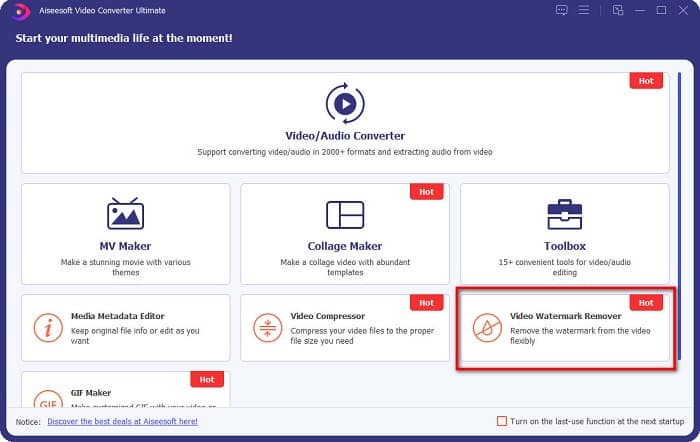
Шаг 2. Затем в главном окне программы перейдите к разделу Video Watermark Remover. Если вы не видите его на первом экране, нажмите Toolbox.
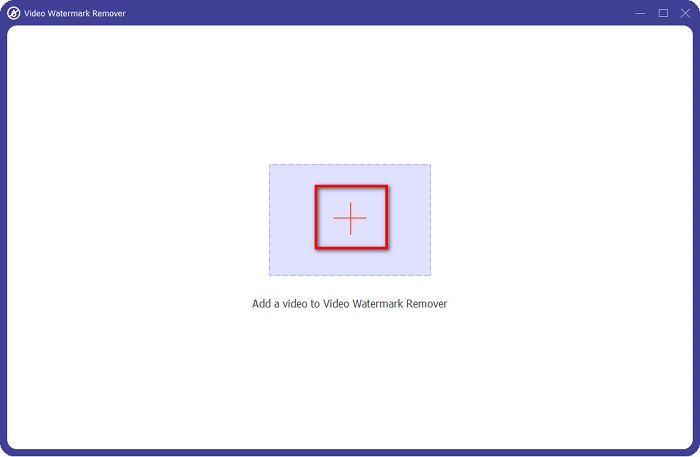
Шаг 3. Нажмите кнопку с значком +, чтобы загрузить coub‑видео на следующем экране. Откроется проводник файлов на вашем компьютере, где вы выберете нужное видео и нажмёте Open.
Шаг 4. Далее нажмите кнопку Add watermark removing area, чтобы появилась область удаления. Затем переместите рамку области удаления на водяной знак coub. Вы увидите, что выбранная область станет размытой.
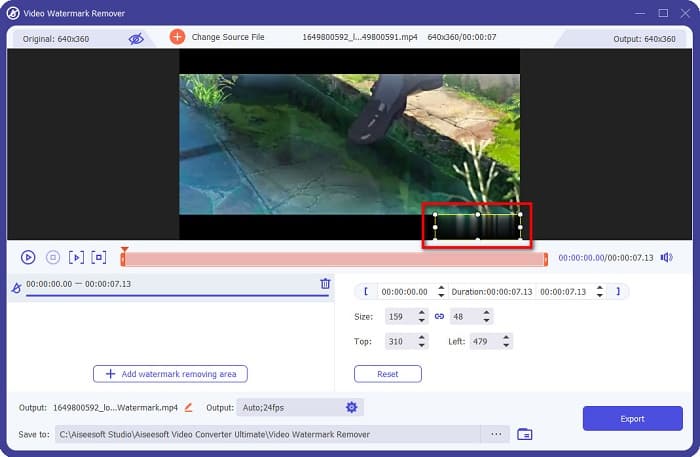
Шаг 5. Наконец, нажмите кнопку Export, чтобы удалить водяной знак Coub; готовый файл автоматически сохранится в папке на вашем компьютере.

Не сложно, верно? Выполнив простые шаги, описанные выше, вы можете удалить водяной знак coub со своего видео. Нажмите здесь, чтобы узнать, как удалить водяной знак TikTok.
Удаление водяных знаков Hitpaw
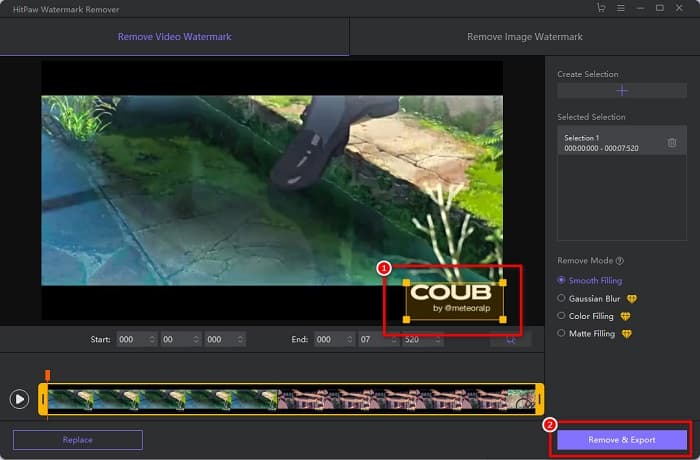
Hitpaw Watermark Remover — это один из популярных скачиваемых инструментов для удаления водяных знаков, который позволяет легко удалить водяной знак coub с вашего видео. Если вы хотите иметь видео Coub без водяного знака, вы можете воспользоваться этой программой. Кроме того, у неё простой интерфейс, что делает её удобной в использовании.
Вам также будет легко удалить водяной знак на определенной части видео, перемещая ползунки. Более того, это позволяет вам иметь гладкую заливку при удалении водяного знака. Его также можно бесплатно загрузить практически на все мультимедийные устройства.
Шаг 1. Сначала скачайте Hitpaw Watermark Remover, выполните установку и запустите приложение.
Шаг 2. Затем нажмите кнопку Choose File в главном окне программы, чтобы загрузить своё coub‑видео. Откроется проводник файлов компьютера, где вы сможете выбрать и открыть нужный ролик.
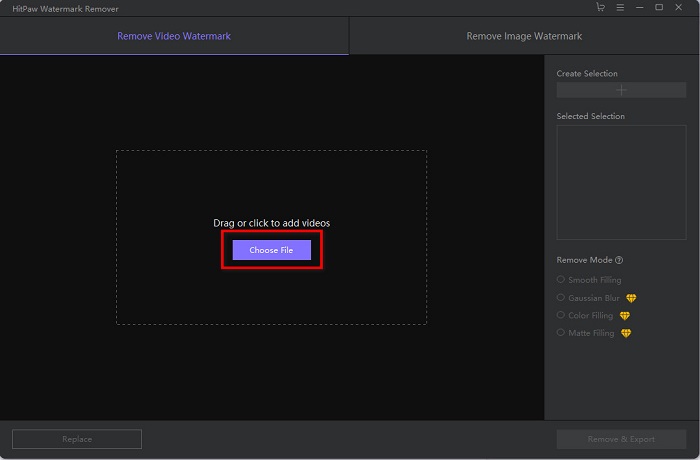
Шаг 3. Переместите область удаления на водяной знак coub, затем нажмите кнопку Remove & Export в правом нижнем углу интерфейса, чтобы окончательно удалить водяной знак.
Media.io
Media.io — это онлайн‑инструмент для удаления водяных знаков с видео. Этот веб‑сервис может удалять водяные знаки, такие как логотипы, текст и печати. Даже если вы пользуетесь подобным сервисом впервые, у вас не возникнет сложностей, так как этот онлайн‑инструмент очень прост в использовании. Кроме того, он поддерживает самые распространённые форматы видео, такие как MP4, MKV, AVI, FLV, MOV и другие. Вы также можете выбирать файлы видео из Dropbox, Google Drive и YouTube. Более того, сервис безопасен и бесплатен. Media.io доступен во всех популярных браузерах, включая Google, Firefox и Safari.
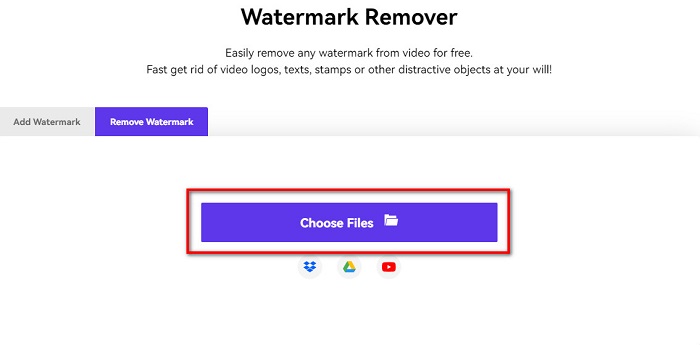
Шаг 1. В используемом вами браузере найдите сайт Media.io, затем перейдите на их веб‑страницу. В главном окне нажмите кнопку Choose Files.
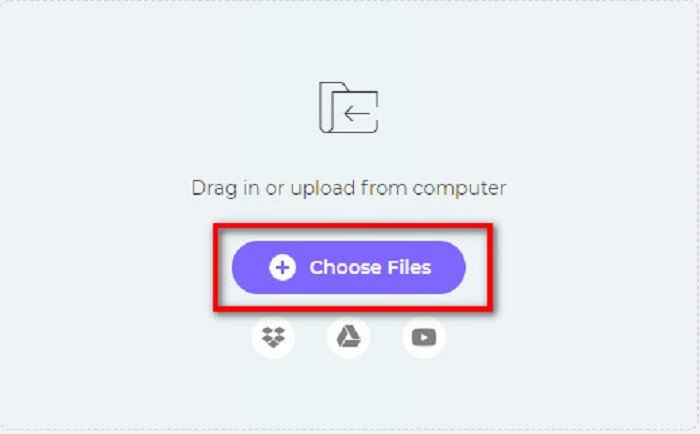
Шаг 2. Откроется новое окно, где вы нажмёте кнопку Choose Files или перетащите своё Coub‑видео на интерфейс сервиса. Дождитесь загрузки видео, затем переходите к следующему шагу.
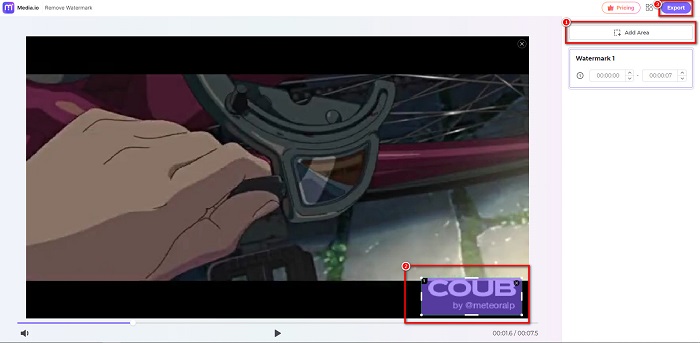
Шаг 3. Затем нажмите Add Area в левом углу интерфейса и переместите область удаления на водяной знак coub. Нажмите кнопку Export, чтобы удалить водяной знак; файл автоматически сохранится на вашем устройстве. Этот способ также можно использовать, чтобы удалить водяной знак с видео.
BeeCut
BeeCut — ещё один онлайн‑способ удалить водяные знаки Coub. Этот инструмент очень удобен, поскольку вам не нужно ничего устанавливать на устройство. Кроме того, он бесплатен и безопасен. Также данный сервис поддерживает множество форматов, включая MP4, AVI, MKV, FLV и другие распространённые форматы.
Кроме того, это удобный инструмент для начинающих, поскольку он имеет простой в использовании пользовательский интерфейс. Тем не менее, вы можете столкнуться с медленным рабочим процессом, когда ваше интернет-соединение медленное, потому что оно зависит от Интернета. Чтобы удалить водяной знак coub с помощью BeeCut, следуйте простому руководству ниже.
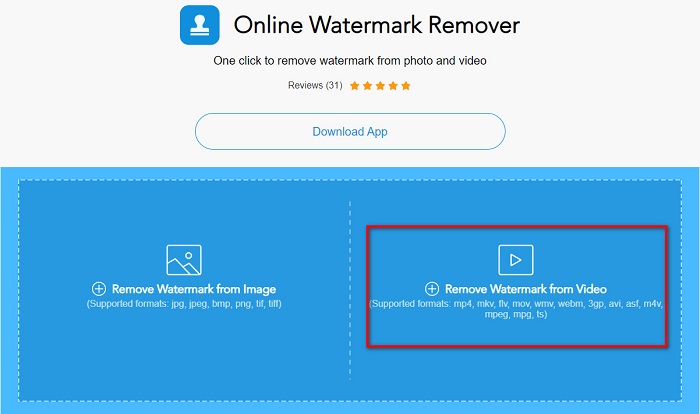
Шаг 1. Найдите BeeCut в своём браузере, затем в главном окне сервиса нажмите Remove Watermark from Video. Загрузите своё видео, открыв его из файлов на компьютере.
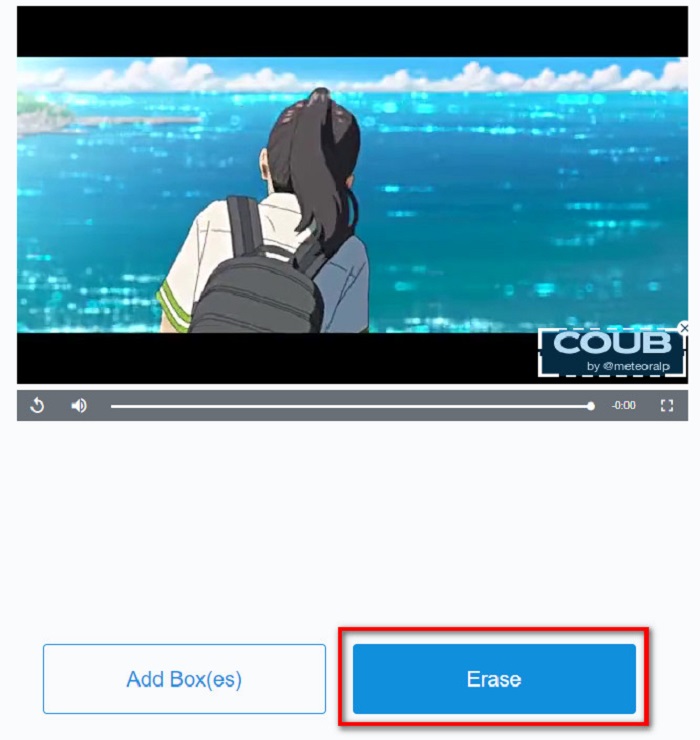
Шаг 2. На следующем экране переместите область удаления на водяной знак coub, который вы хотите убрать. Если на видео есть другие водяные знаки, логотипы или штампы, вы можете добавить ещё одну область удаления, нажав Add Box(es).
Шаг 3. В конце нажмите кнопку Erase, чтобы удалить водяной знак coub с вашего видео. Готовый файл вы найдёте в папках на своём компьютере.
Часть 2. Часто задаваемые вопросы об удалении водяного знака Coub
Можете ли вы получить видео coub без водяного знака?
К сожалению, не существует конкретных способов или инструментов для загрузки видео из коуба без водяного знака. Тем не менее, средства для удаления водяных знаков помогут вам получить видео в коубе без водяных знаков.
Уменьшает ли удаление водяного знака размер файла вашего видео?
Нет. Удаление водяного знака из вашего видео не влияет на размер файла вашего видео.
Почему появляется размытие в области водяного знака после его удаления?
Наличие размытия в области водяного знака, которую вы удалили, потому что именно так инструменты удаляют водяной знак на ваших изображениях или видео.
Заключение
Удаление водяного знака Coub с видео может показаться сложным. Но, используя инструменты, представленные выше, вы легко сможете удалить водяные знаки Coub со своего ролика. Однако если вам нужен инструмент с быстрой обработкой и множеством дополнительных функций, скачайте FVC Video Converter Ultimate.
-
 4 лучших способа удалить водяной знак из GIF [онлайн и оффлайн]
 Нужно удалить водяной знак из GIF? С помощью инструмента в этой статье вы изучите различные стили с помощью различных средств удаления водяных знаков, доступных на вашей платформе.
-
 Выдающееся средство для удаления водяных знаков Photobucket онлайн и офлайн
 Узнайте, как удалить водяной знак Photobucket с ваших фотографий с помощью этого замечательного средства для удаления водяных знаков Photobucket. Прочитайте эту статью, чтобы узнать способы.
-
 Легко удалить водяной знак из PDF с помощью простых шагов
 Удалите водяной знак из PDF, выполнив следующие простые шаги. Узнайте, как легко удалить водяные знаки из файла PDF с помощью этих замечательных инструментов.
